

The Delta Logo Almost Got Me—Until I Asked One Simple Question
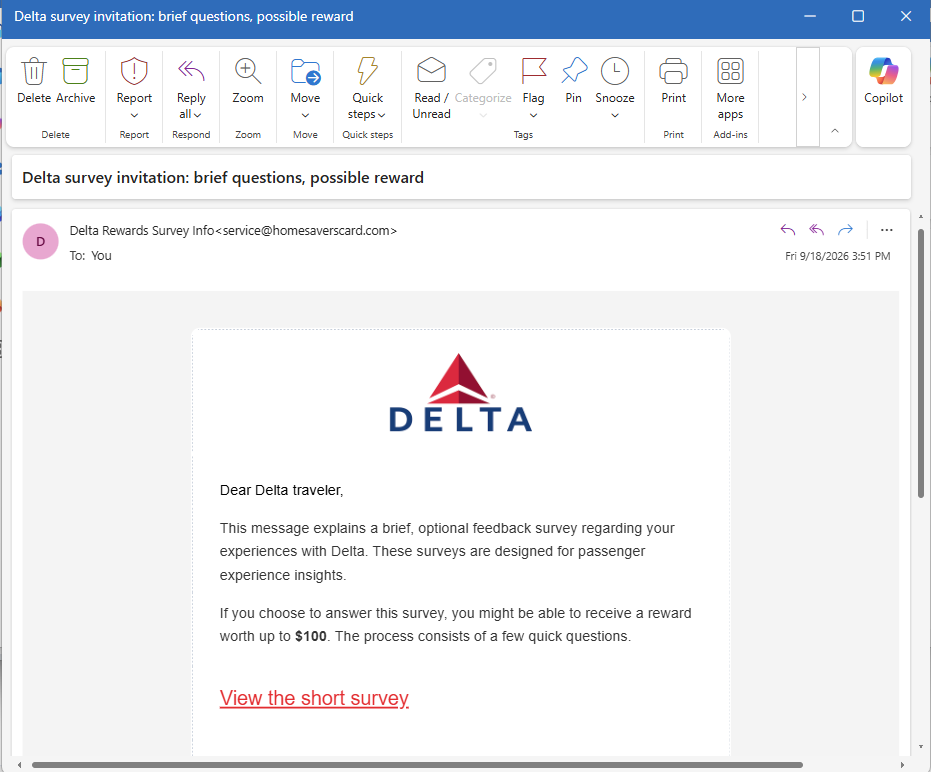
I received an email today with the subject:
“Delta survey invitation: brief questions, possible reward”
At first glance, I didn't think much about it.
The Delta logo was nicely displayed in the email. The message addressed me as a “Delta traveler” and said Delta wanted feedback about my passenger experience.
And asked if I'd complete a few quick questions.
I “might be able to receive a reward worth up to $100.”
Okay. A customer survey. I've received plenty of those.
Then my brain finally caught up with my eyes.
✈️ Wait... When Was the Last Time I Flew Delta?
I started thinking about it.
I haven't flown Delta recently.
Actually, I haven't flown Delta in a long time.
I'm talking at least five years.
So why would Delta suddenly want feedback about my passenger experience?
Was I supposed to review the legroom from 2021?
Tell them how the pretzels were half a decade ago?
That's when an email that initially looked routine became a lot more interesting.
🚩 The Logo Isn't the Sender
Here's the part I think is especially important.
I initially viewed the email on my device. It showed the sender as something along the lines of:
Delta Rewards Survey Info
At a glance, that looks plausible.
And on a small screen, the actual email address wasn't immediately visible.
So I clicked on the sender's name to see more information.
And...
BAM.
There it was:
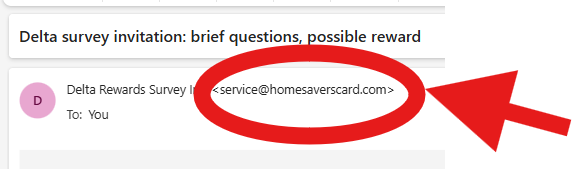
Well, hello there.
That's not what I expected to see under “Delta Rewards Survey Info.”
The email may have a Delta logo.
It may say “Delta traveler.”
It may talk about my “experiences with Delta.”
But the visible sender name and the actual sender address are two very different pieces of information.
That doesn't by itself prove exactly who created the message or what would happen after clicking the survey link. I didn't click the survey, and I'm not going to pretend I know where it ultimately leads.
But it was more than enough for me to stop.
🚩 Then the Rest of the Email Started Looking Different
Once I questioned the sender, other details stood out more.
The email says:
“If you choose to answer this survey, you might be able to receive a reward worth up to $100.”
Might be able to?
Up to $100?
That's a lot of work.
Then there's the big red:
“View the short survey.”
That's the action the email wants me to take.
The logo establishes familiarity.
The survey gives me a reason to click.
The possible $100 reward gives me an incentive.
And the sender name makes it look like I'm dealing with something related to Delta.
But none of that answers my original question:
Why is Delta asking someone who hasn't flown with them in at least five years about his passenger experience?
🧠 Context May Be the Best Scam Detector You Have
This is why recognizing suspicious emails isn't always about finding a misspelled word or a badly designed logo.
Sometimes the biggest red flag is:
The story doesn't make sense.
Your bank sends you something about an account you don't have.
A delivery company contacts you about a package you didn't order.
A recruiter offers you a job you never discussed.
A subscription service sends you a renewal for something you never subscribed to.
Or an airline asks about a passenger experience you haven't had in years.
Before clicking anything, ask:
Does this email make sense in the context of my actual life?
In this case, mine didn't.
🔍 Click the NAME—Not the Link
There's another practical lesson here.
On phones and other devices, email apps often emphasize the display name rather than showing the complete sender address prominently.
That's convenient.
It can also make a questionable message look more legitimate than it is.
If something seems strange, don't click the button in the email.
Instead, inspect the sender information.
In my case, tapping “Delta Rewards Survey Info” exposed the underlying address:
That took a few seconds.
And those few seconds completely changed how I viewed the email.
🏡 Don't Be Passive—Be a Good Neighbor
I've been saying this with the suspicious vehicle listings I've been documenting, and it also applies to email.
If you recognize something suspicious, don't assume everyone else will.
Someone else may see the Delta logo and click.
Someone else may see “reward worth up to $100” and get excited.
Someone else may not think to expand the sender information.
So show them.
Tell your friends and family how to reveal the actual sender address on their devices.
Remind them that a logo is an image—not authentication.
And if you're uncertain about a survey supposedly sent by an airline, bank, retailer, or other company, don't use the email to verify the email. Go independently to the company's official website or app.
Sometimes being a good neighbor means saying:
“Before you click that $100 survey, let's see who actually sent it.”
Because in my case, one tap was all it took.
Delta Rewards Survey Info
became:
And suddenly I wasn't nearly as interested in that $100 reward.
Follow along at NielFlamm.com/blog for more suspicious emails, questionable vehicle offers, recruiting scams, and whatever else decides to show up in my inbox.