
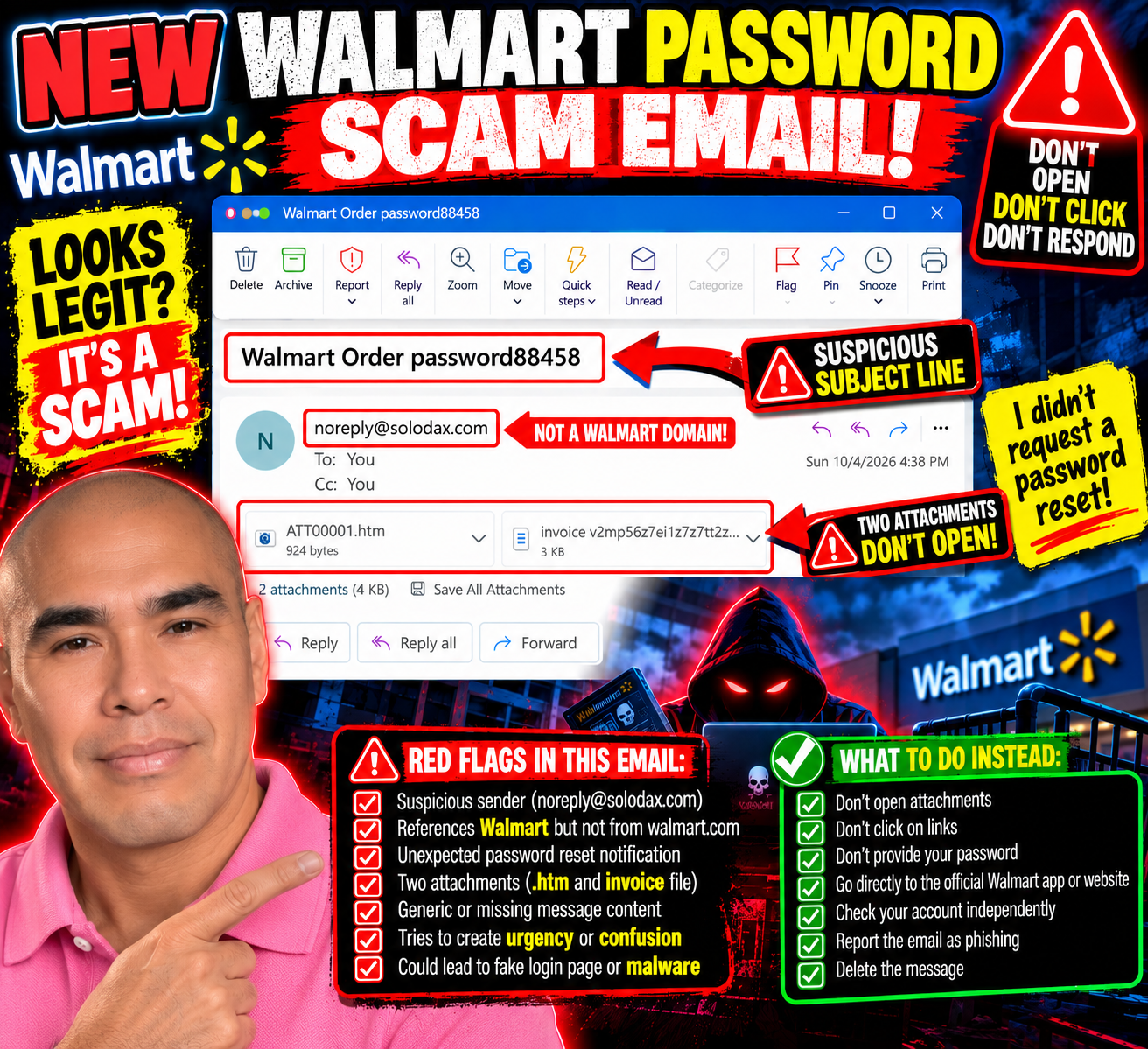
A New Scam Tactic Made Me Do a Double Take: “Walmart Order password88458”
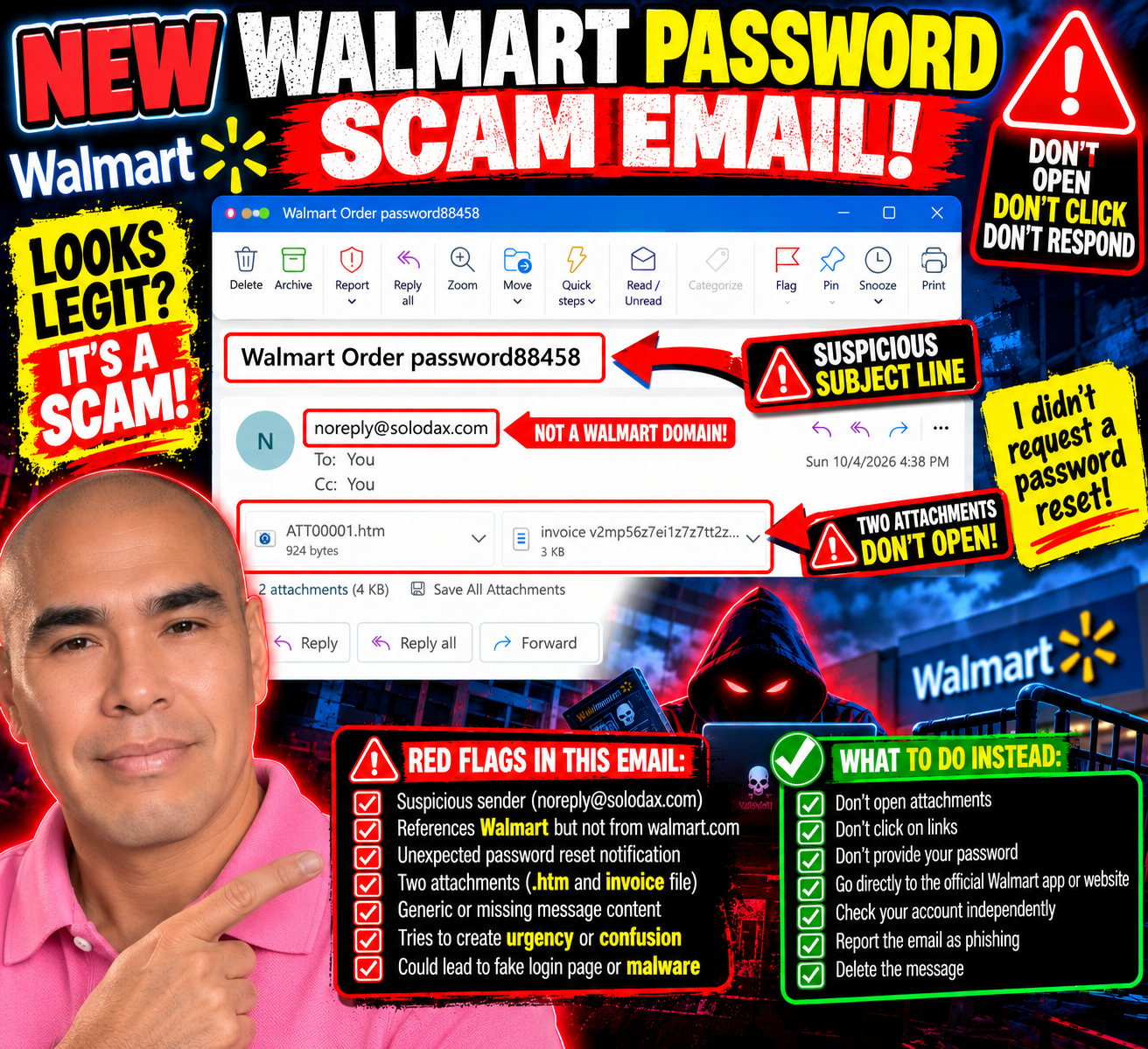
When I thought my inbox scammers had settled into a comfortable routine of fake PayPal charges, Geek Squad subscriptions, and invitations to give away hundreds of dollars, somebody apparently decided the script needed an update.
This one actually made me do a double take.
The subject line reads:
“Walmart Order password88458”
Password?
Wait.
Did I ask for my Walmart password to be reset?
No.
And that tiny moment of uncertainty is exactly what caught my attention.
This One Feels Different
Most of the scam emails I've been receiving practically announce themselves.
YOU SPENT $499.99!
YOUR GEEK SQUAD SUBSCRIPTION RENEWED!
CALL THIS NUMBER IMMEDIATELY!
They want panic.
This one is quieter.
The email body has no real message. Instead, it has two attachments: an HTML file and what looks like an invoice.
The sender shown is:
Yet the subject references Walmart.
That's enough for me to stop.
If this is supposedly about my Walmart account, why is the message coming from a completely unrelated domain?
And why would I need to open attachments to figure out what's happening with my password?
No thanks.
The “Password” Word Almost Worked
That's what I find interesting about this one.
I saw “password” and instinctively wondered whether I'd requested a password reset.
For a moment, the message made me question my own memory.
That's potentially much more effective than another ridiculous $499.99 invoice.
People reset passwords all the time. Sometimes we forget that we requested one. Sometimes an app logs us out. Sometimes we get legitimate security alerts when someone attempts to access an account.
So seeing Walmart + Order + Password mashed together in a subject line can create just enough confusion to make someone investigate.
And investigating might mean opening one of those attachments.
That's where I stop.
Two Attachments? I'm Good.
One attachment ends in .htm.
That's an HTML file—a webpage packaged as a file.
Opening an unexpected HTML attachment can potentially take someone into a fake login or other deceptive content designed to look legitimate. I'm not opening it to find out what this particular one does.
The second attachment appears to be an invoice.
I'm not opening that one either, thank you.
If Walmart needs me to take action on my account, I don't need an attachment from solodax.com to proceed.
I can independently open the Walmart app or type the legitimate Walmart website into my browser and check my account there.
The suspicious email doesn't give me a roadmap for how to investigate it.

This Is Why I Keep Sharing These
Scams don't always look like:
“HELLO DEAR SIR, YOU HAVE WON $47 MILLION.”
Sometimes they're messy.
Sometimes they're polished.
Sometimes they use familiar company names.
And sometimes all they need is one word—like password—to make me stop and wonder:
“Wait...did I do something?”
I did the double take.
Then I looked at the sender.
Then I looked at the attachments.
And I remembered:
I didn't request a password reset.
Mystery solved.
No attachments opened.
No links clicked.
No passwords entered.
And, for once, Bill apparently had the day off.
Send Me Your Scam Attempts
I'm still documenting the different tactics that land in my inbox because seeing real examples can make the next suspicious message easier to recognize.
If you've received an unusual scam email, phishing attempt, fake invoice, suspicious password-reset message, or another creative attempt to get your information, send me a screenshot and your experience:
First, remove or cover any sensitive personal, financial, or account information.
The scammers changed tactics.
So I'll keep paying attention.
If I didn't request a password reset, I won’t open an attachment to understand why someone believes I did.
Bill Is Back—Twice: Apparently My Fake PayPal Account Had a Busy Morning
At this point, I think Bill needs an intervention.
If you've been following my continuing adventures with scam emails, you may remember Bill. Bill is the mysterious person who keeps appearing in these fake invoices and event invitations, supposedly using my PayPal account to buy things I never ordered.
Well, Bill is back.
And this time, he brought friends.
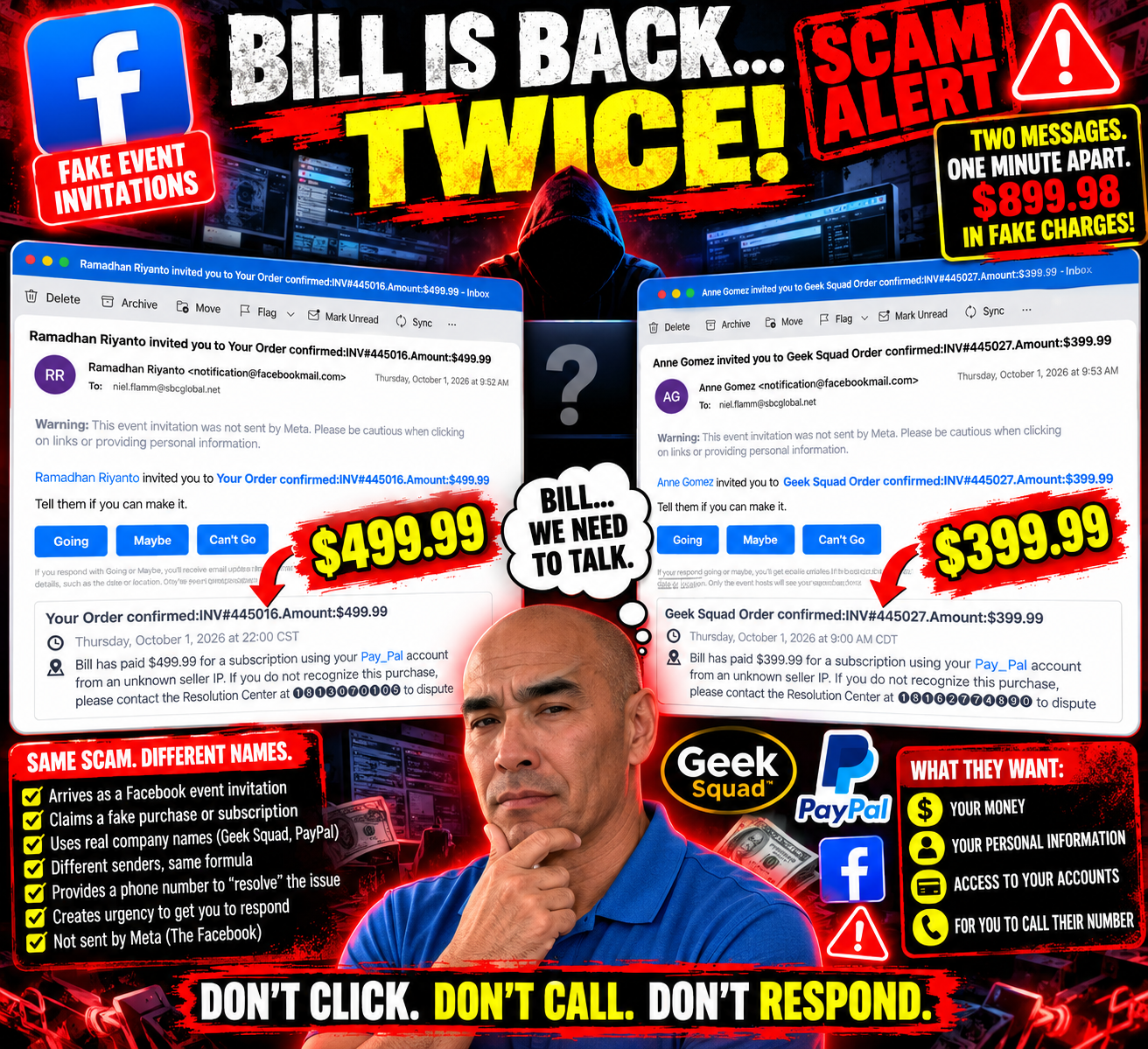
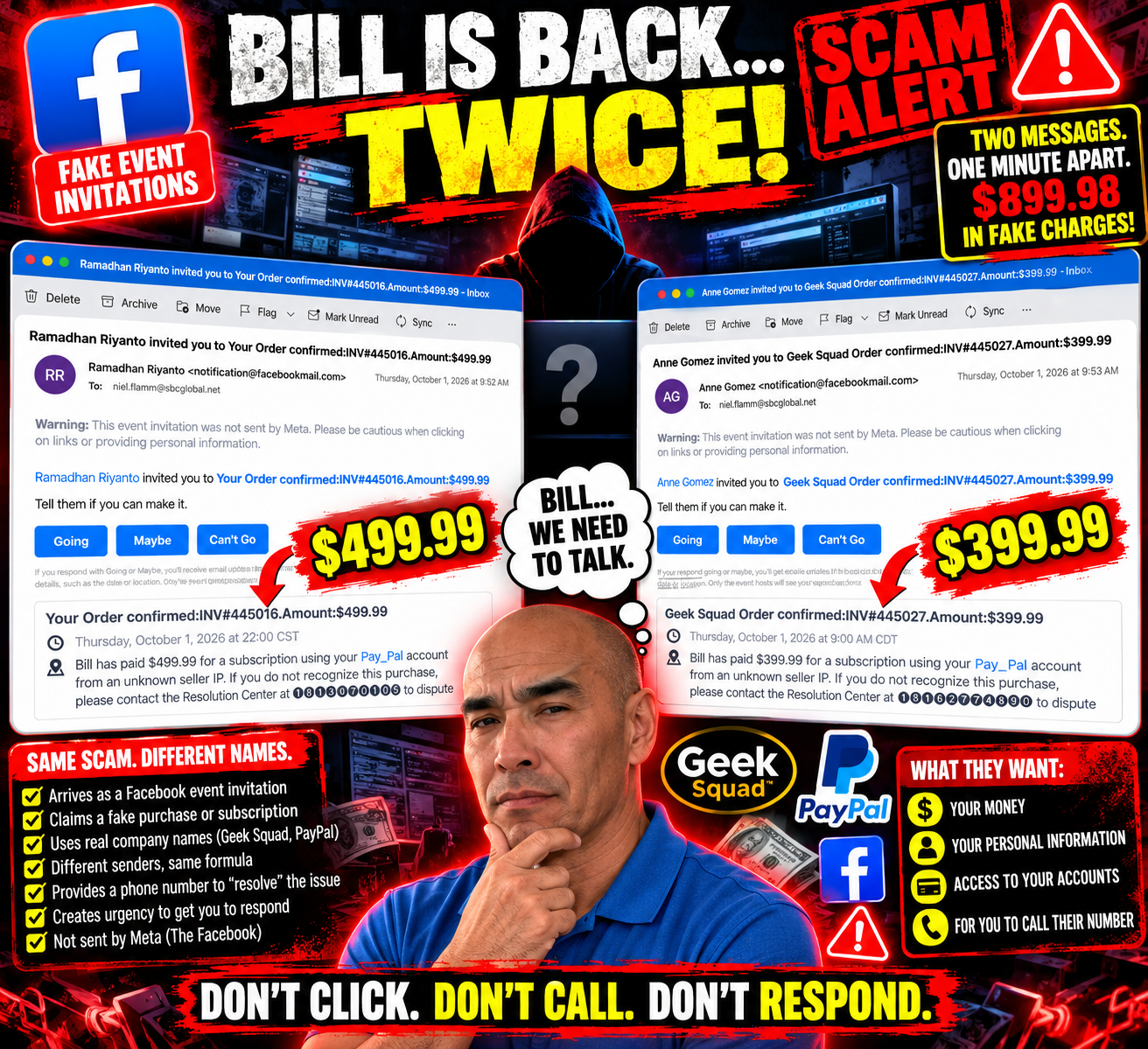
On October 1, I received two more suspicious event invitations. They arrived just one minute apart.
The first came from Ramadhan Riyanto at 9:52 a.m.
The second came from Anne Gomez at 9:53 a.m.
Apparently, scammers believe in efficiency.
First Invitation: $499.99
Ramadhan invited me to:
“Your Order confirmed: INV#445016. Amount:$499.99”
How thoughtful.
According to the invitation, Bill supposedly paid $499.99 for a subscription using my “Pay_Pal” account.
Yes, Pay_Pal.
Maybe PayPal's lesser-known cousin.
And, naturally, if I didn't recognize the purchase, there was a convenient telephone number for the “Resolution Center.”
Convenient for whom is another question.
The invitation even gave me the familiar choices:
Going. Maybe. Can't Go.
I'm going with Can't Go.
I have a scheduling conflict.
I'm busy not losing $499.99.
One Minute Later: Another Party!
Apparently, declining one imaginary purchase wasn't enough.
At 9:53 a.m.—just one minute later—Anne Gomez invited me to another event:
“Geek Squad Order confirmed: INV#445027. Amount:$399.99”
And guess who made the purchase?
BILL!
Bill allegedly spent another $399.99 using my imaginary Pay_Pal account.
So within one minute, Bill supposedly racked up $899.98 in fake charges.
Bill, buddy...
We need to talk about your spending habits.

The Similarities Are Almost Comical
Put these two messages side by side, and the pattern is hard to miss.
Different sender.
Different invoice number.
Different dollar amount.
Different supposed Resolution Center phone number.
But almost everything else follows the same formula.
Both arrived as event invitations.
Both claim Bill used my PayPal account.
Both mention an “unknown seller IP.”
Both provide a telephone number to dispute the transaction.
Both create a sense of urgency around a purchase I supposedly didn't make.
And both contain a warning right there in the email:
“This event invitation was not sent by Meta. Please be cautious when clicking on links or providing personal information.”
At this point, the warning may as well be flashing in neon.
Yesterday It Was Geek Squad. Today It's a Doubleheader.
What makes this even funnier is that these arrived right after another fake Geek Squad invitation I recently wrote about.
That one claimed Bill spent $399.99.
Now Bill supposedly spent another $499.99 and $399.99.
My fictional friend is having quite a shopping spree.
If this keeps up, I'll need to stage a fictional financial intervention.
Why Send Two So Close Together?
I obviously can't know who is behind these messages from the emails alone, and I can't say whether the two invitations were generated by the same person or operation.
But the nearly identical wording and timing are worth noticing.
That's part of why I keep documenting these messages.
One strange email might make someone stop and wonder whether there's really a problem with an account.
When several nearly identical versions appear, the formula becomes much easier to see.
The company name can change.
The amount can change.
The sender can change.
The telephone number can change.
But the basic objective appears to remain the same:
Get me worried enough to respond before I stop and think.
I'm Still Not Calling
If I received a legitimate-looking notice about a PayPal, Geek Squad, bank or credit-card transaction I didn't recognize, I wouldn't use the telephone number supplied in a suspicious email.
I'd go directly to the company's official app or website and check my account independently.
The email doesn't tell me how to verify it.
That's an important distinction.
And I'm definitely not calling a mystery “Resolution Center” because Bill supposedly went shopping again.
Going? Maybe? Can't Go?
I still love that these arrive as event invitations.
Imagine putting these on my calendar:
9:00 a.m. — Lose $399.99
10:00 p.m. — Lose another $499.99
Dress code: Business casual.
Refreshments: None.
Financial regret: Complimentary.
RSVP?
Can't Go.

Keep Sending Me Your Scam Stories
I'll keep documenting these because the more examples we see, the easier it becomes to recognize the patterns.
If you've received a suspicious invoice, fake purchase notification, Facebook event scam, PayPal impersonation, Geek Squad message, or another creative attempt to separate you from your money, send me your story and screenshots at:
Just remove or cover any sensitive personal or financial information before sending it.
As for Bill?
If anyone sees him, please tell him his Pay_Pal privileges have officially been revoked.
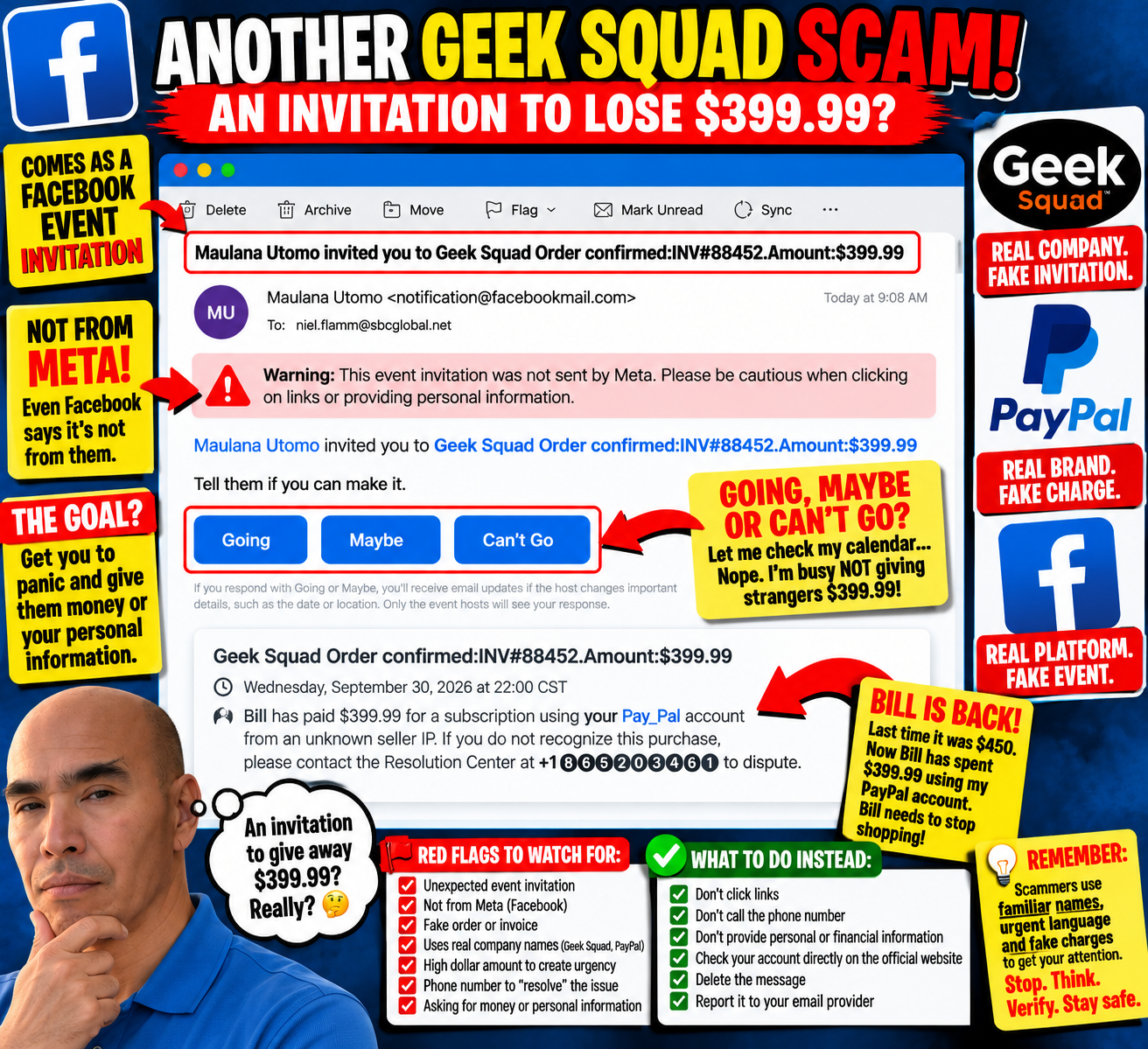
Another Scam Invitation: Apparently I’m Invited to Give Away $399.99
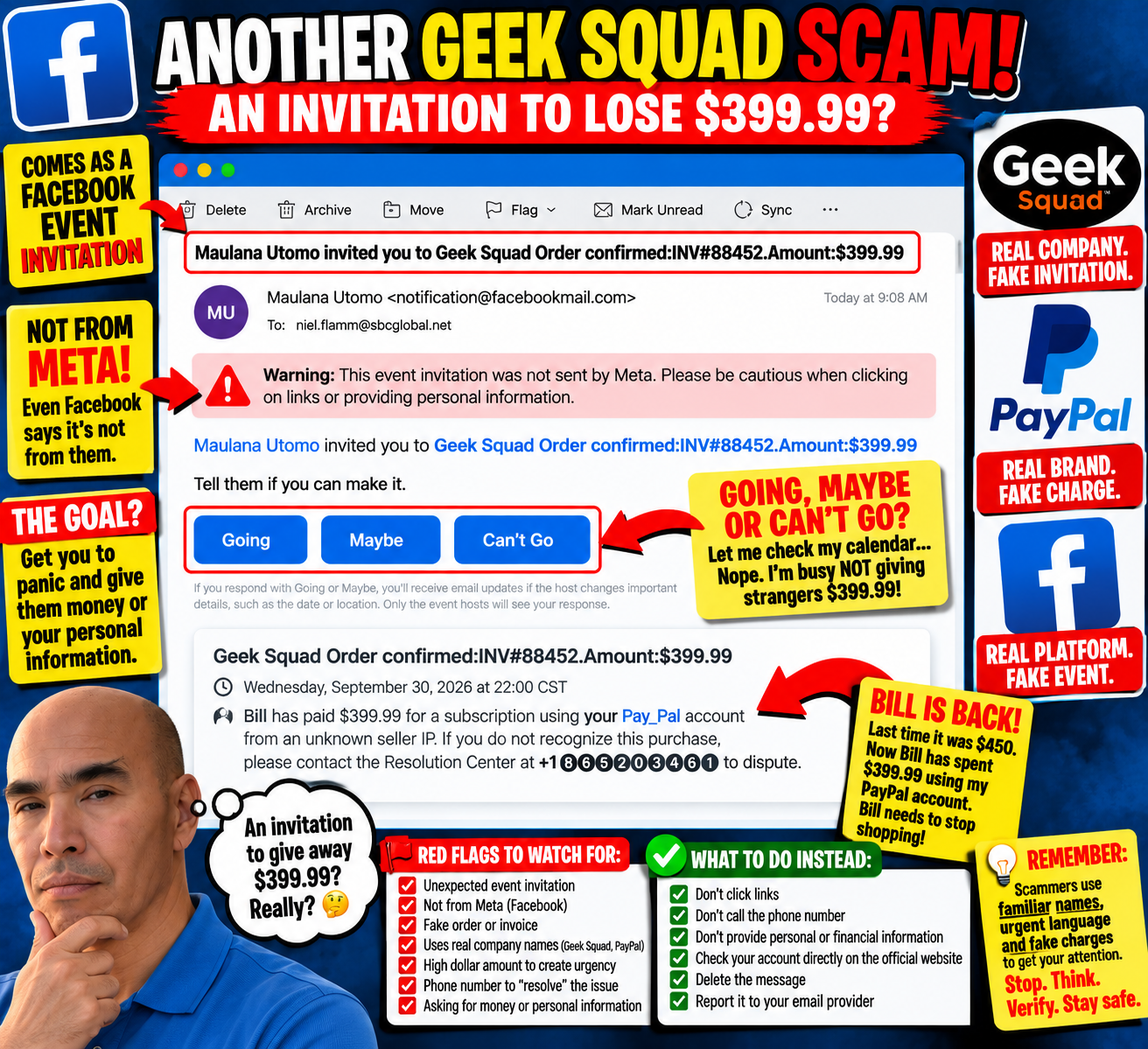
My inbox has once again extended a very generous invitation.
This time, Maulana Utomo has invited me to an event called:
“Geek Squad Order confirmed: INV#88452. Amount: $399.99”
How thoughtful.
Some people get invited to weddings.
Some people get invited to birthday parties.
Apparently, I get invited to give scammers money or personal information.
I really need a better social life.
Going, Maybe, or Can’t Go?
This is my favorite part of these fake Facebook event invitations.
According to the message, I supposedly have a $399.99 Geek Squad order.
Naturally, The Facebook gives me three options:
Going
Maybe
Can’t Go
Let me check my calendar...
Nope.
Unfortunately, I'm busy that evening, not giving strangers $399.99.
I'm going with Can’t Go.

Bill Is Back!
Then I read the description, and an old friend has apparently returned.
Bill.
The invitation says:
“Bill has paid $399.99 for a subscription using your Pay_Pal account from an unknown seller IP.”
Bill!
We've talked about this.
In one of my previous mystery-subscription emails, Bill supposedly spent $450 using my PayPal account.
Now he's back for another $399.99.
At this point, Bill has more subscriptions than I do.
Someone needs to take away his imaginary credit card.
Geek Squad, PayPal and Facebook Walk Into a Scam...
This one throws several recognizable names into the blender.
The event title references Geek Squad.
The description references PayPal—although creatively written as “Pay_Pal.”
The email itself comes from a Facebook event invitation.
And then there's a phone number supposedly belonging to a “Resolution Center.”
That's a lot of recognizable branding packed into one message.
But there's also something else sitting prominently near the top of the email:
“Warning: This event invitation was not sent by Meta. Please be cautious when clicking on links or providing personal information.”
That's probably the most useful sentence in the entire email.

What Exactly Am I Being Invited To?
That's what makes these messages funny to me.
The email literally says:
“Tell them if you can make it.”
Make it to what?
My $399.99 unauthorized transaction?
Is there going to be cake?
Should I bring a gift?
Do I need to RSVP?
Because from where I'm sitting, this looks like an invitation to worry about a fake charge, call the number provided, and potentially hand over money, account information, personal information—or some combination of the three.
That's one party I'm happy to miss.
The Urgency Is the Point
The $399.99 isn't there because someone necessarily charged me $399.99.
It's there to get my attention.
The recognizable company names get my attention.
The “unknown seller” creates concern.
The telephone number gives me an immediate action to take.
Put everything together, and the hope seems pretty obvious:
React first. Investigate later.
I'm doing the opposite.
If I ever receive a suspicious message claiming I've been charged by a company, I can check the account independently through the company's legitimate app or website rather than using the contact information in the suspicious message.
I don't need Bill's help.
Thanks for the Invitation
So, Maulana, thank you for thinking of me.
Unfortunately, I must respectfully decline your invitation to potentially hand over $399.99 and my personal information.
I already have plans.
I'm going to hit Delete.
And Bill?
Please stop shopping.
Have a Scam Story? Send It My Way
These messages keep coming, and I'll keep documenting them.
If you've received a strange scam email, fake invoice, suspicious Facebook invitation, mystery purchase, phishing text, or another creative attempt to get your money or information, send it to:
Send a screenshot and tell me what happened. Be sure to remove or cover any sensitive personal or financial information first.
Maybe your scammer can meet Bill.
They apparently have similar interests.
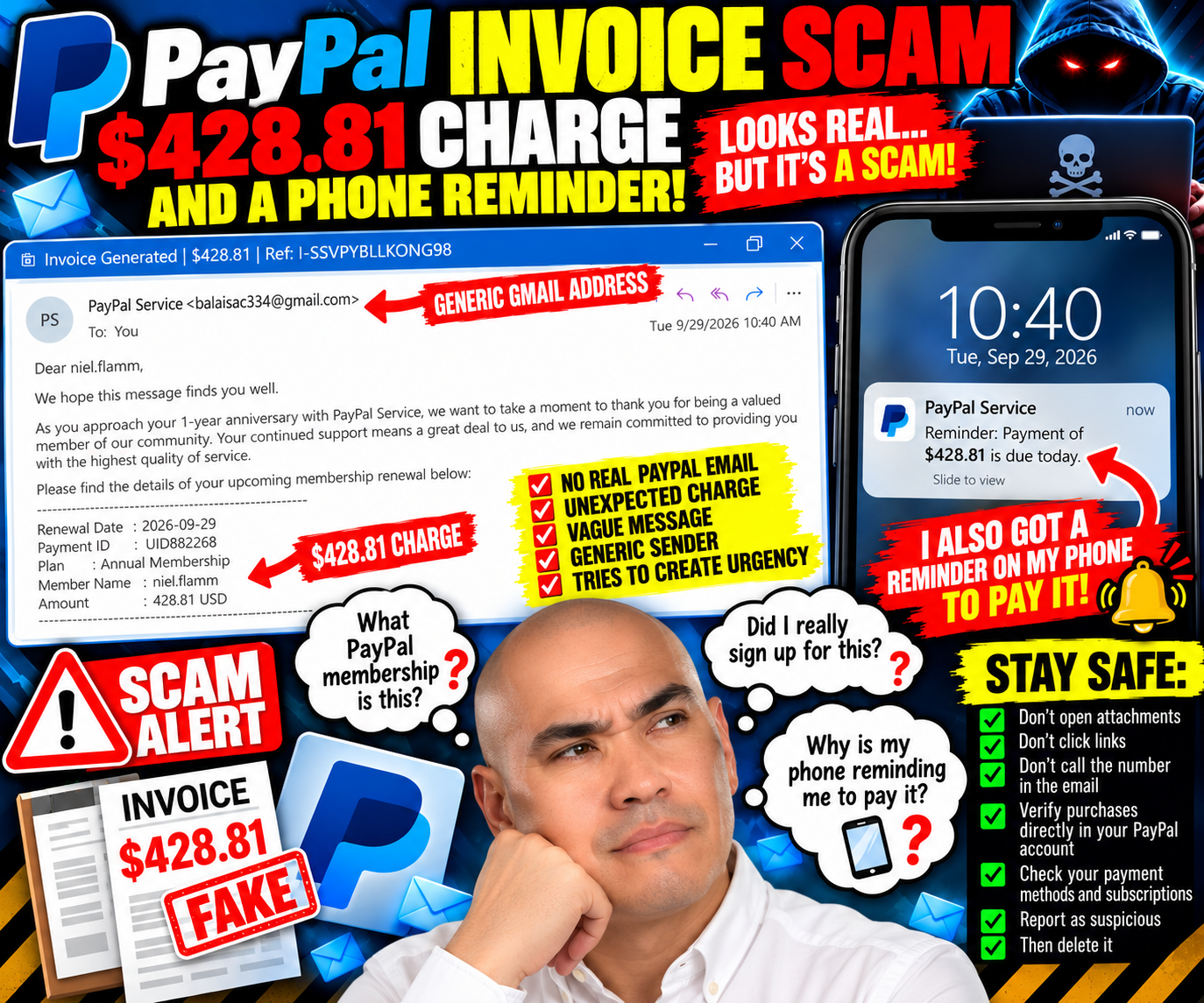
The PayPal Scam That Apparently Scheduled Its Own Reminder on My Phone
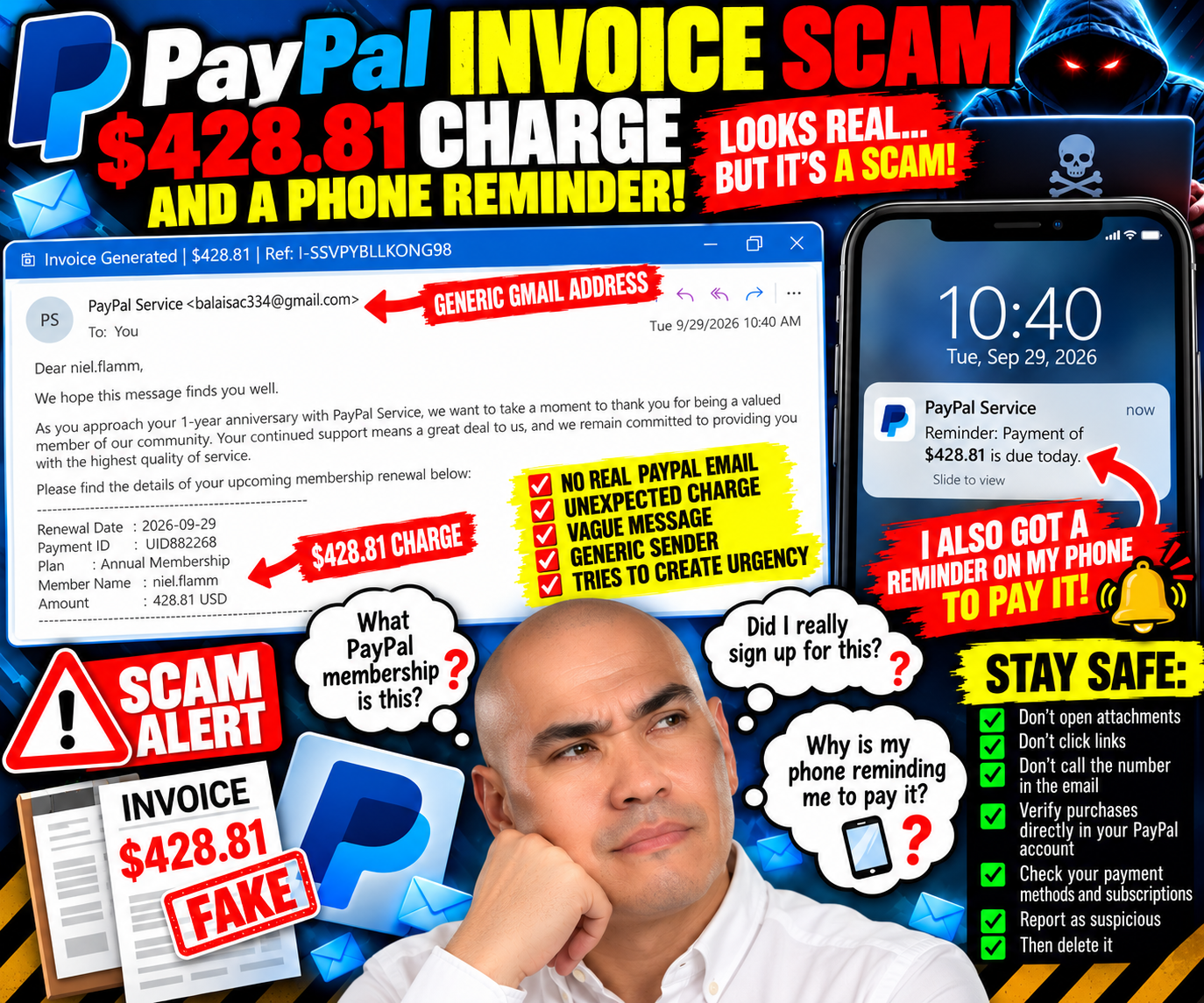
The scammers are getting ambitious.
Lately, I’ve been getting mystery order emails with almost no information. Apparently, somebody decided those weren't convincing enough.
This time, I received what looks like a much more complete invoice.
And then something happened that made this one especially interesting:
I also got a reminder on my phone telling me to pay it.
That will get my attention.
Apparently, I Have a $428.81 “PayPal Service” Membership
The subject line reads:
“Invoice Generated | $428.81 | Ref: I-SSVPYBLLKONG98”
Right away, the email gives me something the previous mystery emails didn't: a specific dollar amount.
$428.81.
The sender's display name says “PayPal Service.”
Sounds official.
Except the actual email address shown next to it is:
There's my first rather large red flag.
If someone is going to impersonate a major financial company, using a random Gmail account while displaying “PayPal Service” isn't exactly subtle.
Happy Anniversary to Me!
According to the email, I'm approaching my one-year anniversary with “PayPal Service.”
How thoughtful.
It thanks me for being a “valued member” and tells me about my upcoming membership renewal.
The supposed details include:
Renewal Date: September 29, 2026
Plan: Annual Membership
Member Name: niel.flamm
Amount: $428.81 USD
The message claims the membership will automatically renew using my saved payment method.
There's just one little problem:
What PayPal annual membership?
That question matters more to me than the email's professional appearance.
🚩 Then Comes the Phone Number
The message tells me that if I want to update my billing information, change my plan, or ask questions, I should call:
1 (816) 372-4805
And there it is.
The email creates the problem:
You're about to be charged $428.81!
Then it conveniently provides the solution:
Call us!
That's exactly when I don't call the number in the email.
If I were concerned about an actual PayPal transaction, I'd open PayPal independently—not use contact information supplied by the message that created the emergency.
But This One Had an Extra Trick
What really got my attention wasn't just the email.
I also got a reminder on my phone to pay it.
That makes the experience considerably more convincing.
Now I'm not simply looking at an unsolicited email.
My phone is also reminding me about the supposed payment.
For a moment, that can create an entirely different psychological reaction:
Wait. Did I actually schedule this?
Did I forget about something?
Did my phone pull this from somewhere legitimate?
That's precisely why I found this one worth documenting.
A reminder appearing on my phone doesn't independently authenticate the underlying invoice. Depending on the phone, email, calendar, assistant, and account settings involved, information from messages can sometimes surface elsewhere automatically.
The reminder made the claim feel more legitimate.
It didn't make the sender's Gmail address disappear.
This Is Why I Look at the Actual Sender
A familiar logo can be copied.
A company name can be typed into an email.
“PayPal Service” can appear as a display name.
A professional-looking invoice number can be invented.
An amount like $428.81 feels specific enough to seem real.
Even a reminder appearing on my phone can make the situation feel more urgent.
But I keep coming back to the basics.
Who actually sent this?
In this case, the screenshot shows:
PayPal Service balaisac334@gmail.com
That's enough for me to stop interacting with the message and verify everything independently.
The Weird Details Keep Coming
Other things make me skeptical.
The email refers repeatedly to “PayPal Service” as though I'm paying for an annual membership.
There's also some mangled text:
“we’re here to help.”
Then the signature lists:
PayPal Service
12014 Copernicus Ave
Bakersfield Ca 93312 Usa
Again, you don't need to investigate those details through the email itself.
That's an important distinction.
I don't have to prove every element is fake before deciding not to trust an unsolicited message.
I can independently verify the account that is said to owe the money.
Don't Let a $428.81 Charge Create Panic
This type of message depends on urgency.
Four hundred twenty-eight dollars and eighty-one cents isn't pocket change.
Someone sees that amount and thinks:
Please stop this charge now.
That's when judgment can disappear.
Instead, I'd do the boring thing.
Open PayPal independently.
Check my activity.
Check automatic payments and subscriptions.
Check the payment methods attached to the account.
If necessary, contact PayPal using contact information obtained independently from PayPal—not the telephone number in the suspicious email.
If the $428.81 transaction isn't there, I'm certainly not going to call a stranger and give them account information so they can “cancel” it.
The Phone Reminder Is the Best Part of This One
Not because it's funny—although something is amusing about a suspicious invoice apparently getting promoted to my personal to-do list.
It matters because it shows how context can influence trust.
An email alone?
Suspicious.
An email plus a phone reminder?
Suddenly my brain gets another signal suggesting that maybe this is something I previously knew about.
That's when I have to separate familiarity from verification.
My phone displaying information doesn't prove it’s legitimate.
A professional-looking invoice doesn't prove it's legitimate.
The exact amount doesn't prove it's legitimate.
The reference number doesn't prove it's legitimate.
And putting “PayPal Service” next to a Gmail address certainly doesn't prove it's PayPal.
Be a Good Neighbor
This is another one worth showing to someone who isn't as comfortable spotting suspicious messages.
Don't just tell them:
“That's obviously fake.”
Show them why you're suspicious.
Point to the sender address.
Ask whether they actually have the membership being described.
Show them how to open the real company's app or website on their own.
Explain why they shouldn't call the telephone number supplied by the same message claiming there's a problem.
And if their phone generates a reminder from the message, explain something else:
A reminder is a reminder. It isn't authentication.
The scammers don't need everybody to believe their story.
They need one person to see $428.81, panic, and make that phone call.
As for my alleged PayPal Service anniversary?
I don't think I'll be celebrating.
I won’t be sending a card.
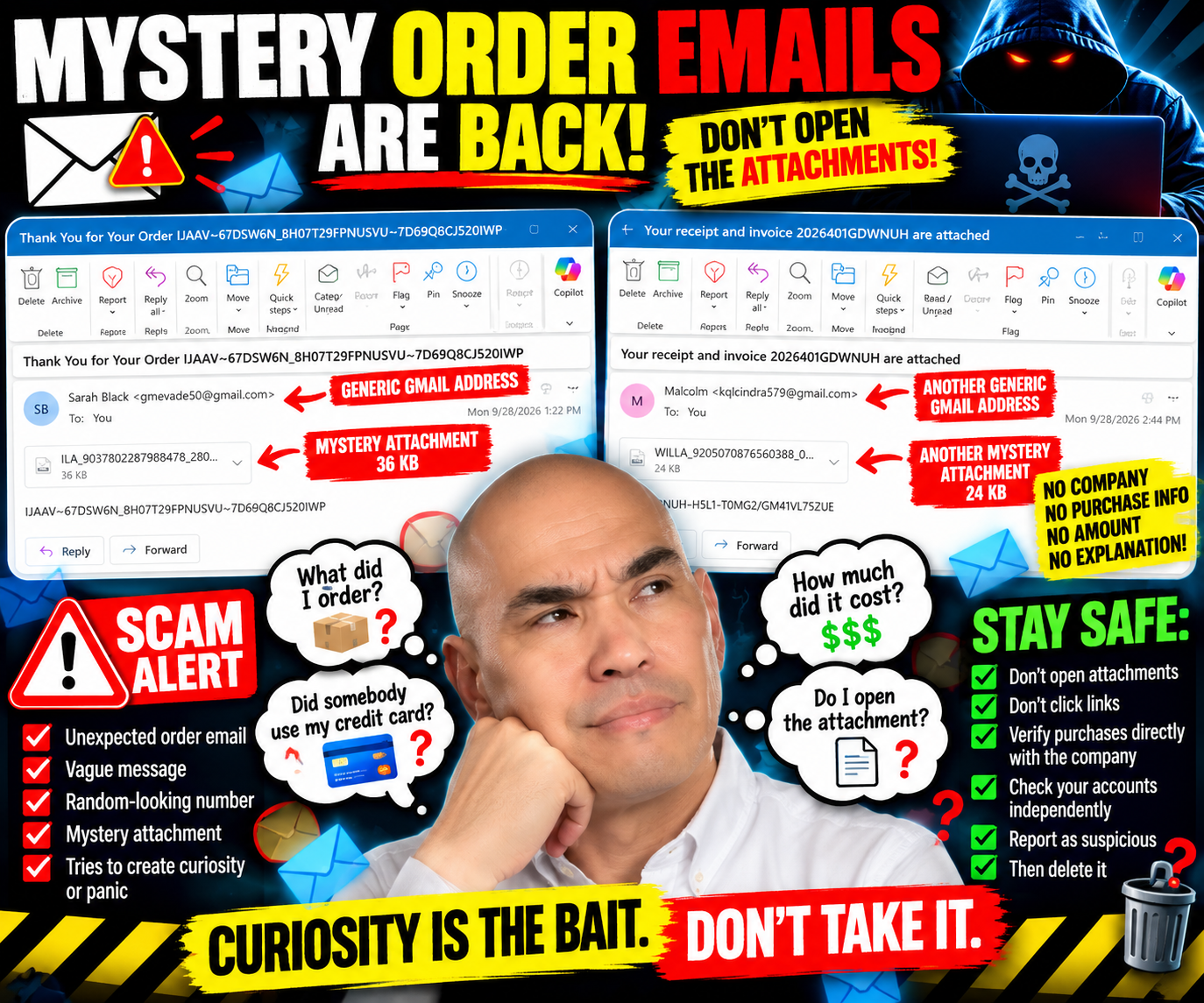
Apparently, the Scammers Still Haven’t Started Writing Emails
Just when I thought the mystery-order-email department might have run out of ideas, two more showed up.
Apparently, writing an actual email is still too much work.
No company introduction. No explanation of what I supposedly purchased. No recognizable merchant. No dollar amount. No useful order details.
Just a mysterious attachment and the digital equivalent of:
“You bought something. Trust me. Open this.”
Yeah, I’ll get right on that.
Mystery Order #1: Thank You for…Whatever I Ordered
The first email arrived with this rather catchy subject line:
“Thank You for Your Order IJAAV~67DSW6N_8H07T29FPNUSVU~7D69Q8CJ520IWP”
Well, that certainly clears things up.
It came from someone named Sarah Black, using a Gmail address.
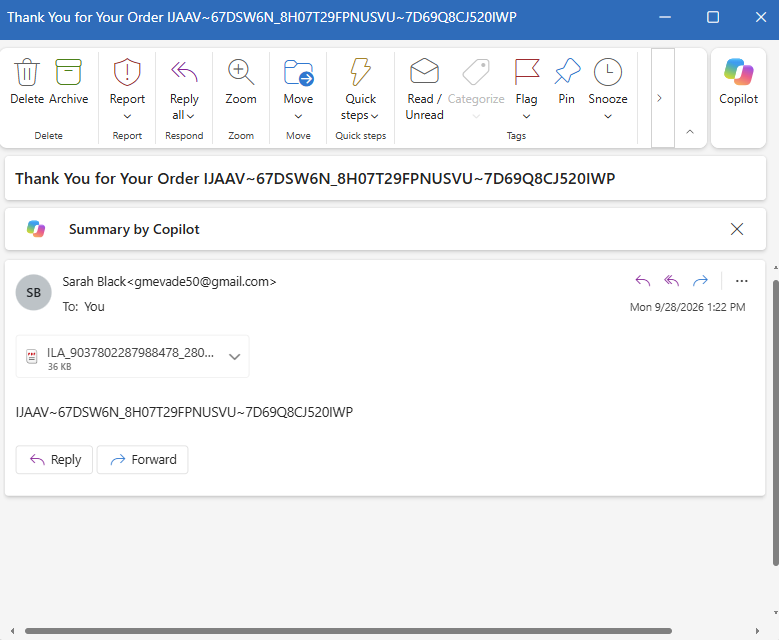
Inside the email?
Almost nothing.
There's another long collection of letters and numbers and a 36 KB attachment.
That's it.
No store.
No product.
No purchase price.
No credit card information.
No shipping address.
No customer-service information.
Nothing explaining what this alleged order actually is.
To see what I bought, I need to open the attachment.
Nope.
Mystery Order #2 Arrives the Next Day
Then another one arrived.
This time the subject was:
“Your receipt and invoice 2026401GDWNUH are attached”
Now we're getting fancy.
We've upgraded from a mysterious “order” to a mysterious receipt AND invoice.
This one came from someone named Malcolm, also using a Gmail address.
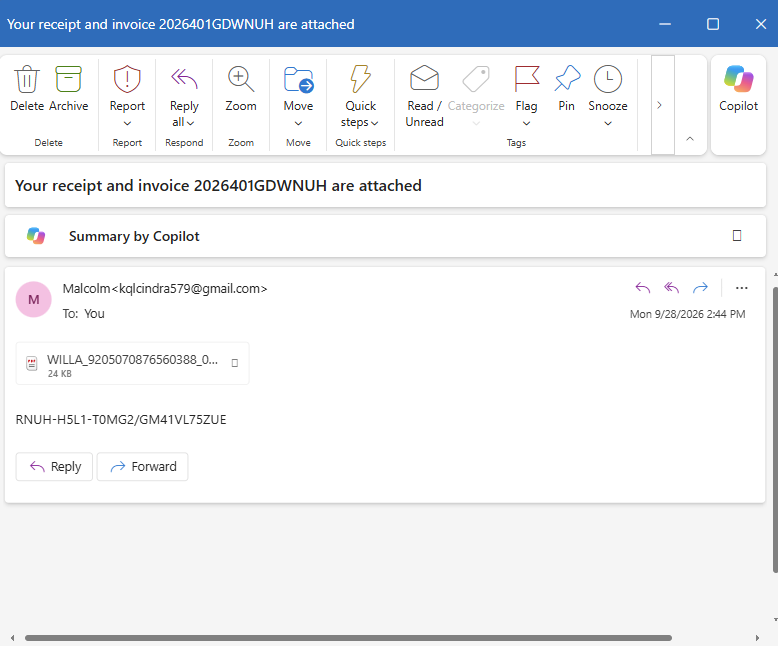
The body of the email contains another random-looking code:
RNUH-H5L1-I0MG2/GM41VL75ZUE
And, naturally, there's another attachment—this one is 24 KB.
Again, the message doesn’t identify a recognizable business.
No explanation of what I purchased.
No price.
No payment information.
No description.
Just an attachment.
🚩 The Attachment Is Still the Email
I've written about this before, and apparently somebody out there wants to provide me with additional examples.
These messages aren't really trying to communicate anything useful.
The attachment is the email.
Everything surrounding it seems designed to create just enough curiosity or concern to make me open it.
Maybe my first reaction is:
What did I order?
Then:
Did somebody use my credit card?
Then:
How much did they charge me?
And finally:
I’d better open this invoice and find out.
That's precisely the reaction I don't want to have.
If I don't recognize a purchase, my first move isn't to open a mystery attachment from an unfamiliar Gmail account.
I'm going directly to my bank, credit-card company, retailer account, or whatever legitimate service supposedly processed the transaction.
Curiosity Can Be the Bait
I haven't opened either attachment, so I don't know what's inside them.
I can't claim they're malware without examining them.
And that's really the point.
I don't need to know what's inside.
Neither message gives me a reason to take that risk.
If I really made a purchase, I can verify it independently.
If there's an unauthorized charge, I can see it through my financial institution.
If a legitimate company needs to contact me about an order, I can go directly to that company's website or app rather than following instructions contained in an unsolicited email.
Opening a mystery file shouldn't cost me to find out whether I supposedly spent money.
Two Emails, Same Basic Formula
These arrived on consecutive days from different Gmail addresses with different names, different order numbers, and different attachments.
But look at the structure:
Unexpected purchase notification → vague message → meaningless-looking number → attachment → curiosity.
That's what catches my attention.
They don't need me to believe the email for very long.
They need me to think:
“What the heck did I buy?”
…and click.
Don't Let the Email Create the Emergency
That's another lesson I've learned from documenting these messages.
A suspicious email shouldn't create a problem and then dictate how I investigate it.
If an email tells me there's an order I don't recognize, I'll check my accounts independently.
If it says there's a PayPal charge, I'll log in to PayPal independently.
If it says there's a credit-card transaction, I'll check that card myself.
If it claims there's an Amazon order, I'll open Amazon myself.
I don't need the mystery attachment.
Be a Good Neighbor
These emails may look ridiculous to someone who's seen hundreds of them.
Not everyone has.
Someone else might see “Thank You for Your Order” and immediately panic.
Maybe they're worried someone stole their credit card.
Maybe they're afraid hundreds of dollars just disappeared from their checking account.
Maybe they can't remember whether they ordered something.
That's when it's worth saying:
Don't open the attachment yet. Let's verify the supposed purchase another way.
Help someone check the real account.
Show them how to inspect the sender.
Explain why an unexpected attachment deserves caution.
Report suspicious messages.
Then delete them.
Because apparently the scammers still haven't started writing emails.
But they certainly haven't stopped sending attachments.