

The Scam Emails Are Getting Lazy: “Thanks for Your Order”… What Order?
Apparently, my imaginary shopping spree continues.
After Bitcoin purchases, mystery subscriptions, Geek Squad renewals, Facebook event invitations, and even a watch repair I never requested, the scammers have apparently decided they were working too hard.
Why bother creating an elaborate fake invoice when you can simply send:
“Thank You for Your Order.”
What order?
Excellent question.
Two Days, Two Mystery Orders
Yesterday, I received an email from “Manthan Williams” with the subject:
“Re: Thank You for Your Order 1KJBO6SYBRM6TJBQLEDV”
There was an attachment.
And almost nothing else.
Today, “Elizabeth Lewis” joined the party with:
“Thank You for Your Order 0RQKQA6198JOMD57P”
Another random order number.
Another attachment.
Another email with practically no explanation.
Apparently, customer service has embraced minimalism.
At Least Tell Me What I Bought
This is what makes these emails almost funny.
No recognizable retailer.
No product description.
No price prominently displayed.
No useful explanation of what I supposedly ordered.
Just:
Thank you for your order. Here's an attachment.
Oh, sure. Let me immediately open a mystery attachment from a random Gmail account to discover what I supposedly purchased.
What could possibly go wrong?
I'm not opening it.
That's an important point. I don't need to open an unsolicited attachment to investigate a purchase I don't recognize.
If I actually ordered something, I can check the retailer or payment account independently.
The Random Gmail Addresses Aren't Helping
One email claims to be from Elizabeth Lewis but arrives from a seemingly unrelated Gmail address.
The other claims to be from Manthan Williams and also comes from an unrelated Gmail address.
Could legitimate people use Gmail?
Of course.
But when an unexpected “order” email arrives from a random Gmail account, provides virtually no information, and wants me to open an attachment to learn more, my curiosity isn't winning this battle.
Delete beats double-click.
The Attachment Is the Bait
These messages use a slightly different approach than the fake PayPal and Facebook invitation scams I've been documenting.
Those messages tried to scare me with a large dollar amount and get me to call a telephone number.
These appear designed to create curiosity:
What did I order?
How much did they charge me?
Did somebody use my credit card?
What's in that attachment?
And that's exactly why I'm leaving the attachment alone.
Fear can make people click.
But so can curiosity.
My Imaginary Self Has Quite the Lifestyle
According to my inbox, imaginary Niel has been busy.
Bitcoin.
Geek Squad.
Mystery subscriptions.
Watch repairs.
More mystery subscriptions.
And now two mystery orders in two days.
The only thing missing is knowing what I actually bought.
Come on, scammers.
If you're going to invent purchases for me, at least make them interesting.
Tell me I bought a Ferrari.
A beachfront condo.
A private jet.
Maybe a lifetime supply of Coke Zero.
Give me something worth accidentally ordering.
Instead, I get:
ORDER 0RQKQA6198JOMD57P.
I'm underwhelmed.
Have a Scam Email? Send It to Me
I'm still collecting these because the tactics keep changing, even though the objective remains the same: get us to react before we stop and think.
If you've received a suspicious email, fake invoice, mystery order, phishing text, social media scam, or another creative attempt to separate you from your money, send it my way:
Tell me what happened and send a screenshot if you have one. Please remove or cover sensitive personal or financial information before sending anything.
Maybe I'll feature it in a future post.
Until then, Elizabeth and Manthan:
Thanks for thanking me for my orders.
Whatever they are.

Apparently, the Scammers Have Stopped Writing Emails
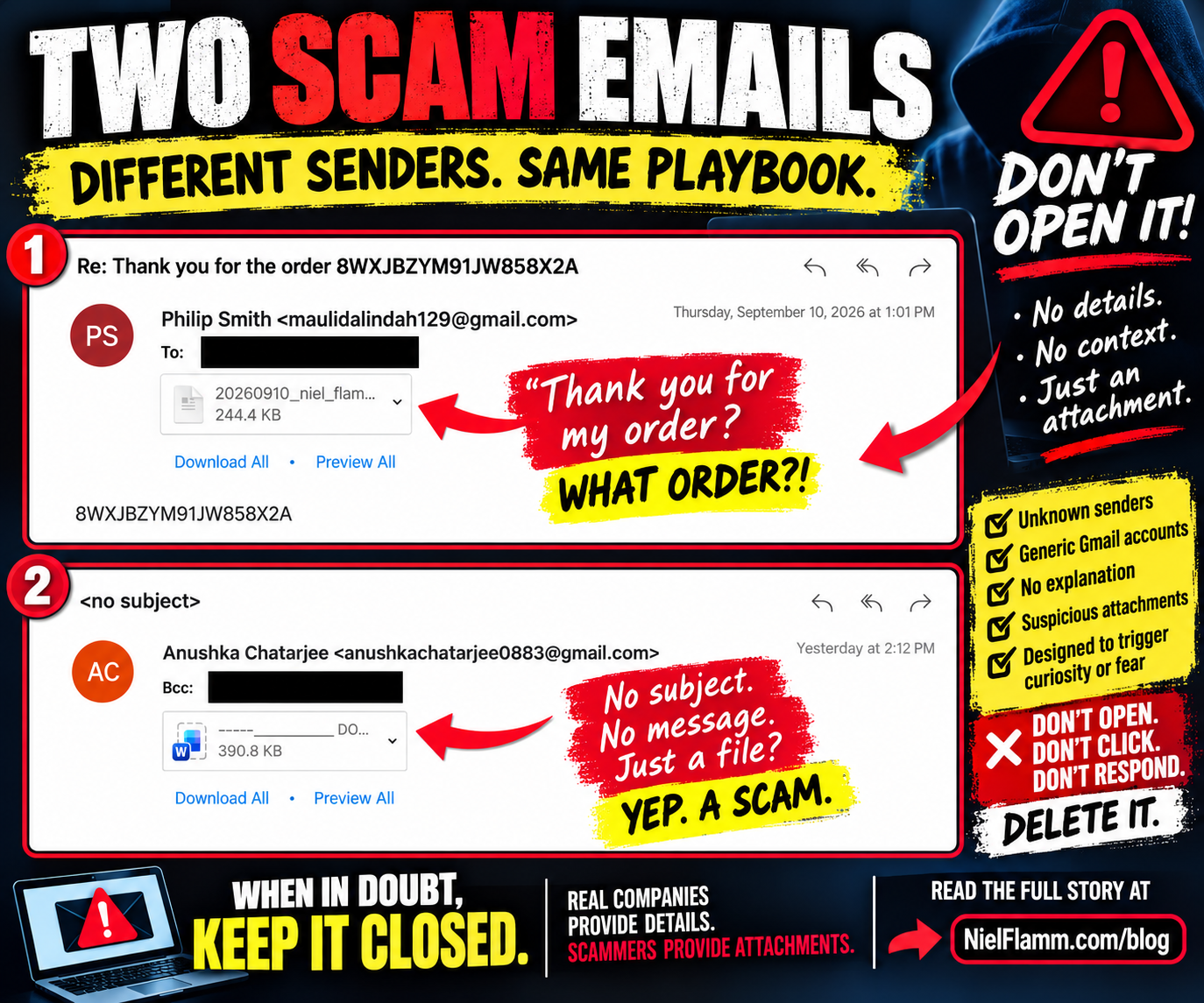
I've written quite a bit lately about scam emails, suspicious recruiters, mystery attachments, and people desperately trying to convince me to click something.
Apparently, we've now reached the minimalist phase of scamming.
Why bother writing an elaborate fake invoice when you can simply send me an attachment and hope I do the rest?
Over the past few days, I received two more emails that follow essentially the same strategy: almost no information, a mystery attachment, and curiosity as the bait.
🚩 Scam Email #1: Thank You for the Order!
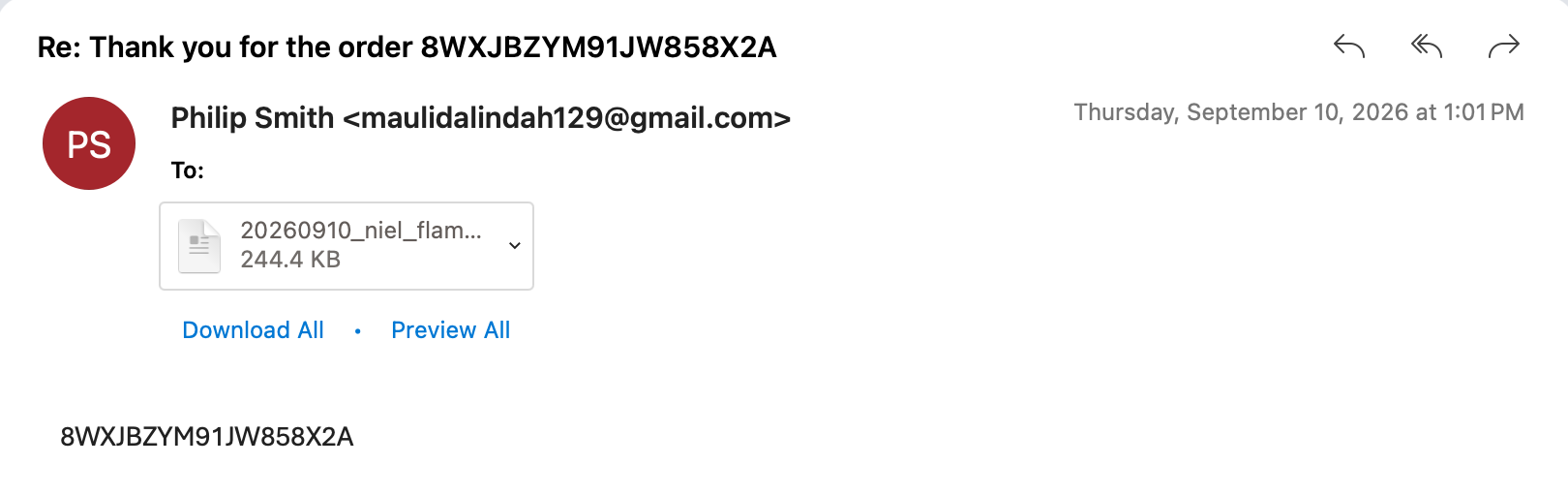
The first one came from someone identifying himself as Philip Smith, using a Gmail address.
The subject:
“Re: Thank you for the order 8WXJBZYM91JW858X2A”
Oh!
Thank you for my order!
There's just one tiny problem.
What order?
There's no company name.
No product.
No price.
No shipping information.
No recognizable merchant.
The body of the email contains essentially nothing except the same mysterious string:
8WXJBZYM91JW858X2A
And then there's an attachment.
A 244.4 KB file with a filename beginning with a date and my name.
That's a nice touch.
Putting someone's name in a filename can make the attachment feel personalized and legitimate.
But I'm supposed to believe I placed an order somewhere, received no explanation of what I purchased, and now need to open an unexplained attachment to discover what happened?
No thanks.
🚩 Scam Email #2: They Didn't Even Bother With a Subject
Then another masterpiece arrived.
Sender:
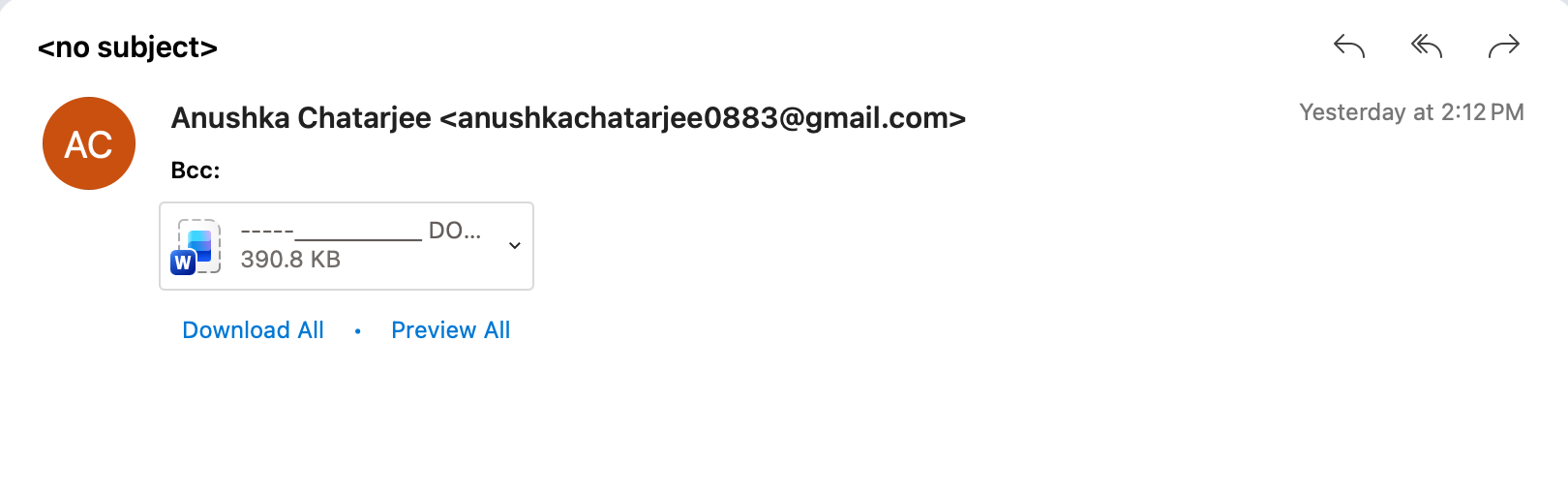
Anushka Chatarjee
Another Gmail account.
Subject:
<no subject>
The message was sent using BCC, suggesting I may simply be one of multiple recipients who received the same message.
And what's in the email?
Nothing useful.
But, naturally, there's a 390.8 KB Microsoft Word attachment.
So now the pitch has been reduced to:
Hi.
Actually, they didn't even say hi.
It's basically:
Here's a Word document. Open it.
That's the entire sales presentation.
The Attachment IS the Email
This is what people need to understand about messages like these.
The lack of information isn't necessarily a failure.
Curiosity can be the social-engineering technique.
The first email wants me wondering:
Did I accidentally order something?
Was my credit card compromised?
How much did they charge me?
What did I supposedly buy?
And where should I look for the answer?
Inside the attachment.
The second email is even more direct.
There's no story at all. Just a mysterious Word document.
The scammer doesn't necessarily need me to believe anything yet.
They just need me to open the file.
Why I Don't Open Them
I don't know what's inside either attachment because I didn't open them.
That's important.
I'm not going to claim these particular files contain malware, malicious links or credential-stealing software when I haven't analyzed them.
I also don't need to.
An unexpected attachment from an unknown Gmail account with no legitimate explanation for why I'm receiving it has already failed my trust test.
The safest question isn't:
“I wonder what's inside?”
It's:
“Why would I open this?”
And in both cases, I can't come up with a good answer.
The Fake Order Trick Is Particularly Clever
The fake-order approach adds another psychological ingredient:
Fear.
Imagine someone receives the first email and thinks:
I didn't order anything!
That's exactly when rational thinking can get replaced by urgency.
They want to find out whether someone used their credit card.
They want to know how much money was charged.
They want to cancel the transaction.
So they open the attachment.
That's why, if you receive a suspicious purchase confirmation, don't use the mystery attachment to investigate it.
Check your credit card or bank account independently.
Log into Amazon, Walmart, PayPal or whatever company supposedly processed the purchase by going directly to the service yourself—not through links or attachments supplied in the suspicious message.
If there's no transaction, there's nothing to cancel.
From “Pharmacy Office” to This
Just days ago, I received another email with the subject “Pharmacy Office.”
That one also contained mystery attachments with practically no explanation.
Now I've received a mysterious order confirmation and a completely blank email carrying a Word document.
There seems to be a theme developing:
The scammers want me to supply the curiosity.
Sorry.
I'm fresh out.
My New Attachment Policy Is Pretty Simple
Unknown sender?
Unexpected attachment?
No explanation?
Generic Gmail account?
Fake urgency?
Mystery purchase?
I'm not opening it.
If someone legitimately needs me to review a document, they can identify themselves, explain what they're sending, and give me a reason to expect it.
Until then, your mysterious 390.8 KB Word document can remain a mystery forever.
Sometimes the safest click is the one you never make.
Follow along at NielFlamm.com/blog for more scams, suspicious emails, questionable recruiters and the increasingly creative ways strangers on the internet try to get me to click things.

Pharmacy Office? Sure. Let Me Open These Mystery Attachments…
Another day, another email apparently hoping curiosity will overpower common sense.
This one arrived with the wonderfully official-sounding subject line:
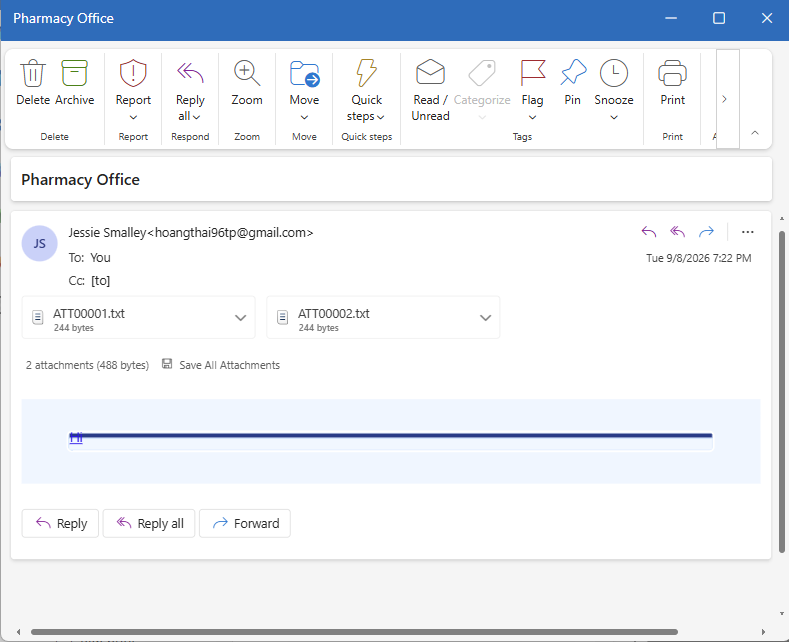
“Pharmacy Office”
Oh, good. The Pharmacy Office!
Which pharmacy?
What office?
Why are they contacting me?
Apparently, those are minor details.
The sender identifies herself as “Jessie Smalley,” but the email address displayed with the name is a random-looking Gmail account:
hoangthai96tp@gmail.com
Nothing screams official pharmacy correspondence quite like that.
But the best part?
There is essentially no message.
No:
“Hello Niel.”
No:
“We're contacting you regarding your prescription.”
No explanation of who they are, why they're contacting me, or what I'm supposed to do.
Instead, I get two attachments:
ATT00001.txt
ATT00002.txt
Each is only 244 bytes.
And there they sit, practically whispering:
Come on, Niel. Open us.
We're probably important.
Maybe one of us contains information about your extended car warranty.
Nice try.
The Attachment Is the Bait
This is one of the simplest tricks in the scammer toolbox.
They don't necessarily need to write an elaborate story if they can get you curious enough to interact with an attachment.
The vague subject creates just enough uncertainty.
Pharmacy Office?
Did my pharmacy send something?
Is there a prescription problem?
Is this about insurance?
Do I owe money?
And that's precisely why I didn't open the attachments.
I don't know the sender. I wasn't expecting the email. The sender's address doesn't connect to a pharmacy, and the email provides no context for the attachments.
That's not a reason to investigate the files.
That's a reason to investigate the email.
Congratulations, You Have Failed the Trust Test
If my actual pharmacy needs me, they presumably have several better ways to communicate than:
PHARMACY OFFICE
Two mystery files attached.
Good luck.
Even if an unexpected attachment looks harmless—whether it's a TXT, PDF, Word document, ZIP file, or something else—I won’t open it just because somebody successfully delivered it to my inbox.
And scammers don't always need the attachment itself to infect a computer immediately. An attachment or document can also be part of a larger social-engineering chain intended to send someone to a malicious website, request credentials, provide instructions for contacting someone, or move the conversation somewhere else.
The objective is simple:
Get you to take the next step.
Curiosity Isn't a Security Strategy
These particular files may contain nothing malicious.
I'm not going to open them to find out.
That's an important distinction.
I don't need to prove something is malicious before deciding I shouldn't interact with it. An unsolicited email with no meaningful message, an unknown sender, and two mystery attachments give me absolutely no reason to trust it.
If something supposedly comes from your pharmacy, bank, employer, insurance company, delivery service, or another organization you actually use, don't rely on the contact information conveniently supplied by the suspicious message.
Please visit the organization's website or app, or contact them through a number you already know is legitimate.
Scammers, You Can Do Better
We've had fake recruiters.
Fake job opportunities.
Career-service pitches disguised as recruiting.
And now apparently I've reached the mystery pharmacy attachment chapter of the adventure.
At least put some effort into it.
Please let me know when my prescription for unicorn medication is ready.
Tell me Walgreens accidentally filled 700 gallons of cough syrup in my name.
Give me something.
Instead, I received two tiny text files and the expectation that curiosity would do the rest.
It didn't.
Delete. Report. Move on.
And, most importantly:
Don't open mystery attachments just because somebody was clever enough to put “Pharmacy Office” in the subject line.
Follow along at NielFlamm.com/blog for more scams, suspicious recruiting adventures, and other examples of people on the internet desperately trying to get me to click things I shouldn't.