
Thank You for Your Order! Wait… What Did I Buy?
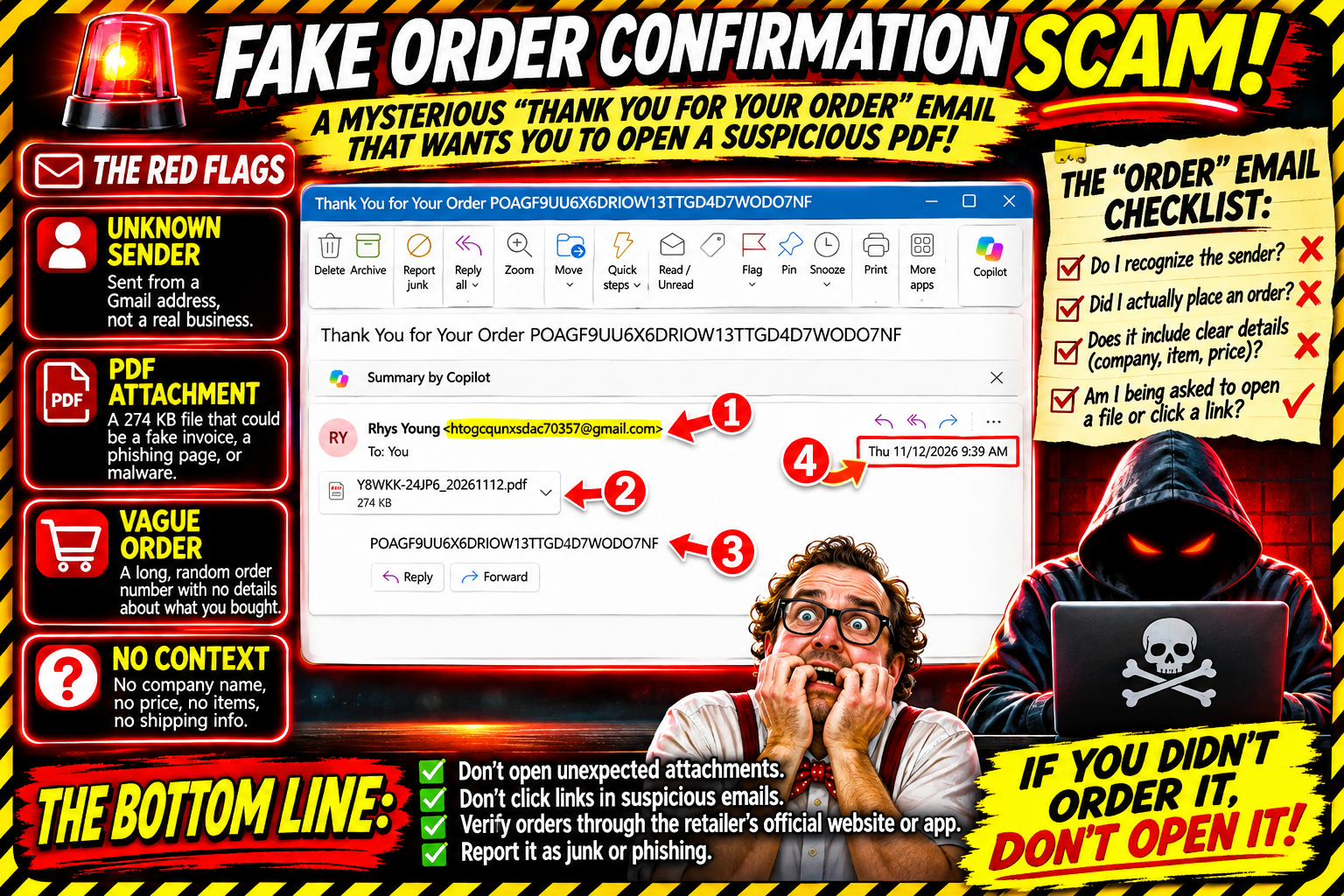
Now that the Microsoft Server problems have been resolved, I can now receive emails like the following. It was sent at 9:39 a.m., before the world outage. I was lucky it got to me before the world got to experience the joy.
Apparently, someone named Rhys Young has some exciting news for me.
The subject line?
“Thank You for Your Order POAGF9UU6X6DRIOW13TTGD4D7WODO7NF”
Well, that's a mouthful.
I opened the email, and here's what I found:
Sender: Rhys Young
Email address: A rather suspicious-looking Gmail address
Subject: Thank You for Your Order
Attachment: Y8WKK-24JP6_20261112.pdf
Attachment size: 274 KB
Message: A mysterious order number
And that's pretty much it.
No company name. No description of what I supposedly purchased. No price. No shipping information. No explanation of what this order is for.
Just an order number and a PDF attachment.
What Exactly Did I Order?
That's the million-dollar question.
Did I order a new television? A subscription? A vacation? A lifetime supply of something I don't need?
Apparently, I'm supposed to open the attachment to find out.
That's where I draw the line.
An unexpected order confirmation with an attachment is a familiar phishing tactic. The sender wants to create enough curiosity or concern to make the recipient open the file.
The attachment may contain a fake invoice. Maybe it contains a phone number to call about a supposedly unauthorized purchase. Maybe it contains something malicious.
I haven't opened it, so I can't tell you what's inside. And I'm certainly not going to open it to satisfy my curiosity.
The Red Flags Are Practically Having a Parade
Here’s what makes this message suspicious.
1. An unfamiliar sender
The message comes from someone identified as Rhys Young, using a Gmail address that doesn't connect to any retailer or service provider.
2. A vague order confirmation
A legitimate order confirmation should provide useful information about the merchant, the product or service, and the transaction. This email gives me none of that.
3. A random-looking order number
The subject line contains a long string of letters and numbers. It looks official enough to catch someone's attention, but it doesn't tell me anything.
4. An unexpected PDF attachment
Why should I open an attachment from someone I don't recognize to learn what I supposedly purchased?
5. No context whatsoever
If I actually placed an order, I should be able to find it by checking the accounts and retailers I use. I don't need to trust an unexplained email.
The Timing Is Almost Comical
The email arrived at 9:39 a.m. on November 12.
That was before the Microsoft server problems that would later disrupt email services and other parts of the online world.
So, while the rest of us were about to experience the joy of technology having a bad day, this little gift had already made its way into my inbox.
I guess I should be grateful.
The scammers managed to get their message delivered before the digital traffic jam.
What timing!
What Should You Do With an Email Like This?
My advice is simple:
Don't open unexpected attachments.
Don't call phone numbers included in suspicious order notifications.
Don't click links to investigate an order.
Check your purchase history by visiting the retailer's official website or app independently.
Report suspicious messages as junk or phishing.
If you are concerned that someone has used your payment information, check your financial accounts through the official app or website and contact your financial institution using a verified number.
My Purchase History Says Otherwise
I don't recognize this sender. I don't recognize the order number. And I certainly wasn't expecting this particular confirmation.
So, Rhys, thanks for the notification, but I think I'll pass.
I have no idea what you believe I ordered, and I'm not opening a mystery PDF to find out.
My inbox is apparently back in business after the Microsoft server problems, and the scammers are wasting absolutely no time.
Welcome back to email, Niel. Your first order confirmation is suspicious.
Have you received an unexpected order confirmation with an attachment? Send me a screenshot or tell me about it at niel@nielflamm.com. Please remove any personal or sensitive information first.
Until next time, remember: if you don't recognize the order, don't open the attachment to find out what it is.
Stop. Think. Verify.