
MyChart, Medicare and a Free Kit? Apparently, Scammers Have a New Survey for Me
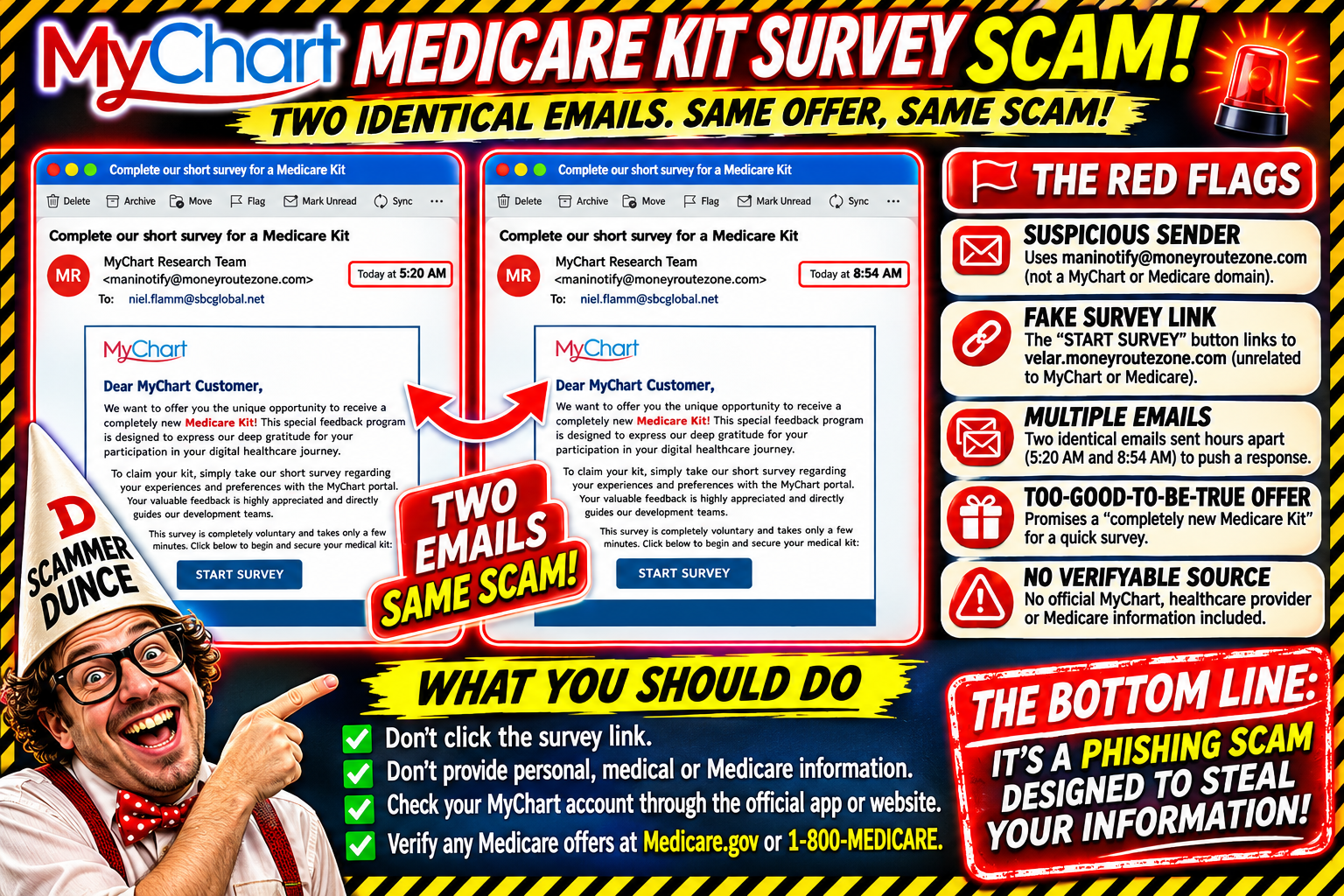
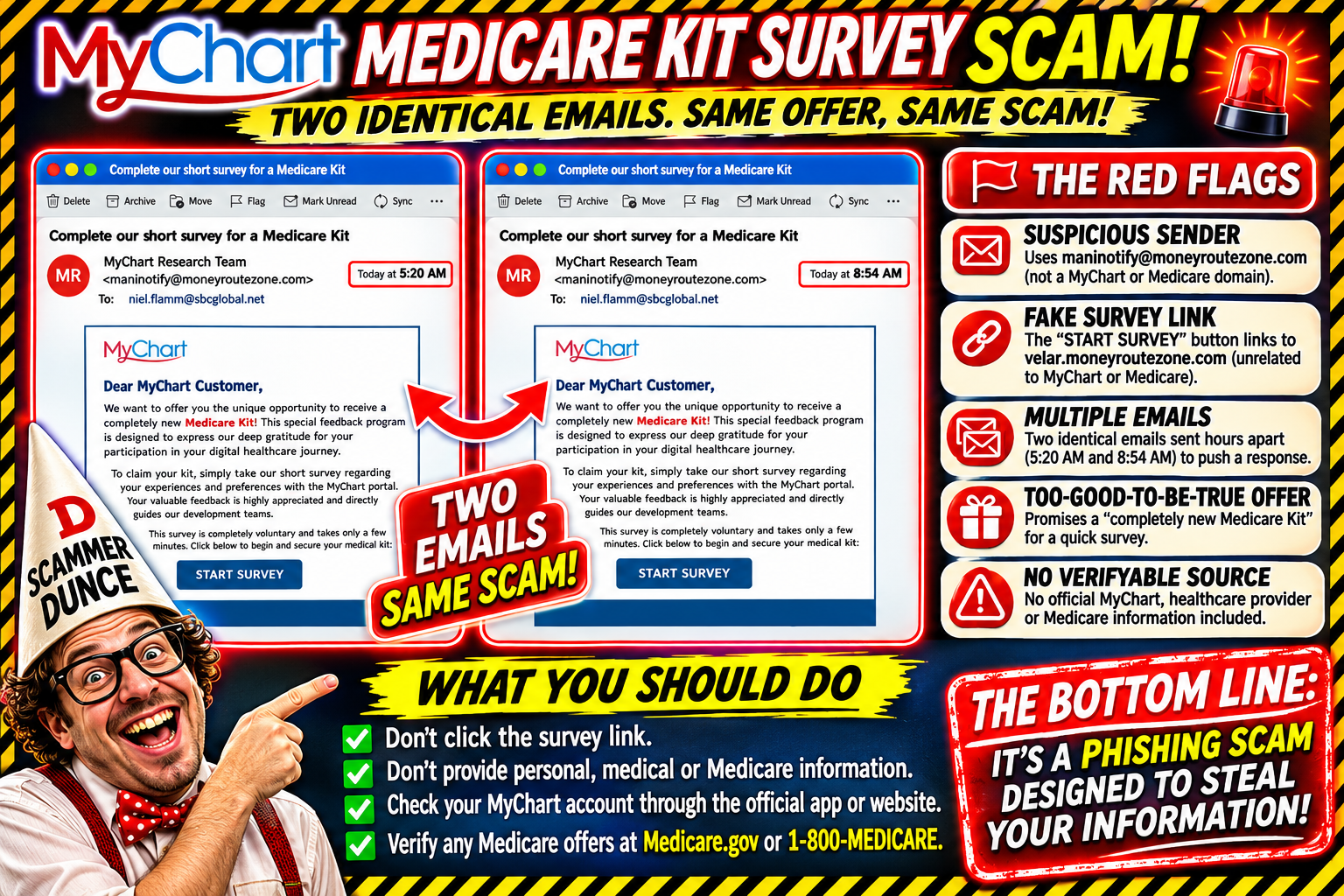
I received not one, but two emails today offering me a completely new Medicare Kit. Apparently, all I have to do is complete a short survey about my experience with the MyChart portal.
Well, isn't that generous?
The first email arrived at 5:20 a.m. The second showed up at 8:54 a.m. Same sender, same subject, same message, same offer. I guess the first invitation wasn't getting enough attention, so they decided to send me a reminder.
The emails came from someone calling themselves “MyChart Research Team”, using the address maninotify@moneyroutezone.com.
Let's pause there.
MyChart is a familiar name in healthcare. But the sender's email domain is not a MyChart domain. That's the first red flag, and it's a pretty big one.
The offer sounds wonderful. That's the problem.
The message tells me:
I can receive a completely new Medicare Kit.
All I need to do is complete a short survey.
My feedback will supposedly help guide their development teams.
The survey takes only a few minutes.
There's a convenient button labeled “START SURVEY.”
What could possibly go wrong?
Well, the first screenshot gives us another clue. When hovering over the survey button, the destination displayed a URL at velar.moneyroutezone.com, which has absolutely no apparent connection to MyChart or Medicare.
That's not where I would expect a legitimate healthcare organization to send me.
And here's the bigger issue: why is a supposed MyChart research team using a completely unrelated email domain and directing people to an unrelated website?
The scammer's marketing department needs a meeting
If you're going to impersonate a healthcare organization, at least understand the organization you're pretending to represent.
MyChart is a patient portal. Medicare is a federal health insurance program. A generic promise of a free Medicare Kit in exchange for a survey doesn't establish any legitimate connection between the two.
Scammers hope familiar names will make people lower their guard.
They're also counting on people being curious about a free offer. Who doesn't like getting something for free?
But there's a difference between a legitimate benefit and an unsolicited email trying to get you to click an unfamiliar link.
Here's what I would do
Don't click the survey button.
Don't provide personal, medical, Medicare, or financial information.
Don't assume an email is legitimate because it uses a familiar company logo.
Check your MyChart account by navigating to its official website or app independently.
If the message claims to be connected to Medicare, verify it through Medicare's official website or phone number.
And please, don't use the contact information or links provided in a suspicious email to verify that same email.
Two emails, one bad idea
I received two nearly identical messages in less than four hours. Maybe the sender thought persistence would pay off.
It might. Unfortunately, someone who isn't paying attention could click that button and hand over information they never intended to share.
My advice? A free Medicare Kit from an unfamiliar sender isn't worth risking your personal information.
To whoever is behind this: the MyChart logo doesn't magically make your email legitimate. Maybe take a little more time with your next attempt.
And to everyone else: Stop. Think. Verify.
Have you received something similar? Send me the screenshot or tell me about it at niel@nielflamm.com. Remove any personal information before sending.
I'll keep sharing these examples because the more people recognize the warning signs, the harder it becomes for these messages to work.
Prime Time for a Scam? Two More Emails That Deserve a Closer Look
I checked my inbox, and apparently the scammers are working overtime. This time, I've got two very different messages, both of which deserve a little attention—and neither is getting the response its sender probably wants.
Let's take a look.
Email #1: Some Recent News… and an Unexpected Attachment
The first message arrived with the subject line “Fw: Some Recent News.”
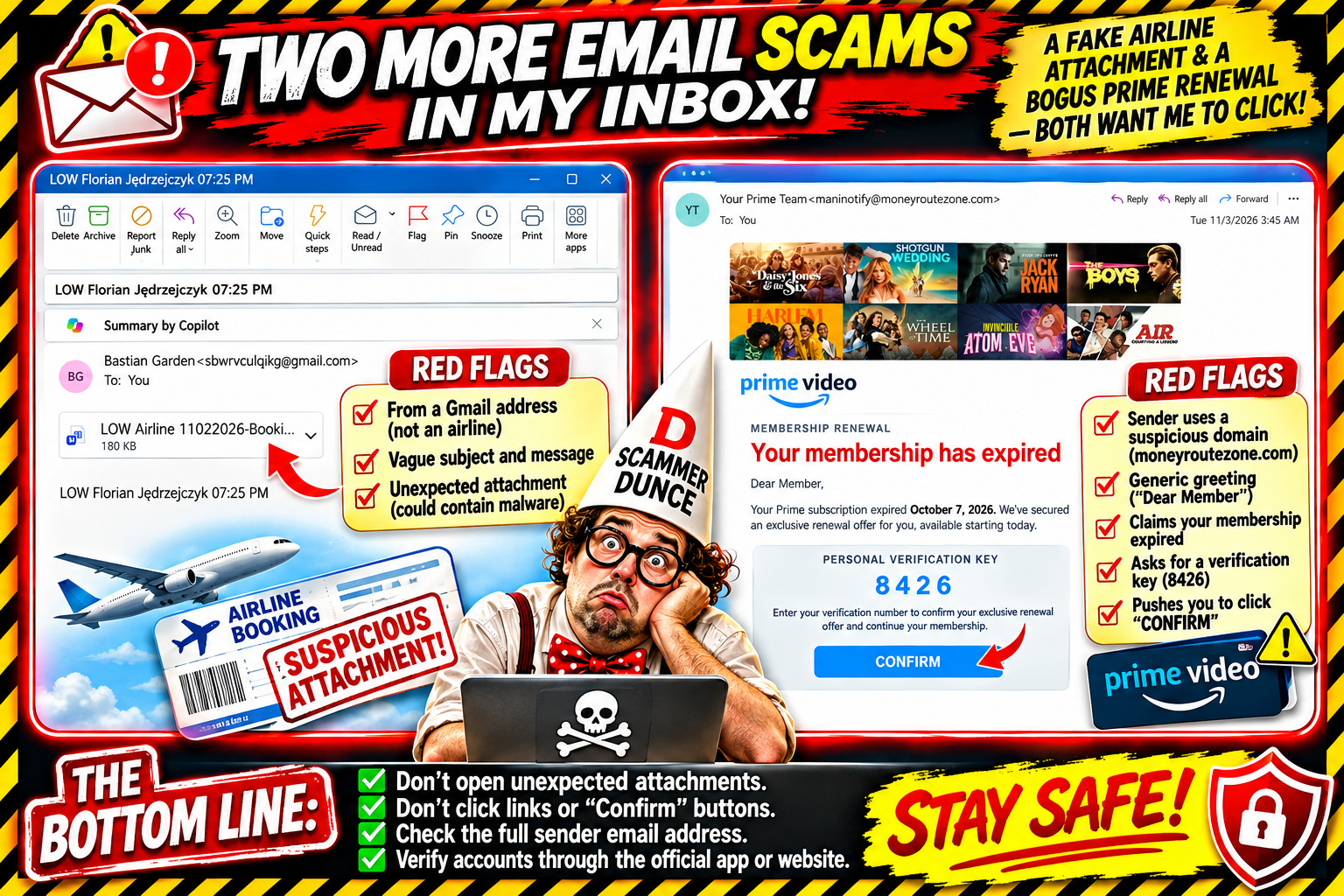
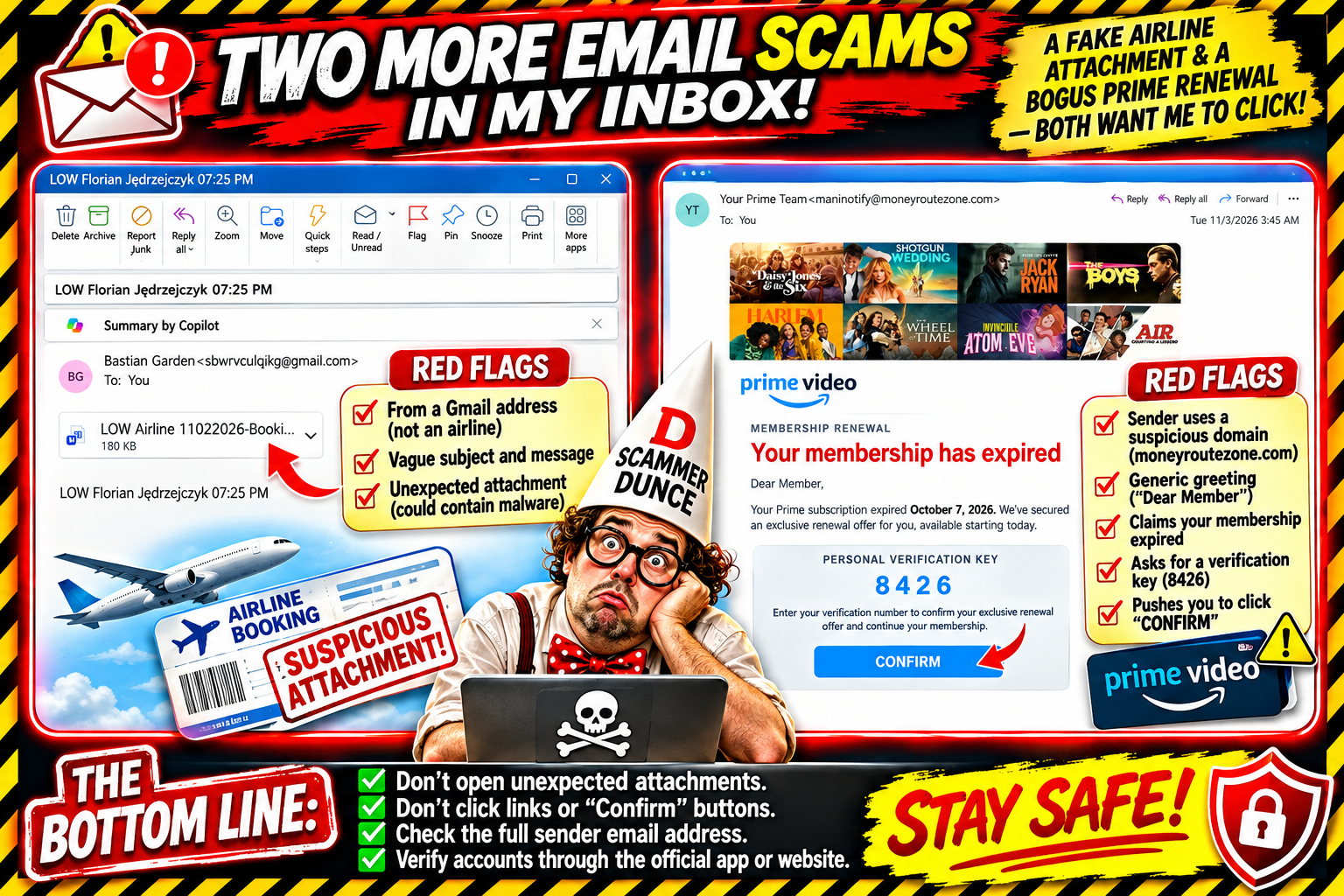
It came from someone identified as Bastian Garden, using a Gmail address. The email body offered almost no explanation. It simply displayed:
“LOW Florian Jędrzejczyk 07:25 PM”
And then there was an attachment labeled something like “LOW Airline 11022026-Booki…”
That's it: no real explanation, no context, and no clear reason to open this file.
What exactly am I supposed to do with this? Is it an airline booking? A travel update? Some reservation confirmation? Am I supposed to recognize Florian?
I'm not opening an unexpected attachment just because somebody decided to send it to me.
An unfamiliar sender, a vague subject line, and an unexplained attachment are enough reasons to stop and investigate. The file could contain malicious content, so I'm leaving it alone.
Email #2: Your Prime Membership Has Expired!
Next up is a message from “Your Prime Team.”
The email features Prime Video branding, a collection of television and movie images, and a big red announcement:
“Your membership has expired.”
According to the message, my Prime subscription expired on October 7, 2026. The email arrived on November 3.
But don't worry! They say they’ve secured an exclusive renewal offer just for me.
Then comes the interesting part.
The message displays a Personal Verification Key: 8426 and tells me to enter that number to confirm the exclusive renewal offer and continue my membership.
There's even a big blue CONFIRM button.
How generous!
Let's examine the red flags.
The sender's email address: Your Prime Team is using maninotify@moneyroutezone.com. That domain doesn't look like an official Amazon or Prime Video email address.
The branding: Putting the Prime Video logo and popular show images into an email doesn't make it legitimate.
The verification key: A four-digit number displayed inside an email isn't proof that the message came from Amazon.
The button: The email wants me to click CONFIRM rather than independently check my account.
The generic greeting: It starts with “Dear Member,” rather than identifying me as an actual customer.
If I want to know whether my Prime membership is active, I can open the Amazon app or type Amazon's address into my browser myself. I don't need an email from a mystery domain to tell me what's happening with my subscription.
Scammers, Can We Get a Little More Sophisticated?
Here's something I've been thinking about: scammers seem so eager to get to the payoff that they forget to make the setup believable.
They want you to click, download, confirm, enter information, or call a number immediately.
But think about some classic heist movies: Ocean's Eleven, The Italian Job, and The Town.
Those capers weren't built around walking up to someone and yelling, “Give me your money!”
There was planning. Research. Preparation. Reconnaissance. A process.
Of course, these are fictional movies, and I'm not suggesting criminals need a better playbook. My point is that the scams I'm receiving are often so poorly put together that they're practically announcing themselves.
The obvious mistakes are what make them easy to spot.
A legitimate company doesn't need to send an unexplained attachment from a random Gmail address. And Amazon doesn't need a suspicious third-party domain to convince me that my Prime membership has expired.
My advice remains the same:
Don't open unexpected attachments.
Don't click suspicious links or buttons.
Check the sender's complete email address.
Don't enter personal or payment information through an unsolicited message.
Visit the company's official website or app independently.
I'm not saying every unusual email is automatically a scam. I'm saying these messages have enough warning signs to treat with caution.
And to the people sending these things: the logos are pretty, the movie thumbnails are colorful, and the buttons are large. Unfortunately for you, the details still matter.
I'm not clicking. I'm not confirming. And I'm certainly not downloading a mystery airline attachment.
Better luck next time.
Have you received something similar? Send me the email, screenshot, or your story at niel@nielflamm.com. Please remove any personal or sensitive information first.
Let's keep shining a light on these scams.
The Medicare Kit Is Back! Apparently, MyChart Really Wants My Survey Answers 😂
Well, well, well. Look what showed up in my inbox today.
Remember that email I received offering me a supposedly free Medicare Kit in exchange for completing a short survey about my MyChart experience?
Apparently, the first invitation wasn't enough.
They're back for another round!
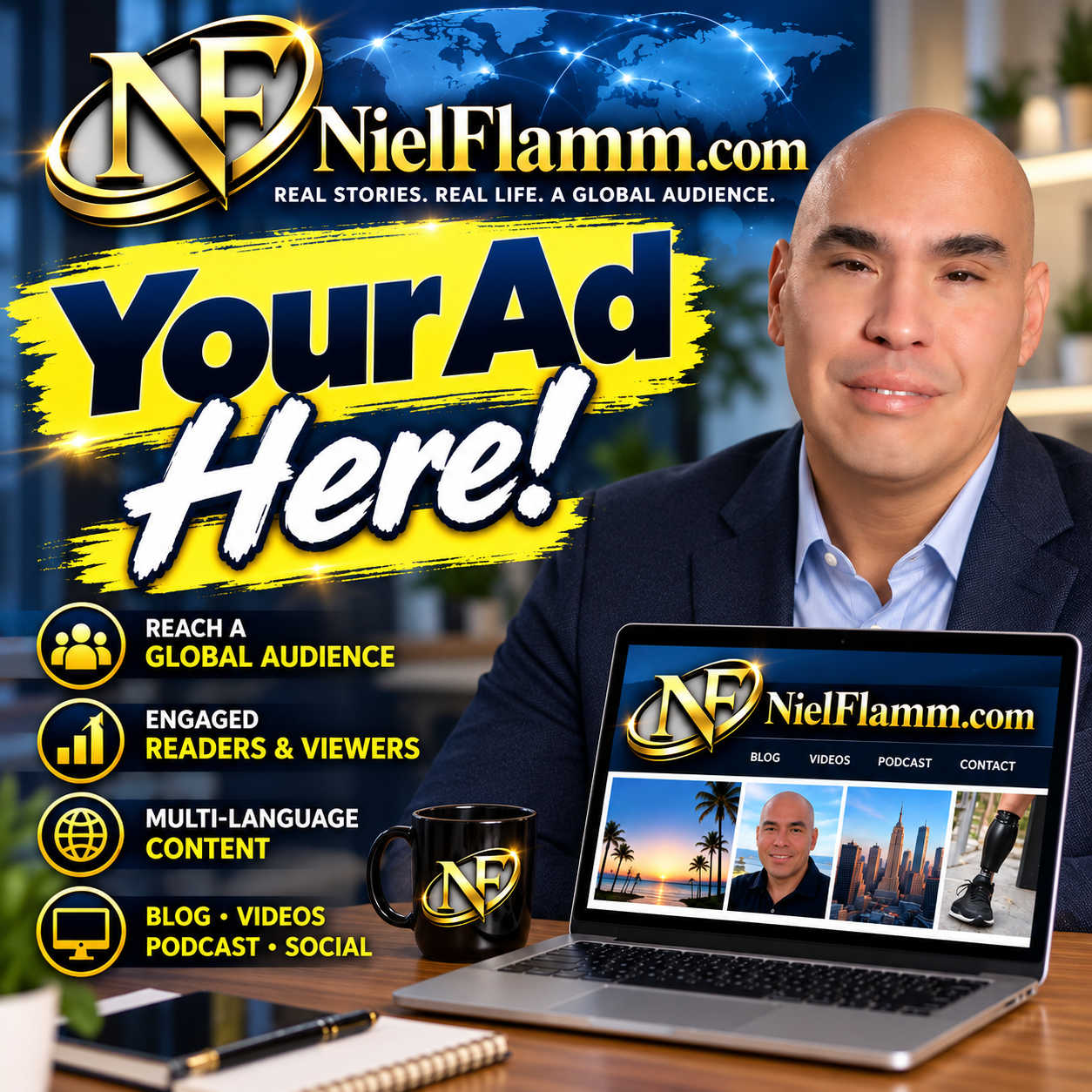
This time, the email arrived with the subject line “Fw: Some Recent News.” It came from someone named Jessie Gaines, using a Gmail address, and included four attachments—two text files and two PNG images.
And right there in the message is the familiar offer:
A completely new Medicare Kit!
All I have to do is complete a short survey about my experiences and preferences with the MyChart portal.
How thoughtful.
My inbox is apparently determined to improve my healthcare experience, one suspicious email at a time.
Déjà Vu: The Medicare Kit Edition
The message uses the MyChart name and logo, addresses me as “Dear MyChart Customer,” and claims the survey is part of a special feedback program designed to thank people for participating in their digital healthcare journey.
The promised reward? A Medicare Kit.
The call to action? A big green START SURVEY button.
The pitch is simple: answer a few questions, share your feedback, and claim your reward.
But here's the thing: the email doesn't establish that MyChart or any healthcare provider actually sent it.
The sender's Gmail address doesn't demonstrate an official connection to MyChart. The message also doesn't identify a specific healthcare organization sponsoring the promotion.
And the fact that it arrived as a forwarded message doesn't make it any more trustworthy.
Why Does This Raise Red Flags?
A few things caught my attention.
1. The sender isn't using an official healthcare domain.
The email comes from a Gmail address. That doesn't automatically prove it's fraudulent, but it certainly doesn't verify the sender's claimed connection to MyChart.
2. The offer uses a familiar healthcare brand.
MyChart is a recognizable patient portal. A familiar name and logo can make an unsolicited message seem more credible than it is.
3. The reward encourages me to click.
Who doesn't like a free gift? The promise of a Medicare Kit gives the recipient a reason to act before asking whether the offer is legitimate.
4. The email includes unexpected attachments.
There are four attachments, including text files and images. I haven't confirmed what's in each attachment, and I'm not going to open suspicious files just out of curiosity.
5. This offer has appeared before.
I've now encountered a very similar Medicare Kit pitch in another email. Repeated messages using the same reward and survey formula make me even more cautious.
I can't confirm the sender's identity or where the survey button goes from this screenshot alone. I also can't say definitively what happens if someone clicks it.
But I don't need to click it to recognize that the offer deserves independent verification.
What Would I Do If I Really Wanted to Check?
I'd open the official MyChart app or go directly to my healthcare provider's website.
If I had questions about a promotion, I'd contact the provider through a phone number or contact method I already knew was legitimate.
I would not use the link in this email to verify the email itself.
And I certainly wouldn't provide my login credentials, Medicare information, payment details or other sensitive personal information to claim an unverified reward.
If the offer is legitimate, I should be able to verify it without trusting the message that brought it to my attention.
My Inbox Is Becoming a Rewards Department
Let's review the recent opportunities my inbox has presented:
A supposedly free Medicare Kit for completing a survey.
A USPS Cart offered in exchange for feedback.
An unsolicited loan offer advertising up to $40,000.
A mysterious recruiting message promising an exciting job opportunity.
Now the Medicare Kit has returned for an encore.
I'm starting to wonder whether my inbox has mistaken me for a professional survey participant with an unlimited appetite for suspicious freebies.
Maybe next I'll receive an email offering me a free hospital, a complimentary postal truck, and a corner office with a $300,000 salary.
One can dream.
But I prefer to keep my personal information, my healthcare accounts, and my money out of these little adventures.
The Bottom Line
An email featuring the MyChart logo is not proof that MyChart sent it. A free gift is not proof of a legitimate promotion. And a survey button is not an invitation I need to accept.
Verify the offer independently. Don't click first and ask questions later.
Have you received an email offering a free Medicare Kit or another reward in exchange for completing a survey? I'd like to hear about it.
Send screenshots and your experiences to niel@nielflamm.com. Please remove sensitive personal information before sending anything.
I'll keep documenting what shows up in my inbox. Apparently, the freebie department isn't going out of business anytime soon.
Until next time: stay curious, stay cautious, and don't let a green button make decisions for you.
The LinkedIn Caper: Apparently Scammers Have Never Watched Ocean's Eleven
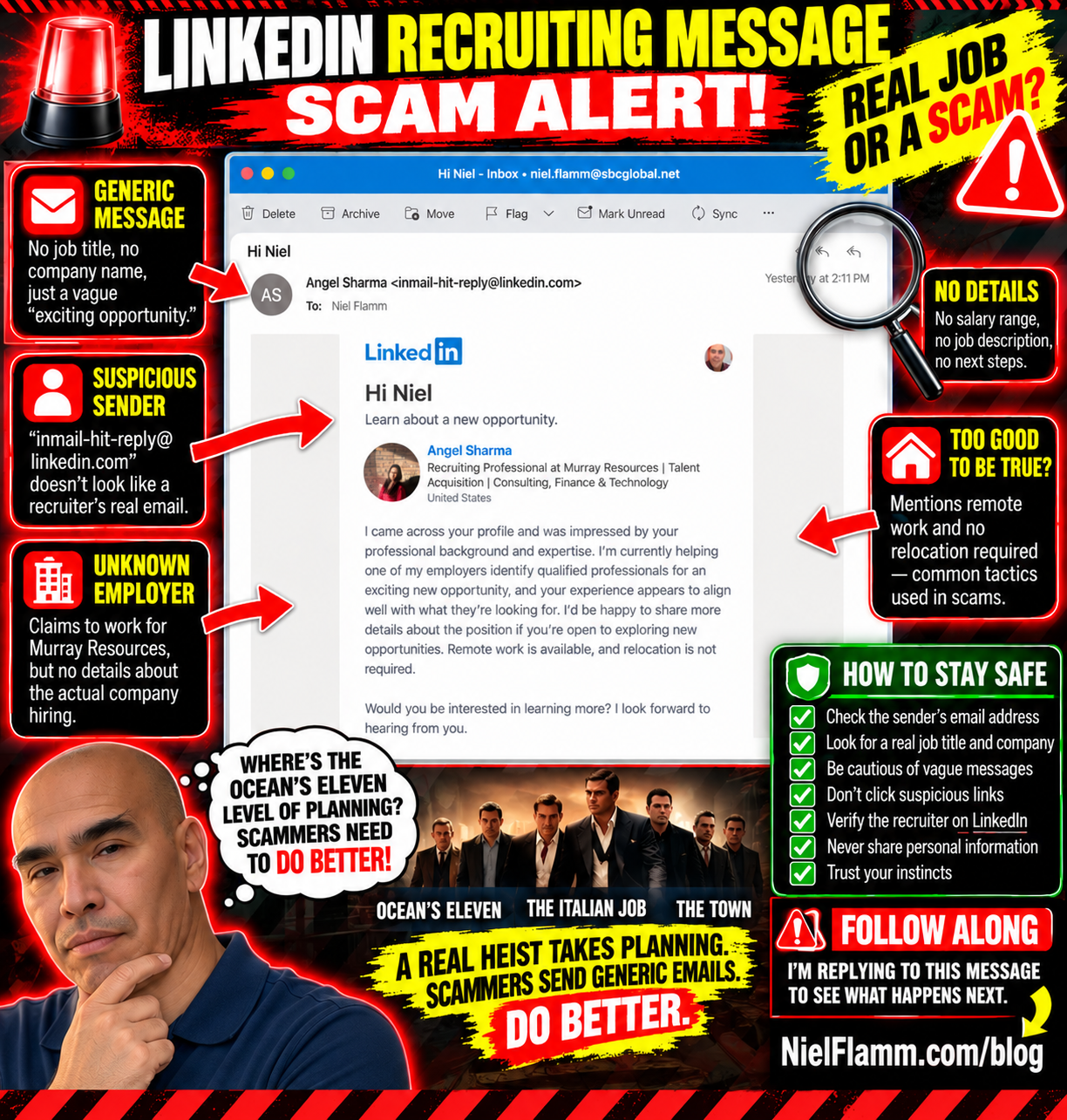
Another day, another unsolicited message that lands in my inbox promising a mysterious job opportunity.
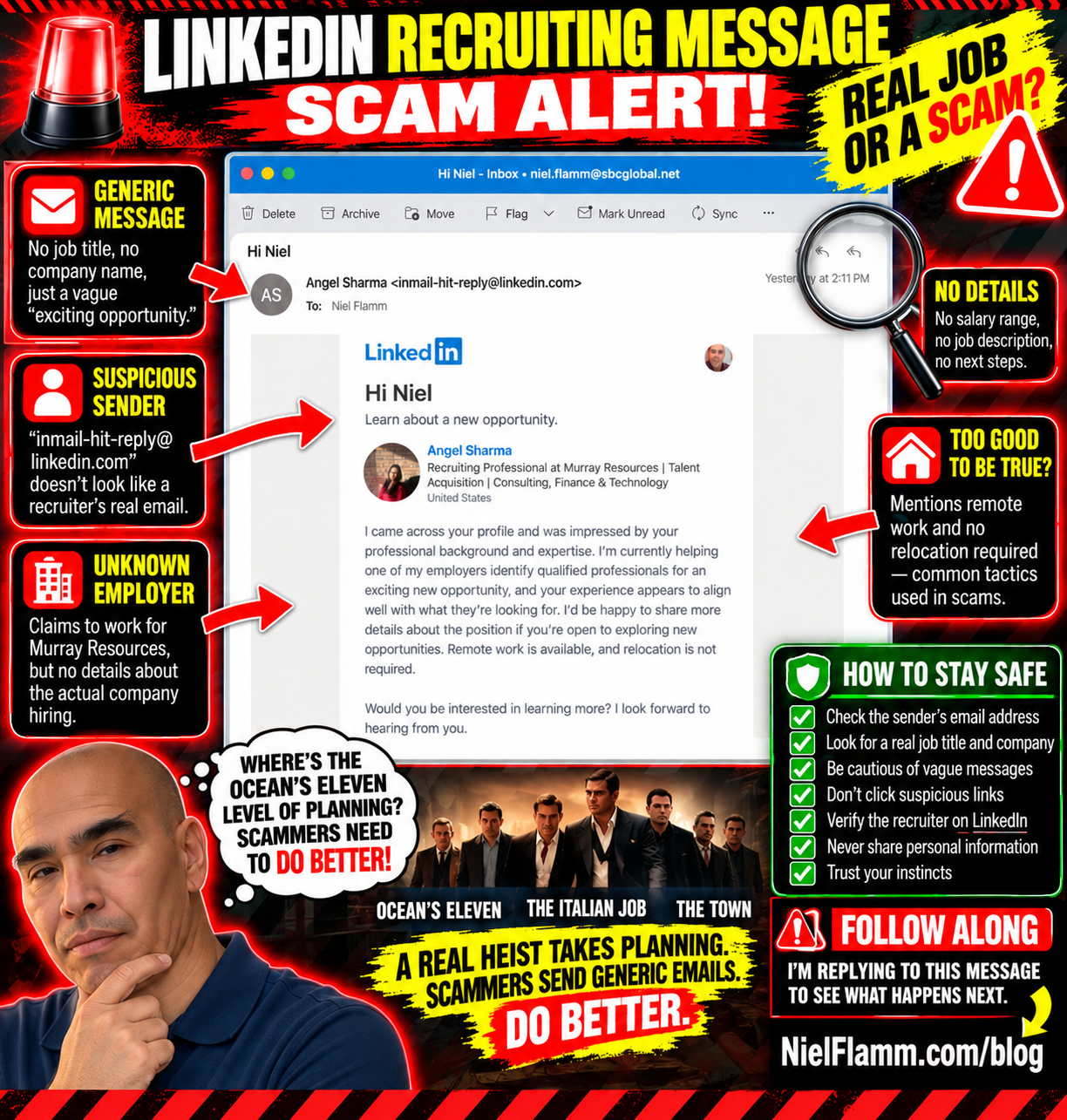
This time, it's supposedly from Angel Sharma, a recruiter at Murray Resources, reaching out via what looks like a LinkedIn notification email.
The message says she came across my profile, was impressed by my professional background, and is helping one of her employers identify qualified professionals for an exciting opportunity.
Remote work is available. No relocation required.
Sounds wonderful, doesn't it?
There's just one small detail missing: What is the actual job?
No job title. No company name for the supposed employer. No salary range. No specific details about the opportunity.
Just a friendly introduction and an invitation to express interest.
Now, I don't know yet whether this particular message is a scam, a questionable recruiting approach, or a legitimate recruiter using a very generic opening. I'm not going to pretend I know more than the screenshot tells me.
But it got me thinking about the state of the scamming business.
Have Today's Scammers Lost Their Imagination?
I was thinking about this today: Some of these scammers don't seem to know how to run a proper grift anymore.
They want the money immediately.
Click this link. Send this payment. Pay this fee. Give me your information.
It's all very rushed.
Where's the creativity? Where's the planning? Where's the commitment to the craft?
Think about movies like Ocean's Eleven, The Italian Job, and The Town.
These movies didn't revolve around someone walking into a casino or a bank and yelling, “Hey, give me all your money!”
Well, that would have made for a very short movie.
Instead, the caper involved planning, reconnaissance, learning how the target operated, understanding security, identifying weaknesses, coordinating people, and executing a carefully developed plan.
The characters invested time before attempting the big score.
When successful, these fictional heists could bring in millions of dollars.
Meanwhile, some of today's suspicious emails can't even tell me what job they're supposedly recruiting me for.
Come on, people. At least give me a plot.
It's a Marathon, Not a 40-Yard Dash
Now, before anyone gets the wrong idea, I'm not offering scammers a consulting service. I'm making a point about how transparent and poorly constructed some of these approaches can be.
A message that promises an exciting opportunity but offers no meaningful details isn't exactly persuasive.
If you're trying to convince someone to trust you, a generic message that could have been sent to 10,000 people isn't a particularly compelling start.
And when the next step involves clicking an unexplained link, sharing personal information, or moving to another messaging platform, the warning signs become even more important.
The problem isn't that I need scammers to become more sophisticated. The problem is that I want people to recognize these tactics before they get hurt.
Still, looking at this email, I can't help but think of Hollywood's master thieves.
Danny Ocean would probably hold a team meeting, make a detailed plan, and prepare several contingencies before he ever approached the target.
This email? It barely makes it through the opening credits.
So, What Am I Going to Do?
I'm going to reply.
Yes, you read that correctly.
I'm going to respond to this message and see what happens next.
That doesn't mean I'll send money, disclose sensitive information, open suspicious attachments, or blindly follow instructions. I'll be cautious about links and requests, and I'll be paying attention to what the sender says next.
I'm curious to see whether this turns into a specific job opportunity, a request to move the conversation elsewhere, a pitch for personal information, or something completely different.
I don't know where this will lead, and that's precisely why I'm documenting the experiment.
I'll share the next installment once there's something to report.
Follow Along for the Next Chapter
Will this be a legitimate recruiting conversation? Will the opportunity become clearer? Will the plot take an unexpected turn?
I don't know yet.
But I'll find out what I can without risking my money or personal information.
If you've received similar recruiting messages, I'd love to hear about your experiences.
And to the people sending these generic messages: if you're going to approach someone with an “exciting opportunity,” at least bring a little substance to the opening scene.
Do better.
Because even a good caper takes planning—and this inbox production needs a rewrite.
Follow along here at NielFlamm.com/blog to see what happens next.
Three Emails, Three Red Flags: Free Medical Kits, $40,000 Loans and a $300K Job?
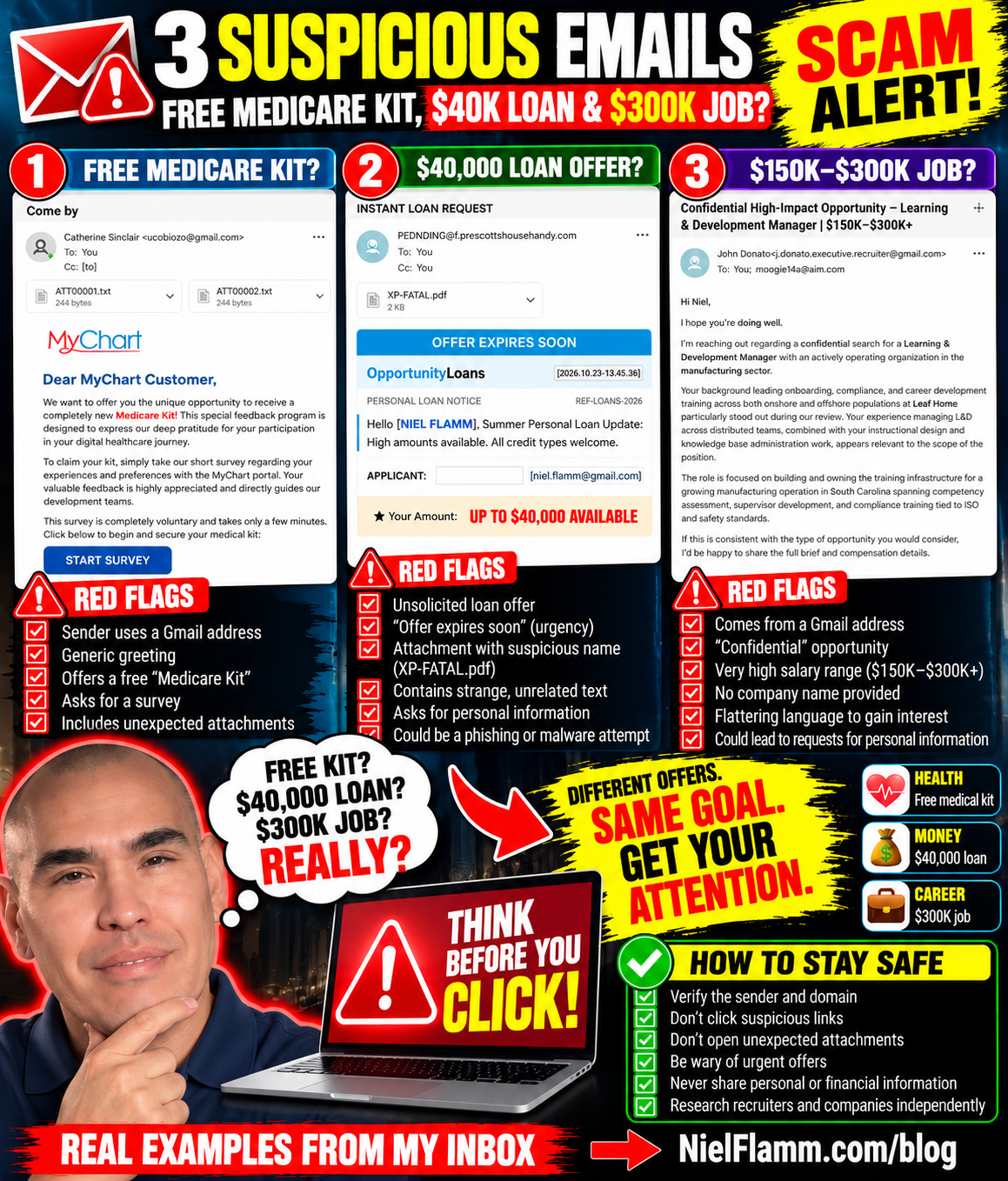
My inbox has been busy again. Apparently, the internet thinks I'm either entitled to a free medical kit, desperately need a $40,000 personal loan, or am the perfect candidate for a $300,000 Learning & Development job.
It's nice to be so popular.
One problem: these emails raise some serious questions.
Let's take a look at three messages that landed in my inbox on October 22 and 23, 2026.
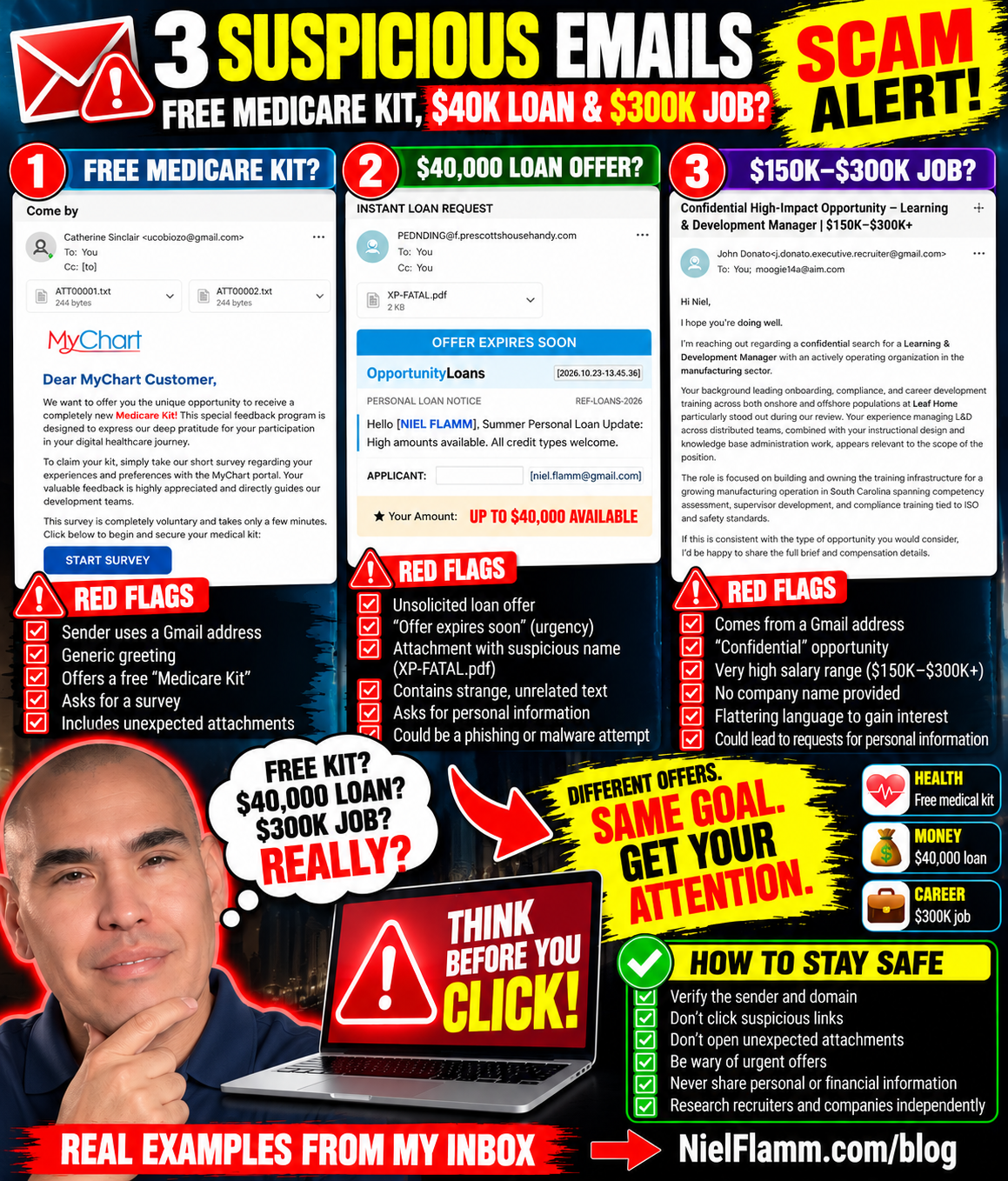
1. A Free Medicare Kit From “MyChart”?
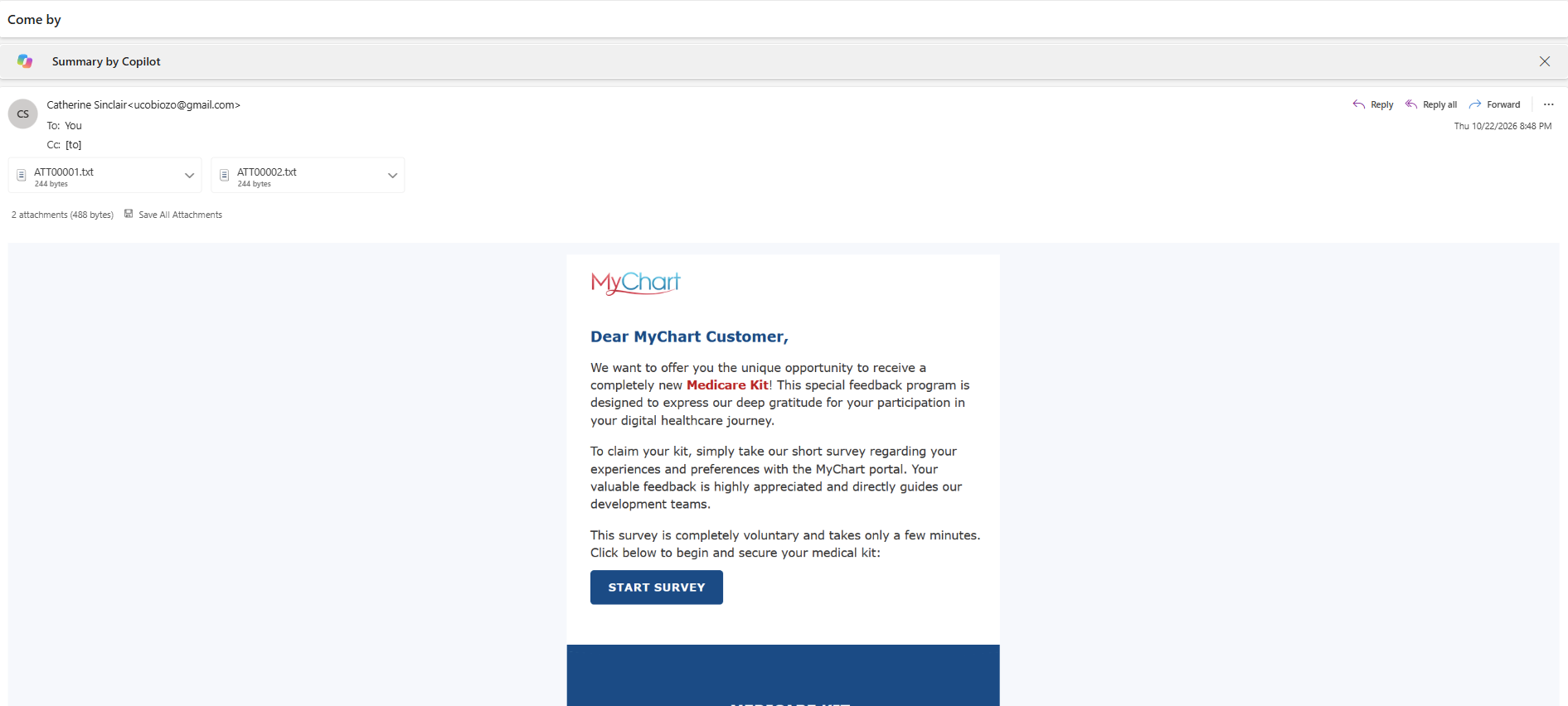
Email subject: “Come by”
The first email came from an address listed as Catherine Sinclair and used a Gmail address. It included two tiny text attachments and an image styled to look like a MyChart message.
The message addressed me as a “MyChart Customer” and offered a supposedly new “Medicare Kit” in exchange for completing a short survey about my MyChart portal experience.
How generous!
A free medical kit just for answering a few questions? What could go wrong?
Well, a few things caught my attention:
The sender's Gmail address doesn't establish any connection to MyChart or a healthcare provider.
The email uses a generic greeting rather than identifying a specific healthcare organization.
The offer combines a medical-related brand with a gift and a survey link.
The email includes unexpected attachments.
I can't establish from this screenshot alone who sent the message or what the attachments contain. But I certainly wouldn't click the survey button or open unexpected files to find out.
If a healthcare portal genuinely offers a survey or patient benefit, I'll check the official portal or contact my healthcare provider using contact details I already trust.
My medical information is not a prize to be claimed through a mystery email.
2. An “Instant Loan” Offering Up to $40,000
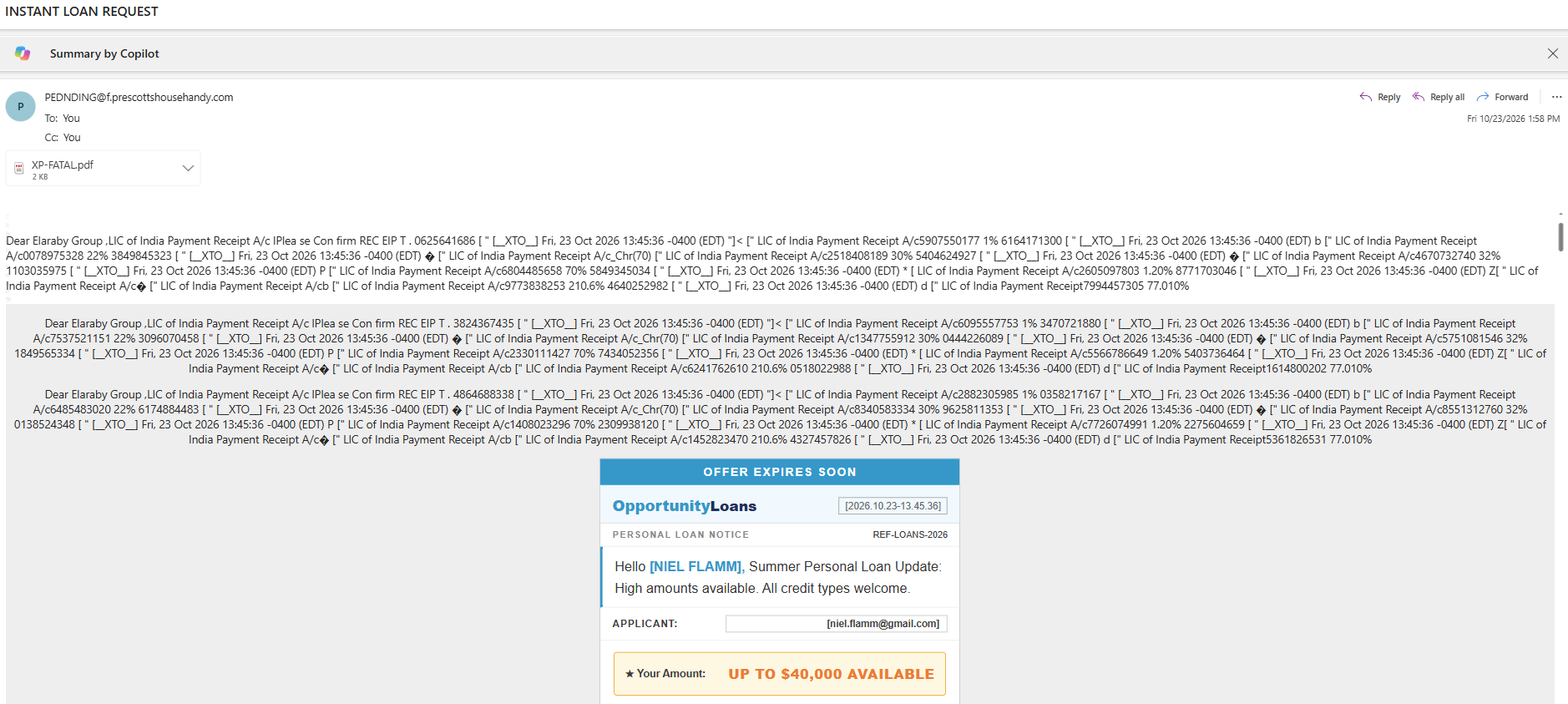
Email subject: “INSTANT LOAN REQUEST”
The second email takes a different approach. This one appears to be about money—specifically, money someone supposedly wants to lend me.
The message contains a banner that says “OFFER EXPIRES SOON” and promotes something called OpportunityLoans. It addresses me by name and advertises personal loans of up to $40,000.
The email also includes a PDF attachment named XP-FATAL.pdf.
Wait a minute. Someone I don't recognize wants to offer me up to $40,000, and there's a PDF attachment with a filename that looks like it wandered out of a computer-security nightmare?
I think I'll pass.
Here are the red flags I noticed:
Urgency: “Offer expires soon” encourages a quick decision.
Unsolicited credit offer: I didn't request this loan information.
Unusual formatting: The message contains a jumble of apparent payment-receipt text that has little to do with the loan offer.
Unexpected attachment: There's no reason for me to open a suspicious PDF just because an email tells me money is available.
Personal information: The email displays identifying information, which can make a message feel more convincing without proving it's legitimate.
I can't determine from the screenshot alone whether this is an outright scam, an unsolicited marketing message, or something else. But I wouldn't use the email's links or contact details to investigate it.
If I ever need a personal loan, I'll research lenders independently, check their credentials, and carefully review the terms. I won’t let a countdown banner drive my financial decisions.
A loan offer isn't free money. And “up to $40,000” doesn't mean I'm approved for $40,000.
3. A $150K–$300K Learning & Development Job?
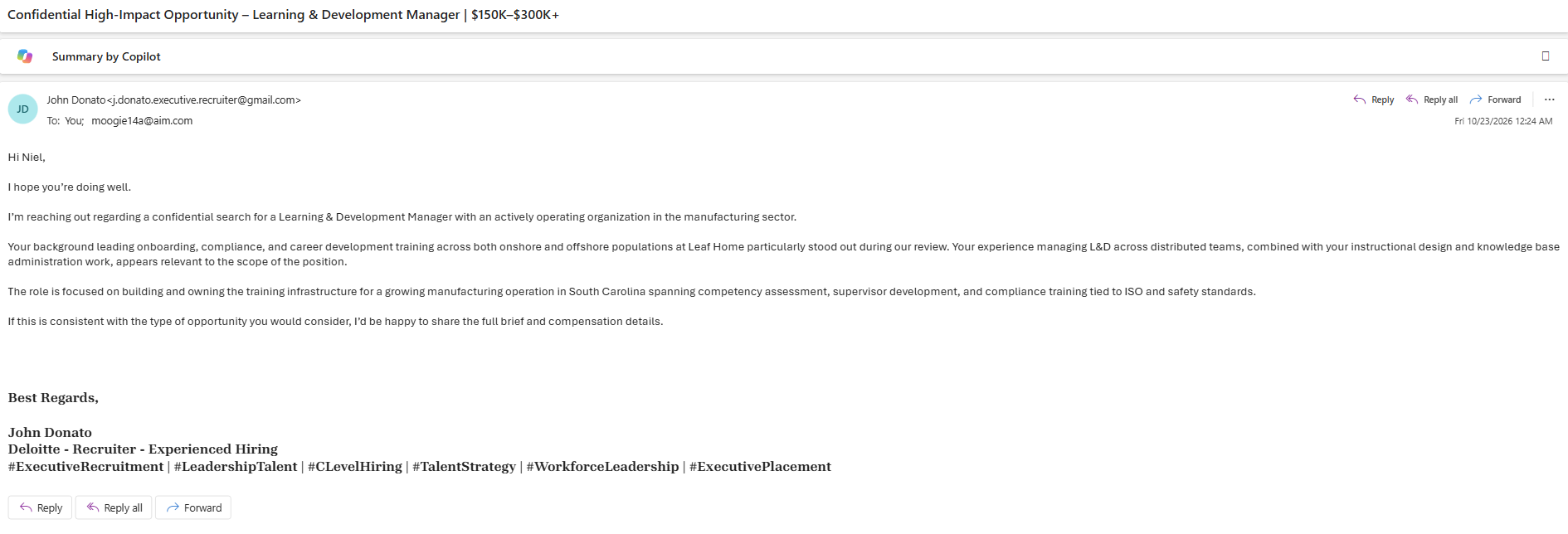
Email subject: “Confidential High-Impact Opportunity – Learning & Development Manager | $150K–$300K+”
Now this one caught my professional eye.
The email came from someone named John Donato, using a Gmail address that includes the words “executive recruiter.”
The sender claims to be contacting me about a confidential search for a Learning & Development Manager at a manufacturing organization in South Carolina.
The message references my professional background, including onboarding, compliance, career development training, instructional design, and knowledge base work. Those are relevant to my career experience.
And then comes the compensation range:
$150,000–$300,000+.
Well, hello there!
After all, who wouldn't want to hear about a potential six-figure opportunity?
The sender says my experience stood out during a review and offers to share the full brief and compensation details if I’d consider the opportunity.
Unlike the other two emails, this one doesn't immediately ask me to pay a fee or open an attachment. The message itself is reasonably polished and references aspects of my professional background.
But that doesn't prove the recruiter, job, or opportunity is legitimate.
Here's what I'd want to verify:
The recruiter's identity: Does this person have a verifiable professional presence and a credible recruiting history?
The company: Which manufacturing organization is hiring? Why isn't it named?
The job: Is there a genuine position matching the description?
The compensation: Is the advertised range supported by a real employer and a defined role?
The next step: Will the recruiter ask for personal information, identification documents, banking details, or money before providing verifiable information?
Using a Gmail address isn't proof of fraud. Independent recruiters sometimes use noncorporate email accounts. But a high salary, flattering language, and references to my experience don’t prove legitimacy either.
The broader issue is that fake recruiting approaches can collect personal information, direct candidates to malicious links, or eventually introduce fraudulent payments and fees.
So I'll treat this as unverified until I can establish who is contacting me and which organization is hiring.
If the opportunity is real, reasonable verification shouldn't ruin it.
Three Emails, Three Different Hooks
What's interesting about these messages is how differently they try to attract attention.
The healthcare hook
A supposedly free Medicare Kit in exchange for survey participation.
The temptation: a free benefit tied to a familiar healthcare name.
The money hook
A supposedly available personal loan of up to $40,000, with an offer that expires soon.
The temptation: easy access to money and FOMO.
The career hook
A confidential Learning & Development role with a potential salary of $150,000–$300,000+.
The temptation: professional recognition and a potentially life-changing opportunity.
These messages target different motivations: health, financial need, and career ambition.
That's why I don't judge an email solely by how professional it looks. A polished message can still be misleading, and a legitimate-looking logo doesn't prove that the sender represents the organization.
What I'm Doing Instead
I don't click suspicious links, open unexpected attachments, or provide sensitive information just because an email promises something appealing.
My approach is straightforward:
Verify independently. Visit the official website or app yourself instead of using a link in the message.
Check the sender. Look beyond the display name and examine the actual email address and domain.
Be wary of urgency. “Offer expires soon” is a reason to slow down, not speed up.
Protect personal information. Don't provide Social Security numbers, banking details, passwords, or identity documents to an unverified sender.
Research recruiters and employers. Confirm the person, company, and job opening independently before sharing sensitive information.
Don't open suspicious attachments. An attachment doesn't become safe just because the email has a convincing explanation.
If you've already clicked something or shared information, don't panic. The appropriate next steps depend on what happened, but they may include changing compromised passwords, contacting your financial institution, or reporting the message.
My Inbox Is Apparently a Career Fair, a Bank and a Healthcare Portal
I started with three emails and ended up with three very different offers.
A free medical kit.
A loan of up to $40,000.
A job that might pay $300,000.
I appreciate the variety. My inbox apparently believes in diversification.
But I don't need to claim that every suspicious message is definitely a scam to recognize that each one deserves scrutiny.
The healthcare offer needs verification. The loan offer needs verification. The recruiter needs verification.
And none of them gets a free pass just because the offer sounds good.
Have you received an email offering a gift, a too-good-to-be-true loan, or an unbelievable job opportunity? I'd like to hear about it.
Send your screenshots and experiences to niel@nielflamm.com. Please remove sensitive personal, financial, and account information before sending them.
I'll keep documenting what comes into my inbox, because the more we recognize these tactics, the less likely we are to get caught off guard.
Remember: Verify first. Click later—if at all.