
Prime Time for a Scam? Two More Emails That Deserve a Closer Look
I checked my inbox, and apparently the scammers are working overtime. This time, I've got two very different messages, both of which deserve a little attention—and neither is getting the response its sender probably wants.
Let's take a look.
Email #1: Some Recent News… and an Unexpected Attachment
The first message arrived with the subject line “Fw: Some Recent News.”
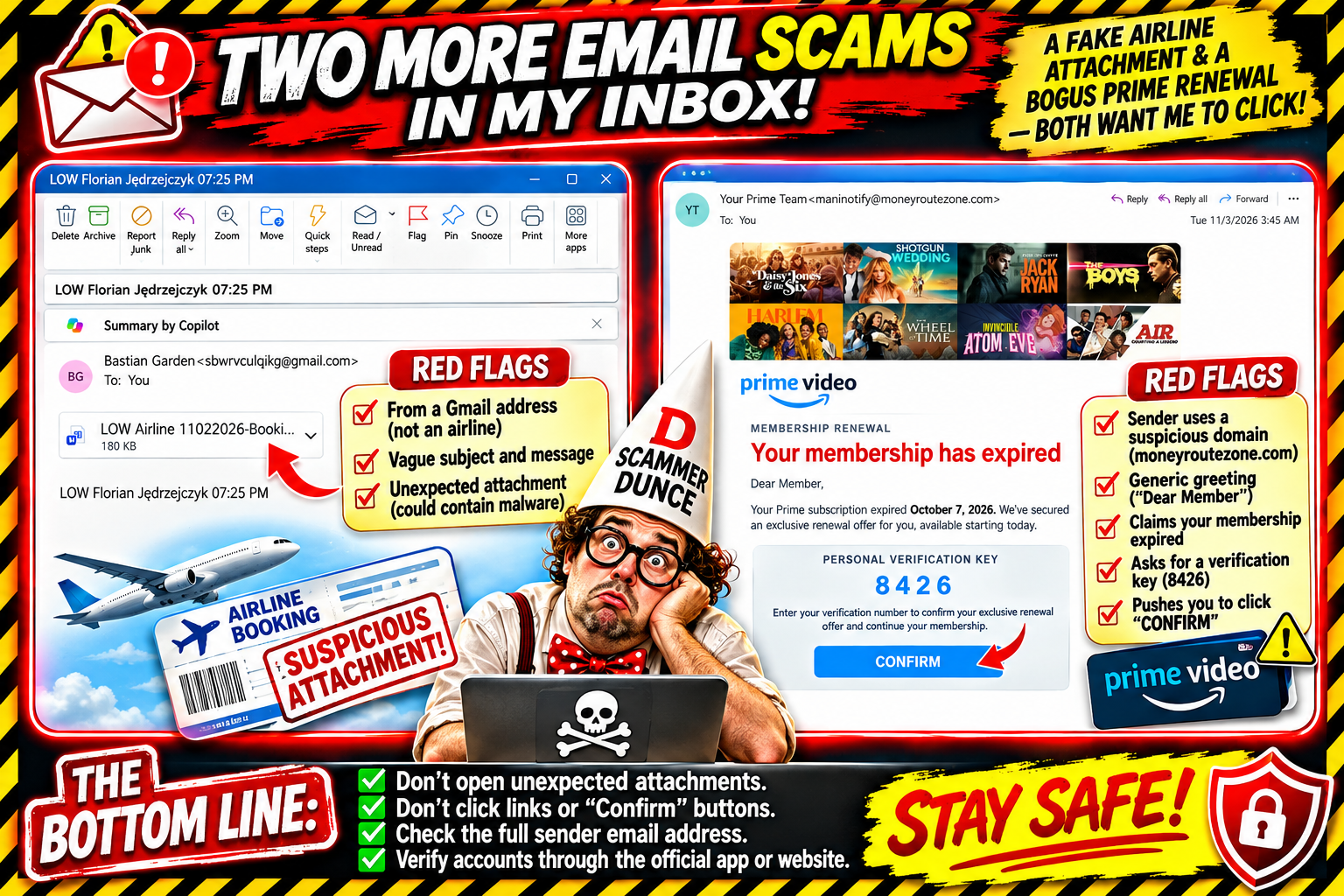
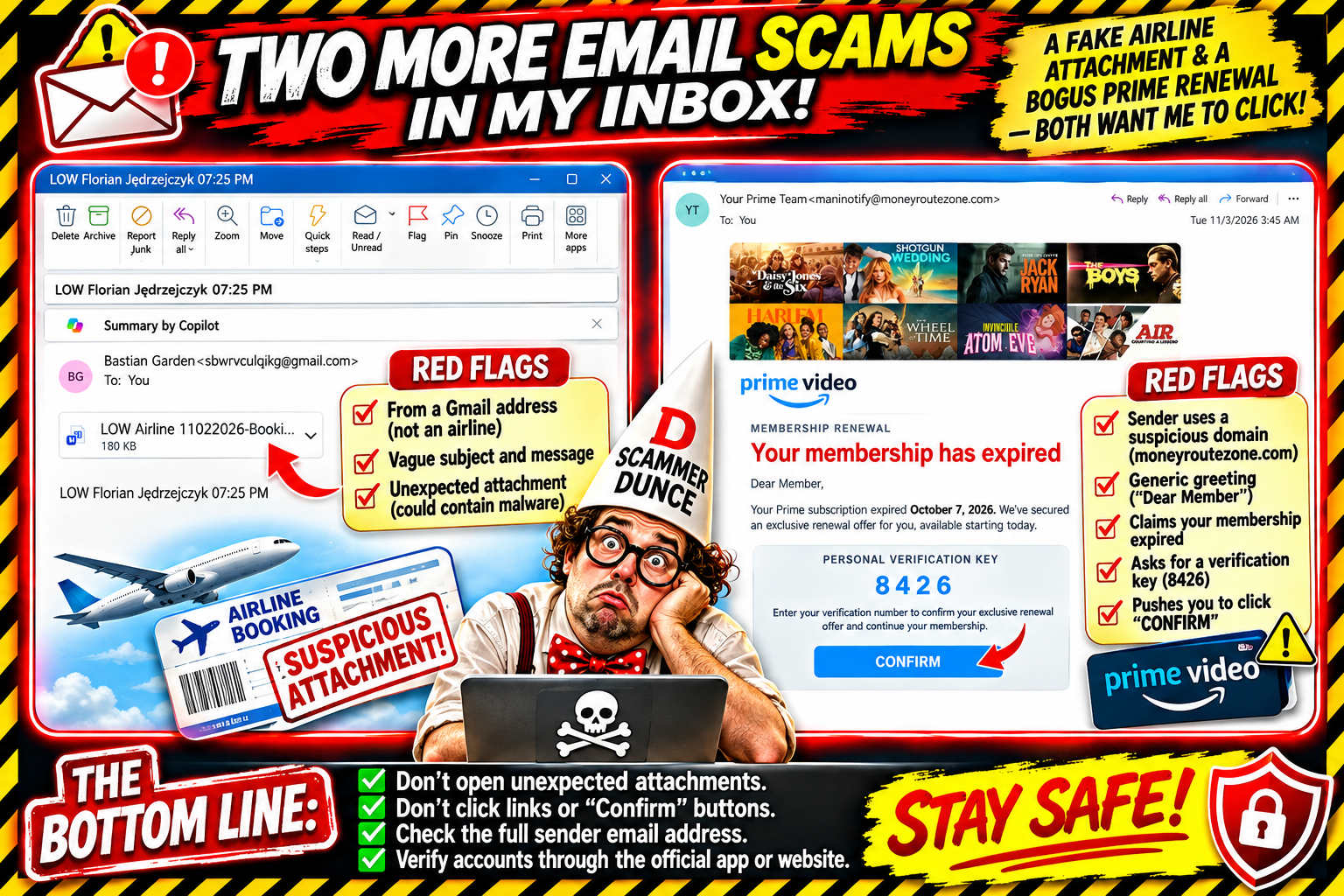
It came from someone identified as Bastian Garden, using a Gmail address. The email body offered almost no explanation. It simply displayed:
“LOW Florian Jędrzejczyk 07:25 PM”
And then there was an attachment labeled something like “LOW Airline 11022026-Booki…”
That's it: no real explanation, no context, and no clear reason to open this file.
What exactly am I supposed to do with this? Is it an airline booking? A travel update? Some reservation confirmation? Am I supposed to recognize Florian?
I'm not opening an unexpected attachment just because somebody decided to send it to me.
An unfamiliar sender, a vague subject line, and an unexplained attachment are enough reasons to stop and investigate. The file could contain malicious content, so I'm leaving it alone.
Email #2: Your Prime Membership Has Expired!
Next up is a message from “Your Prime Team.”
The email features Prime Video branding, a collection of television and movie images, and a big red announcement:
“Your membership has expired.”
According to the message, my Prime subscription expired on October 7, 2026. The email arrived on November 3.
But don't worry! They say they’ve secured an exclusive renewal offer just for me.
Then comes the interesting part.
The message displays a Personal Verification Key: 8426 and tells me to enter that number to confirm the exclusive renewal offer and continue my membership.
There's even a big blue CONFIRM button.
How generous!
Let's examine the red flags.
The sender's email address: Your Prime Team is using maninotify@moneyroutezone.com. That domain doesn't look like an official Amazon or Prime Video email address.
The branding: Putting the Prime Video logo and popular show images into an email doesn't make it legitimate.
The verification key: A four-digit number displayed inside an email isn't proof that the message came from Amazon.
The button: The email wants me to click CONFIRM rather than independently check my account.
The generic greeting: It starts with “Dear Member,” rather than identifying me as an actual customer.
If I want to know whether my Prime membership is active, I can open the Amazon app or type Amazon's address into my browser myself. I don't need an email from a mystery domain to tell me what's happening with my subscription.
Scammers, Can We Get a Little More Sophisticated?
Here's something I've been thinking about: scammers seem so eager to get to the payoff that they forget to make the setup believable.
They want you to click, download, confirm, enter information, or call a number immediately.
But think about some classic heist movies: Ocean's Eleven, The Italian Job, and The Town.
Those capers weren't built around walking up to someone and yelling, “Give me your money!”
There was planning. Research. Preparation. Reconnaissance. A process.
Of course, these are fictional movies, and I'm not suggesting criminals need a better playbook. My point is that the scams I'm receiving are often so poorly put together that they're practically announcing themselves.
The obvious mistakes are what make them easy to spot.
A legitimate company doesn't need to send an unexplained attachment from a random Gmail address. And Amazon doesn't need a suspicious third-party domain to convince me that my Prime membership has expired.
My advice remains the same:
Don't open unexpected attachments.
Don't click suspicious links or buttons.
Check the sender's complete email address.
Don't enter personal or payment information through an unsolicited message.
Visit the company's official website or app independently.
I'm not saying every unusual email is automatically a scam. I'm saying these messages have enough warning signs to treat with caution.
And to the people sending these things: the logos are pretty, the movie thumbnails are colorful, and the buttons are large. Unfortunately for you, the details still matter.
I'm not clicking. I'm not confirming. And I'm certainly not downloading a mystery airline attachment.
Better luck next time.
Have you received something similar? Send me the email, screenshot, or your story at niel@nielflamm.com. Please remove any personal or sensitive information first.
Let's keep shining a light on these scams.
Delta Airlines Wants My Travel Opinion? Apparently, I'm Worth Up to $100! 😂
My inbox has another opportunity for me today.
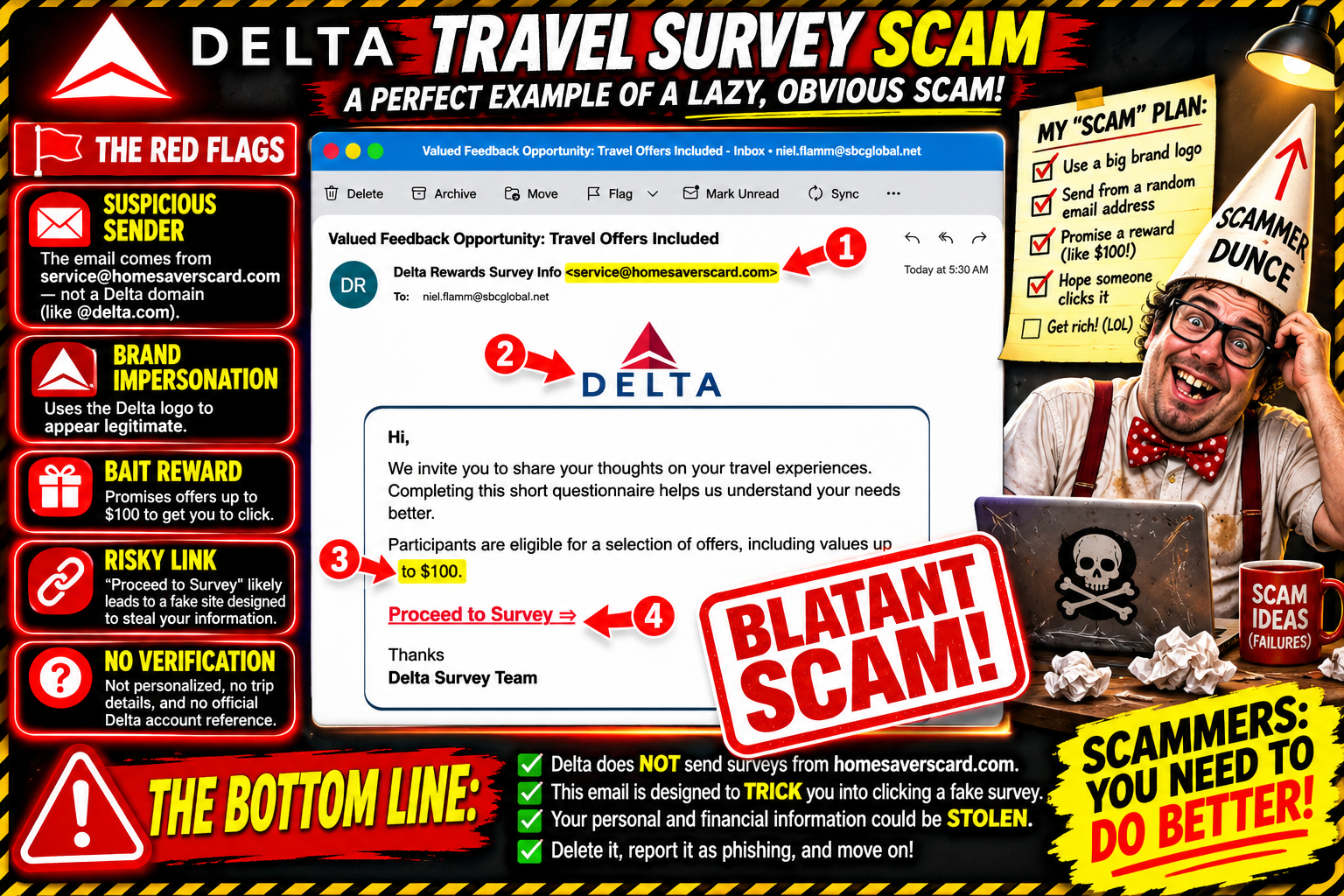
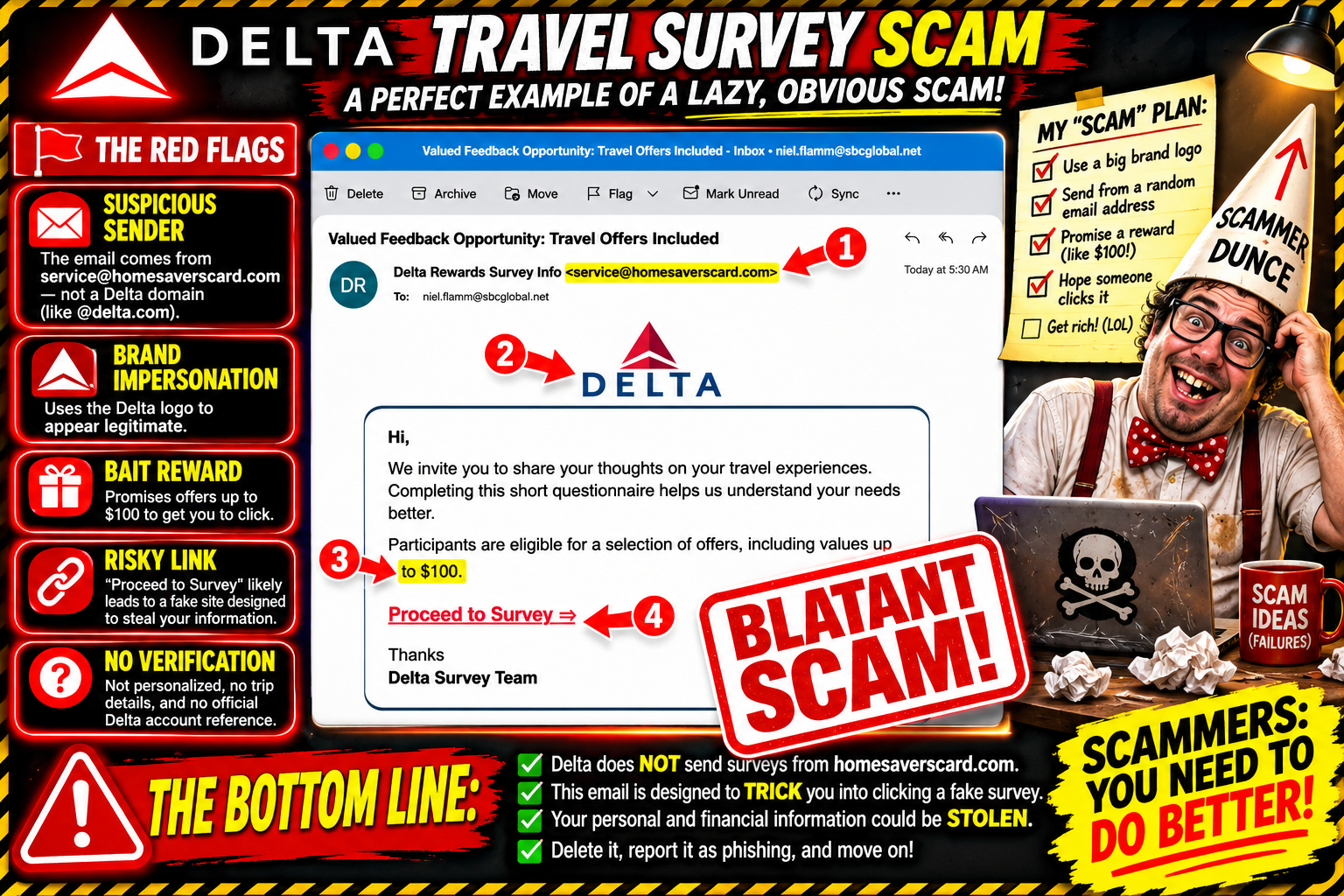
This time, I'm apparently being invited to share my travel experiences with Delta Airlines in exchange for a chance to receive offers worth up to $100.
Well, isn't that generous?
The email arrived with the subject line:
“Valued Feedback Opportunity: Travel Offers Included”
The sender identifies itself as Delta Rewards Survey Info, but the actual email address is:
Wait a minute.
Delta Airlines... and Home Savers Card?
Something doesn't quite add up.
The Offer: Tell Us About Your Travel and Get Up to $100
The email features the Delta logo and a message inviting me to share my thoughts about my travel experiences.
It says completing a short questionnaire will help the company better understand my needs.
And here's the reward:
Participants are eligible for a selection of offers, including values up to $100.
There's a big red link encouraging me to:
Proceed to Survey
The message is short, polished enough to look like a promotion, and uses a familiar airline brand.
But the sender's actual email domain doesn't appear to have any connection to Delta.
That's my first red flag.
Delta? Home Savers Card? Who Is Actually Sending This?
Here's what we have.
Display name: Delta Rewards Survey Info
Actual sender: service@homesaverscard.com
Subject: Valued Feedback Opportunity: Travel Offers Included
Offer: A survey about travel experiences
Potential reward: Offers valued up to $100
Call to action: Proceed to Survey
The email uses Delta's branding, but the sender address raises a very reasonable question: who is actually behind this message?
I can't identify the sender or the survey link's destination from the screenshot alone. I also can't confirm whether the advertised reward exists.
But I certainly wouldn't click the link to find out.
If Delta wants my feedback, I'll go directly to Delta's official website or app and check for a legitimate survey or promotion.
I don't need an unrelated-looking email domain as a middleman.
Scammers, You Need to Do Better!
Here's something I've been thinking about as I keep documenting these messages.
Some of these scammers are making it far too easy to recognize that something is wrong.
If the goal is to convince people that a message is legitimate, why are there so many obvious inconsistencies?
Delta Airlines using a Home Savers Card email address?
A free Medicare Kit from a random Gmail account?
A USPS Cart offered through an unrelated survey domain?
A recruiter promising a six-figure opportunity without identifying the actual job?
Come on!
At some point, the lack of effort becomes the biggest warning sign.
I'm not suggesting criminals need coaching or that I want to help them succeed. Quite the opposite. I'm pointing out how frequently these messages fall apart under even a little scrutiny.
Think About the Movies: The Criminals Who Actually Planned
I recently mentioned movies like Ocean's Eleven, The Italian Job, and The Town when discussing a suspicious recruiting message.
Those fictional capers involved planning, preparation, coordination, and attention to detail.
The characters didn't just show up, announce what they were doing, and expect everything to work out.
And that brings me to a broader observation.
Criminals who attempt bank robberies, pass counterfeit checks, or use stolen identities to purchase expensive items can get caught because they make mistakes, overlook details, underestimate the people investigating them, or leave evidence behind.
Being involved in a crime doesn't make someone clever. And getting away with something temporarily doesn't mean someone has a good plan.
The same general principle applies to these suspicious emails: the more obvious the inconsistencies, the easier it is for recipients to recognize the warning signs.
The real objective here isn’t to help scammers improve. It's to help potential victims recognize the nonsense before they lose money or personal information.
The Problem With These Messages
A familiar brand name can make people let their guard down.
When someone sees Delta, MyChart, USPS, PayPal, or another recognizable organization, they assume the message deserves attention.
Then comes the offer:
Complete a survey.
Claim a reward.
Receive a free gift.
Confirm an account.
Resolve an unexpected charge.
The next step often involves clicking a link or providing information.
That's where I want people to slow down.
A logo is not proof of legitimacy. A familiar company name is not proof of legitimacy. A professional-looking email is not proof of legitimacy.
And an offer worth up to $100 doesn't mean you're actually receiving $100.
What I'm Doing With This One
I'm not clicking the survey link.
I'm not providing personal information.
I'm not giving the sender access to my travel preferences, accounts, or payment information.
If I want to participate in a Delta survey, I'll verify it through Delta's official channels.
And if the offer can't be independently verified, it can stay right where it belongs: in my suspicious-email collection.
The Bottom Line: Don't Make It Easy for Them to Fool You
I know these emails can be convincing to people unfamiliar with phishing tactics. That's why I keep sharing examples.
Not everyone has the time or experience to examine an email address, inspect a link, or recognize when a familiar brand is being used in a questionable message.
That's also why these messages deserve attention.
I don't want people to lose money because they thought they were claiming a travel reward, receiving a medical benefit, or responding to a legitimate company.
As for the supposed Delta offer, I'll pass.
My travel feedback isn't worth handing over my personal information to an unverified sender.
Have you received a similar survey or reward offer using a familiar company logo? Send me a screenshot at niel@nielflamm.com. Please remove personal and financial information first.
I'll keep collecting these examples and sharing the warning signs.
And to the people sending these messages: if your email falls apart the moment someone looks at the sender address, perhaps it's time to rethink your business model.
Actually, no. Better yet, find something legitimate to do.
I'll keep watching. And I'll keep sharing.
The Medicare Kit Is Back! Apparently, MyChart Really Wants My Survey Answers 😂
Well, well, well. Look what showed up in my inbox today.
Remember that email I received offering me a supposedly free Medicare Kit in exchange for completing a short survey about my MyChart experience?
Apparently, the first invitation wasn't enough.
They're back for another round!
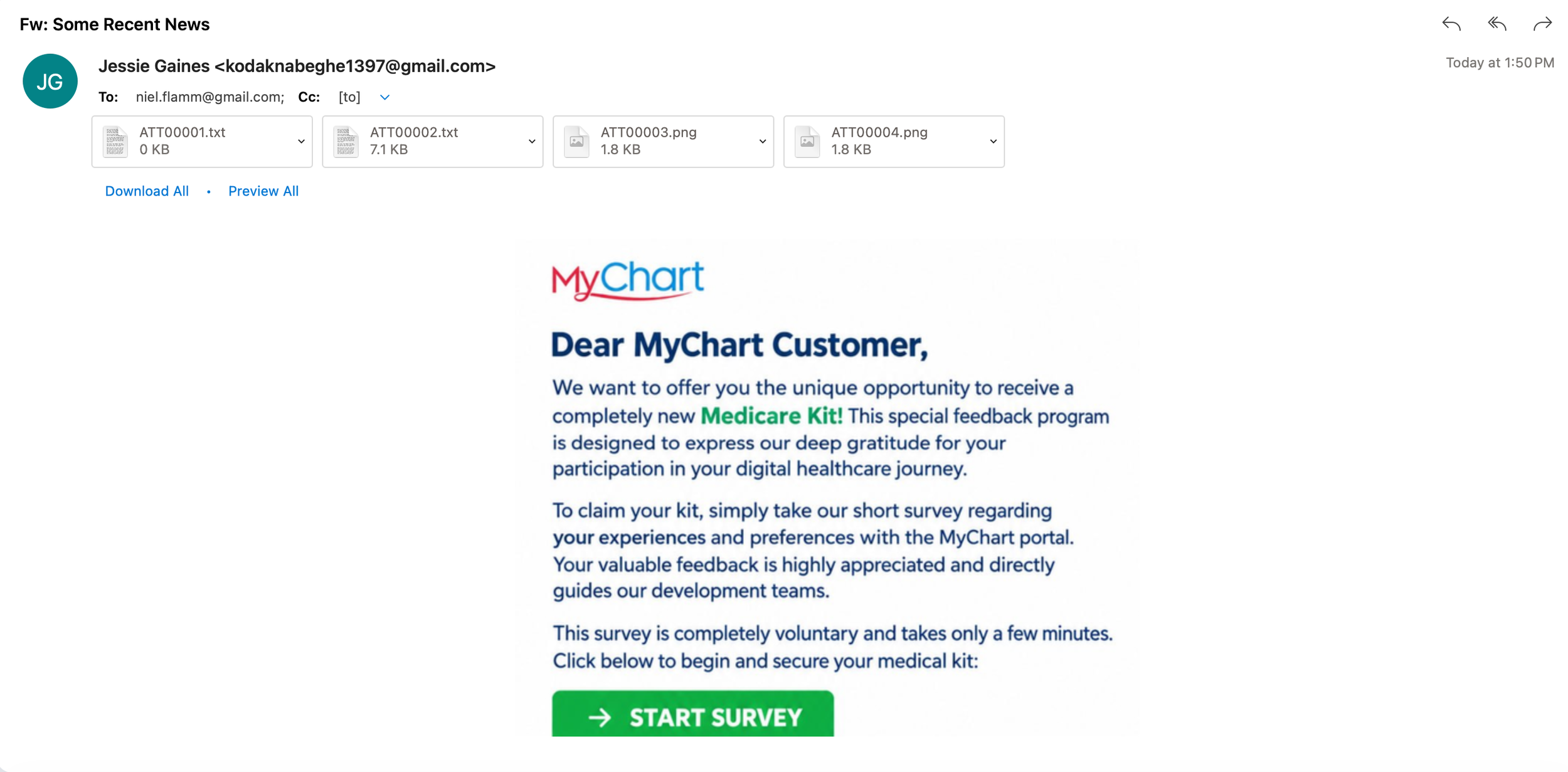
This time, the email arrived with the subject line “Fw: Some Recent News.” It came from someone named Jessie Gaines, using a Gmail address, and included four attachments—two text files and two PNG images.
And right there in the message is the familiar offer:
A completely new Medicare Kit!
All I have to do is complete a short survey about my experiences and preferences with the MyChart portal.
How thoughtful.
My inbox is apparently determined to improve my healthcare experience, one suspicious email at a time.
Déjà Vu: The Medicare Kit Edition
The message uses the MyChart name and logo, addresses me as “Dear MyChart Customer,” and claims the survey is part of a special feedback program designed to thank people for participating in their digital healthcare journey.
The promised reward? A Medicare Kit.
The call to action? A big green START SURVEY button.
The pitch is simple: answer a few questions, share your feedback, and claim your reward.
But here's the thing: the email doesn't establish that MyChart or any healthcare provider actually sent it.
The sender's Gmail address doesn't demonstrate an official connection to MyChart. The message also doesn't identify a specific healthcare organization sponsoring the promotion.
And the fact that it arrived as a forwarded message doesn't make it any more trustworthy.
Why Does This Raise Red Flags?
A few things caught my attention.
1. The sender isn't using an official healthcare domain.
The email comes from a Gmail address. That doesn't automatically prove it's fraudulent, but it certainly doesn't verify the sender's claimed connection to MyChart.
2. The offer uses a familiar healthcare brand.
MyChart is a recognizable patient portal. A familiar name and logo can make an unsolicited message seem more credible than it is.
3. The reward encourages me to click.
Who doesn't like a free gift? The promise of a Medicare Kit gives the recipient a reason to act before asking whether the offer is legitimate.
4. The email includes unexpected attachments.
There are four attachments, including text files and images. I haven't confirmed what's in each attachment, and I'm not going to open suspicious files just out of curiosity.
5. This offer has appeared before.
I've now encountered a very similar Medicare Kit pitch in another email. Repeated messages using the same reward and survey formula make me even more cautious.
I can't confirm the sender's identity or where the survey button goes from this screenshot alone. I also can't say definitively what happens if someone clicks it.
But I don't need to click it to recognize that the offer deserves independent verification.
What Would I Do If I Really Wanted to Check?
I'd open the official MyChart app or go directly to my healthcare provider's website.
If I had questions about a promotion, I'd contact the provider through a phone number or contact method I already knew was legitimate.
I would not use the link in this email to verify the email itself.
And I certainly wouldn't provide my login credentials, Medicare information, payment details or other sensitive personal information to claim an unverified reward.
If the offer is legitimate, I should be able to verify it without trusting the message that brought it to my attention.
My Inbox Is Becoming a Rewards Department
Let's review the recent opportunities my inbox has presented:
A supposedly free Medicare Kit for completing a survey.
A USPS Cart offered in exchange for feedback.
An unsolicited loan offer advertising up to $40,000.
A mysterious recruiting message promising an exciting job opportunity.
Now the Medicare Kit has returned for an encore.
I'm starting to wonder whether my inbox has mistaken me for a professional survey participant with an unlimited appetite for suspicious freebies.
Maybe next I'll receive an email offering me a free hospital, a complimentary postal truck, and a corner office with a $300,000 salary.
One can dream.
But I prefer to keep my personal information, my healthcare accounts, and my money out of these little adventures.
The Bottom Line
An email featuring the MyChart logo is not proof that MyChart sent it. A free gift is not proof of a legitimate promotion. And a survey button is not an invitation I need to accept.
Verify the offer independently. Don't click first and ask questions later.
Have you received an email offering a free Medicare Kit or another reward in exchange for completing a survey? I'd like to hear about it.
Send screenshots and your experiences to niel@nielflamm.com. Please remove sensitive personal information before sending anything.
I'll keep documenting what shows up in my inbox. Apparently, the freebie department isn't going out of business anytime soon.
Until next time: stay curious, stay cautious, and don't let a green button make decisions for you.
Another Day, Another Freebie: Apparently the USPS Wants to Give Me a Cart
My inbox has done it again.
This time, I've apparently been selected for a special opportunity: a brand-new USPS cart for completing a short survey.
A free cart! From the United States Postal Service!
I can only assume this is the beginning of my rise to postal greatness. Perhaps my next promotion will involve delivering mail, driving a truck, or becoming Postmaster General.
There's just one small problem: I strongly suspect this email is a scam.
The Email That Wants My Opinion
The message arrived with the subject line:
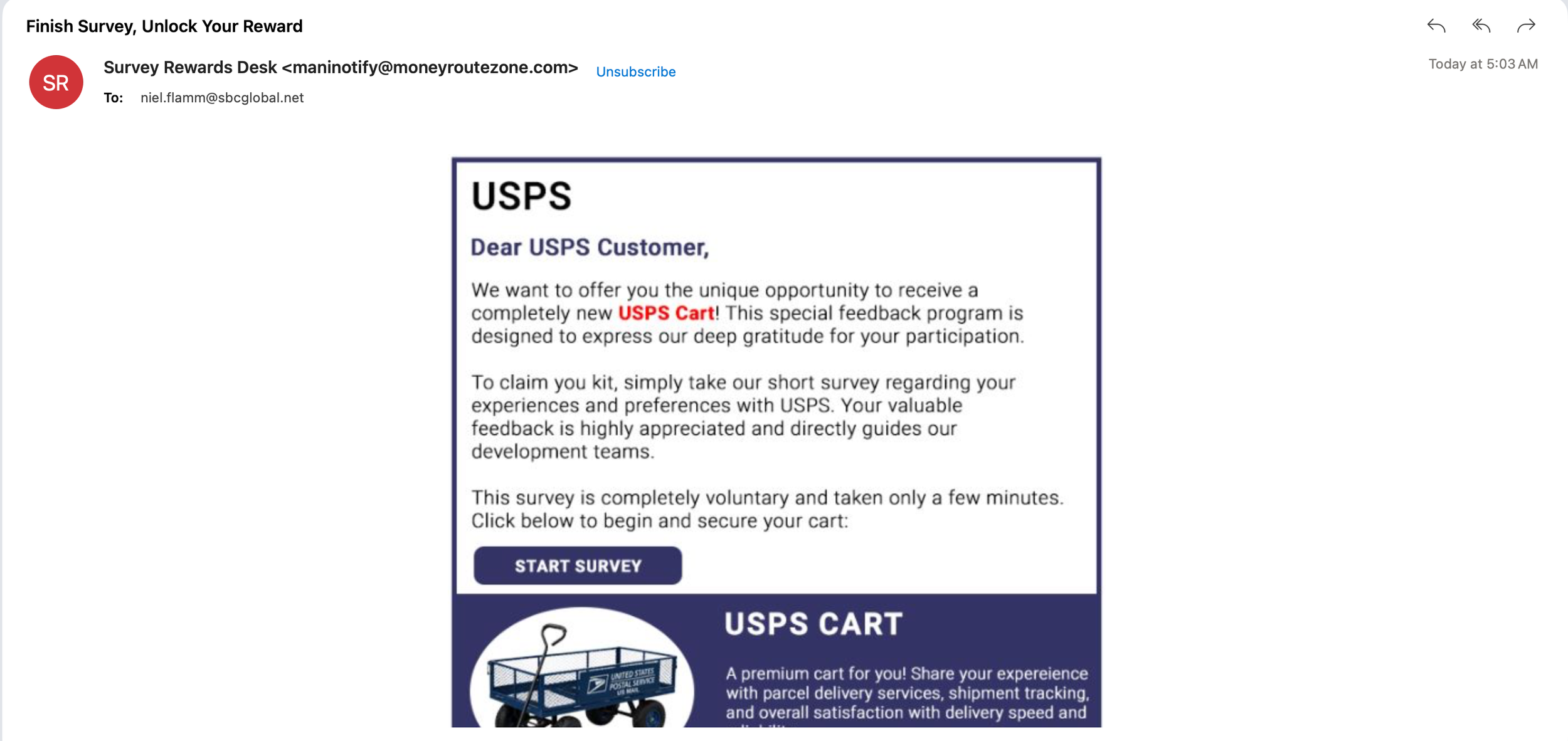
“Finish Survey, Unlock Your Reward”
It came from a sender calling itself “Survey Rewards Desk,” using the email address maninotify@moneyroutezone.com.
Inside is a message styled to look like a USPS promotion. It addresses me as “Dear USPS Customer” and offers a supposedly new USPS Cart in exchange for completing a survey about my postal delivery experience.
The email even includes a “START SURVEY” button.
Apparently, my opinions about package tracking and delivery speeds are so valuable that I deserve a premium postal cart.
I'm touched.
But before I start imagining myself rolling around the neighborhood with my new postal equipment, let's look at what this message is actually telling me.
The Red Flags Are Arriving Faster Than the Mail
1. The sender's email address doesn't match USPS.
The message uses moneyroutezone.com, not an official USPS domain. The sender's display name may sound convincing, but display names are easy to invent.
That alone doesn't prove who sent the email, but it is a significant reason to be cautious.
2. The greeting is generic.
“Dear USPS Customer” isn't a personalized message. It doesn't identify a specific transaction, delivery, or legitimate USPS program.
Scammers often send messages to large numbers of people and hope that enough recipients will take the bait.
3. The free gift is designed to get me clicking.
The offer claims I can receive a new USPS Cart by answering a few questions. The message describes the survey as voluntary and says it will take only a few minutes.
That's a familiar formula: offer something appealing, make the task sound easy, and encourage the recipient to click a button.
What happens after clicking? The screenshot doesn't tell us. It could lead to a phishing page, a request for personal information, a data-collection survey, or another misleading offer. I can't confirm the destination or the sender's intentions from the screenshot alone.
4. The branding doesn't establish legitimacy.
The message uses the USPS name and a postal-cart image to make the offer look official.
But putting a recognizable organization's name on an email doesn't mean that organization sent it.
5. The sender wants me to take action.
The big “START SURVEY” button is the centerpiece of the email. That's where the sender wants my attention.
I'm not going to click it just to discover whether the promised cart exists.
What Is a USPS Cart, Anyway?
The email describes the reward as a “premium cart” and mentions parcel delivery, shipment tracking, and overall satisfaction with delivery speed.
Maybe the image is supposed to make the reward seem tangible and exciting. But the offer raises a pretty obvious question: why would USPS give away equipment to random email recipients in exchange for a few minutes of survey feedback?
I can't rule out every possible legitimate promotional program based on a screenshot. However, this message provides no convincing evidence that the offer is an official USPS promotion.
If USPS really is conducting a survey or offering a reward, I should be able to verify it independently through the official USPS website or a trusted customer-service channel.
I don't need to use the link in this email to find out.
What I'm Going to Do
I'm leaving that survey button alone.
Here's my approach when an email offers a gift from a familiar company:
Don't click links or buttons in an unexpected message.
Don't open unexpected attachments.
Check the sender's actual email address, not just the display name.
Visit the company's official website independently to verify the offer.
Never provide passwords, payment details or sensitive personal information to claim an unverified reward.
Report suspicious messages through the appropriate official channel and delete them.
And no, I'm not going to reply to the sender to ask where my cart is.
I suspect that conversation would be about as productive as asking a suspicious email to verify itself.
My Inbox Thinks I'm Very Special
Between surprise prizes, suspicious loan offers, unbelievable job opportunities, and mystery rewards, my inbox seems convinced I'm someone of extraordinary importance.
Today, I'm apparently one short survey away from becoming the proud owner of a USPS Cart.
Tomorrow, who knows? Maybe the postal service will offer me a free sorting facility.
I'll try not to get carried away.
The point isn't that every survey or promotional offer is fraudulent. It's that an unexpected reward, familiar branding, and a prominent button are not proof that an offer is legitimate.
Scammers know that free things get our attention. They also know that people are more likely to click when a message looks like it came from a company they recognize.
So, before you take a survey, claim a prize, or hand over personal information, stop and verify.
As for me, I'll continue getting my mail the old-fashioned way.
Through the mailbox—not through a suspicious email promising free postal equipment.
Have you received a similar “free gift” or survey-reward email? Send your screenshots and experiences to niel@nielflamm.com. Please remove personal information, account details, and other sensitive data before sending.
Let's compare notes and help other people recognize the warning signs.
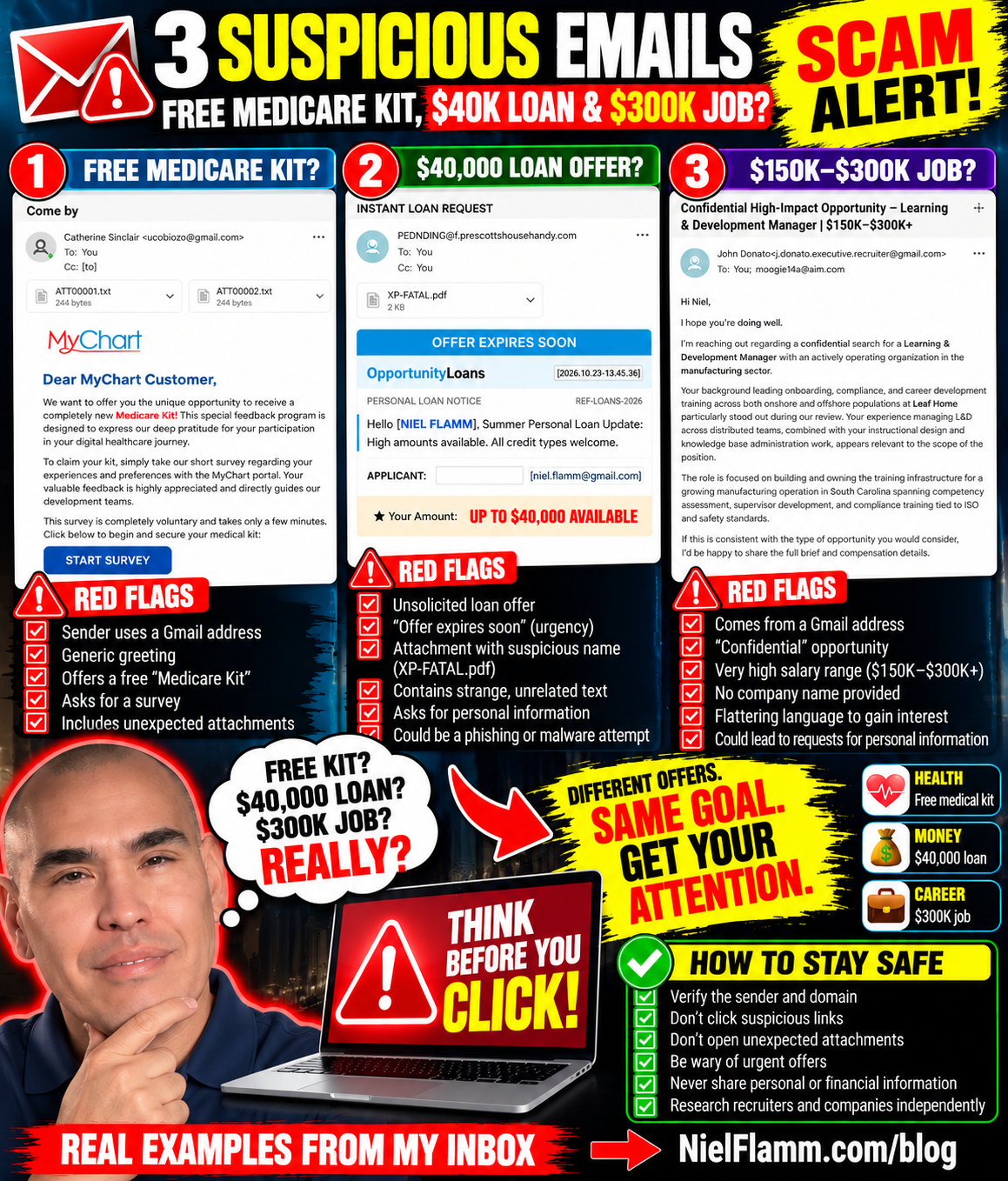
Three Emails, Three Red Flags: Free Medical Kits, $40,000 Loans and a $300K Job?
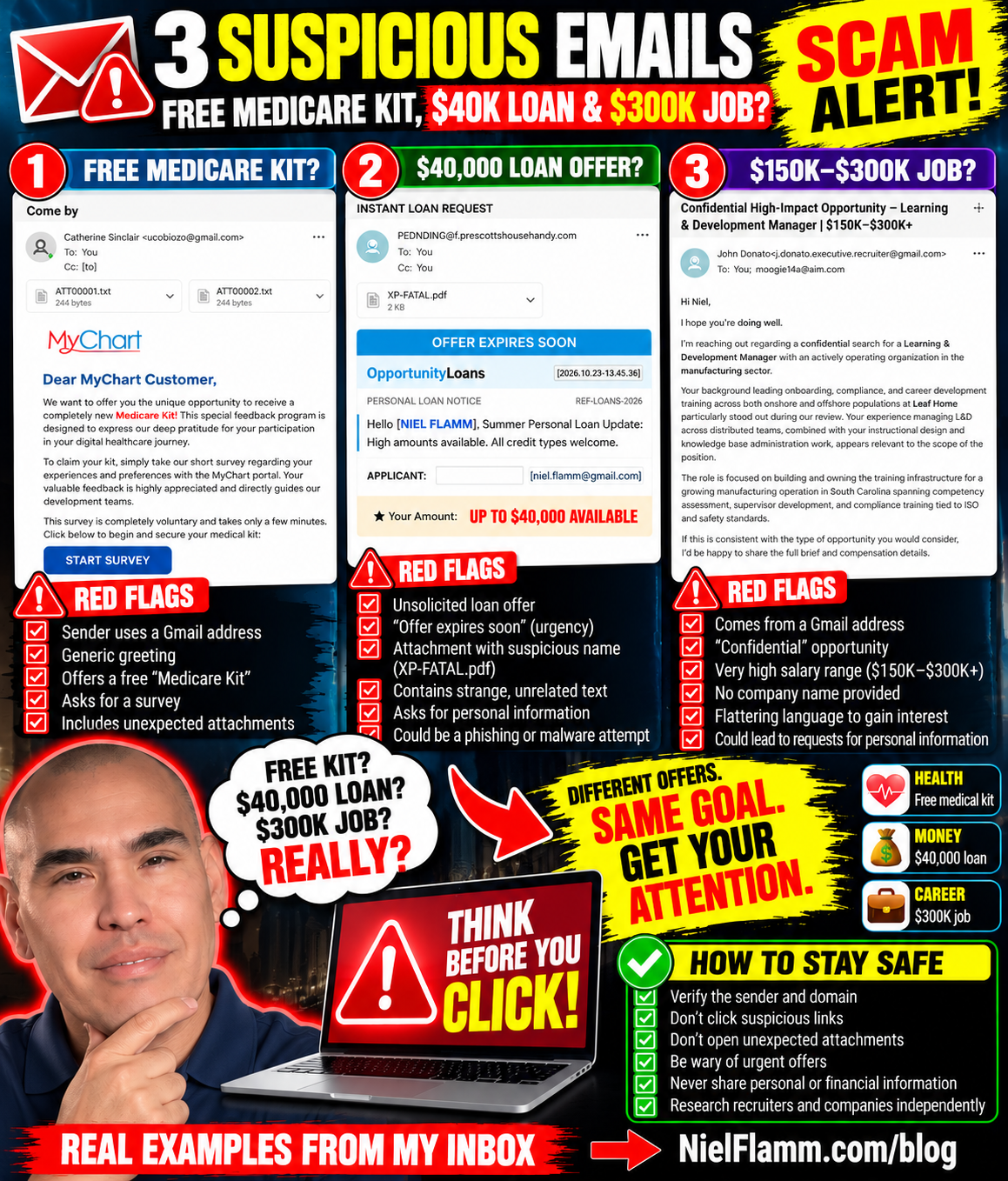
My inbox has been busy again. Apparently, the internet thinks I'm either entitled to a free medical kit, desperately need a $40,000 personal loan, or am the perfect candidate for a $300,000 Learning & Development job.
It's nice to be so popular.
One problem: these emails raise some serious questions.
Let's take a look at three messages that landed in my inbox on October 22 and 23, 2026.
1. A Free Medicare Kit From “MyChart”?
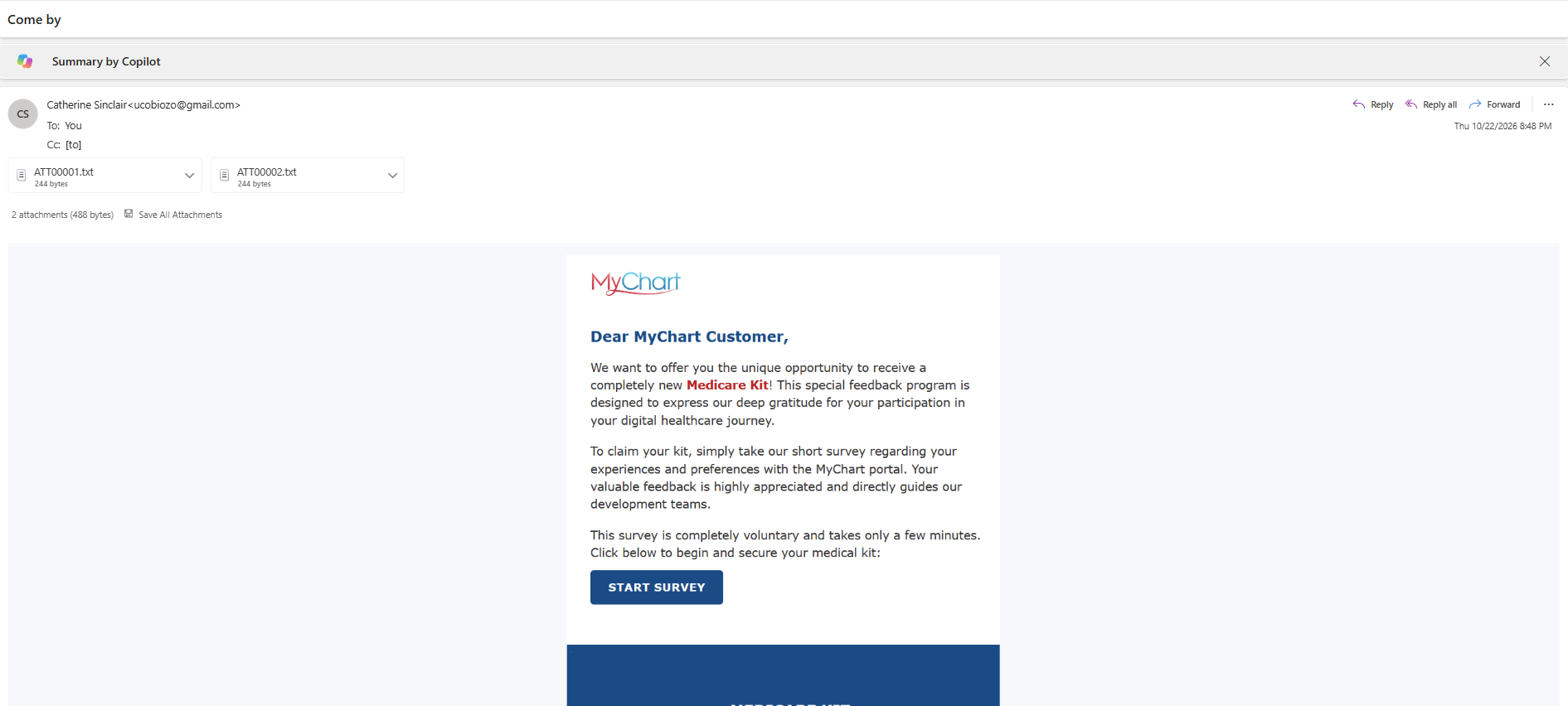
Email subject: “Come by”
The first email came from an address listed as Catherine Sinclair and used a Gmail address. It included two tiny text attachments and an image styled to look like a MyChart message.
The message addressed me as a “MyChart Customer” and offered a supposedly new “Medicare Kit” in exchange for completing a short survey about my MyChart portal experience.
How generous!
A free medical kit just for answering a few questions? What could go wrong?
Well, a few things caught my attention:
The sender's Gmail address doesn't establish any connection to MyChart or a healthcare provider.
The email uses a generic greeting rather than identifying a specific healthcare organization.
The offer combines a medical-related brand with a gift and a survey link.
The email includes unexpected attachments.
I can't establish from this screenshot alone who sent the message or what the attachments contain. But I certainly wouldn't click the survey button or open unexpected files to find out.
If a healthcare portal genuinely offers a survey or patient benefit, I'll check the official portal or contact my healthcare provider using contact details I already trust.
My medical information is not a prize to be claimed through a mystery email.
2. An “Instant Loan” Offering Up to $40,000
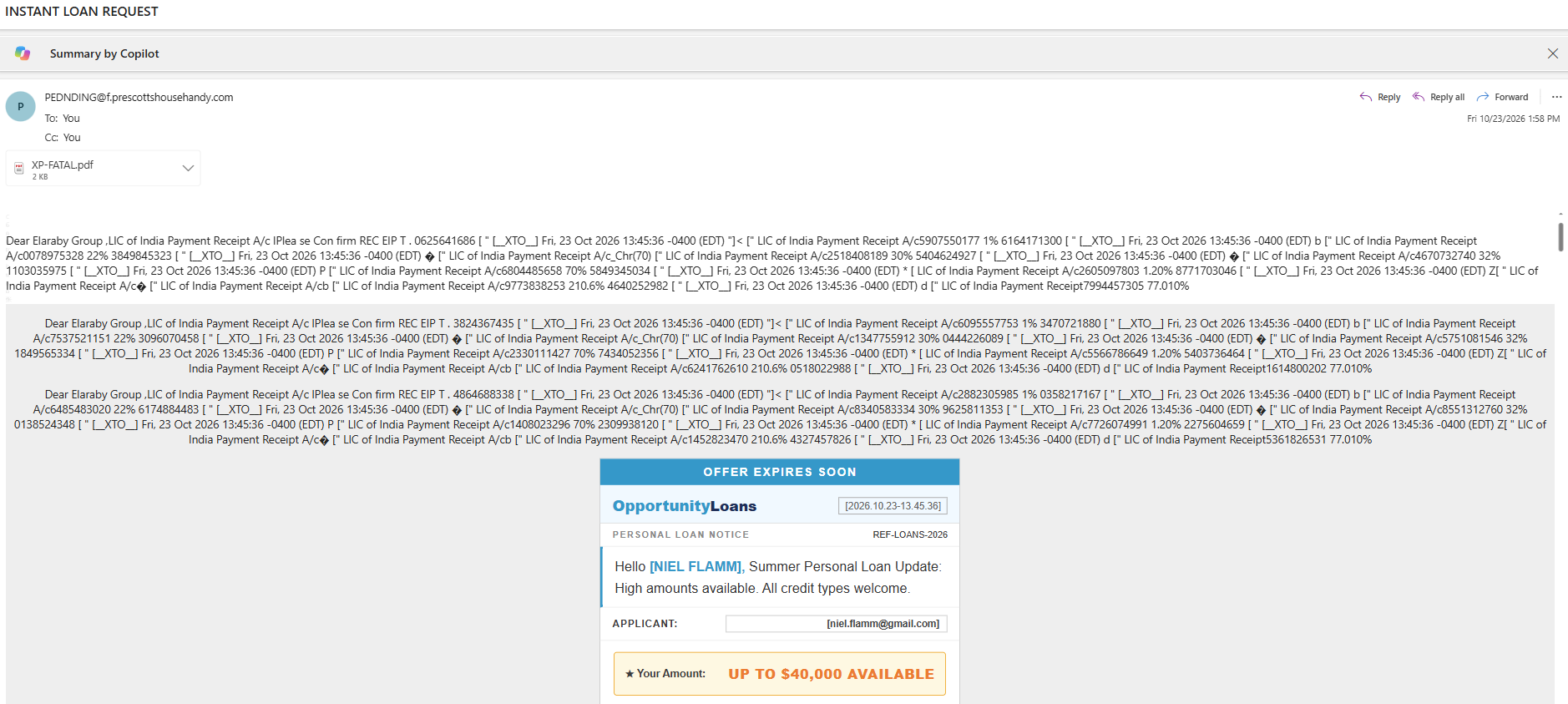
Email subject: “INSTANT LOAN REQUEST”
The second email takes a different approach. This one appears to be about money—specifically, money someone supposedly wants to lend me.
The message contains a banner that says “OFFER EXPIRES SOON” and promotes something called OpportunityLoans. It addresses me by name and advertises personal loans of up to $40,000.
The email also includes a PDF attachment named XP-FATAL.pdf.
Wait a minute. Someone I don't recognize wants to offer me up to $40,000, and there's a PDF attachment with a filename that looks like it wandered out of a computer-security nightmare?
I think I'll pass.
Here are the red flags I noticed:
Urgency: “Offer expires soon” encourages a quick decision.
Unsolicited credit offer: I didn't request this loan information.
Unusual formatting: The message contains a jumble of apparent payment-receipt text that has little to do with the loan offer.
Unexpected attachment: There's no reason for me to open a suspicious PDF just because an email tells me money is available.
Personal information: The email displays identifying information, which can make a message feel more convincing without proving it's legitimate.
I can't determine from the screenshot alone whether this is an outright scam, an unsolicited marketing message, or something else. But I wouldn't use the email's links or contact details to investigate it.
If I ever need a personal loan, I'll research lenders independently, check their credentials, and carefully review the terms. I won’t let a countdown banner drive my financial decisions.
A loan offer isn't free money. And “up to $40,000” doesn't mean I'm approved for $40,000.
3. A $150K–$300K Learning & Development Job?
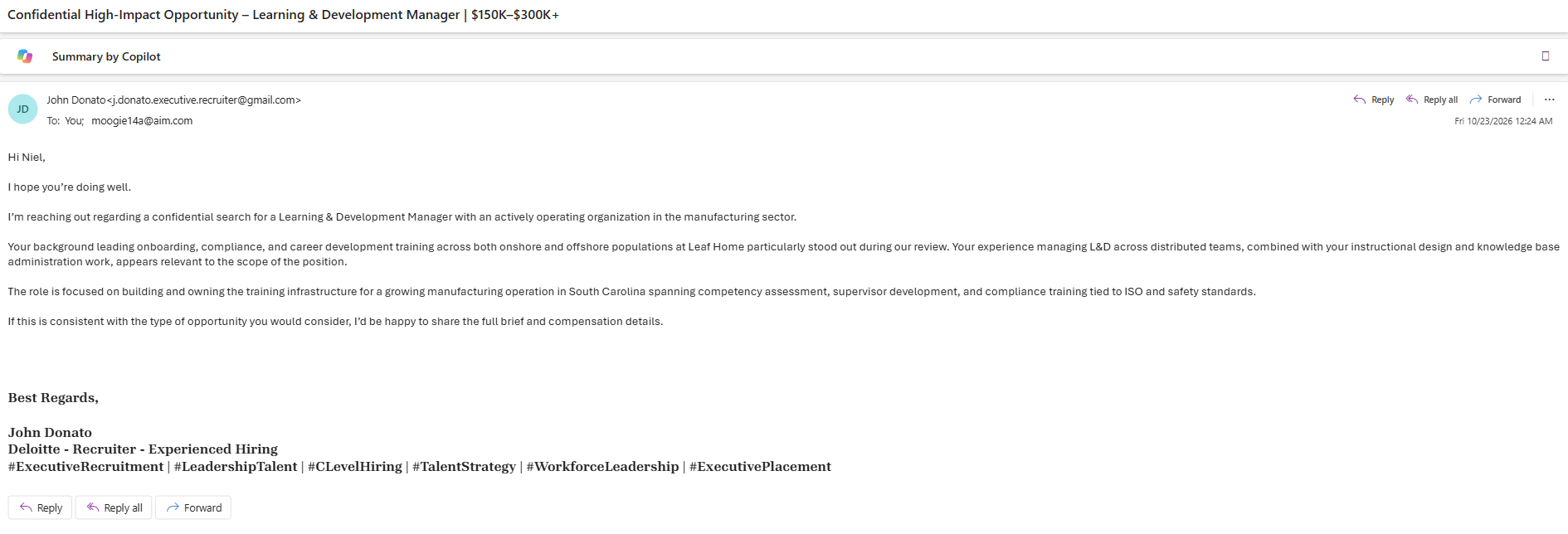
Email subject: “Confidential High-Impact Opportunity – Learning & Development Manager | $150K–$300K+”
Now this one caught my professional eye.
The email came from someone named John Donato, using a Gmail address that includes the words “executive recruiter.”
The sender claims to be contacting me about a confidential search for a Learning & Development Manager at a manufacturing organization in South Carolina.
The message references my professional background, including onboarding, compliance, career development training, instructional design, and knowledge base work. Those are relevant to my career experience.
And then comes the compensation range:
$150,000–$300,000+.
Well, hello there!
After all, who wouldn't want to hear about a potential six-figure opportunity?
The sender says my experience stood out during a review and offers to share the full brief and compensation details if I’d consider the opportunity.
Unlike the other two emails, this one doesn't immediately ask me to pay a fee or open an attachment. The message itself is reasonably polished and references aspects of my professional background.
But that doesn't prove the recruiter, job, or opportunity is legitimate.
Here's what I'd want to verify:
The recruiter's identity: Does this person have a verifiable professional presence and a credible recruiting history?
The company: Which manufacturing organization is hiring? Why isn't it named?
The job: Is there a genuine position matching the description?
The compensation: Is the advertised range supported by a real employer and a defined role?
The next step: Will the recruiter ask for personal information, identification documents, banking details, or money before providing verifiable information?
Using a Gmail address isn't proof of fraud. Independent recruiters sometimes use noncorporate email accounts. But a high salary, flattering language, and references to my experience don’t prove legitimacy either.
The broader issue is that fake recruiting approaches can collect personal information, direct candidates to malicious links, or eventually introduce fraudulent payments and fees.
So I'll treat this as unverified until I can establish who is contacting me and which organization is hiring.
If the opportunity is real, reasonable verification shouldn't ruin it.
Three Emails, Three Different Hooks
What's interesting about these messages is how differently they try to attract attention.
The healthcare hook
A supposedly free Medicare Kit in exchange for survey participation.
The temptation: a free benefit tied to a familiar healthcare name.
The money hook
A supposedly available personal loan of up to $40,000, with an offer that expires soon.
The temptation: easy access to money and FOMO.
The career hook
A confidential Learning & Development role with a potential salary of $150,000–$300,000+.
The temptation: professional recognition and a potentially life-changing opportunity.
These messages target different motivations: health, financial need, and career ambition.
That's why I don't judge an email solely by how professional it looks. A polished message can still be misleading, and a legitimate-looking logo doesn't prove that the sender represents the organization.
What I'm Doing Instead
I don't click suspicious links, open unexpected attachments, or provide sensitive information just because an email promises something appealing.
My approach is straightforward:
Verify independently. Visit the official website or app yourself instead of using a link in the message.
Check the sender. Look beyond the display name and examine the actual email address and domain.
Be wary of urgency. “Offer expires soon” is a reason to slow down, not speed up.
Protect personal information. Don't provide Social Security numbers, banking details, passwords, or identity documents to an unverified sender.
Research recruiters and employers. Confirm the person, company, and job opening independently before sharing sensitive information.
Don't open suspicious attachments. An attachment doesn't become safe just because the email has a convincing explanation.
If you've already clicked something or shared information, don't panic. The appropriate next steps depend on what happened, but they may include changing compromised passwords, contacting your financial institution, or reporting the message.
My Inbox Is Apparently a Career Fair, a Bank and a Healthcare Portal
I started with three emails and ended up with three very different offers.
A free medical kit.
A loan of up to $40,000.
A job that might pay $300,000.
I appreciate the variety. My inbox apparently believes in diversification.
But I don't need to claim that every suspicious message is definitely a scam to recognize that each one deserves scrutiny.
The healthcare offer needs verification. The loan offer needs verification. The recruiter needs verification.
And none of them gets a free pass just because the offer sounds good.
Have you received an email offering a gift, a too-good-to-be-true loan, or an unbelievable job opportunity? I'd like to hear about it.
Send your screenshots and experiences to niel@nielflamm.com. Please remove sensitive personal, financial, and account information before sending them.
I'll keep documenting what comes into my inbox, because the more we recognize these tactics, the less likely we are to get caught off guard.
Remember: Verify first. Click later—if at all.