
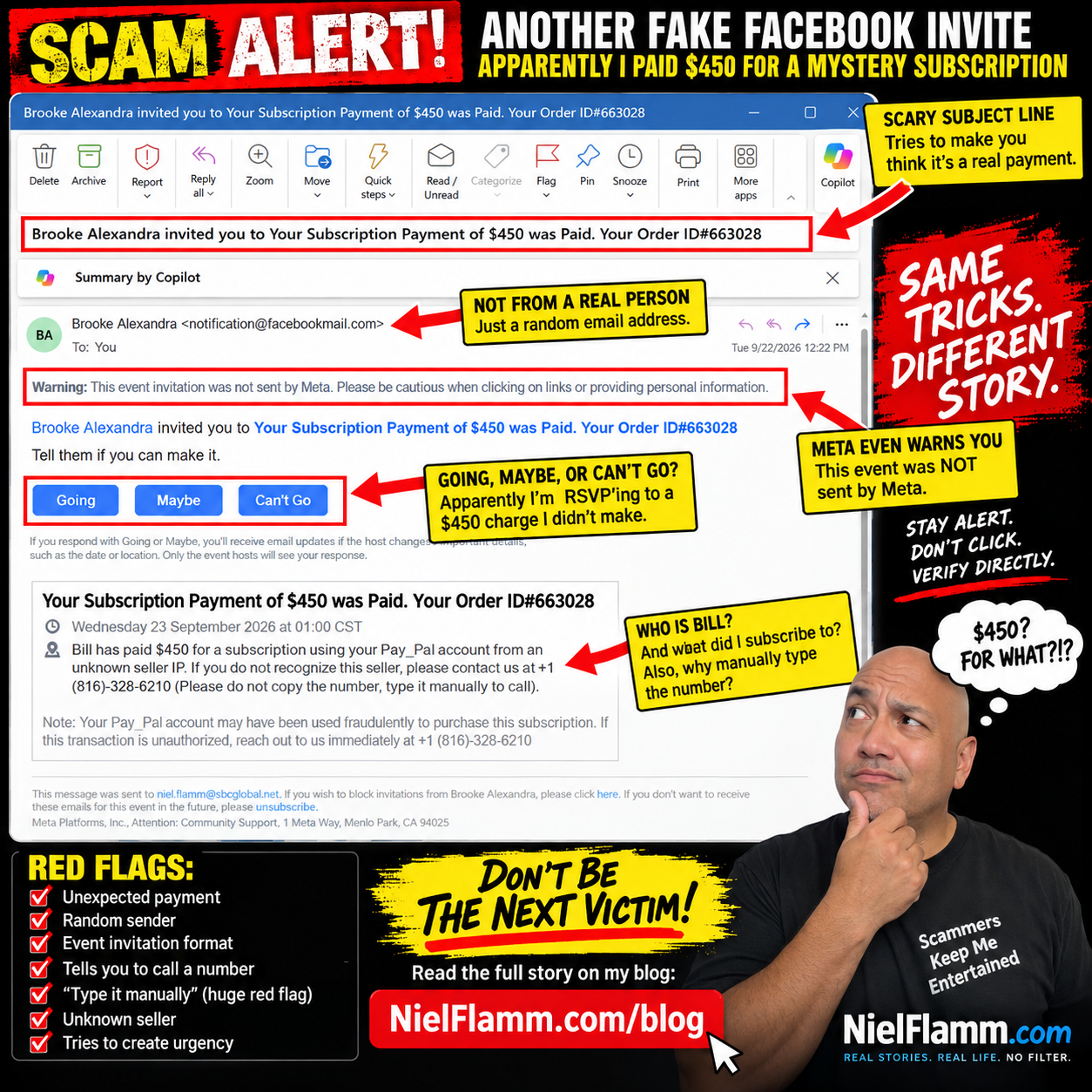
They’re Back! Apparently I Paid $450 for Another Mystery Subscription
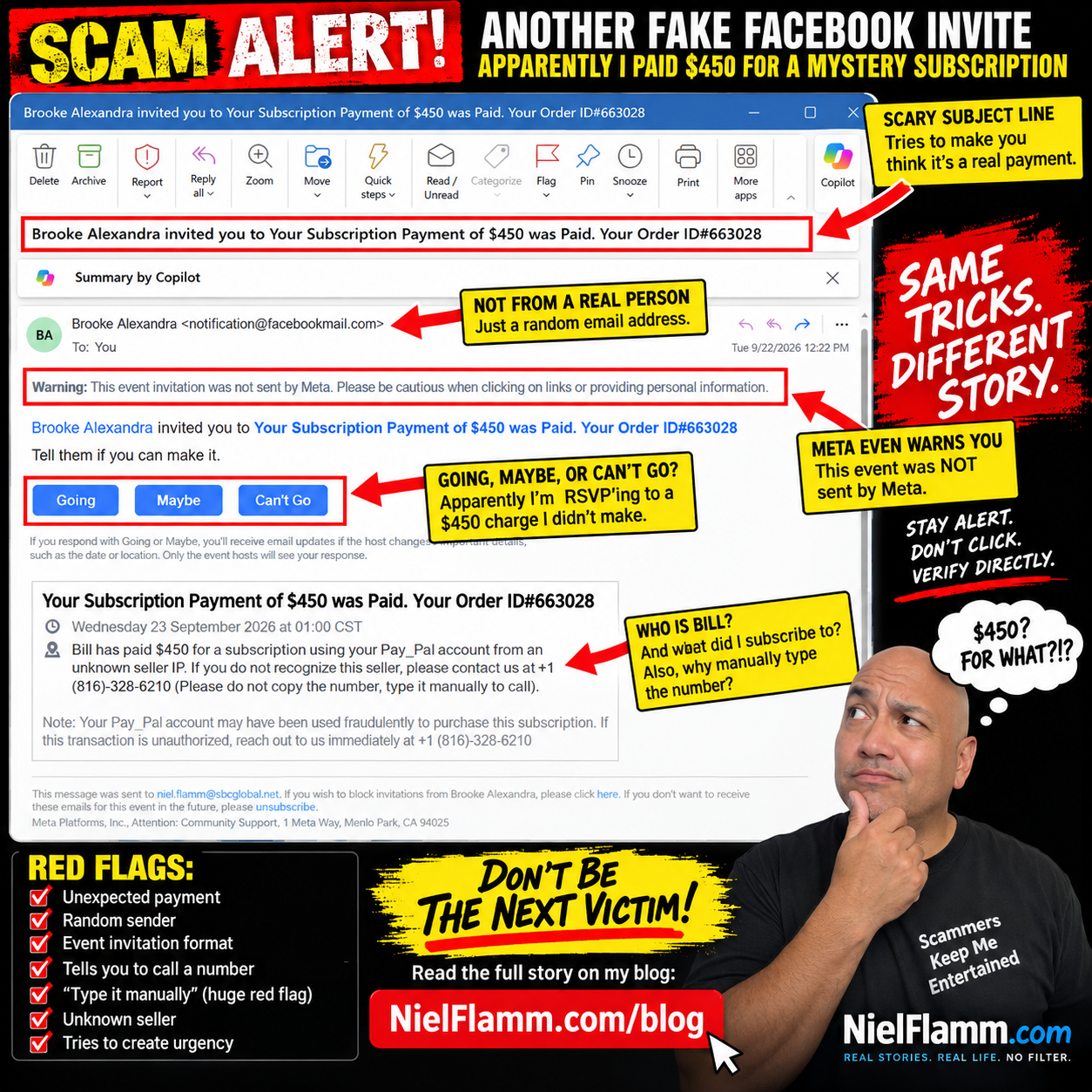
It’s been a little while, but apparently my scam social calendar is back in action.
For those who haven’t been following along, I’ve received some interesting emails over the past few months. According to my inbox, I’ve bought Bitcoin, renewed Geek Squad protection—more than once—and even had a watch repaired that I never sent anywhere.
Today, we return to an old favorite:
The Facebook Event Invitation Scam.
This time, “Brooke Alexandra” has invited me to an exciting event called:
“Your Subscription Payment of $450 was Paid. Your Order ID#663028”
Well, Brooke, thank you for the invitation.
Unfortunately, I have absolutely no idea what I supposedly subscribed to.
Going, Maybe, or Can’t Go?
My favorite part of these scams is still Facebook’s event format.
I’ve supposedly just discovered an unauthorized $450 PayPal transaction, and immediately underneath this alarming news, I’m asked:
Tell them if you can make it.
My choices?
Going.
Maybe.
Can’t Go.
Decisions, decisions.
I’m going with Can’t Go.
Not because I have another commitment. I try not to attend celebrations for fraudulent purchases.
Meet Bill, My Apparently Very Generous Alter Ego
The description gets even better.
It says:
“Bill has paid $450 for a subscription using your Pay_Pal account from an unknown seller IP.”
Who is Bill?
I have no idea.
Bill, please stop spending my imaginary money.
The message then provides a phone number and tells me to call if I don’t recognize the seller.
And then comes my favorite instruction:
“Please do not copy the number, type it manually to call.”
Oh, absolutely.
I'm not comfortable trusting a financial alert that asks me to type a phone number manually.
That’s practically the international symbol for:
“Nothing suspicious happening here!”
Meta Is Literally Warning Me
As with the previous versions, there’s an important message sitting prominently near the top:
“Warning: This event invitation was not sent by Meta. Please be cautious when clicking on links or providing personal information.”
That deserves more attention than the scary $450 headline.
The formula hasn’t changed much:
Create an alarming transaction.
Use a recognizable brand name like PayPal.
Please let me know if my account may have been compromised.
Give me a telephone number.
Please create urgency so I call before I stop to think.
And package everything inside a Facebook event invitation so the resulting notification looks more familiar.
The Scam Has One Big Problem
If my PayPal account really has a mysterious $450 transaction, I don’t need Brooke Alexandra—or Bill—to help me investigate it.
I can go directly to PayPal through its official app or website and check my account.
The same rule applies to suspicious emails claiming to come from a bank, credit card company, retailer, Geek Squad, or practically anyone else.
Don’t let the suspicious message tell you how to verify the suspicious message.
Verify it independently.
And don’t call a mystery number just because someone put “PayPal” next to it.
My Imaginary Spending Spree Continues
So let’s add another purchase to the growing list.
Bitcoin? ✔️
Mystery subscriptions? ✔️
Geek Squad? ✔️
Watch repair? ✔️
Another mystery $450 subscription? ✔️
At this point, the person living inside my spam folder has a considerably more exciting financial life than I do.
I’m just disappointed that after all this imaginary spending, nobody has emailed me to say I’ve purchased a beachfront condo in Thailand.
Scammers, if you’re reading this, at least make the next fake purchase interesting.
Have a Scam Story? Send It My Way
Now I want to hear what’s landing in your inbox.
If you’ve received a scam email, suspicious text, social media message, fake invoice, questionable refund notice, or something that made you think, “There is no way this is legitimate,” send it to me.
Please send me your screenshots and let me know what happened. I may feature some of them in future posts as we look at the creative—and sometimes hilariously bad—ways scammers try to separate people from their money.
Please remove or cover passwords, account numbers, addresses, phone numbers, or other sensitive personal information before sending screenshots.
Maybe it’s time to turn my scam collection into our scam collection.
And until then, Brooke...
Can’t Go.
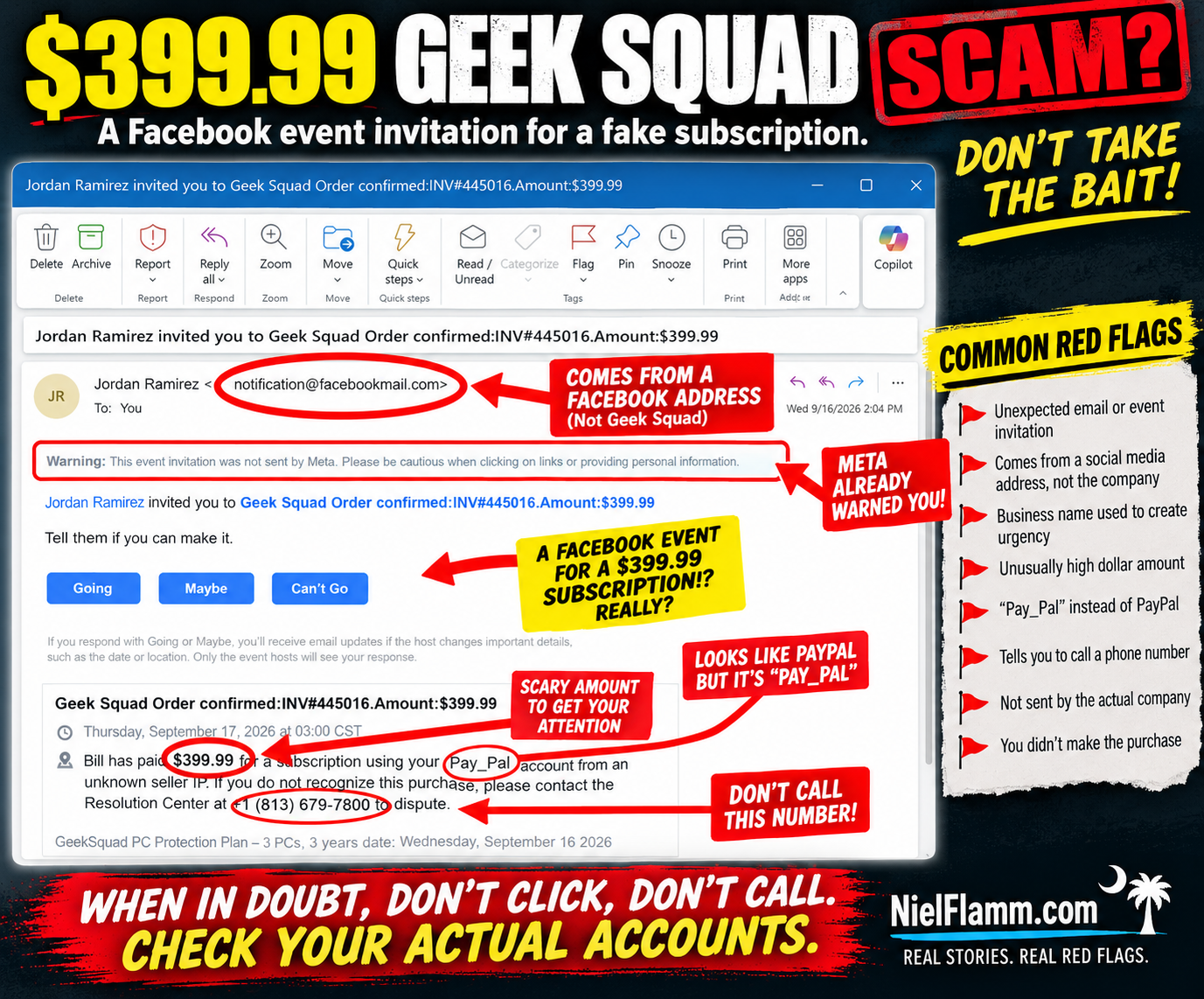
Another $399.99 Subscription? Apparently Geek Squad Is Throwing a Facebook Event
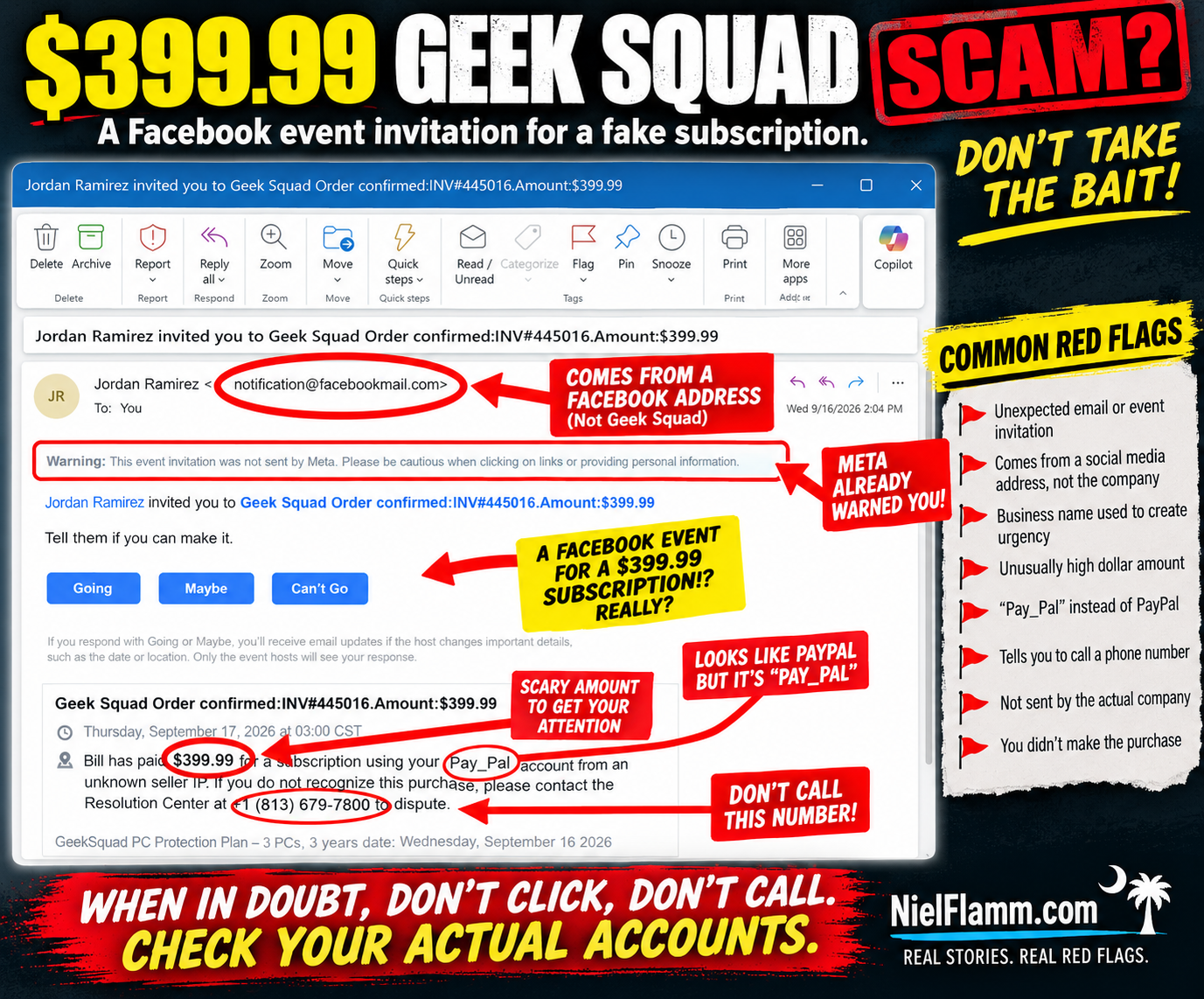
I have another expensive subscription I didn’t know about.
And once again, the scammers were thoughtful enough to invite me to a Facebook event to celebrate it.
This email arrived with the subject:
“Jordan Ramirez invited you to Geek Squad Order confirmed: INV#445016.Amount:$399.99”
According to the invitation, I supposedly paid $399.99 for a Geek Squad PC Protection Plan.
There's just one minor problem.
I didn't.
And if this looks familiar, it should.
🚩 Haven't We Seen This Movie Before?
Just recently, I received another Facebook event invitation claiming that $498.99 had been paid for a subscription through my PayPal account.
That one came from “Agnes V. Burden.”
This time we have Jordan Ramirez, Geek Squad, and $399.99.
Different person.
Different company.
Different dollar amount.
But remarkably similar script.
The invitation claims:
“Bill has paid $399.99 for a subscription using your PayPal account from an unknown seller IP.”
Wait.
Bill is back?!
Apparently Bill has access to my imaginary PayPal account and is having quite a shopping spree.
It would be helpful to sit Bill down and discuss boundaries.
🚩 Facebook Is Literally Warning Me
One of my favorite parts is that the warning is sitting right there at the top of the message:
“Meta did not send this event invitation. Please be cautious when clicking on links or providing personal information.”
Thank you, Meta.
Message received.
That's an important distinction because the sender shown in the email is:
Jordan Ramirez <notification@facebookmail.com>
Someone might see the Facebook-related email address and assume the underlying message must be trustworthy.
But the screenshot itself explains what's happening.
Jordan Ramirez invited me to an event.
The suspicious content is contained inside that event invitation.
A legitimate platform delivering a notification doesn't automatically make the content created by another user legitimate.
🎉 What Time Does My Geek Squad Party Start?
The invitation gives me the traditional Facebook choices:
Going
Maybe
Can't Go
Let's see.
Am I going to my imaginary $399.99 Geek Squad subscription celebration?
I'm leaning toward:
Can't Go.
I have plans that evening.
Specifically, not calling the phone number in this message.
🚩 And There It Is: The Phone Number
The message says that if I don't recognize the purchase, I should contact a:
“Resolution Center”
and conveniently provides a phone number.
That's the part that deserves attention.
The scary $399.99 charge gets your attention.
Geek Squad provides a recognizable brand.
PayPal adds a financial component.
And the phone number provides an immediate way to “fix” the problem.
That's exactly when I'd stop.
If I genuinely thought Geek Squad charged me $399.99, I wouldn't call the number supplied in a suspicious Facebook event.
I'd check my PayPal, credit card, and bank accounts independently.
Then, if necessary, I'd independently find the legitimate contact information for Geek Squad or the financial institution involved.
The suspicious message doesn't provide both the problem and the solution.
🚩 “Pay_Pal” Makes Another Appearance
This is another detail I noticed in both messages.
Not PayPal.
Pay_Pal.
The previous $498.99 subscription invitation used essentially the same wording.
Now this one does too.
So let's compare.
Previous message:
$498.99 subscription.
Facebook event invitation.
Claim involving “Pay_Pal.”
Unknown seller IP.
Phone number to call.
Current message:
$399.99 Geek Squad subscription.
Facebook event invitation.
Claim involving “PayPal.”
Unknown seller IP.
Phone number to call.
That's quite a coincidence.
Or perhaps we're looking at variations of the same social-engineering template.
🧠 The Scam Isn't Really About Geek Squad
That's an important point.
The recognizable company name makes the story believable.
Today it's Geek Squad.
Another day it could be PayPal, Norton, McAfee, Amazon, Microsoft, or another familiar brand.
The psychology is what matters.
You see:
$399.99
Your immediate reaction might be:
WHAT DID I BUY?!
Then you see:
“If you do not recognize this purchase, please contact...”
Perfect!
There's a phone number!
And before you've checked whether the transaction actually exists, you're talking to whoever is on the other end.
That's why urgency is so effective.
The message doesn't necessarily need to survive careful analysis.
It just needs to get you to act before you do careful analysis.
🚩 Don't Call the Number to Find Out Whether the Number Is Legitimate
This seems obvious when you say it out loud, but it's worth repeating.
If a suspicious message tells you that something terrible happened and then provides a phone number to fix it:
Don't use the suspicious message to verify the suspicious message.
Go around it.
Open your actual PayPal app.
Check your bank.
Check your credit card.
Go independently to the company's official website.
If there's no $399.99 transaction anywhere, that's important information.
And if there is an unauthorized transaction, contact the financial institution using independently verified information—not the number supplied in the questionable message.
🏡 Don't Be Passive. Be a Good Neighbor.
This is why I keep sharing these.
I recognize the pattern because I've been documenting them.
Someone else might not.
Someone might see Geek Squad, recognize the name, and panic.
Someone might think their spouse or child bought something.
Someone might worry that their PayPal account has been hacked.
And someone might immediately call.
If you see one of these, don't just delete it and move on.
Warn somebody.
Show your parents.
Show your neighbors.
Show the person who always calls you when something weird appears on their computer.
Report suspicious content through the appropriate platform.
Sometimes being a good neighbor is simply saying:
“Don't call that number. Let's check your actual account first.”
Jordan, I'm Going to Have to Decline
So thank you, Jordan Ramirez, for inviting me to the celebration of my imaginary $399.99 Geek Squad subscription.
Unfortunately:
Going? Nope.
Maybe? Still nope.
Can't Go? That's the one.
And apparently I need to have a serious conversation with Bill, because he keeps buying subscriptions with my imaginary PayPal account.
Follow along at NielFlamm.com/blog for more scam emails, suspicious recruiters, questionable vehicle offers, and whatever strange invitation lands in my inbox next.
Apparently My $498.99 PayPal Subscription Is Now a Facebook Event
The scammers are getting creative.
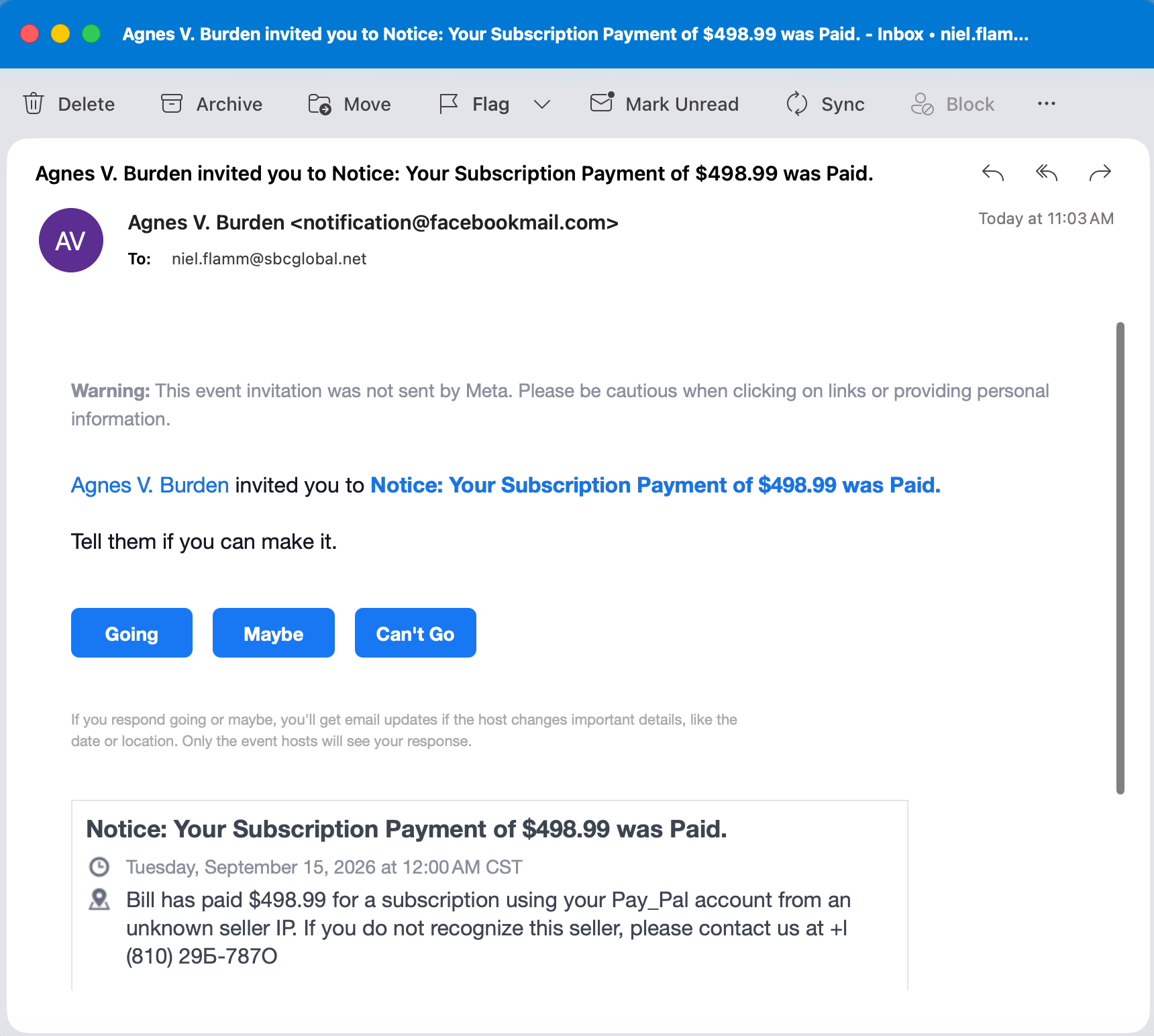
Today I received an email with this wonderfully alarming subject line:
“Agnes V. Burden invited you to Notice: Your Subscription Payment of $498.99 was Paid.”
Wait.
I bought a subscription?
For $498.99?
And Agnes is throwing an event to tell me about it?
I appreciate the invitation, Agnes, but I think I'm busy that day.
🚩 The First Red Flag Is Actually a Giant Warning
This one gets interesting because the email appears to be generated through Facebook's event system rather than simply pretending to be a normal PayPal notification.
And Facebook practically puts a warning label on it for us:
“This event invitation was not sent by Meta. Please be cautious when clicking on links or providing personal information.”
That's not exactly subtle.
The apparent sender address is notification@facebookmail.com, which could make someone think, Well, it came through Facebook, so it must be legitimate.
But that's the trick.
The screenshot indicates that Agnes V. Burden created the event. The event itself appears to carry the scam message.
That's an important distinction: a legitimate platform can be used to deliver content created by someone else.
🎉 You're Invited! Your Money Is Gone!
The event title reads:
“Notice: Your Subscription Payment of $498.99 was Paid.”
Then we get the usual Facebook invitation:
Going | Maybe | Can't Go
I'm struggling to choose the right RSVP.
Going: Yes, I definitely want to attend the disappearance of $498.99.
Maybe: Depends. Will there be food?
Can't Go: Sorry, I have another fraudulent transaction at 1:00.
But then we get to the actual event description:
“Bill has paid $498.99 for a subscription using your Pay_Pal account from an unknown seller IP.”
There are so many questions.
Who is Bill?
Why is Bill spending my money?
Why is PayPal suddenly “Pay_Pal”?
And what exactly is an “unknown seller IP” supposed to mean?
But don't worry.
They've conveniently provided a phone number.
🚩 And THAT Is the Point
The message says that if I don't recognize the seller, I should call the number shown in the invitation.
There's the hook.
The $498.99 isn't necessarily the objective.
The objective may be to make me panic about the $498.99 and call the number.
The FTC specifically warns about this type of subscription-renewal scam. Victims receive notices claiming they've been charged hundreds of dollars for a subscription and are instructed to call a number to dispute it. Once they call, scammers may try to get financial information, persuade the victim to grant remote computer access, or create a fake “refund” problem that ultimately leads the victim to send money. Consumer Advice
In other words:
The fake charge creates the panic.
The phone number gives the scammer a path in.
🚩 This Facebook-Event Version Isn't Unique
Here's what really caught my attention.
I found a strikingly similar report in the Better Business Bureau's Scam Tracker from July 2026.
That report described a Facebook/Meta event invitation claiming a $749.49 MetaPay payment, complete with the same warning that the event invitation wasn't sent by Meta. The event then instructed the recipient to call a phone number if the payment was unauthorized. BBB categorized that report as phishing. Better Business Bureau
Different amount.
Different supposed transaction.
Different phone number.
Very similar playbook.
That's a useful reminder that scammers don't always need to spoof an entire company's email system. Sometimes they can abuse legitimate features—event invitations, calendar invites, shared documents, comments or other notifications—to get their message delivered.
💰 So What Should I Do About My $498.99?
First, I'm not calling the number in the invitation.
I'm also not clicking anything in the event to “resolve” the supposed charge.
If I were genuinely concerned that $498.99 had been charged through PayPal, I'd independently open the real PayPal app or website and inspect my transactions.
I'd also check the bank or credit-card account connected to it.
The FTC recommends that same approach for suspicious subscription notices: check your actual financial accounts, and if you need to contact the company, use contact information you know is legitimate—not the phone number supplied in the suspicious message. Consumer Advice
If the $498.99 transaction isn't there?
Then there's nothing to refund.
And there's certainly no reason to call Agnes.
🧠 The Psychology Is Better Than the Grammar
What makes this scam potentially effective isn't perfect spelling or a sophisticated story.
It's the number:
$498.99
That's large enough to make someone panic.
You don't stop to analyze “Pay_Pal.”
You don't wonder why a financial transaction has become a Facebook event.
You don't ask who Bill is.
You see:
YOU JUST LOST $498.99.
Then:
CALL THIS NUMBER.
That's social engineering.
The scammer doesn't need you to believe the entire story.
They just need you to become concerned enough to take the next action.
🏡 Be a Good Neighbor
I've said this before, and I'll keep saying it.
If you see something like this, don't be passive.
Tell your parents.
Tell your grandparents.
Tell your friends.
Tell the neighbor who isn't particularly comfortable with technology.
Share screenshots.
Report suspicious messages.
The FTC even recommends talking to someone you trust—a friend, family member, or neighbor—when you're unsure whether something is a scam. That second set of eyes can interrupt the panic that these schemes depend upon. Consumer Advice
You might recognize it as suspicious right away.
Someone else may see $498.99 and think their money is disappearing.
Sometimes being a good neighbor is simply saying:
“Don't call that number. Let's check your actual account first.”
Agnes, I'm Going to Have to Decline
So, Agnes V. Burden, thank you for inviting me to the celebration of my imaginary $498.99 subscription.
Unfortunately:
Going? No.
Maybe? No.
Can't Go? Absolutely.
And I'm definitely not calling your phone number.
Follow along at NielFlamm.com/blog for more scam emails, questionable TikTok car deals, suspicious recruiters, and whatever creative nonsense lands in my inbox next.
The Scammers Missed Me — Apparently My Geek Squad Membership Renewed Again
I was starting to get worried.
It had been an entire week since someone invited me to a Facebook event announcing that I had supposedly purchased something I didn't purchase.
Was I no longer desirable to scammers?
Had they moved on?
Did Karen, Taiba, Callie, and Princess Manahil have a group chat where they decided I wasn't worth the effort?
Thankfully, my fears were put to rest today.
They're back.
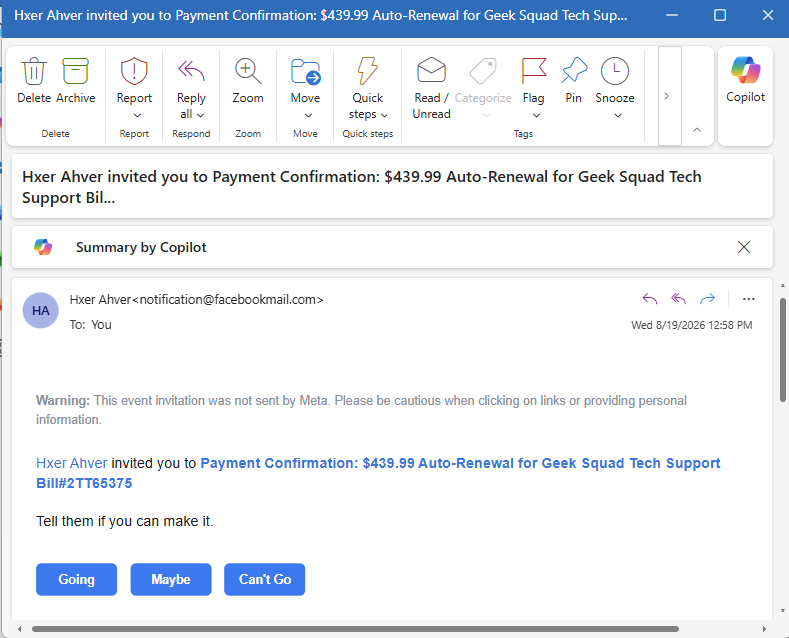
This afternoon, I received another Facebook event invitation. This one came from the wonderfully named “Hxer Ahver.”
Hxer has invited me to:
“Payment Confirmation: $439.99 Auto-Renewal for Geek Squad Tech Support…”
Oh good.
Geek Squad again.
My Computer Is Apparently VERY Protected
Last week, Princess Manahil informed me that I had supposedly renewed my Geek Squad protection.
Now Hxer Ahver says I've done it again.
At this point, my computer should be the most protected in North America.
I'm expecting Geek Squad employees to start physically guarding it.
One by the monitor.
One near the keyboard.
Another stationed outside my house.
For $439.99, somebody better be watching the perimeter.
There is, of course, one tiny problem:
I didn't buy this.
Just like I didn't buy the Bitcoin.
Just like I didn't authorize the mystery subscription.
Just like I didn't purchase the previous Geek Squad protection.
My imaginary credit card has apparently been having an incredible summer.
And Once Again, I'm Invited to Attend
The brilliance of this particular scam remains my favorite part.
It's being delivered as a Facebook event invitation.
That means underneath a message claiming I've been charged $439.99, Facebook politely asks:
“Tell them if you can make it.”
And then gives me three options:
Going
Maybe
Can't Go
I appreciate the flexibility.
After reviewing my calendar, however, I'm going to have to select:
Can't Go.
I'd love to attend my $439.99 fraudulent Geek Squad auto-renewal, but unfortunately I have plans that afternoon.
Maybe next year.
Meta Is Still Warning Me
Just like the previous scam invitations, there's a warning sitting right at the top:
“Meta did not send this event invitation. Please be cautious when clicking on links or providing personal information.”
That's probably worth reading.
The clever part of this scam is that the notification itself can arrive through Facebook's event system. That gives the garbage in the invitation a little borrowed legitimacy.
You see a familiar notification.
You see Facebook.
You see a large dollar amount.
You see “Payment Confirmation.”
And the scammer hopes you panic before stopping to ask the most obvious question:
Why in the hell is Geek Squad notifying me about a $439.99 auto-renewal through a Facebook event invitation?
Geek Squad isn't throwing me a party.
The Scam Social Calendar Continues
So let's update the guest list.
Previously, I had:
Karen: Bitcoin purchase.
Taiba: Another Bitcoin purchase.
Callie: Mystery $398.99 subscription.
Princess Manahil: Geek Squad protection.
And now:
Hxer Ahver: Another $439.99 Geek Squad renewal.
I'm beginning to see a pattern.
The names change.
The dollar amounts change.
The supposed purchases change.
But the objective remains remarkably similar: make the recipient believe money has been charged, create urgency, and get them to react before they think.
That's why I don't use the contact information contained in suspicious messages.
If a message says there's a charge on one of my accounts, I'll independently open the company's official app or website and check the account myself.
No panic.
No mystery phone numbers.
No handing over account information.
Please don't attend Facebook events celebrating purchases I didn't make.
See You at the Next One
At this point, I don't think this is over.
We've done Bitcoin.
We've done subscriptions.
We've done Geek Squad twice.
I'm curious what I'll apparently purchase next.
A $799 Norton subscription?
A $1,200 iPhone?
Extended warranty coverage for a car I don't own?
Whatever it is, I have only one request for the scammers:
Please check my calendar first.
I'm getting really busy declining all these invitations.
Apparently My Scam Social Calendar Is Getting Pretty Full
Well, this is getting ridiculous.
Yesterday, I wrote about the collection of scam emails I've been receiving disguised as Facebook event invitations.
Apparently, I had purchased Bitcoin. Twice. I had also supposedly paid for a mysterious subscription.
Today, I received another invitation.
At this point, I don't know whether I'm being scammed or whether I'm just incredibly popular.
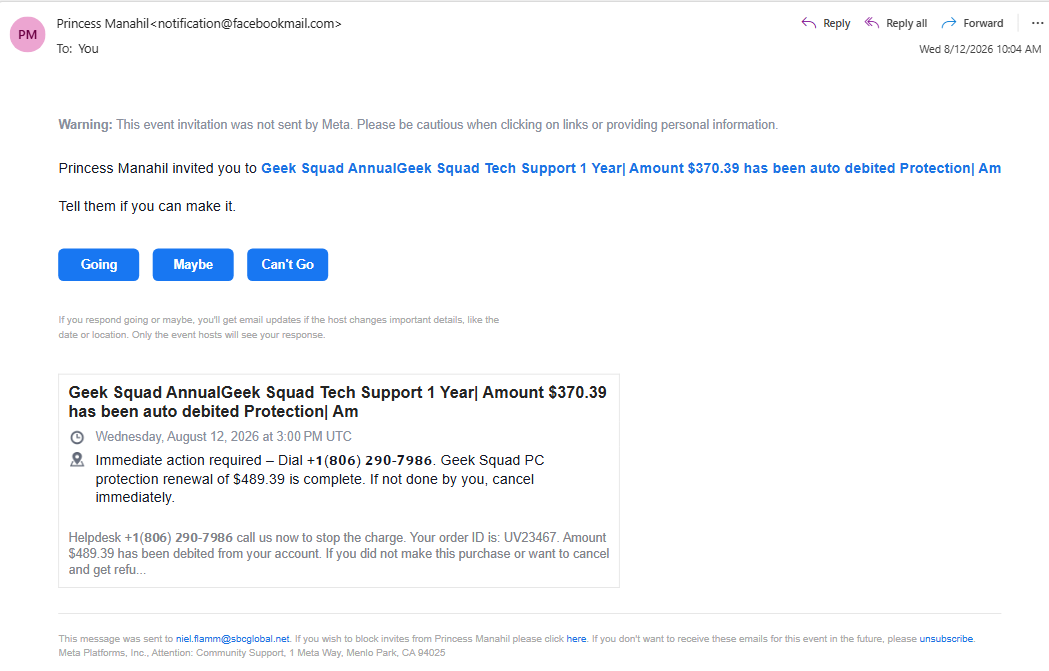
This latest invitation comes courtesy of someone named Princess Manahil, who has graciously invited me to an event involving:
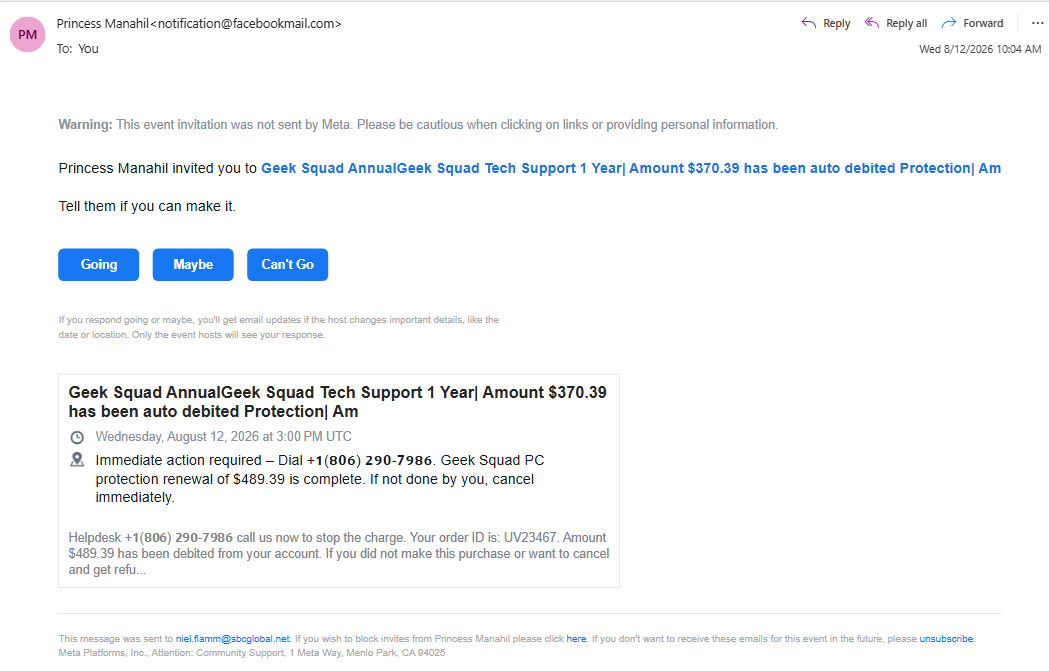
“Geek Squad Annual Geek Squad Tech Support 1 Year | Amount $370.39 has been auto debited…”
Catchy event name.
I'm not sure who's handling marketing for this gathering, but it needs some work.
Going, Maybe, or Can't Go?
Once again, because this is being delivered as a Facebook event invitation, I get three wonderful choices:
Going. Maybe. Can't Go.
I'm going with Can't Go.
Not because I'm busy.
Not because I have another engagement.
But because I DIDN'T BUY GEEK SQUAD PROTECTION.
The invitation claims that a Geek Squad PC protection renewal is complete and that I need to take “immediate action” by calling the conveniently supplied telephone number if I want to cancel.
Interestingly, the email can't even seem to decide how much I supposedly spent.
The event title says $370.39.
The description says the Geek Squad protection renewal is $489.39.
Apparently, even my imaginary purchases are experiencing inflation.
Yesterday Bitcoin, Today Geek Squad
What I find interesting is how quickly the product changes while the basic scam stays almost the same.
Yesterday:
PayPal! Bitcoin! Hundreds of dollars! CALL NOW!
Today:
Geek Squad! Computer protection! Hundreds of dollars! CALL NOW!
Tomorrow?
Who knows?
Maybe I'll receive an invitation informing me that I've purchased a 12-month extended warranty for a submarine.
The important part isn't what they're pretending I bought.
The important part is the urgency.
There's supposedly a large charge.
I supposedly need to act immediately.
And—how convenient—there's a phone number waiting for me.
Once Again, Meta Is Basically Waving a Red Flag
At the top of the email is this warning:
“Meta did not send this event invitation. Please be cautious when clicking on links or providing personal information.”
That's not exactly subtle.
When the platform delivering the invitation is essentially saying, “Hey, you might want to be careful with this thing,” perhaps calling the mystery phone number isn't the best next move.
And that's what makes these messages interesting.
The surrounding email can look legitimate because it is tied to an actual Facebook event invitation. The scammer doesn't necessarily need to spoof an entire email from scratch. Instead, the scam message is stuffed into the event information.
The legitimate notification becomes the delivery vehicle for the garbage inside it.
My Rule Remains the Same
If I receive an unexpected message saying I've been charged hundreds of dollars, I won’t call the number provided in that same unexpected message.
If it's supposedly PayPal, I'll go directly to PayPal.
If it's supposedly my bank, I'll go directly to my bank.
If it's supposed to be Geek Squad, I’ll look up the legitimate company contact information and check there.
I'm not calling Princess Manahil's Urgent: Please Call Us Immediately Refund Department.
So, let's update my scam social calendar:
Karen: Bitcoin — Can't Go.
Taiba: Bitcoin — Can't Go.
Callie: Mystery subscription — Can't Go.
Princess Manahil: Geek Squad — Can't Go.
Four invitations and I've declined every one.
At this rate, the scammers are going to stop inviting me to things.
And frankly, that would hurt.