
It’s been a little while, but apparently my scam social calendar is back in action.
For those who haven’t been following along, I’ve received some interesting emails over the past few months. According to my inbox, I’ve bought Bitcoin, renewed Geek Squad protection—more than once—and even had a watch repaired that I never sent anywhere.
Today, we return to an old favorite:
The Facebook Event Invitation Scam.
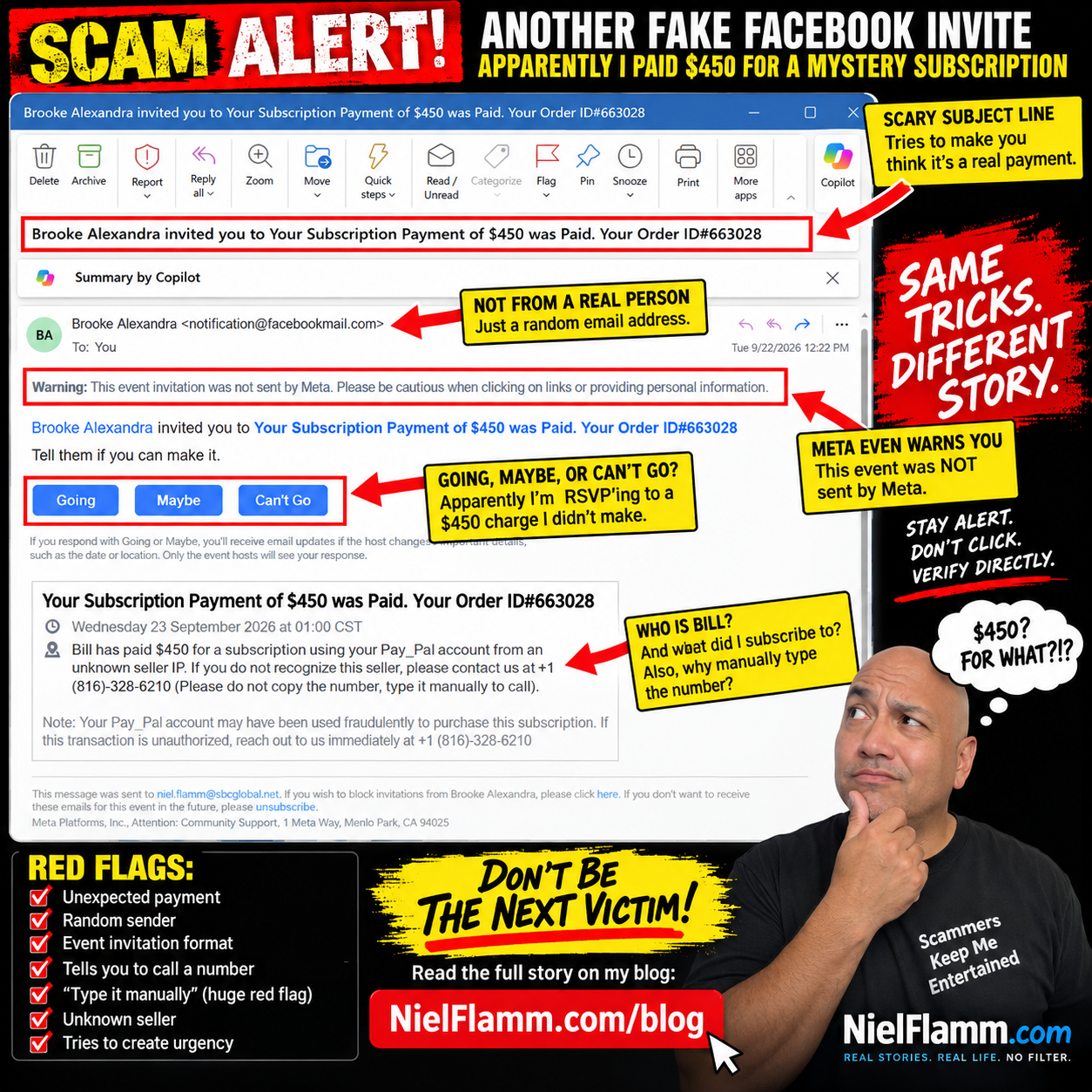
This time, “Brooke Alexandra” has invited me to an exciting event called:
“Your Subscription Payment of $450 was Paid. Your Order ID#663028”
Well, Brooke, thank you for the invitation.
Unfortunately, I have absolutely no idea what I supposedly subscribed to.
Going, Maybe, or Can’t Go?
My favorite part of these scams is still Facebook’s event format.
I’ve supposedly just discovered an unauthorized $450 PayPal transaction, and immediately underneath this alarming news, I’m asked:
Tell them if you can make it.
My choices?
Going.
Maybe.
Can’t Go.
Decisions, decisions.
I’m going with Can’t Go.
Not because I have another commitment. I try not to attend celebrations for fraudulent purchases.
Meet Bill, My Apparently Very Generous Alter Ego
The description gets even better.
It says:
“Bill has paid $450 for a subscription using your Pay_Pal account from an unknown seller IP.”
Who is Bill?
I have no idea.
Bill, please stop spending my imaginary money.
The message then provides a phone number and tells me to call if I don’t recognize the seller.
And then comes my favorite instruction:
“Please do not copy the number, type it manually to call.”
Oh, absolutely.
I'm not comfortable trusting a financial alert that asks me to type a phone number manually.
That’s practically the international symbol for:
“Nothing suspicious happening here!”
Meta Is Literally Warning Me
As with the previous versions, there’s an important message sitting prominently near the top:
“Warning: This event invitation was not sent by Meta. Please be cautious when clicking on links or providing personal information.”
That deserves more attention than the scary $450 headline.
The formula hasn’t changed much:
Create an alarming transaction.
Use a recognizable brand name like PayPal.
Please let me know if my account may have been compromised.
Give me a telephone number.
Please create urgency so I call before I stop to think.
And package everything inside a Facebook event invitation so the resulting notification looks more familiar.
The Scam Has One Big Problem
If my PayPal account really has a mysterious $450 transaction, I don’t need Brooke Alexandra—or Bill—to help me investigate it.
I can go directly to PayPal through its official app or website and check my account.
The same rule applies to suspicious emails claiming to come from a bank, credit card company, retailer, Geek Squad, or practically anyone else.
Don’t let the suspicious message tell you how to verify the suspicious message.
Verify it independently.
And don’t call a mystery number just because someone put “PayPal” next to it.
My Imaginary Spending Spree Continues
So let’s add another purchase to the growing list.
Bitcoin? ✔️
Mystery subscriptions? ✔️
Geek Squad? ✔️
Watch repair? ✔️
Another mystery $450 subscription? ✔️
At this point, the person living inside my spam folder has a considerably more exciting financial life than I do.
I’m just disappointed that after all this imaginary spending, nobody has emailed me to say I’ve purchased a beachfront condo in Thailand.
Scammers, if you’re reading this, at least make the next fake purchase interesting.
Have a Scam Story? Send It My Way
Now I want to hear what’s landing in your inbox.
If you’ve received a scam email, suspicious text, social media message, fake invoice, questionable refund notice, or something that made you think, “There is no way this is legitimate,” send it to me.
Please send me your screenshots and let me know what happened. I may feature some of them in future posts as we look at the creative—and sometimes hilariously bad—ways scammers try to separate people from their money.
Please remove or cover passwords, account numbers, addresses, phone numbers, or other sensitive personal information before sending screenshots.
Maybe it’s time to turn my scam collection into our scam collection.
And until then, Brooke...
Can’t Go.
