
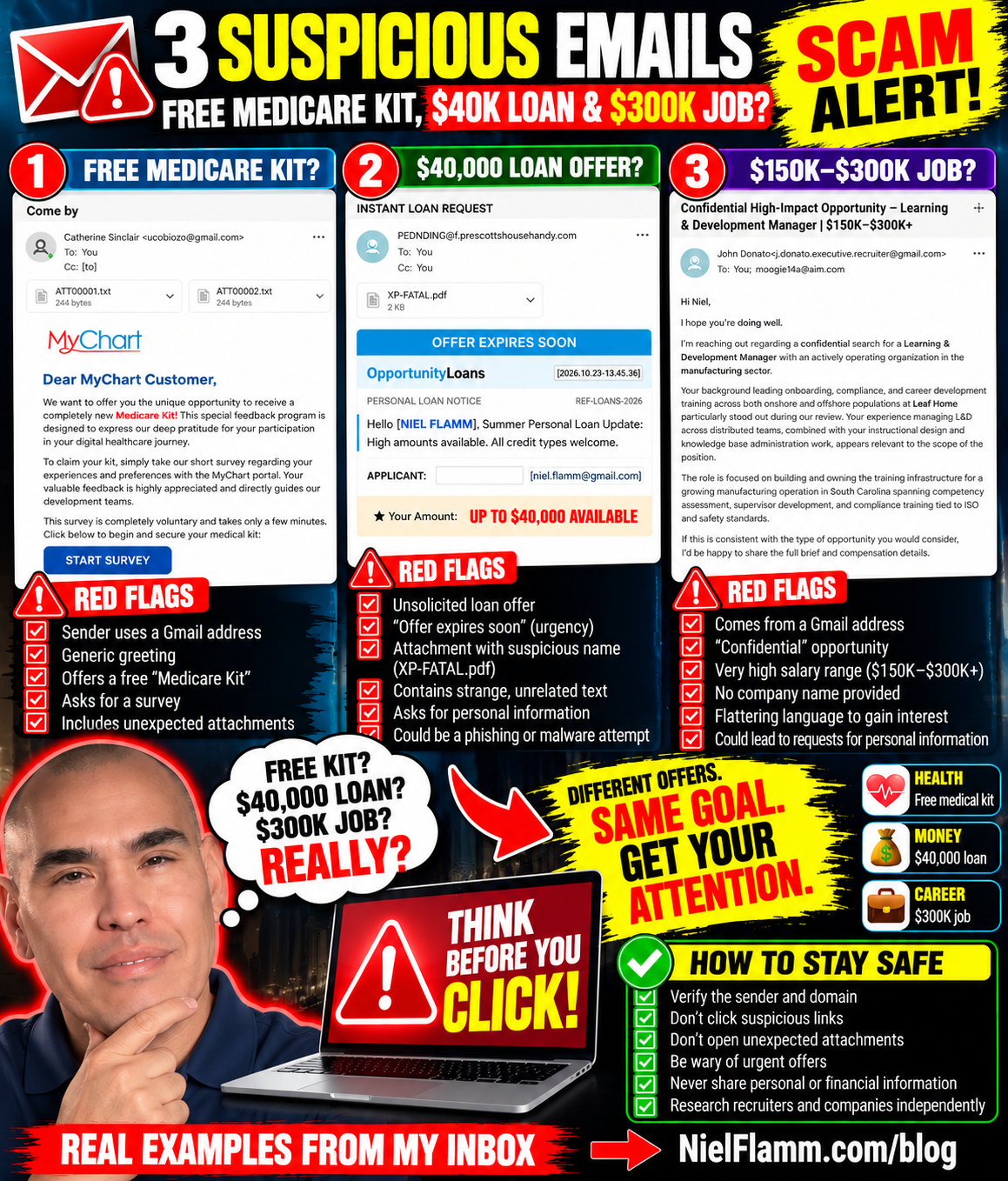
Three Emails, Three Red Flags: Free Medical Kits, $40,000 Loans and a $300K Job?
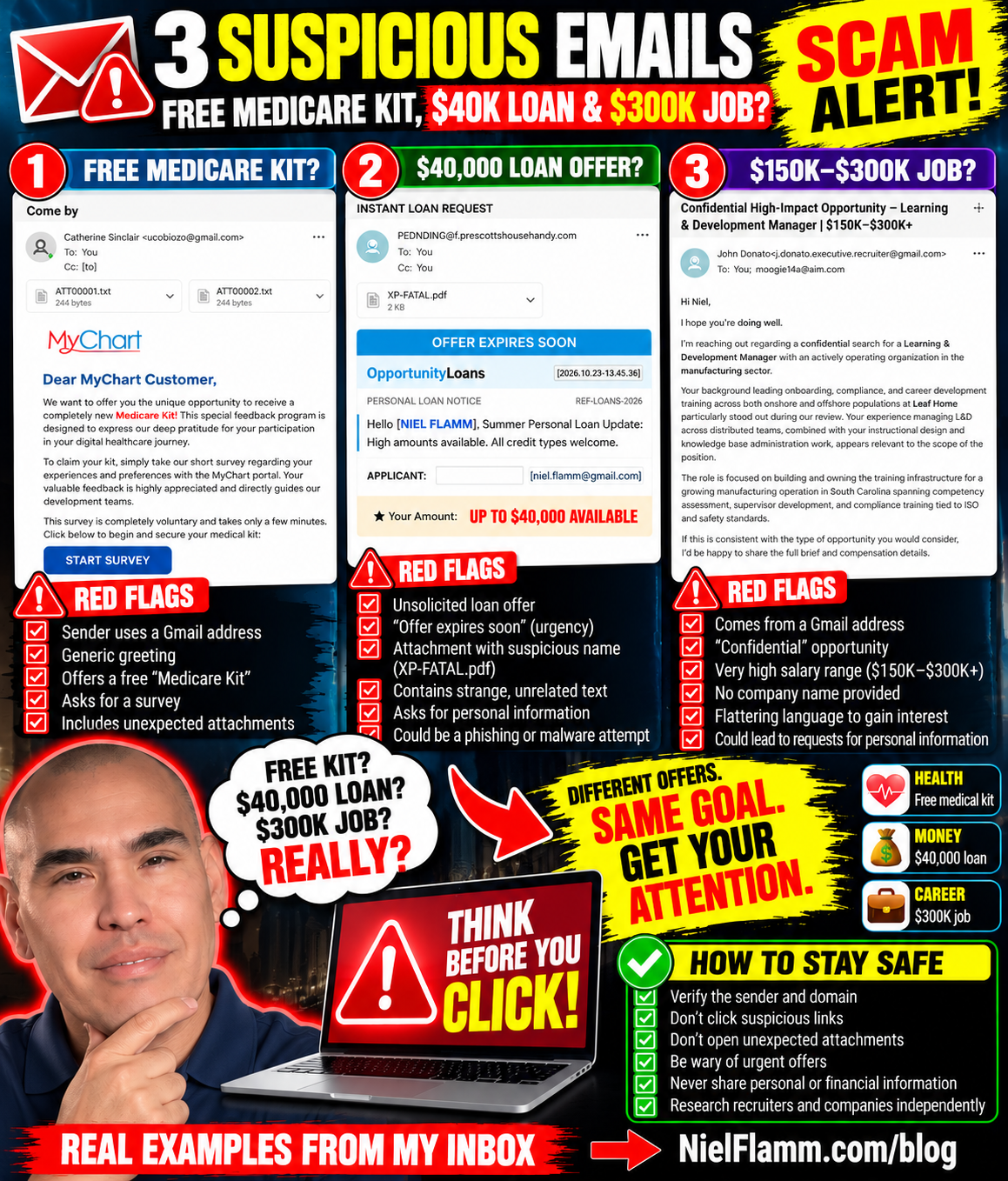
My inbox has been busy again. Apparently, the internet thinks I'm either entitled to a free medical kit, desperately need a $40,000 personal loan, or am the perfect candidate for a $300,000 Learning & Development job.
It's nice to be so popular.
One problem: these emails raise some serious questions.
Let's take a look at three messages that landed in my inbox on October 22 and 23, 2026.
1. A Free Medicare Kit From “MyChart”?
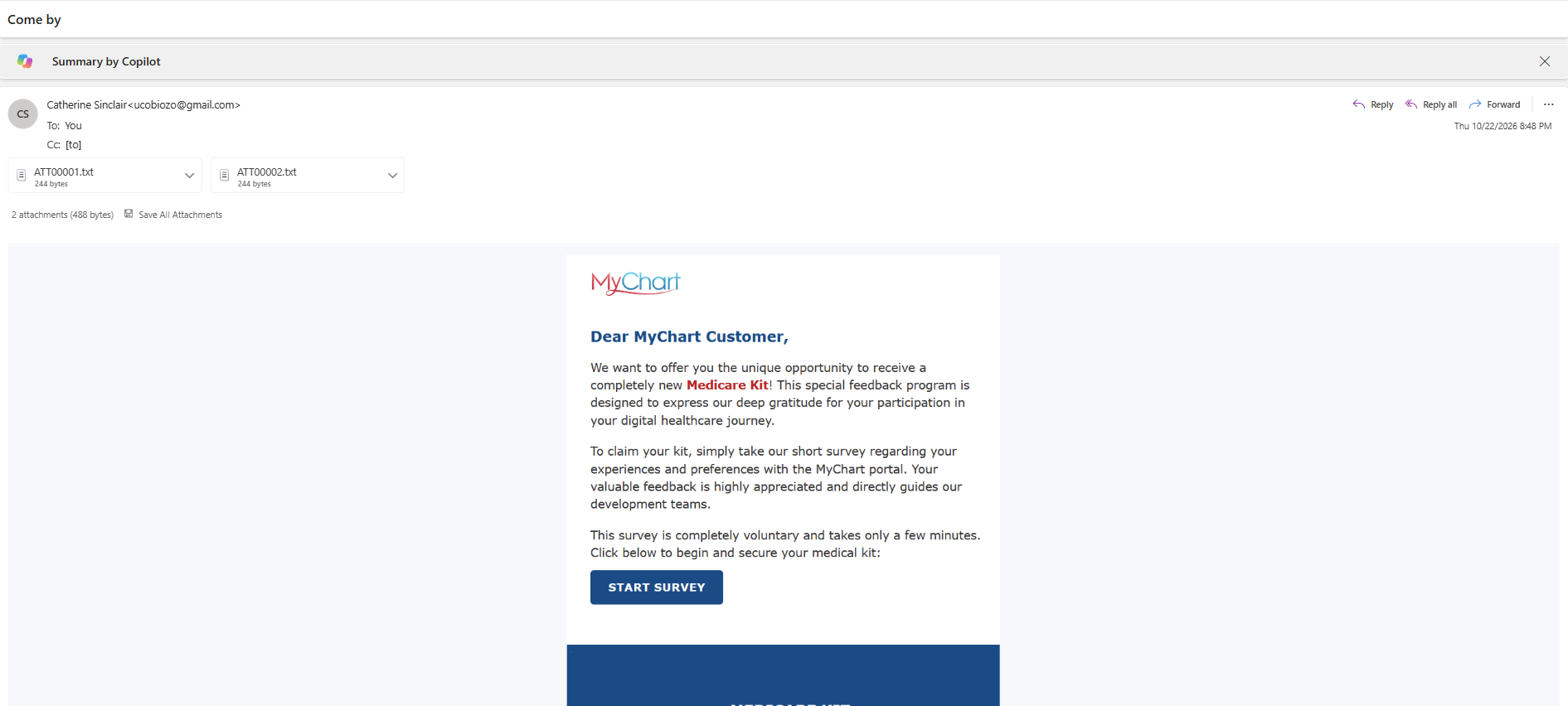
Email subject: “Come by”
The first email came from an address listed as Catherine Sinclair and used a Gmail address. It included two tiny text attachments and an image styled to look like a MyChart message.
The message addressed me as a “MyChart Customer” and offered a supposedly new “Medicare Kit” in exchange for completing a short survey about my MyChart portal experience.
How generous!
A free medical kit just for answering a few questions? What could go wrong?
Well, a few things caught my attention:
The sender's Gmail address doesn't establish any connection to MyChart or a healthcare provider.
The email uses a generic greeting rather than identifying a specific healthcare organization.
The offer combines a medical-related brand with a gift and a survey link.
The email includes unexpected attachments.
I can't establish from this screenshot alone who sent the message or what the attachments contain. But I certainly wouldn't click the survey button or open unexpected files to find out.
If a healthcare portal genuinely offers a survey or patient benefit, I'll check the official portal or contact my healthcare provider using contact details I already trust.
My medical information is not a prize to be claimed through a mystery email.
2. An “Instant Loan” Offering Up to $40,000
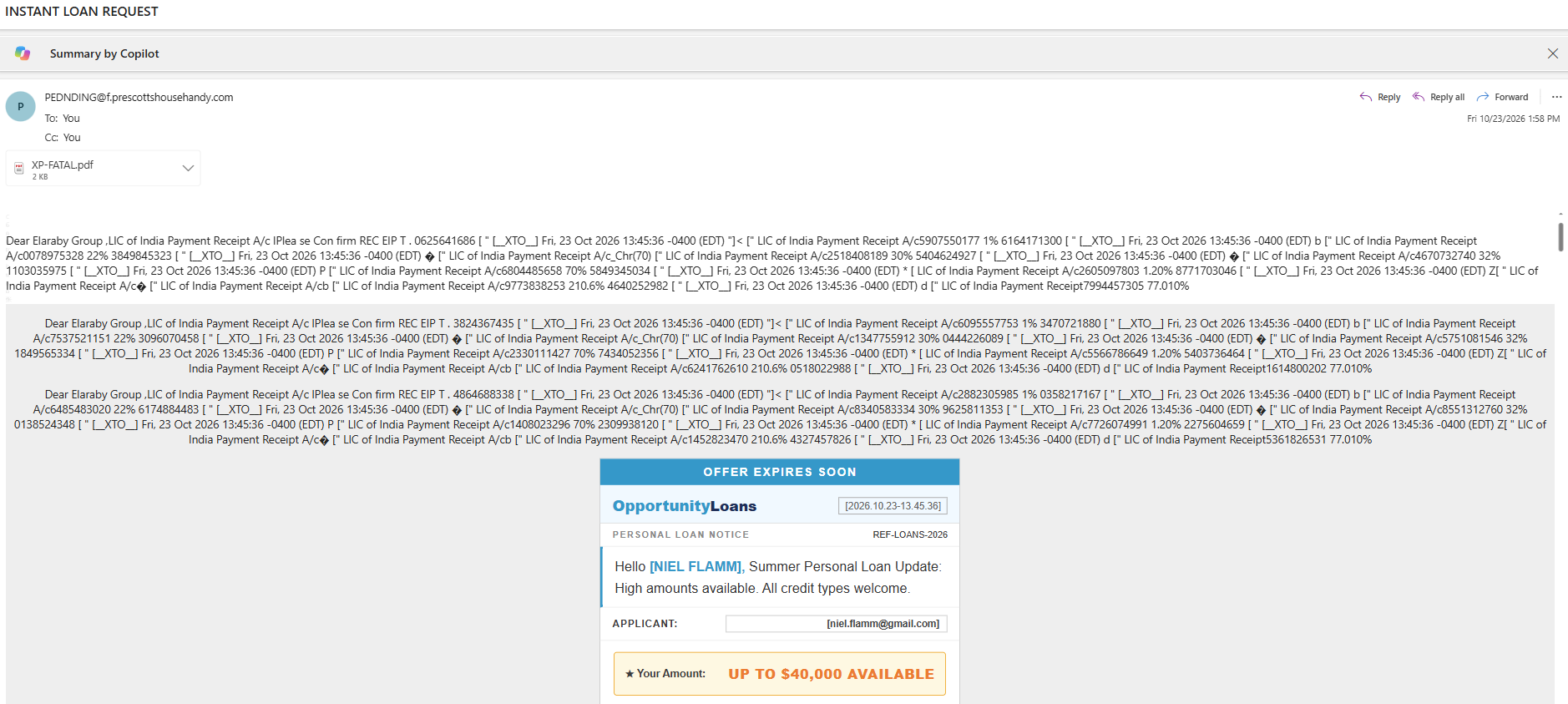
Email subject: “INSTANT LOAN REQUEST”
The second email takes a different approach. This one appears to be about money—specifically, money someone supposedly wants to lend me.
The message contains a banner that says “OFFER EXPIRES SOON” and promotes something called OpportunityLoans. It addresses me by name and advertises personal loans of up to $40,000.
The email also includes a PDF attachment named XP-FATAL.pdf.
Wait a minute. Someone I don't recognize wants to offer me up to $40,000, and there's a PDF attachment with a filename that looks like it wandered out of a computer-security nightmare?
I think I'll pass.
Here are the red flags I noticed:
Urgency: “Offer expires soon” encourages a quick decision.
Unsolicited credit offer: I didn't request this loan information.
Unusual formatting: The message contains a jumble of apparent payment-receipt text that has little to do with the loan offer.
Unexpected attachment: There's no reason for me to open a suspicious PDF just because an email tells me money is available.
Personal information: The email displays identifying information, which can make a message feel more convincing without proving it's legitimate.
I can't determine from the screenshot alone whether this is an outright scam, an unsolicited marketing message, or something else. But I wouldn't use the email's links or contact details to investigate it.
If I ever need a personal loan, I'll research lenders independently, check their credentials, and carefully review the terms. I won’t let a countdown banner drive my financial decisions.
A loan offer isn't free money. And “up to $40,000” doesn't mean I'm approved for $40,000.
3. A $150K–$300K Learning & Development Job?
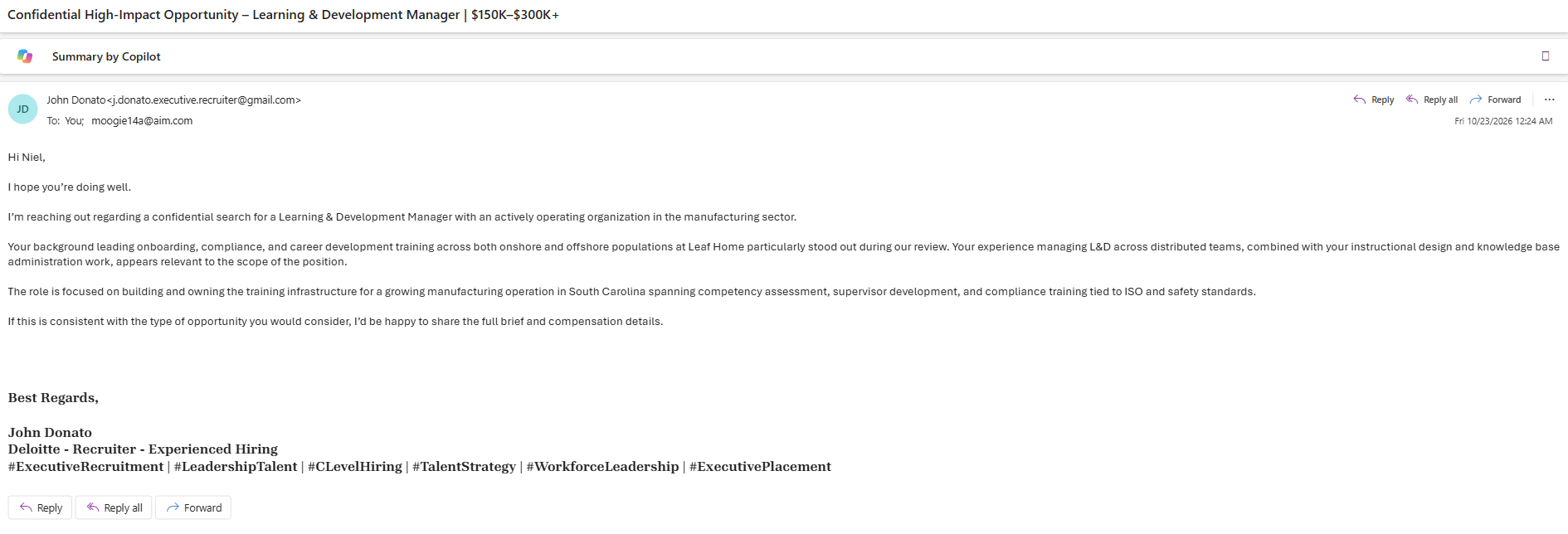
Email subject: “Confidential High-Impact Opportunity – Learning & Development Manager | $150K–$300K+”
Now this one caught my professional eye.
The email came from someone named John Donato, using a Gmail address that includes the words “executive recruiter.”
The sender claims to be contacting me about a confidential search for a Learning & Development Manager at a manufacturing organization in South Carolina.
The message references my professional background, including onboarding, compliance, career development training, instructional design, and knowledge base work. Those are relevant to my career experience.
And then comes the compensation range:
$150,000–$300,000+.
Well, hello there!
After all, who wouldn't want to hear about a potential six-figure opportunity?
The sender says my experience stood out during a review and offers to share the full brief and compensation details if I’d consider the opportunity.
Unlike the other two emails, this one doesn't immediately ask me to pay a fee or open an attachment. The message itself is reasonably polished and references aspects of my professional background.
But that doesn't prove the recruiter, job, or opportunity is legitimate.
Here's what I'd want to verify:
The recruiter's identity: Does this person have a verifiable professional presence and a credible recruiting history?
The company: Which manufacturing organization is hiring? Why isn't it named?
The job: Is there a genuine position matching the description?
The compensation: Is the advertised range supported by a real employer and a defined role?
The next step: Will the recruiter ask for personal information, identification documents, banking details, or money before providing verifiable information?
Using a Gmail address isn't proof of fraud. Independent recruiters sometimes use noncorporate email accounts. But a high salary, flattering language, and references to my experience don’t prove legitimacy either.
The broader issue is that fake recruiting approaches can collect personal information, direct candidates to malicious links, or eventually introduce fraudulent payments and fees.
So I'll treat this as unverified until I can establish who is contacting me and which organization is hiring.
If the opportunity is real, reasonable verification shouldn't ruin it.

Three Emails, Three Different Hooks
What's interesting about these messages is how differently they try to attract attention.
The healthcare hook
A supposedly free Medicare Kit in exchange for survey participation.
The temptation: a free benefit tied to a familiar healthcare name.
The money hook
A supposedly available personal loan of up to $40,000, with an offer that expires soon.
The temptation: easy access to money and FOMO.
The career hook
A confidential Learning & Development role with a potential salary of $150,000–$300,000+.
The temptation: professional recognition and a potentially life-changing opportunity.
These messages target different motivations: health, financial need, and career ambition.
That's why I don't judge an email solely by how professional it looks. A polished message can still be misleading, and a legitimate-looking logo doesn't prove that the sender represents the organization.
What I'm Doing Instead
I don't click suspicious links, open unexpected attachments, or provide sensitive information just because an email promises something appealing.
My approach is straightforward:
Verify independently. Visit the official website or app yourself instead of using a link in the message.
Check the sender. Look beyond the display name and examine the actual email address and domain.
Be wary of urgency. “Offer expires soon” is a reason to slow down, not speed up.
Protect personal information. Don't provide Social Security numbers, banking details, passwords, or identity documents to an unverified sender.
Research recruiters and employers. Confirm the person, company, and job opening independently before sharing sensitive information.
Don't open suspicious attachments. An attachment doesn't become safe just because the email has a convincing explanation.
If you've already clicked something or shared information, don't panic. The appropriate next steps depend on what happened, but they may include changing compromised passwords, contacting your financial institution, or reporting the message.
My Inbox Is Apparently a Career Fair, a Bank and a Healthcare Portal
I started with three emails and ended up with three very different offers.
A free medical kit.
A loan of up to $40,000.
A job that might pay $300,000.
I appreciate the variety. My inbox apparently believes in diversification.
But I don't need to claim that every suspicious message is definitely a scam to recognize that each one deserves scrutiny.
The healthcare offer needs verification. The loan offer needs verification. The recruiter needs verification.
And none of them gets a free pass just because the offer sounds good.
Have you received an email offering a gift, a too-good-to-be-true loan, or an unbelievable job opportunity? I'd like to hear about it.
Send your screenshots and experiences to niel@nielflamm.com. Please remove sensitive personal, financial, and account information before sending them.
I'll keep documenting what comes into my inbox, because the more we recognize these tactics, the less likely we are to get caught off guard.
Remember: Verify first. Click later—if at all.

A New Scam Tactic Made Me Do a Double Take: “Walmart Order password88458”
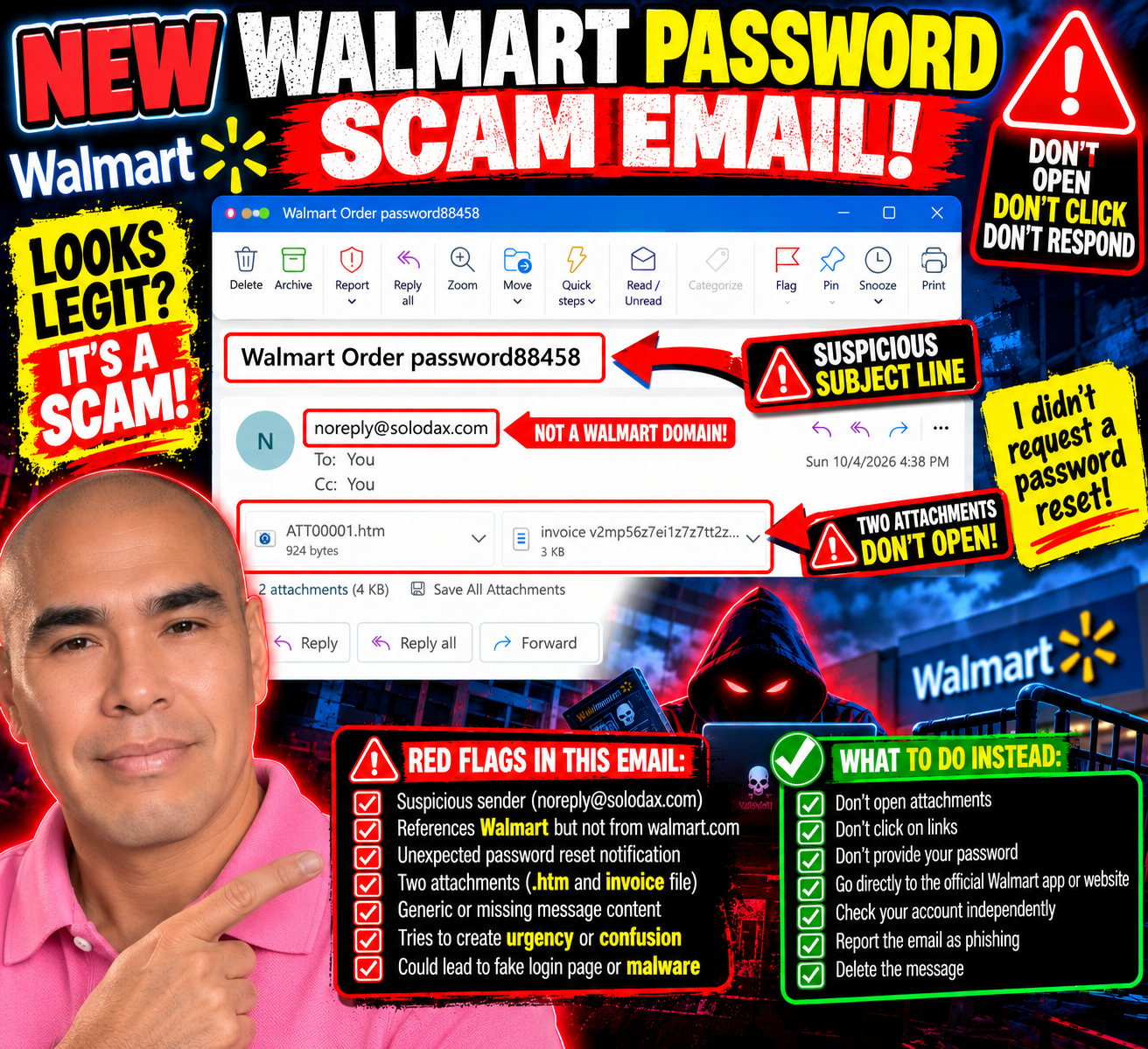
When I thought my inbox scammers had settled into a comfortable routine of fake PayPal charges, Geek Squad subscriptions, and invitations to give away hundreds of dollars, somebody apparently decided the script needed an update.
This one actually made me do a double take.
The subject line reads:
“Walmart Order password88458”
Password?
Wait.
Did I ask for my Walmart password to be reset?
No.
And that tiny moment of uncertainty is exactly what caught my attention.
This One Feels Different
Most of the scam emails I've been receiving practically announce themselves.
YOU SPENT $499.99!
YOUR GEEK SQUAD SUBSCRIPTION RENEWED!
CALL THIS NUMBER IMMEDIATELY!
They want panic.
This one is quieter.
The email body has no real message. Instead, it has two attachments: an HTML file and what looks like an invoice.
The sender shown is:
Yet the subject references Walmart.
That's enough for me to stop.
If this is supposedly about my Walmart account, why is the message coming from a completely unrelated domain?
And why would I need to open attachments to figure out what's happening with my password?
No thanks.
The “Password” Word Almost Worked
That's what I find interesting about this one.
I saw “password” and instinctively wondered whether I'd requested a password reset.
For a moment, the message made me question my own memory.
That's potentially much more effective than another ridiculous $499.99 invoice.
People reset passwords all the time. Sometimes we forget that we requested one. Sometimes an app logs us out. Sometimes we get legitimate security alerts when someone attempts to access an account.
So seeing Walmart + Order + Password mashed together in a subject line can create just enough confusion to make someone investigate.
And investigating might mean opening one of those attachments.
That's where I stop.
Two Attachments? I'm Good.
One attachment ends in .htm.
That's an HTML file—a webpage packaged as a file.
Opening an unexpected HTML attachment can potentially take someone into a fake login or other deceptive content designed to look legitimate. I'm not opening it to find out what this particular one does.
The second attachment appears to be an invoice.
I'm not opening that one either, thank you.
If Walmart needs me to take action on my account, I don't need an attachment from solodax.com to proceed.
I can independently open the Walmart app or type the legitimate Walmart website into my browser and check my account there.
The suspicious email doesn't give me a roadmap for how to investigate it.

This Is Why I Keep Sharing These
Scams don't always look like:
“HELLO DEAR SIR, YOU HAVE WON $47 MILLION.”
Sometimes they're messy.
Sometimes they're polished.
Sometimes they use familiar company names.
And sometimes all they need is one word—like password—to make me stop and wonder:
“Wait...did I do something?”
I did the double take.
Then I looked at the sender.
Then I looked at the attachments.
And I remembered:
I didn't request a password reset.
Mystery solved.
No attachments opened.
No links clicked.
No passwords entered.
And, for once, Bill apparently had the day off.
Send Me Your Scam Attempts
I'm still documenting the different tactics that land in my inbox because seeing real examples can make the next suspicious message easier to recognize.
If you've received an unusual scam email, phishing attempt, fake invoice, suspicious password-reset message, or another creative attempt to get your information, send me a screenshot and your experience:
First, remove or cover any sensitive personal, financial, or account information.
The scammers changed tactics.
So I'll keep paying attention.
If I didn't request a password reset, I won’t open an attachment to understand why someone believes I did.

Bill Is Back—Twice: Apparently My Fake PayPal Account Had a Busy Morning
At this point, I think Bill needs an intervention.
If you've been following my continuing adventures with scam emails, you may remember Bill. Bill is the mysterious person who keeps appearing in these fake invoices and event invitations, supposedly using my PayPal account to buy things I never ordered.
Well, Bill is back.
And this time, he brought friends.
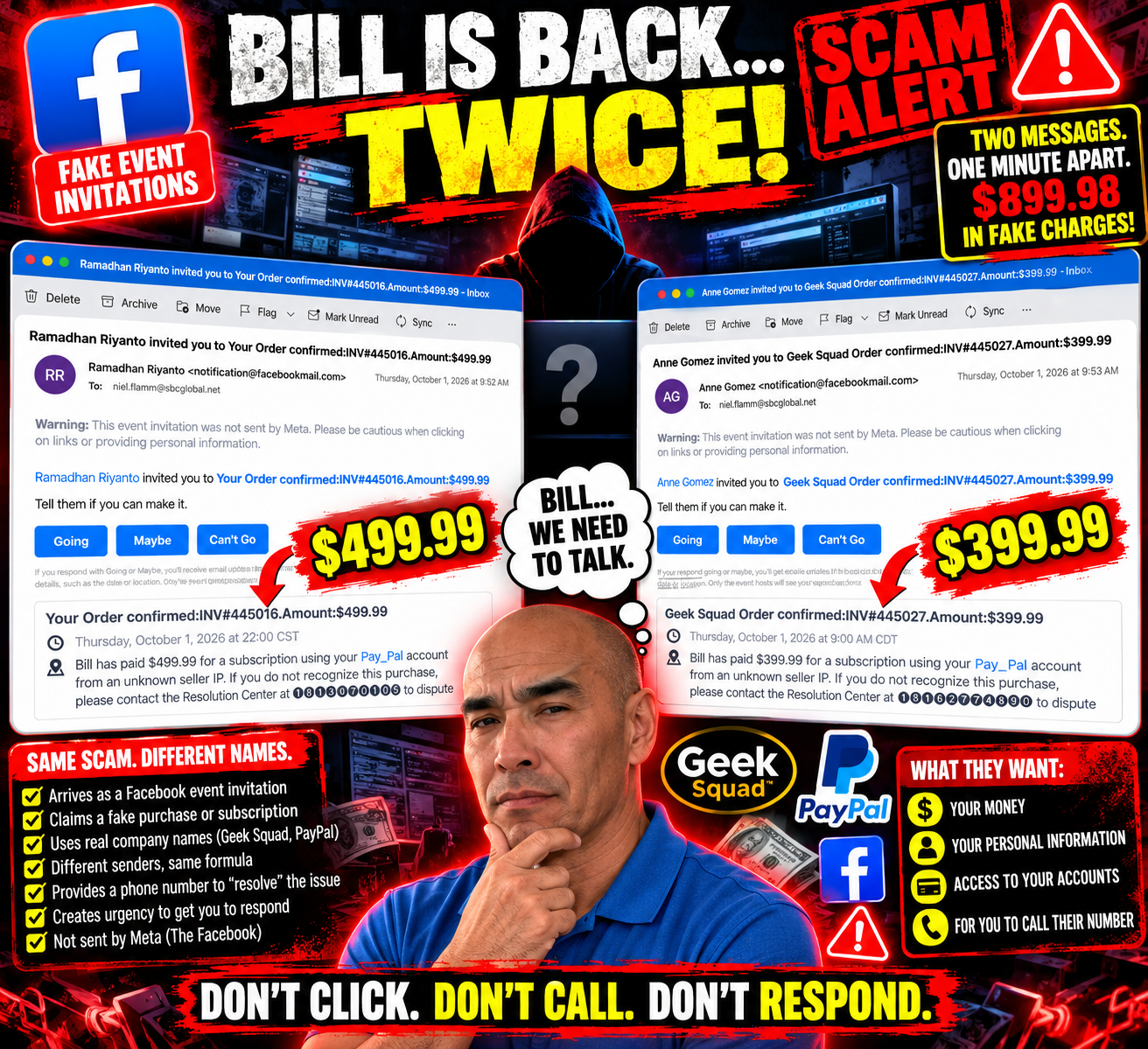
On October 1, I received two more suspicious event invitations. They arrived just one minute apart.
The first came from Ramadhan Riyanto at 9:52 a.m.
The second came from Anne Gomez at 9:53 a.m.
Apparently, scammers believe in efficiency.
First Invitation: $499.99
Ramadhan invited me to:
“Your Order confirmed: INV#445016. Amount:$499.99”
How thoughtful.
According to the invitation, Bill supposedly paid $499.99 for a subscription using my “Pay_Pal” account.
Yes, Pay_Pal.
Maybe PayPal's lesser-known cousin.
And, naturally, if I didn't recognize the purchase, there was a convenient telephone number for the “Resolution Center.”
Convenient for whom is another question.
The invitation even gave me the familiar choices:
Going. Maybe. Can't Go.
I'm going with Can't Go.
I have a scheduling conflict.
I'm busy not losing $499.99.
One Minute Later: Another Party!
Apparently, declining one imaginary purchase wasn't enough.
At 9:53 a.m.—just one minute later—Anne Gomez invited me to another event:
“Geek Squad Order confirmed: INV#445027. Amount:$399.99”
And guess who made the purchase?
BILL!
Bill allegedly spent another $399.99 using my imaginary Pay_Pal account.
So within one minute, Bill supposedly racked up $899.98 in fake charges.
Bill, buddy...
We need to talk about your spending habits.
The Similarities Are Almost Comical
Put these two messages side by side, and the pattern is hard to miss.
Different sender.
Different invoice number.
Different dollar amount.
Different supposed Resolution Center phone number.
But almost everything else follows the same formula.
Both arrived as event invitations.
Both claim Bill used my PayPal account.
Both mention an “unknown seller IP.”
Both provide a telephone number to dispute the transaction.
Both create a sense of urgency around a purchase I supposedly didn't make.
And both contain a warning right there in the email:
“This event invitation was not sent by Meta. Please be cautious when clicking on links or providing personal information.”
At this point, the warning may as well be flashing in neon.
Yesterday It Was Geek Squad. Today It's a Doubleheader.
What makes this even funnier is that these arrived right after another fake Geek Squad invitation I recently wrote about.
That one claimed Bill spent $399.99.
Now Bill supposedly spent another $499.99 and $399.99.
My fictional friend is having quite a shopping spree.
If this keeps up, I'll need to stage a fictional financial intervention.
Why Send Two So Close Together?
I obviously can't know who is behind these messages from the emails alone, and I can't say whether the two invitations were generated by the same person or operation.
But the nearly identical wording and timing are worth noticing.
That's part of why I keep documenting these messages.
One strange email might make someone stop and wonder whether there's really a problem with an account.
When several nearly identical versions appear, the formula becomes much easier to see.
The company name can change.
The amount can change.
The sender can change.
The telephone number can change.
But the basic objective appears to remain the same:
Get me worried enough to respond before I stop and think.
I'm Still Not Calling
If I received a legitimate-looking notice about a PayPal, Geek Squad, bank or credit-card transaction I didn't recognize, I wouldn't use the telephone number supplied in a suspicious email.
I'd go directly to the company's official app or website and check my account independently.
The email doesn't tell me how to verify it.
That's an important distinction.
And I'm definitely not calling a mystery “Resolution Center” because Bill supposedly went shopping again.
Going? Maybe? Can't Go?
I still love that these arrive as event invitations.
Imagine putting these on my calendar:
9:00 a.m. — Lose $399.99
10:00 p.m. — Lose another $499.99
Dress code: Business casual.
Refreshments: None.
Financial regret: Complimentary.
RSVP?
Can't Go.

Keep Sending Me Your Scam Stories
I'll keep documenting these because the more examples we see, the easier it becomes to recognize the patterns.
If you've received a suspicious invoice, fake purchase notification, Facebook event scam, PayPal impersonation, Geek Squad message, or another creative attempt to separate you from your money, send me your story and screenshots at:
Just remove or cover any sensitive personal or financial information before sending it.
As for Bill?
If anyone sees him, please tell him his Pay_Pal privileges have officially been revoked.

Another Scam Invitation: Apparently I’m Invited to Give Away $399.99
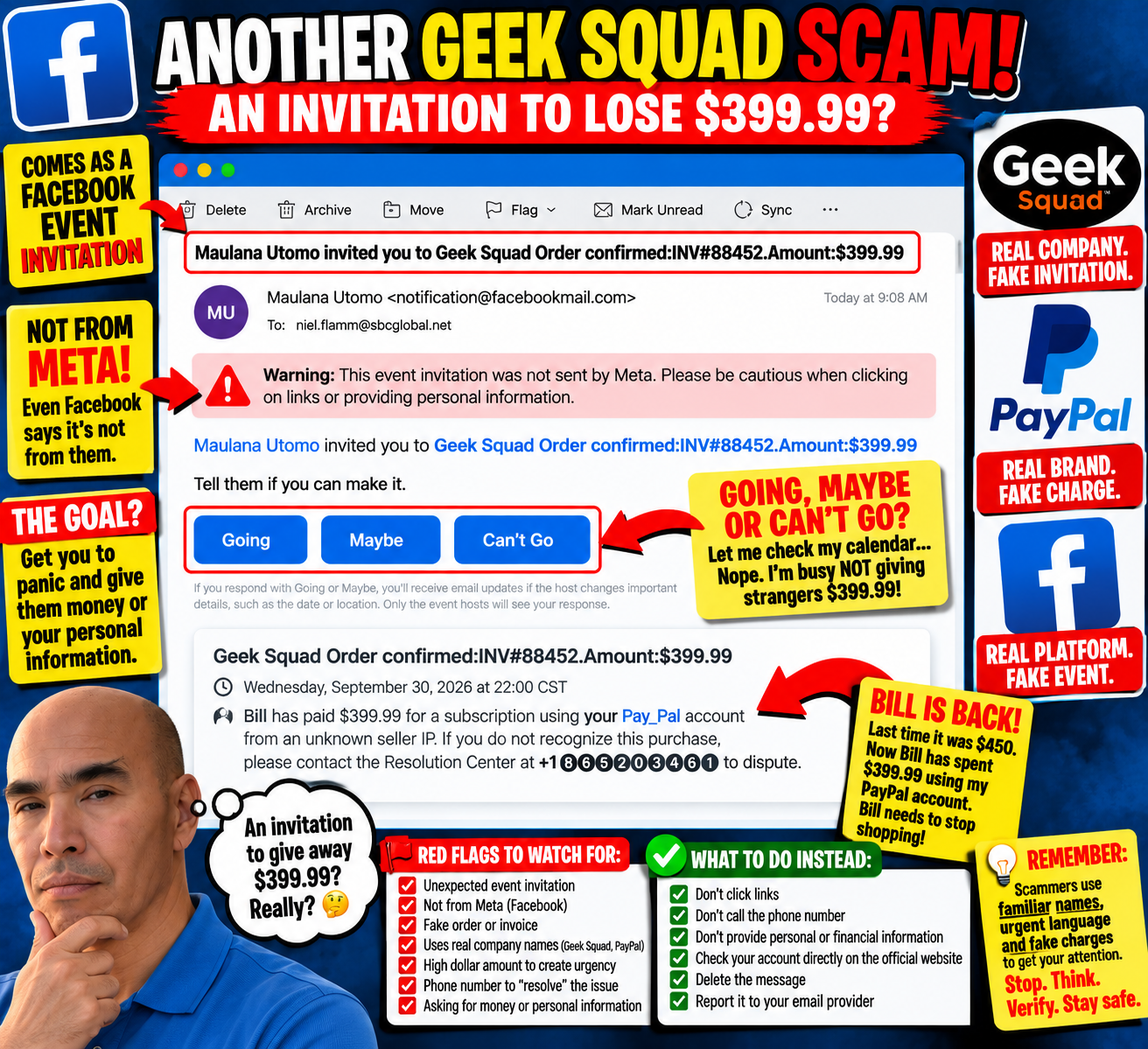
My inbox has once again extended a very generous invitation.
This time, Maulana Utomo has invited me to an event called:
“Geek Squad Order confirmed: INV#88452. Amount: $399.99”
How thoughtful.
Some people get invited to weddings.
Some people get invited to birthday parties.
Apparently, I get invited to give scammers money or personal information.
I really need a better social life.
Going, Maybe, or Can’t Go?
This is my favorite part of these fake Facebook event invitations.
According to the message, I supposedly have a $399.99 Geek Squad order.
Naturally, The Facebook gives me three options:
Going
Maybe
Can’t Go
Let me check my calendar...
Nope.
Unfortunately, I'm busy that evening, not giving strangers $399.99.
I'm going with Can’t Go.
Bill Is Back!
Then I read the description, and an old friend has apparently returned.
Bill.
The invitation says:
“Bill has paid $399.99 for a subscription using your Pay_Pal account from an unknown seller IP.”
Bill!
We've talked about this.
In one of my previous mystery-subscription emails, Bill supposedly spent $450 using my PayPal account.
Now he's back for another $399.99.
At this point, Bill has more subscriptions than I do.
Someone needs to take away his imaginary credit card.
Geek Squad, PayPal and Facebook Walk Into a Scam...
This one throws several recognizable names into the blender.
The event title references Geek Squad.
The description references PayPal—although creatively written as “Pay_Pal.”
The email itself comes from a Facebook event invitation.
And then there's a phone number supposedly belonging to a “Resolution Center.”
That's a lot of recognizable branding packed into one message.
But there's also something else sitting prominently near the top of the email:
“Warning: This event invitation was not sent by Meta. Please be cautious when clicking on links or providing personal information.”
That's probably the most useful sentence in the entire email.
What Exactly Am I Being Invited To?
That's what makes these messages funny to me.
The email literally says:
“Tell them if you can make it.”
Make it to what?
My $399.99 unauthorized transaction?
Is there going to be cake?
Should I bring a gift?
Do I need to RSVP?
Because from where I'm sitting, this looks like an invitation to worry about a fake charge, call the number provided, and potentially hand over money, account information, personal information—or some combination of the three.
That's one party I'm happy to miss.
The Urgency Is the Point
The $399.99 isn't there because someone necessarily charged me $399.99.
It's there to get my attention.
The recognizable company names get my attention.
The “unknown seller” creates concern.
The telephone number gives me an immediate action to take.
Put everything together, and the hope seems pretty obvious:
React first. Investigate later.
I'm doing the opposite.
If I ever receive a suspicious message claiming I've been charged by a company, I can check the account independently through the company's legitimate app or website rather than using the contact information in the suspicious message.
I don't need Bill's help.
Thanks for the Invitation
So, Maulana, thank you for thinking of me.
Unfortunately, I must respectfully decline your invitation to potentially hand over $399.99 and my personal information.
I already have plans.
I'm going to hit Delete.
And Bill?
Please stop shopping.
Have a Scam Story? Send It My Way
These messages keep coming, and I'll keep documenting them.
If you've received a strange scam email, fake invoice, suspicious Facebook invitation, mystery purchase, phishing text, or another creative attempt to get your money or information, send it to:
Send a screenshot and tell me what happened. Be sure to remove or cover any sensitive personal or financial information first.
Maybe your scammer can meet Bill.
They apparently have similar interests.
The Facebook Experiment Continues: Amy Messaged Me, and Now I Have More Questions
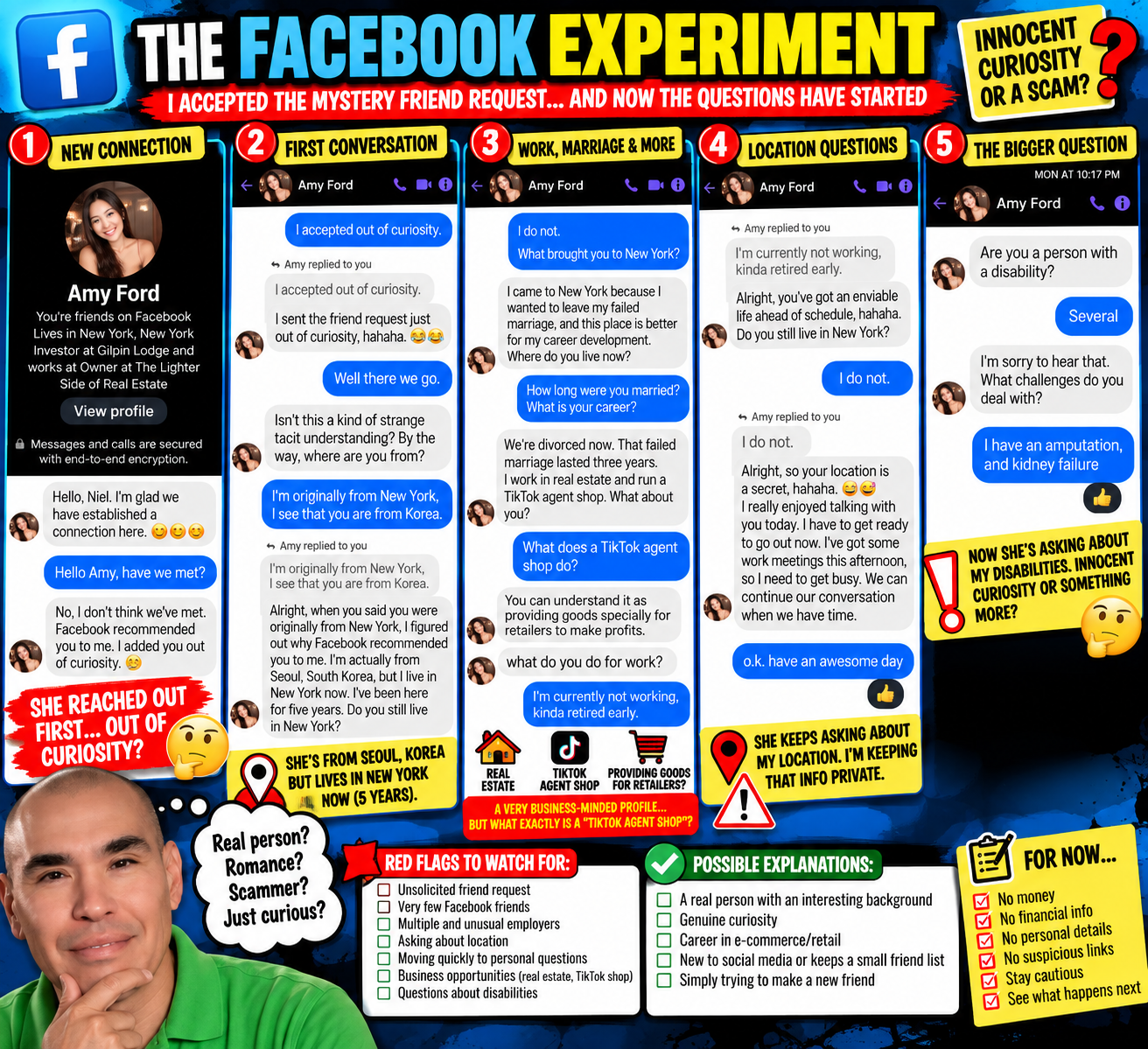
Well, that didn't take long.
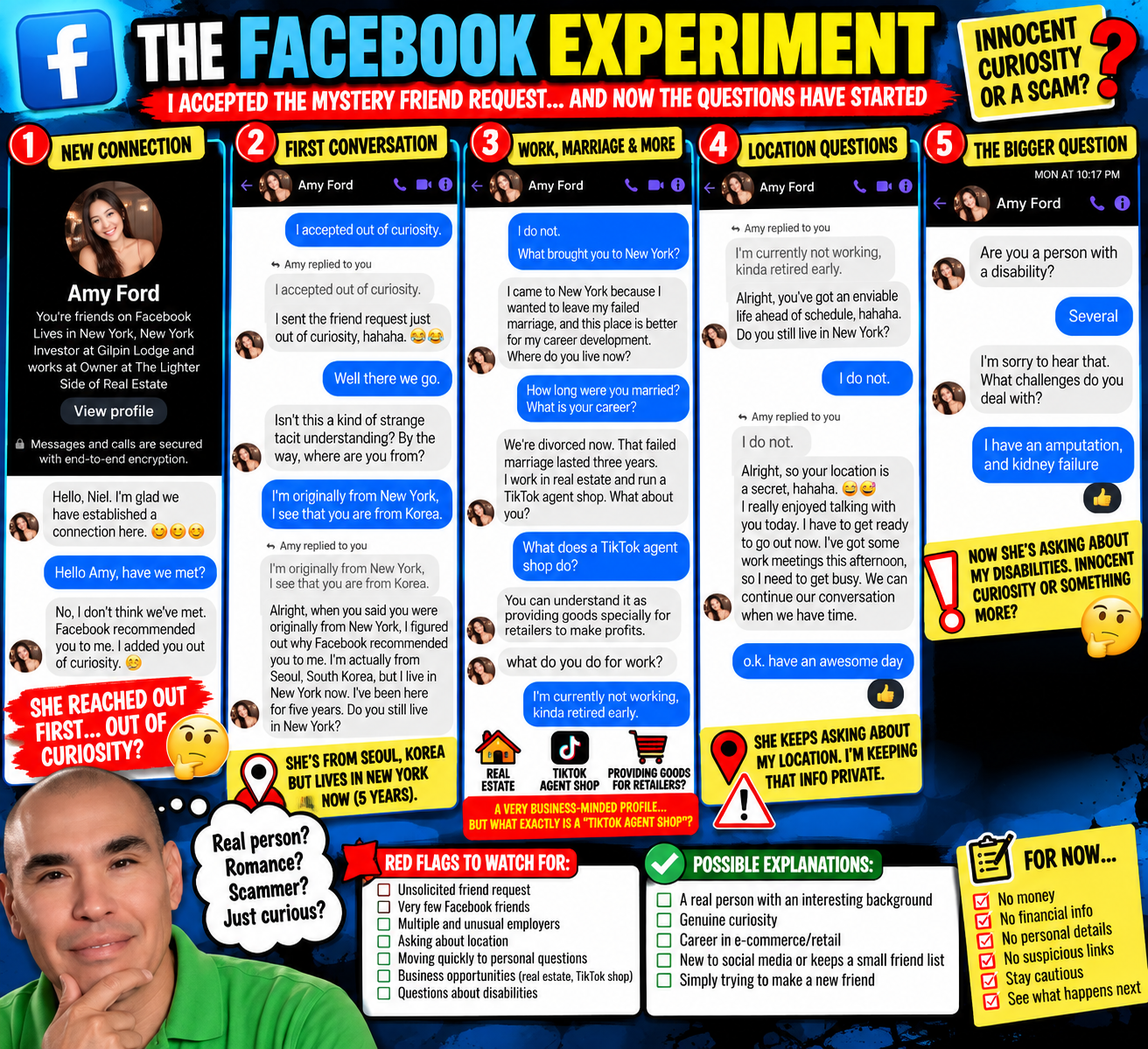
In my last update, I shared that I finally accepted the mysterious friend request from Amy Ford on Facebook.
I didn't know Amy. We had one mutual friend. Her profile caught my attention for several reasons, including a rather impressive collection of jobs. Still, none of that proved anything was wrong with the account.
So curiosity won.
I accepted.
And shortly afterward, Amy messaged me.
“I Added You Out of Curiosity”
Amy opened with:
“Hello, Niel. I'm glad we have established a connection here.”
I asked the obvious question:
“Hello, Amy, have we met?”
Nope.
She said Facebook recommended me and that she added me “out of curiosity.”
That made me laugh because curiosity was exactly why I accepted her.
I told her:
“I accepted out of curiosity.”
Her response?
“I sent the friend request just out of curiosity, hahaha.”
Well, there we go.
Two strangers brought together by the powerful matchmaking algorithm of The Facebook—and apparently mutual curiosity.
What could go wrong?
Then Came the Questions
Amy asked where I was from.
I told her I was originally from New York and mentioned that I saw she was from Korea.
She explained that she's originally from Seoul, South Korea, has lived in New York for five years, and then asked whether I still lived in New York.
I said I didn't.
She asked where I live now.
I didn't answer.
Instead, I asked what brought her to New York.
According to Amy, she moved there after leaving a failed marriage because New York offered better career opportunities.
I asked how long she had been married and what she did for work.
She said the marriage lasted three years and told me:
“I work in real estate and run a TikTok agent shop.”
Now I had another question.
What's a TikTok Agent Shop?
Remember, her Facebook profile already showed several professional roles, including investor, real estate business owner, and an HR-related position.
Now I had a TikTok agent shop to add to the résumé.
So I asked what a TikTok agent shop does.
Her explanation was:
“You can understand it as providing goods specifically for retailers to make profits.”
Okay.
I still don’t entirely understand it.
Then the conversation turned back toward me.
She asked what I do for work.
I told her:
“I'm currently not working, kinda retired early.”
Her response caught my attention:
“Alright, you've got an enviable life ahead of schedule.”
Then she asked again:
“Do you still live in New York?”
I answered:
“I do not.”
And that was it.
No location.
Amy joked that my location was apparently a secret.
For now, it is.
Then the Conversation Took an Unexpected Turn
Amy said she had enjoyed talking with me but needed to get ready for some work meetings. We exchanged pleasantries, and the conversation ended.
Or so I thought.
Later that night, at 10:17 p.m., another message arrived:
“Are you a person with a disability?”
That's certainly a conversation starter.
I answered:
“Several.”
She asked what challenges I deal with.
I told her about my amputation and kidney failure.
And that's where the screenshots currently leave us.
So, Is This a Scam?
I still don't know.
And I think that's important to say.
Nothing in this conversation proves that Amy is running a scam or that the person behind the account isn't who they claim to be.
At the same time, I'm paying attention.
An unsolicited friend request from a stranger.
Very few Facebook friends.
Several different professional descriptions.
Questions about where I live.
Questions about my employment.
A business involving retailers making profits.
And now questions about my disabilities.
Each one can have a perfectly innocent explanation.
Taken together, they're enough for me to continue being cautious.
I'm Also Curious About Where This Goes
This has become a little social-media experiment for me.
I'm not sending money.
I'm not providing financial information.
I'm not sharing passwords or account information.
I'm not clicking mystery links.
And I'm not rushing to provide personal details simply because someone asks.
I'm having a conversation.
If Amy is simply a friendly person in New York who found my profile through Facebook recommendations, that may be all this ever is.
If the conversation eventually turns into:
“Niel, have you ever considered cryptocurrency?”
Well...
I may have another blog post to write.
For now, The Facebook Experiment continues.
And I have a feeling this story isn't finished yet.