
The Scam Emails Are Getting Lazy: “Thanks for Your Order”… What Order?
Apparently, my imaginary shopping spree continues.
After Bitcoin purchases, mystery subscriptions, Geek Squad renewals, Facebook event invitations, and even a watch repair I never requested, the scammers have apparently decided they were working too hard.
Why bother creating an elaborate fake invoice when you can simply send:
“Thank You for Your Order.”
What order?
Excellent question.
Two Days, Two Mystery Orders
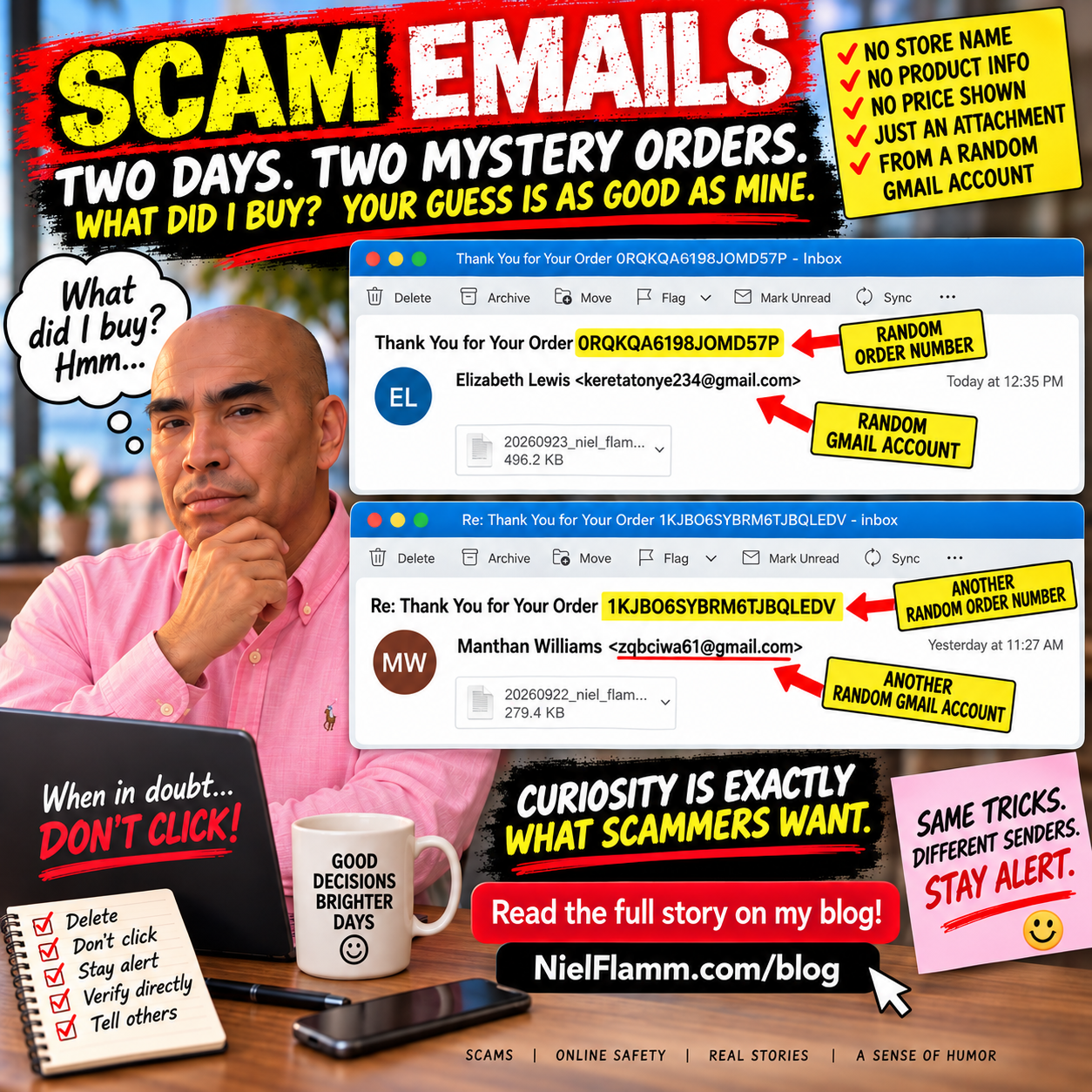
Yesterday, I received an email from “Manthan Williams” with the subject:
“Re: Thank You for Your Order 1KJBO6SYBRM6TJBQLEDV”
There was an attachment.
And almost nothing else.
Today, “Elizabeth Lewis” joined the party with:
“Thank You for Your Order 0RQKQA6198JOMD57P”
Another random order number.
Another attachment.
Another email with practically no explanation.
Apparently, customer service has embraced minimalism.
At Least Tell Me What I Bought
This is what makes these emails almost funny.
No recognizable retailer.
No product description.
No price prominently displayed.
No useful explanation of what I supposedly ordered.
Just:
Thank you for your order. Here's an attachment.
Oh, sure. Let me immediately open a mystery attachment from a random Gmail account to discover what I supposedly purchased.
What could possibly go wrong?
I'm not opening it.
That's an important point. I don't need to open an unsolicited attachment to investigate a purchase I don't recognize.
If I actually ordered something, I can check the retailer or payment account independently.
The Random Gmail Addresses Aren't Helping
One email claims to be from Elizabeth Lewis but arrives from a seemingly unrelated Gmail address.
The other claims to be from Manthan Williams and also comes from an unrelated Gmail address.
Could legitimate people use Gmail?
Of course.
But when an unexpected “order” email arrives from a random Gmail account, provides virtually no information, and wants me to open an attachment to learn more, my curiosity isn't winning this battle.
Delete beats double-click.
The Attachment Is the Bait
These messages use a slightly different approach than the fake PayPal and Facebook invitation scams I've been documenting.
Those messages tried to scare me with a large dollar amount and get me to call a telephone number.
These appear designed to create curiosity:
What did I order?
How much did they charge me?
Did somebody use my credit card?
What's in that attachment?
And that's exactly why I'm leaving the attachment alone.
Fear can make people click.
But so can curiosity.
My Imaginary Self Has Quite the Lifestyle
According to my inbox, imaginary Niel has been busy.
Bitcoin.
Geek Squad.
Mystery subscriptions.
Watch repairs.
More mystery subscriptions.
And now two mystery orders in two days.
The only thing missing is knowing what I actually bought.
Come on, scammers.
If you're going to invent purchases for me, at least make them interesting.
Tell me I bought a Ferrari.
A beachfront condo.
A private jet.
Maybe a lifetime supply of Coke Zero.
Give me something worth accidentally ordering.
Instead, I get:
ORDER 0RQKQA6198JOMD57P.
I'm underwhelmed.
Have a Scam Email? Send It to Me
I'm still collecting these because the tactics keep changing, even though the objective remains the same: get us to react before we stop and think.
If you've received a suspicious email, fake invoice, mystery order, phishing text, social media scam, or another creative attempt to separate you from your money, send it my way:
Tell me what happened and send a screenshot if you have one. Please remove or cover sensitive personal or financial information before sending anything.
Maybe I'll feature it in a future post.
Until then, Elizabeth and Manthan:
Thanks for thanking me for my orders.
Whatever they are.
They’re Back! Apparently I Paid $450 for Another Mystery Subscription
It’s been a little while, but apparently my scam social calendar is back in action.
For those who haven’t been following along, I’ve received some interesting emails over the past few months. According to my inbox, I’ve bought Bitcoin, renewed Geek Squad protection—more than once—and even had a watch repaired that I never sent anywhere.
Today, we return to an old favorite:
The Facebook Event Invitation Scam.
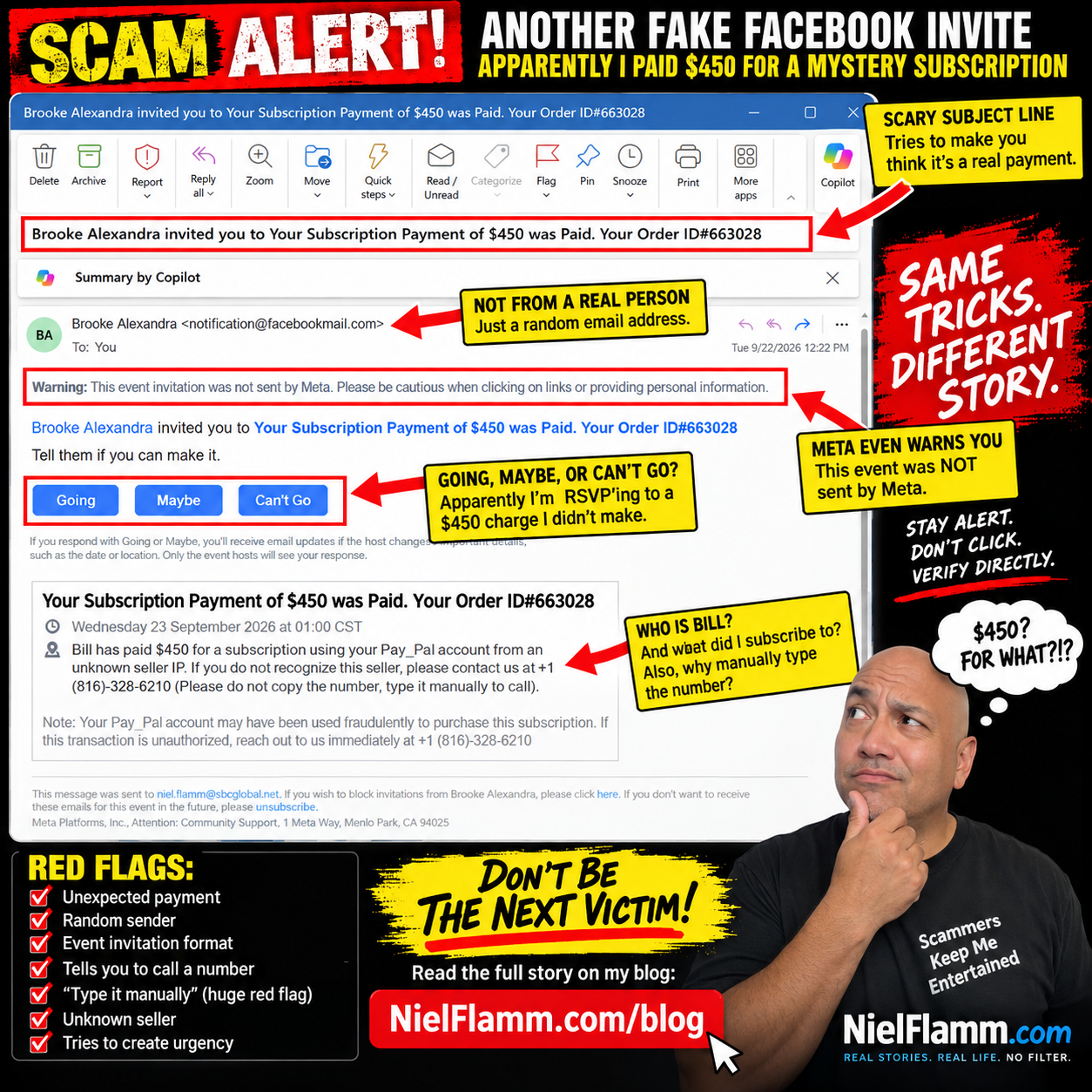
This time, “Brooke Alexandra” has invited me to an exciting event called:
“Your Subscription Payment of $450 was Paid. Your Order ID#663028”
Well, Brooke, thank you for the invitation.
Unfortunately, I have absolutely no idea what I supposedly subscribed to.
Going, Maybe, or Can’t Go?
My favorite part of these scams is still Facebook’s event format.
I’ve supposedly just discovered an unauthorized $450 PayPal transaction, and immediately underneath this alarming news, I’m asked:
Tell them if you can make it.
My choices?
Going.
Maybe.
Can’t Go.
Decisions, decisions.
I’m going with Can’t Go.
Not because I have another commitment. I try not to attend celebrations for fraudulent purchases.
Meet Bill, My Apparently Very Generous Alter Ego
The description gets even better.
It says:
“Bill has paid $450 for a subscription using your Pay_Pal account from an unknown seller IP.”
Who is Bill?
I have no idea.
Bill, please stop spending my imaginary money.
The message then provides a phone number and tells me to call if I don’t recognize the seller.
And then comes my favorite instruction:
“Please do not copy the number, type it manually to call.”
Oh, absolutely.
I'm not comfortable trusting a financial alert that asks me to type a phone number manually.
That’s practically the international symbol for:
“Nothing suspicious happening here!”
Meta Is Literally Warning Me
As with the previous versions, there’s an important message sitting prominently near the top:
“Warning: This event invitation was not sent by Meta. Please be cautious when clicking on links or providing personal information.”
That deserves more attention than the scary $450 headline.
The formula hasn’t changed much:
Create an alarming transaction.
Use a recognizable brand name like PayPal.
Please let me know if my account may have been compromised.
Give me a telephone number.
Please create urgency so I call before I stop to think.
And package everything inside a Facebook event invitation so the resulting notification looks more familiar.
The Scam Has One Big Problem
If my PayPal account really has a mysterious $450 transaction, I don’t need Brooke Alexandra—or Bill—to help me investigate it.
I can go directly to PayPal through its official app or website and check my account.
The same rule applies to suspicious emails claiming to come from a bank, credit card company, retailer, Geek Squad, or practically anyone else.
Don’t let the suspicious message tell you how to verify the suspicious message.
Verify it independently.
And don’t call a mystery number just because someone put “PayPal” next to it.
My Imaginary Spending Spree Continues
So let’s add another purchase to the growing list.
Bitcoin? ✔️
Mystery subscriptions? ✔️
Geek Squad? ✔️
Watch repair? ✔️
Another mystery $450 subscription? ✔️
At this point, the person living inside my spam folder has a considerably more exciting financial life than I do.
I’m just disappointed that after all this imaginary spending, nobody has emailed me to say I’ve purchased a beachfront condo in Thailand.
Scammers, if you’re reading this, at least make the next fake purchase interesting.
Have a Scam Story? Send It My Way
Now I want to hear what’s landing in your inbox.
If you’ve received a scam email, suspicious text, social media message, fake invoice, questionable refund notice, or something that made you think, “There is no way this is legitimate,” send it to me.
Please send me your screenshots and let me know what happened. I may feature some of them in future posts as we look at the creative—and sometimes hilariously bad—ways scammers try to separate people from their money.
Please remove or cover passwords, account numbers, addresses, phone numbers, or other sensitive personal information before sending screenshots.
Maybe it’s time to turn my scam collection into our scam collection.
And until then, Brooke...
Can’t Go.
The Scammers Missed Me — Apparently My Geek Squad Membership Renewed Again
I was starting to get worried.
It had been an entire week since someone invited me to a Facebook event announcing that I had supposedly purchased something I didn't purchase.
Was I no longer desirable to scammers?
Had they moved on?
Did Karen, Taiba, Callie, and Princess Manahil have a group chat where they decided I wasn't worth the effort?
Thankfully, my fears were put to rest today.
They're back.
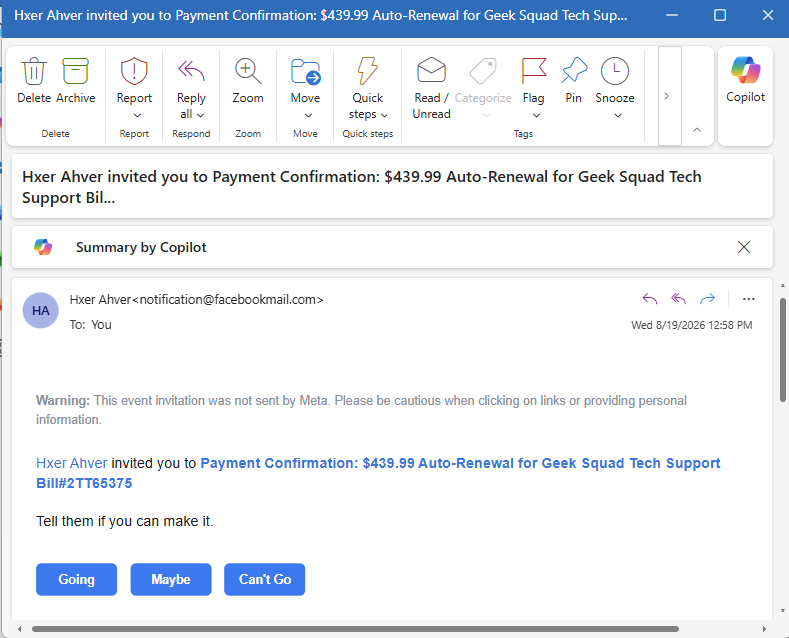
This afternoon, I received another Facebook event invitation. This one came from the wonderfully named “Hxer Ahver.”
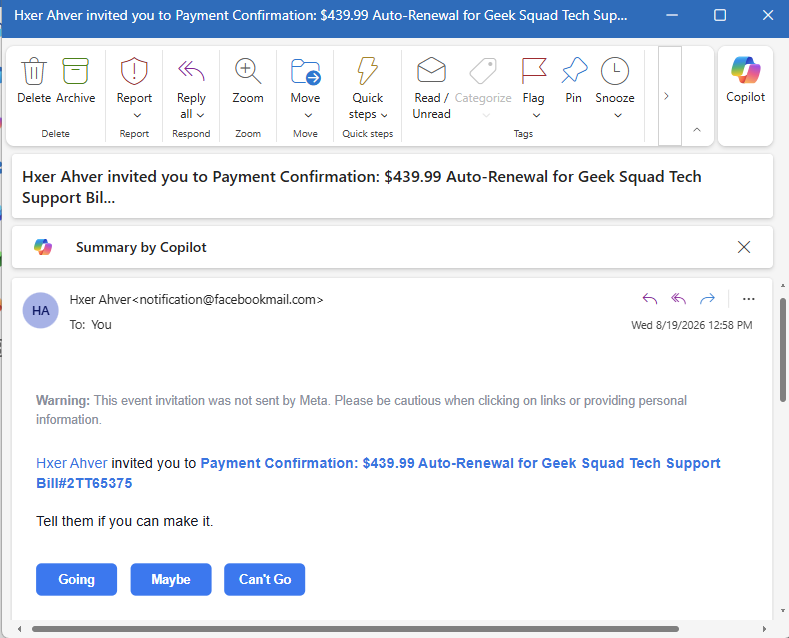
Hxer has invited me to:
“Payment Confirmation: $439.99 Auto-Renewal for Geek Squad Tech Support…”
Oh good.
Geek Squad again.
My Computer Is Apparently VERY Protected
Last week, Princess Manahil informed me that I had supposedly renewed my Geek Squad protection.
Now Hxer Ahver says I've done it again.
At this point, my computer should be the most protected in North America.
I'm expecting Geek Squad employees to start physically guarding it.
One by the monitor.
One near the keyboard.
Another stationed outside my house.
For $439.99, somebody better be watching the perimeter.
There is, of course, one tiny problem:
I didn't buy this.
Just like I didn't buy the Bitcoin.
Just like I didn't authorize the mystery subscription.
Just like I didn't purchase the previous Geek Squad protection.
My imaginary credit card has apparently been having an incredible summer.
And Once Again, I'm Invited to Attend
The brilliance of this particular scam remains my favorite part.
It's being delivered as a Facebook event invitation.
That means underneath a message claiming I've been charged $439.99, Facebook politely asks:
“Tell them if you can make it.”
And then gives me three options:
Going
Maybe
Can't Go
I appreciate the flexibility.
After reviewing my calendar, however, I'm going to have to select:
Can't Go.
I'd love to attend my $439.99 fraudulent Geek Squad auto-renewal, but unfortunately I have plans that afternoon.
Maybe next year.
Meta Is Still Warning Me
Just like the previous scam invitations, there's a warning sitting right at the top:
“Meta did not send this event invitation. Please be cautious when clicking on links or providing personal information.”
That's probably worth reading.
The clever part of this scam is that the notification itself can arrive through Facebook's event system. That gives the garbage in the invitation a little borrowed legitimacy.
You see a familiar notification.
You see Facebook.
You see a large dollar amount.
You see “Payment Confirmation.”
And the scammer hopes you panic before stopping to ask the most obvious question:
Why in the hell is Geek Squad notifying me about a $439.99 auto-renewal through a Facebook event invitation?
Geek Squad isn't throwing me a party.
The Scam Social Calendar Continues
So let's update the guest list.
Previously, I had:
Karen: Bitcoin purchase.
Taiba: Another Bitcoin purchase.
Callie: Mystery $398.99 subscription.
Princess Manahil: Geek Squad protection.
And now:
Hxer Ahver: Another $439.99 Geek Squad renewal.
I'm beginning to see a pattern.
The names change.
The dollar amounts change.
The supposed purchases change.
But the objective remains remarkably similar: make the recipient believe money has been charged, create urgency, and get them to react before they think.
That's why I don't use the contact information contained in suspicious messages.
If a message says there's a charge on one of my accounts, I'll independently open the company's official app or website and check the account myself.
No panic.
No mystery phone numbers.
No handing over account information.
Please don't attend Facebook events celebrating purchases I didn't make.
See You at the Next One
At this point, I don't think this is over.
We've done Bitcoin.
We've done subscriptions.
We've done Geek Squad twice.
I'm curious what I'll apparently purchase next.
A $799 Norton subscription?
A $1,200 iPhone?
Extended warranty coverage for a car I don't own?
Whatever it is, I have only one request for the scammers:
Please check my calendar first.
I'm getting really busy declining all these invitations.
Apparently My Scam Social Calendar Is Getting Pretty Full
Well, this is getting ridiculous.
Yesterday, I wrote about the collection of scam emails I've been receiving disguised as Facebook event invitations.
Apparently, I had purchased Bitcoin. Twice. I had also supposedly paid for a mysterious subscription.
Today, I received another invitation.
At this point, I don't know whether I'm being scammed or whether I'm just incredibly popular.
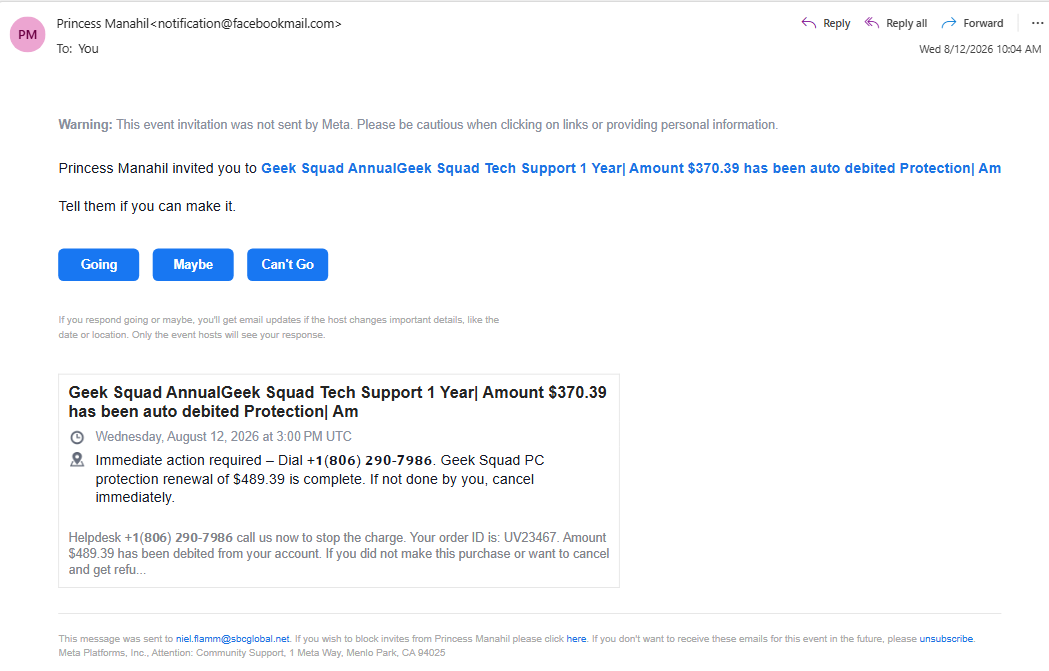
This latest invitation comes courtesy of someone named Princess Manahil, who has graciously invited me to an event involving:
“Geek Squad Annual Geek Squad Tech Support 1 Year | Amount $370.39 has been auto debited…”
Catchy event name.
I'm not sure who's handling marketing for this gathering, but it needs some work.
Going, Maybe, or Can't Go?
Once again, because this is being delivered as a Facebook event invitation, I get three wonderful choices:
Going. Maybe. Can't Go.
I'm going with Can't Go.
Not because I'm busy.
Not because I have another engagement.
But because I DIDN'T BUY GEEK SQUAD PROTECTION.
The invitation claims that a Geek Squad PC protection renewal is complete and that I need to take “immediate action” by calling the conveniently supplied telephone number if I want to cancel.
Interestingly, the email can't even seem to decide how much I supposedly spent.
The event title says $370.39.
The description says the Geek Squad protection renewal is $489.39.
Apparently, even my imaginary purchases are experiencing inflation.
Yesterday Bitcoin, Today Geek Squad
What I find interesting is how quickly the product changes while the basic scam stays almost the same.
Yesterday:
PayPal! Bitcoin! Hundreds of dollars! CALL NOW!
Today:
Geek Squad! Computer protection! Hundreds of dollars! CALL NOW!
Tomorrow?
Who knows?
Maybe I'll receive an invitation informing me that I've purchased a 12-month extended warranty for a submarine.
The important part isn't what they're pretending I bought.
The important part is the urgency.
There's supposedly a large charge.
I supposedly need to act immediately.
And—how convenient—there's a phone number waiting for me.
Once Again, Meta Is Basically Waving a Red Flag
At the top of the email is this warning:
“Meta did not send this event invitation. Please be cautious when clicking on links or providing personal information.”
That's not exactly subtle.
When the platform delivering the invitation is essentially saying, “Hey, you might want to be careful with this thing,” perhaps calling the mystery phone number isn't the best next move.
And that's what makes these messages interesting.
The surrounding email can look legitimate because it is tied to an actual Facebook event invitation. The scammer doesn't necessarily need to spoof an entire email from scratch. Instead, the scam message is stuffed into the event information.
The legitimate notification becomes the delivery vehicle for the garbage inside it.
My Rule Remains the Same
If I receive an unexpected message saying I've been charged hundreds of dollars, I won’t call the number provided in that same unexpected message.
If it's supposedly PayPal, I'll go directly to PayPal.
If it's supposedly my bank, I'll go directly to my bank.
If it's supposed to be Geek Squad, I’ll look up the legitimate company contact information and check there.
I'm not calling Princess Manahil's Urgent: Please Call Us Immediately Refund Department.
So, let's update my scam social calendar:
Karen: Bitcoin — Can't Go.
Taiba: Bitcoin — Can't Go.
Callie: Mystery subscription — Can't Go.
Princess Manahil: Geek Squad — Can't Go.
Four invitations and I've declined every one.
At this rate, the scammers are going to stop inviting me to things.
And frankly, that would hurt.
Congratulations! I’ve Apparently Bought Bitcoin, Paid a Mystery Subscription, AND Been Invited to a Scam
I have exciting financial news.
Apparently, while minding my own business, I purchased hundreds of dollars in Bitcoin.
Twice.
I also paid $398.99 for a subscription I don’t recognize.
I had no idea I was this financially active.
Even more impressive: all of these transactions were announced to me through Facebook event invitations.
Because when I think PayPal fraud department, naturally I think:
“Going” — “Maybe” — “Can’t Go.”
Nothing says urgent financial security alert quite like being asked whether I can attend my own fraudulent Bitcoin purchase.
The Scam That Keeps Inviting Me Places
Over the past couple of days, I've received several emails that look like Facebook event invitations.
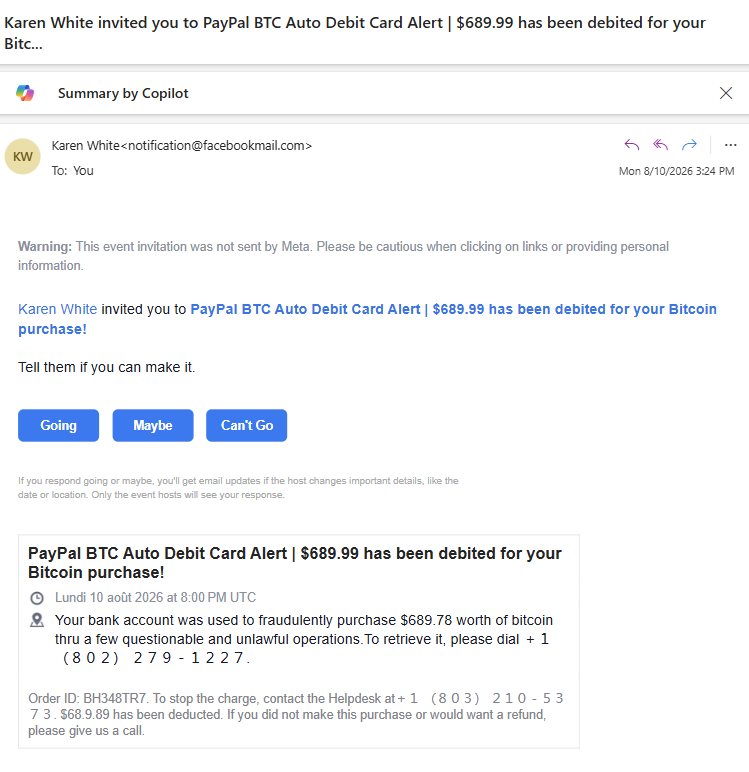
The first one came from “Karen White.”
Karen apparently invited me to:
“PayPal BTC Auto Debit Card Alert | $689.99 has been debited for your Bitcoin purchase!”
Well, Karen, thank you for thinking of me.
The invitation then gave me the traditional Facebook choices:
Going
Maybe
Can’t Go
I'm going with Can't Go.
I have plans that evening.
Also, I DIDN'T BUY ANY BITCOIN.
Then another invitation arrived.
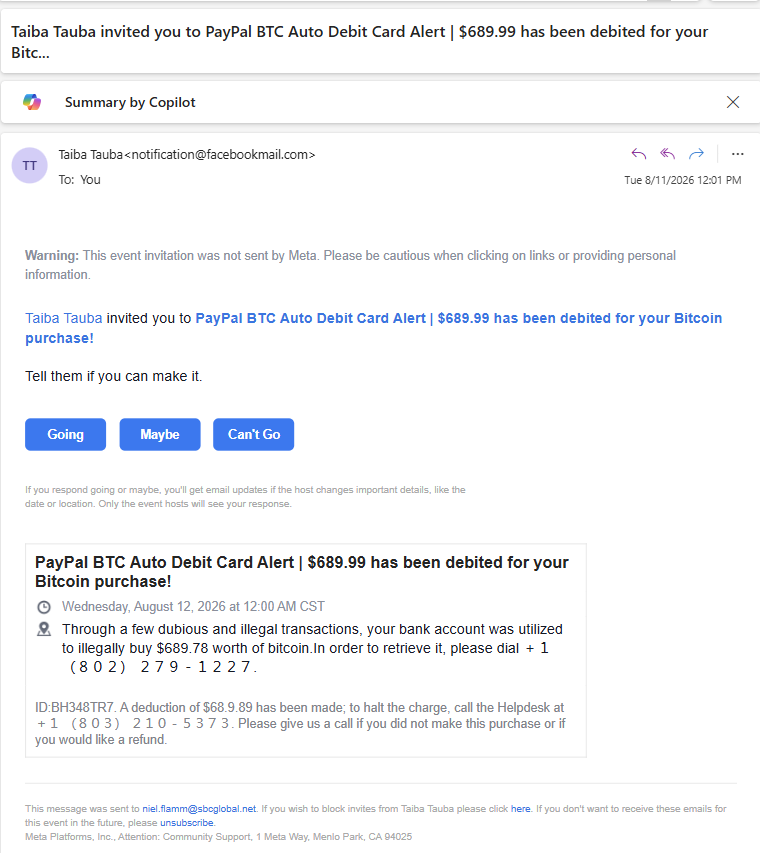
This time, my host was “Taiba Tauba,” inviting me to essentially the same $689.99 Bitcoin extravaganza.
Same general story. My bank account had supposedly been used fraudulently, and I needed to call a phone number to straighten everything out.
At this point, I'm beginning to feel bad.
Karen invited me.
Taiba invited me.
I'm turning down everybody.
This is going to destroy my social life.
Then the Scam Learned Spanish
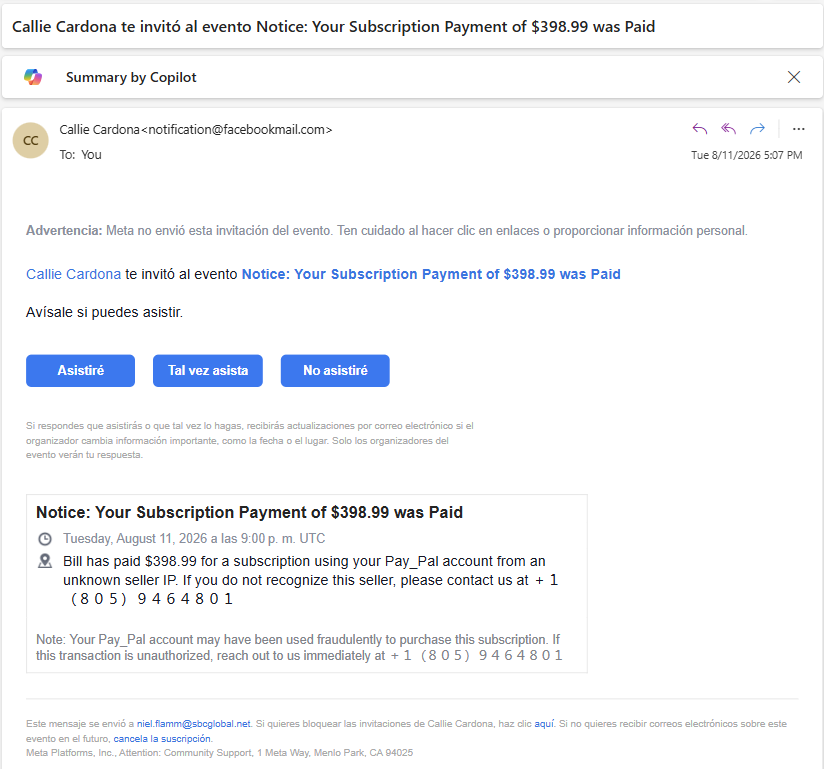
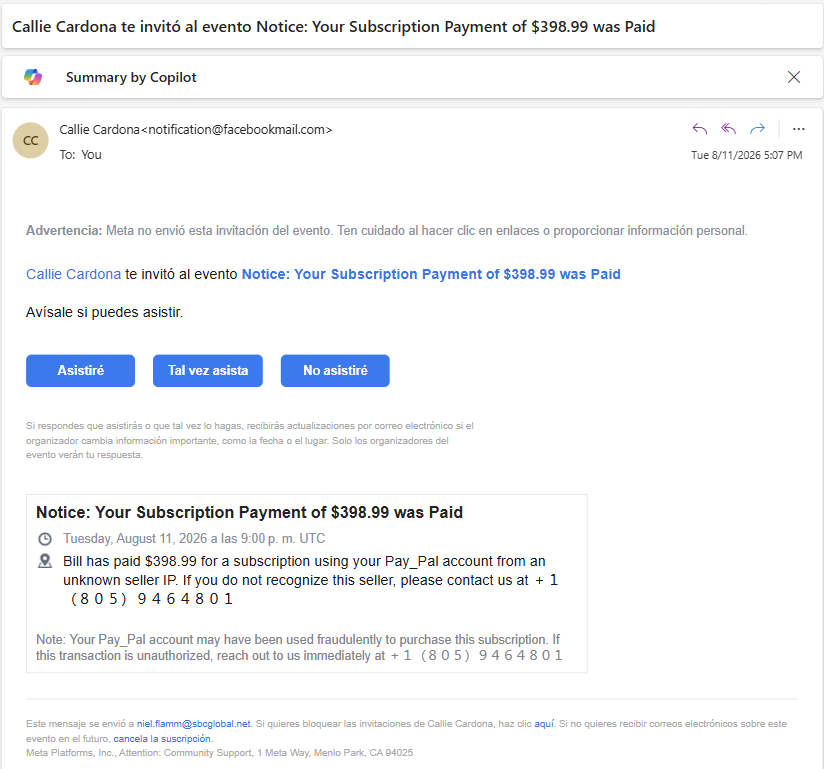
Later, I received another invitation from “Callie Cardona.”
For reasons unknown to me, Facebook presented much of this invitation in Spanish.
“Callie Cardona te invitó al evento…”
Apparently, my scam has gone international.
This time, it wasn't Bitcoin.
The subject announced:
“Notice: Your Subscription Payment of $398.99 was Paid.”
What subscription?
No clue.
Perhaps it's the premium membership to the People Who Keep Calling Random Phone Numbers From Scam Emails Club.
I was provided a phone number to call if I didn't recognize the transaction.
And that's the whole point.
They Don't Really Want the $689.99
The scammer isn't necessarily trying to convince you that you've already lost $689.99.
They're trying to make you panic about losing $689.99.
You see “PayPal.”
You see “Bitcoin.”
You see “$689.99.”
You see “fraudulent transaction.”
And then you see a phone number.
The hope is that your brain skips right over:
“Wait a minute…why is PayPal notifying me about financial fraud through a FACEBOOK EVENT INVITATION?”
…and goes directly to:
OH CRAP! CALL THE NUMBER!
Once you call, the scammer has you engaged. That's when they can try to obtain personal information, financial information, account credentials, remote access to your computer, or convince you to move money.
The fake transaction is the bait.
Your panic is the hook.
Facebook Even Warned Me
One of the funniest parts is that the emails themselves contain a warning:
“Meta did not send this event invitation. Please be cautious when clicking on links or providing personal information.”
That's a fairly significant clue.
It's basically Facebook standing in the background waving its arms:
“WE DIDN'T SEND THIS! DON'T BLAME US!”
The scammers appear to be exploiting legitimate event/invitation functionality to get their message delivered. That can make the email look more convincing because portions of the message may actually come through Facebook's notification system.
But a legitimate-looking messenger doesn't make the message legitimate.
If somebody tapes a fake IRS notice to a Domino's pizza box, it doesn't mean Domino's is collecting your taxes.
The Biggest Red Flag? The Phone Number
All three messages are designed to get me to do essentially the same thing:
Call a phone number.
No thanks.
If I receive an unexpected notice about a PayPal transaction, I won't call the number provided by the person saying my money is disappearing.
I'll open PayPal myself.
If it's supposedly my bank, I'll use my bank's official app, website, or the number printed on the back of my card.
If there's a $689 Bitcoin purchase, I'll handle it through the financial institution.
And if there isn't?
Congratulations.
I just saved myself from attending Karen's Bitcoin party.
Scam Rule of the Day
Unexpected messages involving money deserve skepticism—especially when they create urgency and immediately tell you whom to call.
Don't use the phone number in the suspicious message.
Don't click its links.
Don't give anyone a verification code.
Don't install software because the friendly “fraud department” representative tells you to.
And please don't give someone remote access to your computer so they can “process your refund.”
Verify the alleged transaction independently.
As for my three invitations?
Karen: Can't Go.
Taiba: Can't Go.
Callie: No asistiré.
Finally, I'm multilingual.