

This T-Mobile Email Almost Got Me — And That’s What Makes It Good
I get enough scam emails that most of them don't survive more than a few seconds before getting mentally tossed into the garbage.
Bad grammar.
Random Gmail address.
Mystery attachment.
A $700 charge for something I never bought.
Somebody telling me I won a prize I never entered to win.
Easy.
This one was different.
This one almost got me.
And that is exactly why I'm writing about it.
📱 It Looked Like T-Mobile
The subject line was:
“Time is running out”
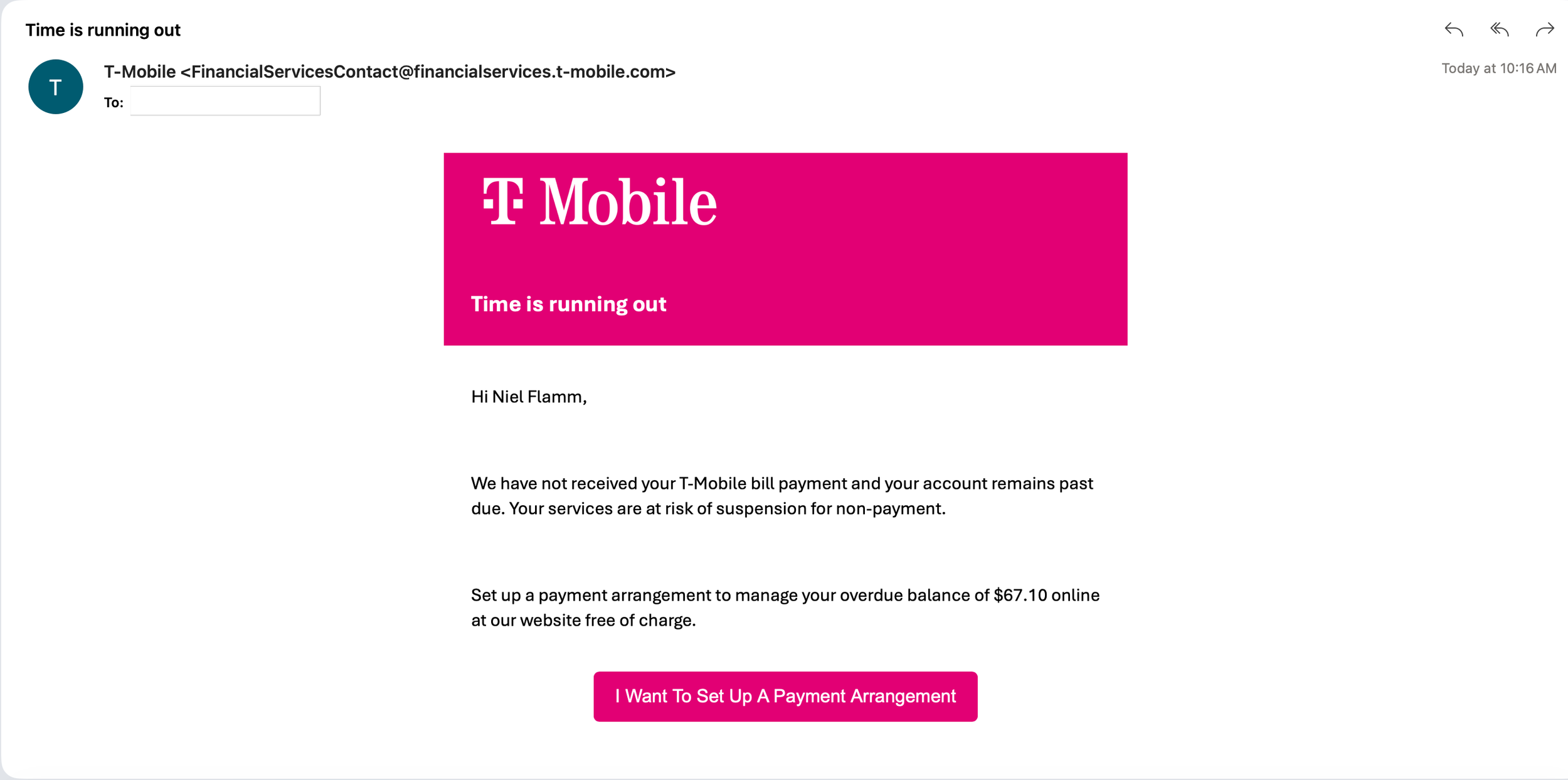
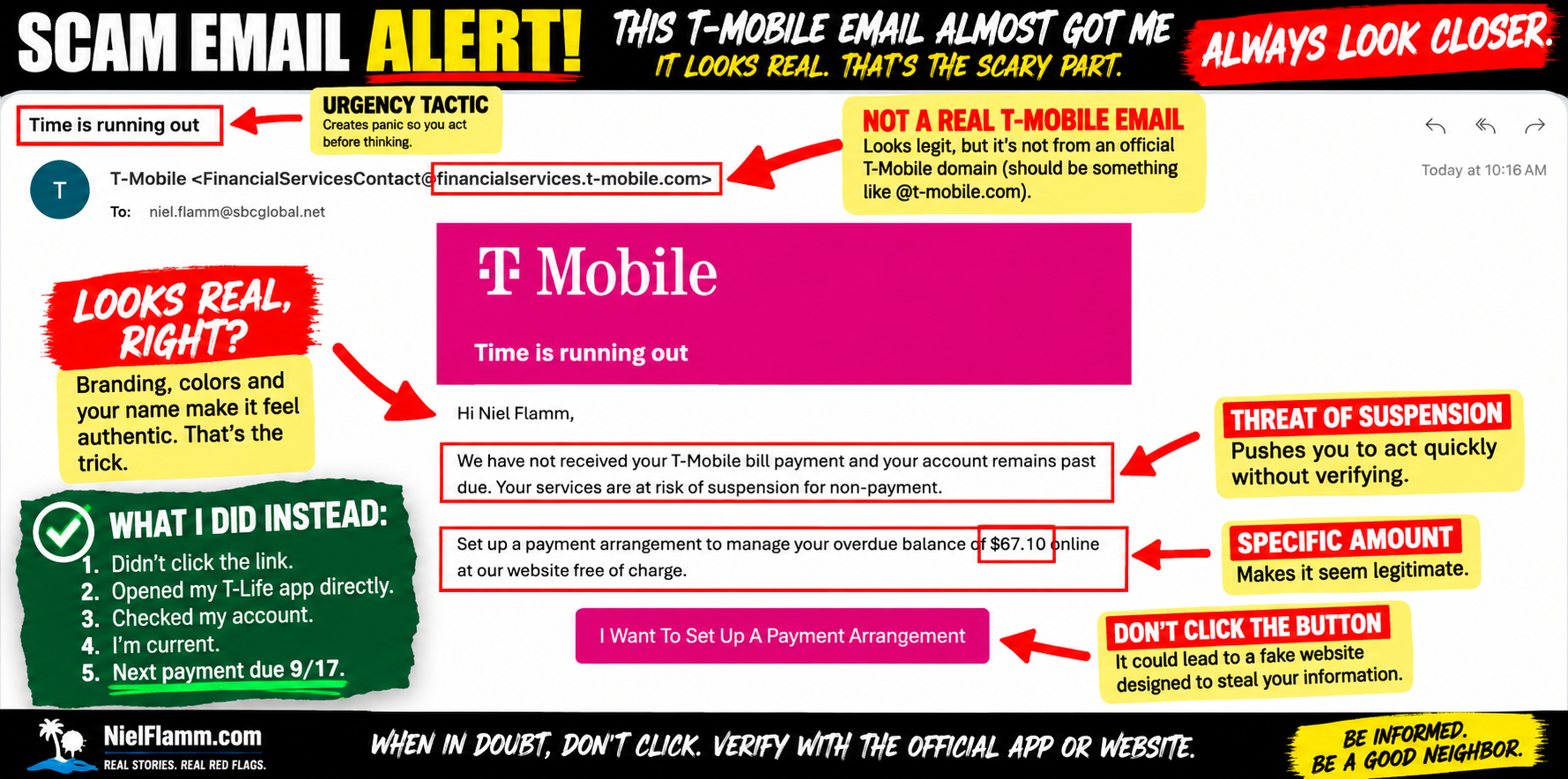
The email had the familiar magenta T-Mobile branding, addressed me by name, and told me:
“We have not received your T-Mobile bill payment and your account remains past due.”
It even gave me a specific overdue balance:
$67.10
Then came the threat:
My service was at risk of suspension for non-payment.
And conveniently, right underneath was a big magenta button:
“I Want To Set Up A Payment Arrangement”
That's a pretty effective combination.
Recognizable company.
My name.
Specific dollar amount.
Urgency.
Threat of losing service.
And an immediate solution.
For a moment I thought:
Wait... did I miss my T-Mobile payment?
🚩 Then I Looked Closer
The email looked fairly legitimate.
Fairly.
Then I looked at the sender:
FinancialServicesContact@financialservices.t-mobile.com
At first glance, that's pretty convincing.
There's “T-Mobile” right there in the address.
But an email address that looks legitimate isn't enough for me anymore.
And more importantly, I realized I was about to make the mistake these emails are designed to encourage:
I was using the email to determine whether the email was legitimate.
So I stopped.
I didn't use the button.
I didn't follow its instructions.
I went somewhere I already trusted.
📲 I Opened the T-Life App
This was the easiest test of all.
Instead of clicking the payment-arrangement button, I opened my T-Life app independently and checked my actual account.
Guess what?
I'm current.
My account isn't showing the overdue situation described in the email.
My next payment isn't due until September 17.
Well, that's awkward.
Apparently, my T-Mobile account forgot to tell T-Mobile that my T-Mobile account is fine.
😂
🚨 This Is the Kind of Message That Concerns Me
The ridiculous scams aren't necessarily the ones I'm most worried about.
It's these.
The ones that are close enough.
The branding looks right.
The formatting looks professional.
The amount is believable.
The situation is plausible.
And the sender information looks convincing enough that you might not examine it carefully.
Then they add urgency:
TIME IS RUNNING OUT
Your service might be suspended.
You owe money.
Fix it now.
And here's a convenient button.
That urgency matters because it pushes you to act before you independently verify the claim.
🔍 The Best Scam Detector Wasn't the Email
Here's the lesson I'll take from this one.
I didn't need to determine whether every graphic was authentic.
I didn't need to inspect HTML.
I didn't need to click the button to see where it went.
And I didn't need to contact whoever sent the message.
I went straight to the account the email was supposedly about.
My actual T-Mobile account told the story.
That's an incredibly simple habit:
If your bank emails you about a problem, open your banking app yourself.
If Amazon says there's an order, open Amazon yourself.
If PayPal says somebody charged you, open PayPal yourself.
If your wireless carrier says you're past due, open your carrier's app yourself.
Don't use the suspicious message to get there.
🧠 And Yes, This One Almost Worked
I think that's worth admitting.
People sometimes talk about scams as though only gullible or technologically inexperienced people fall for them.
That's dangerous thinking.
I spend a ridiculous amount of time looking at these things.
I've written about scam emails.
Recruiting scams.
Mystery attachments.
Fake subscription charges.
Questionable car advertisements.
And this email still made me stop and think:
“Wait... am I past due?”
That's what good social engineering does.
It doesn't necessarily make you believe something ridiculous.
It gives you something believable enough that you react before you think.
Fortunately, this time I thought.
Then I checked.
🏡 Be a Good Neighbor
If you have a parent, friend, coworker, or neighbor who might receive something like this, show them this simple trick:
Don't click the button.
Open the company's app or type the company's known website yourself.
Check the account independently.
A 30-second verification could prevent a much bigger headache.
And if you're ever tempted to think:
“I'd never fall for something like that.”
Neither did I.
But this one got close.
Very close.
That's why I'm sharing it.
Follow along at NielFlamm.com/blog for more scam investigations, suspicious emails and the occasional message that makes even me look twice.

Thank You for Your Order! What Did I Buy? Apparently, I Have to Open the Mystery Attachment
Oh, this one barely even tries. 😂
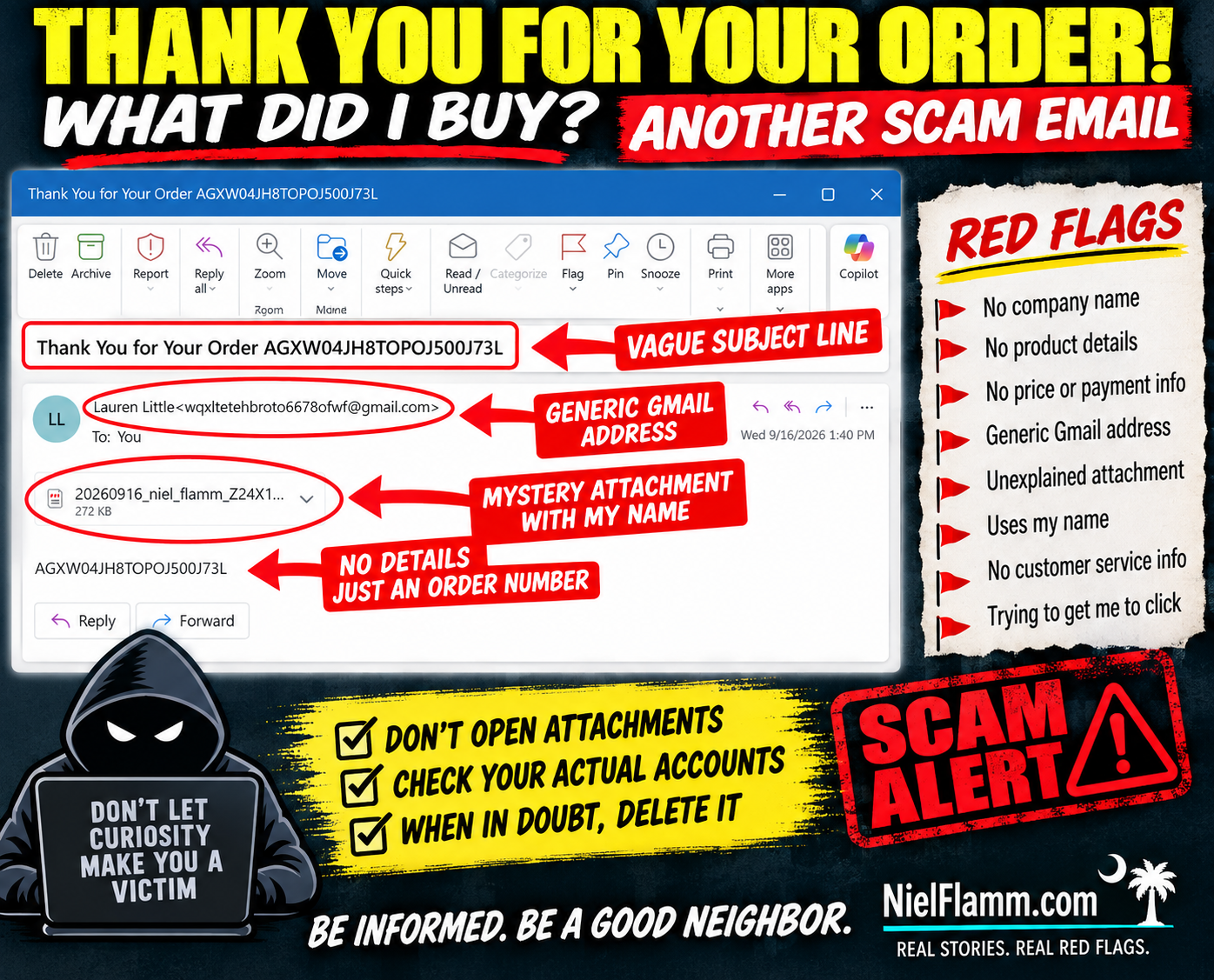
Another suspicious email landed in my inbox with the subject:
“Thank You for Your Order AGXW04JH8TOPOJ500J73L”
Well, thank you!
There's just one small problem.
WHAT DID I ORDER?
The email doesn't tell me.
No company name.
No product.
No price.
No payment method.
No shipping information.
No customer-service information.
Nothing.
The sender is Lauren Little, using a Gmail address that doesn't identify any recognizable merchant.
But don't worry—they did give me an order number.
And, more importantly, a 272 KB mystery attachment.
How thoughtful.
🚩 The Attachment IS the Email
The actual body contains essentially nothing except the same mysterious order number.
So if I want to know what I supposedly purchased, there's an obvious temptation:
Open the attachment.
And that's exactly what I'm not going to do.
I don't know what's inside that file, because I didn't open it. I'm not going to claim it's malware, a malicious document or anything else I haven't verified.
I also don't need to find out.
An unexpected email from an unknown sender telling me about an unidentified purchase and giving me an unexplained attachment has already failed my trust test.
🚩 Apparently Scammers Have Discovered Personalization
Here's another nice touch.
The attachment's filename includes:
“niel_flamm”
Ahhh.
They know my name!
That changes everything.
Actually, no.
Putting my name in the attachment doesn't make me more likely to open it. It makes me more likely to delete it.
Personalization isn't proof of legitimacy.
Names, email addresses, and other basic information can come from countless places online.
🧠 Curiosity Is the Hook
That's what makes these minimalist emails interesting.
They don't need an elaborate story.
They want me to create the story:
Did I accidentally buy something?
Did someone use my credit card?
How much did they charge me?
What company is this?
What's in that attachment?
And there's the trap.
Instead of giving me information, the email creates an information gap and gives me a file that supposedly fills it.
No thanks.
If I'm concerned about an unauthorized purchase, I'll check my bank and credit-card accounts myself.
I don't need to open a mystery attachment to discover whether I've spent money.
🏡 Don't Be Passive. Be a Good Neighbor.
If you receive something like this and recognize the warning signs, share them.
Someone else may see “Thank You for Your Order” and immediately panic.
Before they open the attachment, tell them:
Check your actual financial accounts first.
Sometimes being a good neighbor means preventing someone from making that one curious click.
Because sometimes the safest attachment is the one you never open.
Follow along at NielFlamm.com/blog for more suspicious emails, questionable vehicle offers, recruiting scams and whatever strange thing lands in my inbox next.

Another $399.99 Subscription? Apparently Geek Squad Is Throwing a Facebook Event
I have another expensive subscription I didn’t know about.
And once again, the scammers were thoughtful enough to invite me to a Facebook event to celebrate it.
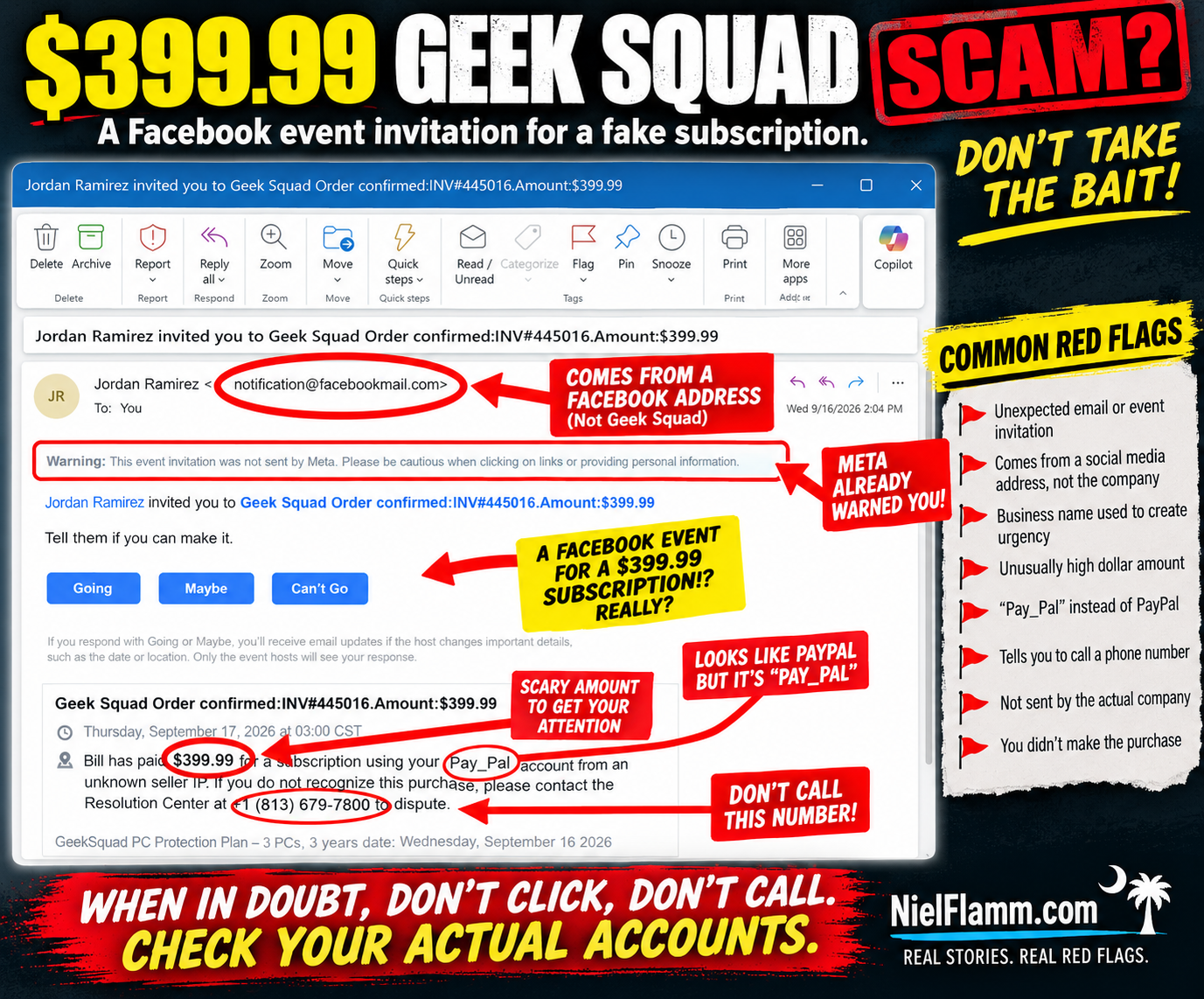
This email arrived with the subject:
“Jordan Ramirez invited you to Geek Squad Order confirmed: INV#445016.Amount:$399.99”
According to the invitation, I supposedly paid $399.99 for a Geek Squad PC Protection Plan.
There's just one minor problem.
I didn't.
And if this looks familiar, it should.
🚩 Haven't We Seen This Movie Before?
Just recently, I received another Facebook event invitation claiming that $498.99 had been paid for a subscription through my PayPal account.
That one came from “Agnes V. Burden.”
This time we have Jordan Ramirez, Geek Squad, and $399.99.
Different person.
Different company.
Different dollar amount.
But remarkably similar script.
The invitation claims:
“Bill has paid $399.99 for a subscription using your PayPal account from an unknown seller IP.”
Wait.
Bill is back?!
Apparently Bill has access to my imaginary PayPal account and is having quite a shopping spree.
It would be helpful to sit Bill down and discuss boundaries.
🚩 Facebook Is Literally Warning Me
One of my favorite parts is that the warning is sitting right there at the top of the message:
“Meta did not send this event invitation. Please be cautious when clicking on links or providing personal information.”
Thank you, Meta.
Message received.
That's an important distinction because the sender shown in the email is:
Jordan Ramirez <notification@facebookmail.com>
Someone might see the Facebook-related email address and assume the underlying message must be trustworthy.
But the screenshot itself explains what's happening.
Jordan Ramirez invited me to an event.
The suspicious content is contained inside that event invitation.
A legitimate platform delivering a notification doesn't automatically make the content created by another user legitimate.
🎉 What Time Does My Geek Squad Party Start?
The invitation gives me the traditional Facebook choices:
Going
Maybe
Can't Go
Let's see.
Am I going to my imaginary $399.99 Geek Squad subscription celebration?
I'm leaning toward:
Can't Go.
I have plans that evening.
Specifically, not calling the phone number in this message.
🚩 And There It Is: The Phone Number
The message says that if I don't recognize the purchase, I should contact a:
“Resolution Center”
and conveniently provides a phone number.
That's the part that deserves attention.
The scary $399.99 charge gets your attention.
Geek Squad provides a recognizable brand.
PayPal adds a financial component.
And the phone number provides an immediate way to “fix” the problem.
That's exactly when I'd stop.
If I genuinely thought Geek Squad charged me $399.99, I wouldn't call the number supplied in a suspicious Facebook event.
I'd check my PayPal, credit card, and bank accounts independently.
Then, if necessary, I'd independently find the legitimate contact information for Geek Squad or the financial institution involved.
The suspicious message doesn't provide both the problem and the solution.
🚩 “Pay_Pal” Makes Another Appearance
This is another detail I noticed in both messages.
Not PayPal.
Pay_Pal.
The previous $498.99 subscription invitation used essentially the same wording.
Now this one does too.
So let's compare.
Previous message:
$498.99 subscription.
Facebook event invitation.
Claim involving “Pay_Pal.”
Unknown seller IP.
Phone number to call.
Current message:
$399.99 Geek Squad subscription.
Facebook event invitation.
Claim involving “PayPal.”
Unknown seller IP.
Phone number to call.
That's quite a coincidence.
Or perhaps we're looking at variations of the same social-engineering template.
🧠 The Scam Isn't Really About Geek Squad
That's an important point.
The recognizable company name makes the story believable.
Today it's Geek Squad.
Another day it could be PayPal, Norton, McAfee, Amazon, Microsoft, or another familiar brand.
The psychology is what matters.
You see:
$399.99
Your immediate reaction might be:
WHAT DID I BUY?!
Then you see:
“If you do not recognize this purchase, please contact...”
Perfect!
There's a phone number!
And before you've checked whether the transaction actually exists, you're talking to whoever is on the other end.
That's why urgency is so effective.
The message doesn't necessarily need to survive careful analysis.
It just needs to get you to act before you do careful analysis.
🚩 Don't Call the Number to Find Out Whether the Number Is Legitimate
This seems obvious when you say it out loud, but it's worth repeating.
If a suspicious message tells you that something terrible happened and then provides a phone number to fix it:
Don't use the suspicious message to verify the suspicious message.
Go around it.
Open your actual PayPal app.
Check your bank.
Check your credit card.
Go independently to the company's official website.
If there's no $399.99 transaction anywhere, that's important information.
And if there is an unauthorized transaction, contact the financial institution using independently verified information—not the number supplied in the questionable message.
🏡 Don't Be Passive. Be a Good Neighbor.
This is why I keep sharing these.
I recognize the pattern because I've been documenting them.
Someone else might not.
Someone might see Geek Squad, recognize the name, and panic.
Someone might think their spouse or child bought something.
Someone might worry that their PayPal account has been hacked.
And someone might immediately call.
If you see one of these, don't just delete it and move on.
Warn somebody.
Show your parents.
Show your neighbors.
Show the person who always calls you when something weird appears on their computer.
Report suspicious content through the appropriate platform.
Sometimes being a good neighbor is simply saying:
“Don't call that number. Let's check your actual account first.”
Jordan, I'm Going to Have to Decline
So thank you, Jordan Ramirez, for inviting me to the celebration of my imaginary $399.99 Geek Squad subscription.
Unfortunately:
Going? Nope.
Maybe? Still nope.
Can't Go? That's the one.
And apparently I need to have a serious conversation with Bill, because he keeps buying subscriptions with my imaginary PayPal account.
Follow along at NielFlamm.com/blog for more scam emails, suspicious recruiters, questionable vehicle offers, and whatever strange invitation lands in my inbox next.

The Delta Logo Almost Got Me—Until I Asked One Simple Question
I received an email today with the subject:
“Delta survey invitation: brief questions, possible reward”
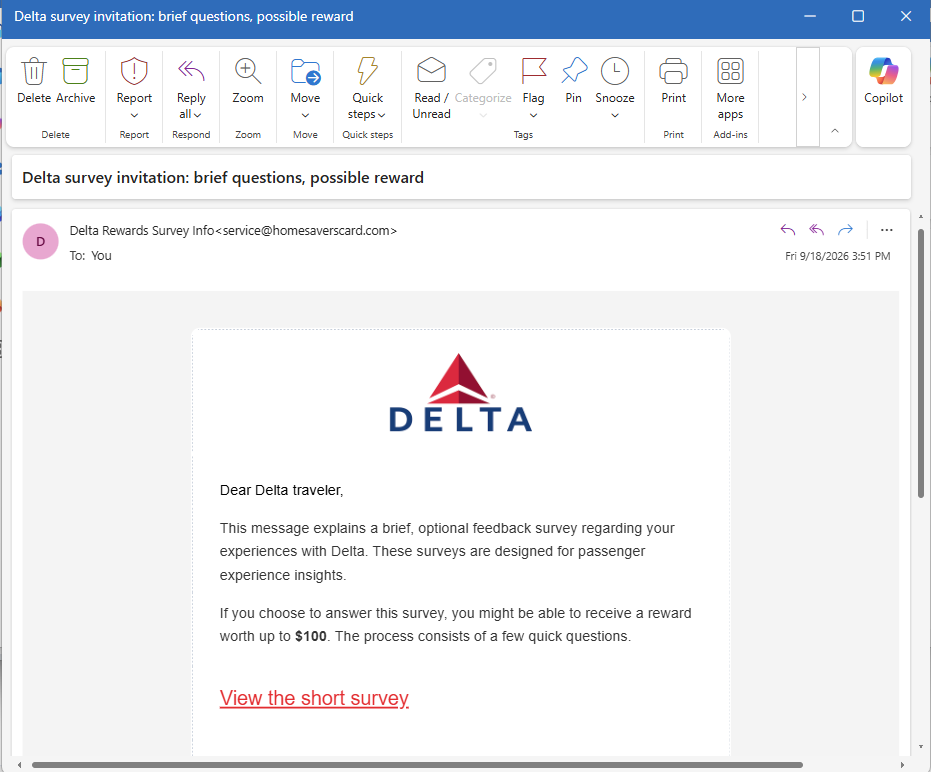
At first glance, I didn't think much about it.
The Delta logo was nicely displayed in the email. The message addressed me as a “Delta traveler” and said Delta wanted feedback about my passenger experience.
And asked if I'd complete a few quick questions.
I “might be able to receive a reward worth up to $100.”
Okay. A customer survey. I've received plenty of those.
Then my brain finally caught up with my eyes.
✈️ Wait... When Was the Last Time I Flew Delta?
I started thinking about it.
I haven't flown Delta recently.
Actually, I haven't flown Delta in a long time.
I'm talking at least five years.
So why would Delta suddenly want feedback about my passenger experience?
Was I supposed to review the legroom from 2021?
Tell them how the pretzels were half a decade ago?
That's when an email that initially looked routine became a lot more interesting.
🚩 The Logo Isn't the Sender
Here's the part I think is especially important.
I initially viewed the email on my device. It showed the sender as something along the lines of:
Delta Rewards Survey Info
At a glance, that looks plausible.
And on a small screen, the actual email address wasn't immediately visible.
So I clicked on the sender's name to see more information.
And...
BAM.
There it was:
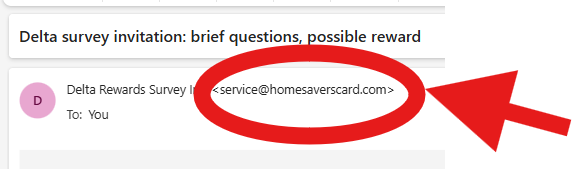
Well, hello there.
That's not what I expected to see under “Delta Rewards Survey Info.”
The email may have a Delta logo.
It may say “Delta traveler.”
It may talk about my “experiences with Delta.”
But the visible sender name and the actual sender address are two very different pieces of information.
That doesn't by itself prove exactly who created the message or what would happen after clicking the survey link. I didn't click the survey, and I'm not going to pretend I know where it ultimately leads.
But it was more than enough for me to stop.
🚩 Then the Rest of the Email Started Looking Different
Once I questioned the sender, other details stood out more.
The email says:
“If you choose to answer this survey, you might be able to receive a reward worth up to $100.”
Might be able to?
Up to $100?
That's a lot of work.
Then there's the big red:
“View the short survey.”
That's the action the email wants me to take.
The logo establishes familiarity.
The survey gives me a reason to click.
The possible $100 reward gives me an incentive.
And the sender name makes it look like I'm dealing with something related to Delta.
But none of that answers my original question:
Why is Delta asking someone who hasn't flown with them in at least five years about his passenger experience?
🧠 Context May Be the Best Scam Detector You Have
This is why recognizing suspicious emails isn't always about finding a misspelled word or a badly designed logo.
Sometimes the biggest red flag is:
The story doesn't make sense.
Your bank sends you something about an account you don't have.
A delivery company contacts you about a package you didn't order.
A recruiter offers you a job you never discussed.
A subscription service sends you a renewal for something you never subscribed to.
Or an airline asks about a passenger experience you haven't had in years.
Before clicking anything, ask:
Does this email make sense in the context of my actual life?
In this case, mine didn't.
🔍 Click the NAME—Not the Link
There's another practical lesson here.
On phones and other devices, email apps often emphasize the display name rather than showing the complete sender address prominently.
That's convenient.
It can also make a questionable message look more legitimate than it is.
If something seems strange, don't click the button in the email.
Instead, inspect the sender information.
In my case, tapping “Delta Rewards Survey Info” exposed the underlying address:
That took a few seconds.
And those few seconds completely changed how I viewed the email.
🏡 Don't Be Passive—Be a Good Neighbor
I've been saying this with the suspicious vehicle listings I've been documenting, and it also applies to email.
If you recognize something suspicious, don't assume everyone else will.
Someone else may see the Delta logo and click.
Someone else may see “reward worth up to $100” and get excited.
Someone else may not think to expand the sender information.
So show them.
Tell your friends and family how to reveal the actual sender address on their devices.
Remind them that a logo is an image—not authentication.
And if you're uncertain about a survey supposedly sent by an airline, bank, retailer, or other company, don't use the email to verify the email. Go independently to the company's official website or app.
Sometimes being a good neighbor means saying:
“Before you click that $100 survey, let's see who actually sent it.”
Because in my case, one tap was all it took.
Delta Rewards Survey Info
became:
And suddenly I wasn't nearly as interested in that $100 reward.
Follow along at NielFlamm.com/blog for more suspicious emails, questionable vehicle offers, recruiting scams, and whatever else decides to show up in my inbox.

Apparently My $498.99 PayPal Subscription Is Now a Facebook Event
The scammers are getting creative.
Today I received an email with this wonderfully alarming subject line:
“Agnes V. Burden invited you to Notice: Your Subscription Payment of $498.99 was Paid.”
Wait.
I bought a subscription?
For $498.99?
And Agnes is throwing an event to tell me about it?
I appreciate the invitation, Agnes, but I think I'm busy that day.
🚩 The First Red Flag Is Actually a Giant Warning
This one gets interesting because the email appears to be generated through Facebook's event system rather than simply pretending to be a normal PayPal notification.
And Facebook practically puts a warning label on it for us:
“This event invitation was not sent by Meta. Please be cautious when clicking on links or providing personal information.”
That's not exactly subtle.
The apparent sender address is notification@facebookmail.com, which could make someone think, Well, it came through Facebook, so it must be legitimate.
But that's the trick.
The screenshot indicates that Agnes V. Burden created the event. The event itself appears to carry the scam message.
That's an important distinction: a legitimate platform can be used to deliver content created by someone else.
🎉 You're Invited! Your Money Is Gone!
The event title reads:
“Notice: Your Subscription Payment of $498.99 was Paid.”
Then we get the usual Facebook invitation:
Going | Maybe | Can't Go
I'm struggling to choose the right RSVP.
Going: Yes, I definitely want to attend the disappearance of $498.99.
Maybe: Depends. Will there be food?
Can't Go: Sorry, I have another fraudulent transaction at 1:00.
But then we get to the actual event description:
“Bill has paid $498.99 for a subscription using your Pay_Pal account from an unknown seller IP.”
There are so many questions.
Who is Bill?
Why is Bill spending my money?
Why is PayPal suddenly “Pay_Pal”?
And what exactly is an “unknown seller IP” supposed to mean?
But don't worry.
They've conveniently provided a phone number.
🚩 And THAT Is the Point
The message says that if I don't recognize the seller, I should call the number shown in the invitation.
There's the hook.
The $498.99 isn't necessarily the objective.
The objective may be to make me panic about the $498.99 and call the number.
The FTC specifically warns about this type of subscription-renewal scam. Victims receive notices claiming they've been charged hundreds of dollars for a subscription and are instructed to call a number to dispute it. Once they call, scammers may try to get financial information, persuade the victim to grant remote computer access, or create a fake “refund” problem that ultimately leads the victim to send money. Consumer Advice
In other words:
The fake charge creates the panic.
The phone number gives the scammer a path in.
🚩 This Facebook-Event Version Isn't Unique
Here's what really caught my attention.
I found a strikingly similar report in the Better Business Bureau's Scam Tracker from July 2026.
That report described a Facebook/Meta event invitation claiming a $749.49 MetaPay payment, complete with the same warning that the event invitation wasn't sent by Meta. The event then instructed the recipient to call a phone number if the payment was unauthorized. BBB categorized that report as phishing. Better Business Bureau
Different amount.
Different supposed transaction.
Different phone number.
Very similar playbook.
That's a useful reminder that scammers don't always need to spoof an entire company's email system. Sometimes they can abuse legitimate features—event invitations, calendar invites, shared documents, comments or other notifications—to get their message delivered.
💰 So What Should I Do About My $498.99?
First, I'm not calling the number in the invitation.
I'm also not clicking anything in the event to “resolve” the supposed charge.
If I were genuinely concerned that $498.99 had been charged through PayPal, I'd independently open the real PayPal app or website and inspect my transactions.
I'd also check the bank or credit-card account connected to it.
The FTC recommends that same approach for suspicious subscription notices: check your actual financial accounts, and if you need to contact the company, use contact information you know is legitimate—not the phone number supplied in the suspicious message. Consumer Advice
If the $498.99 transaction isn't there?
Then there's nothing to refund.
And there's certainly no reason to call Agnes.
🧠 The Psychology Is Better Than the Grammar
What makes this scam potentially effective isn't perfect spelling or a sophisticated story.
It's the number:
$498.99
That's large enough to make someone panic.
You don't stop to analyze “Pay_Pal.”
You don't wonder why a financial transaction has become a Facebook event.
You don't ask who Bill is.
You see:
YOU JUST LOST $498.99.
Then:
CALL THIS NUMBER.
That's social engineering.
The scammer doesn't need you to believe the entire story.
They just need you to become concerned enough to take the next action.
🏡 Be a Good Neighbor
I've said this before, and I'll keep saying it.
If you see something like this, don't be passive.
Tell your parents.
Tell your grandparents.
Tell your friends.
Tell the neighbor who isn't particularly comfortable with technology.
Share screenshots.
Report suspicious messages.
The FTC even recommends talking to someone you trust—a friend, family member, or neighbor—when you're unsure whether something is a scam. That second set of eyes can interrupt the panic that these schemes depend upon. Consumer Advice
You might recognize it as suspicious right away.
Someone else may see $498.99 and think their money is disappearing.
Sometimes being a good neighbor is simply saying:
“Don't call that number. Let's check your actual account first.”
Agnes, I'm Going to Have to Decline
So, Agnes V. Burden, thank you for inviting me to the celebration of my imaginary $498.99 subscription.
Unfortunately:
Going? No.
Maybe? No.
Can't Go? Absolutely.
And I'm definitely not calling your phone number.
Follow along at NielFlamm.com/blog for more scam emails, questionable TikTok car deals, suspicious recruiters, and whatever creative nonsense lands in my inbox next.