

$500 Down for Everything? This TikTok Car Account Raised More Questions the Longer I Watched
Apparently, TikTok still thinks I need a car.
At this point, I'm starting to think the algorithm wants me to open a dealership.
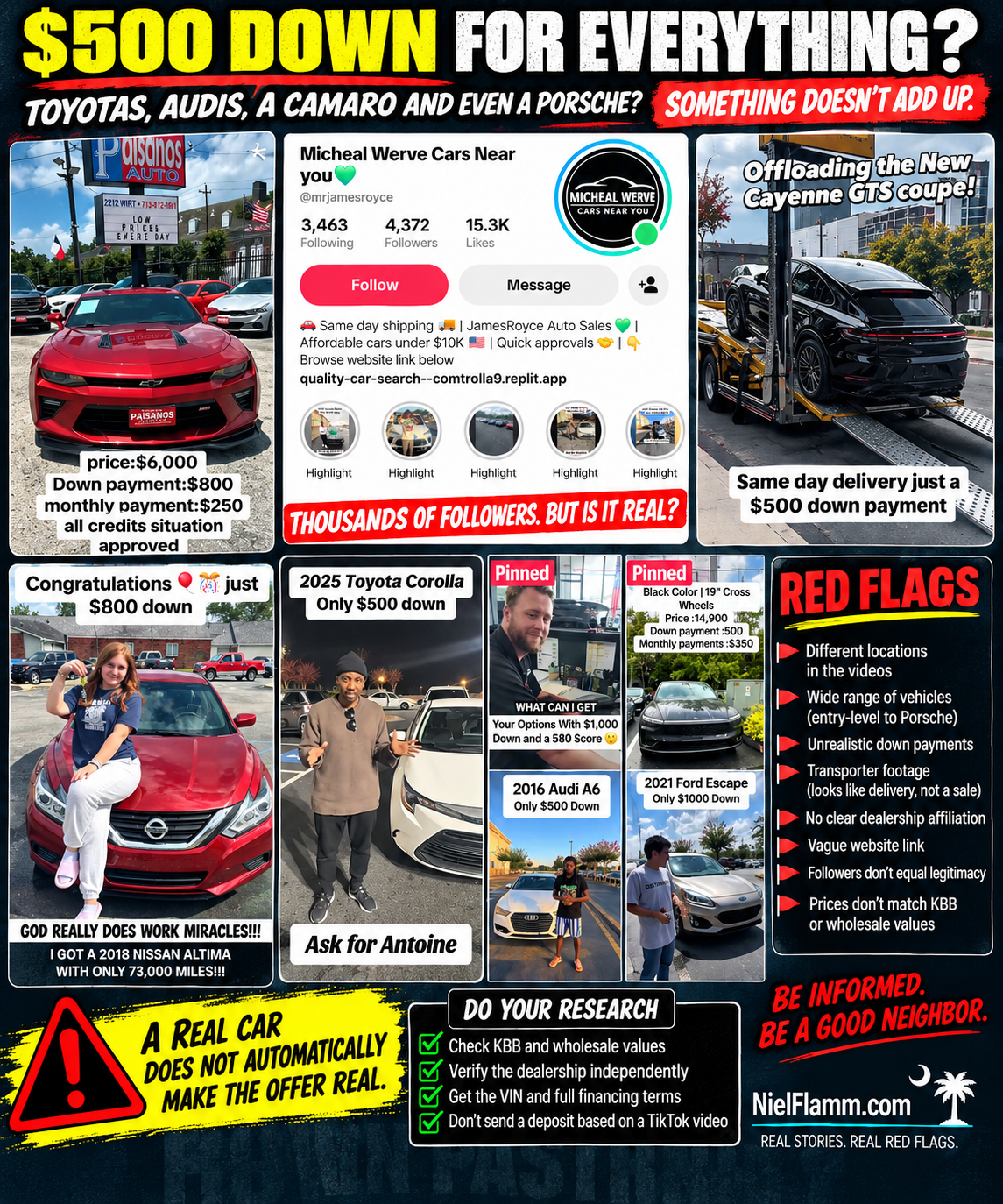
This time I came across an account calling itself “Michael Werve Cars Near You” with more than 4,300 followers and 15,000 likes shown on the profile when I took the screenshot.
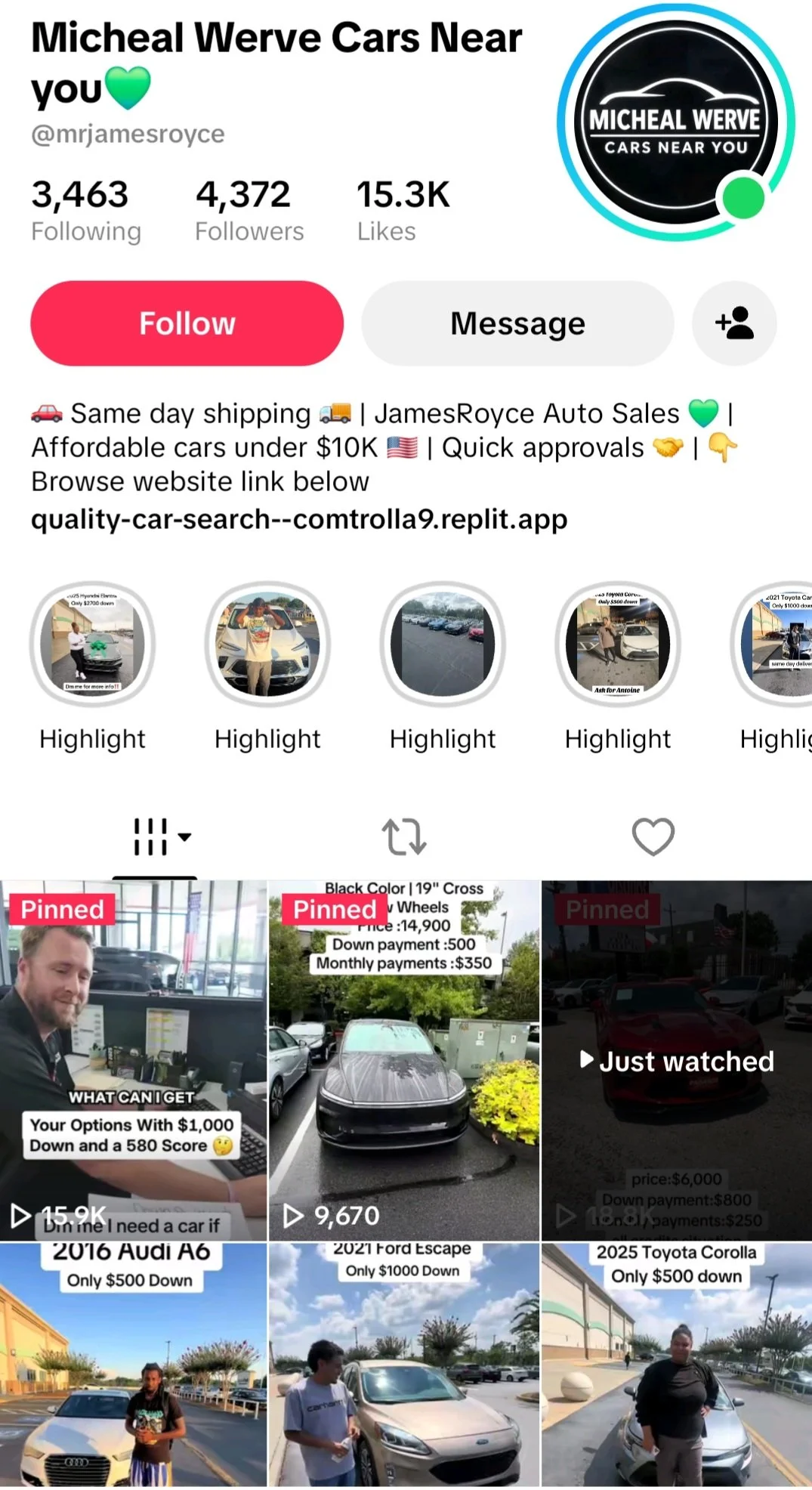
The bio promises:
“Same day shipping”
“Affordable cars under $10K”
“Quick approvals”
And, of course, the magic number that keeps appearing in these TikTok vehicle posts:
$500 DOWN
But the more videos I watched, the more questions I had.
🚩 This Isn't Just a Few Cheap Used Cars
The account shows a surprisingly broad assortment of vehicles.
There's a 2016 Audi A6 advertised with only $500 down.
There's a 2021 Ford Escape with $1,000 down.
There's a 2025 Toyota Corolla with only $500 down.
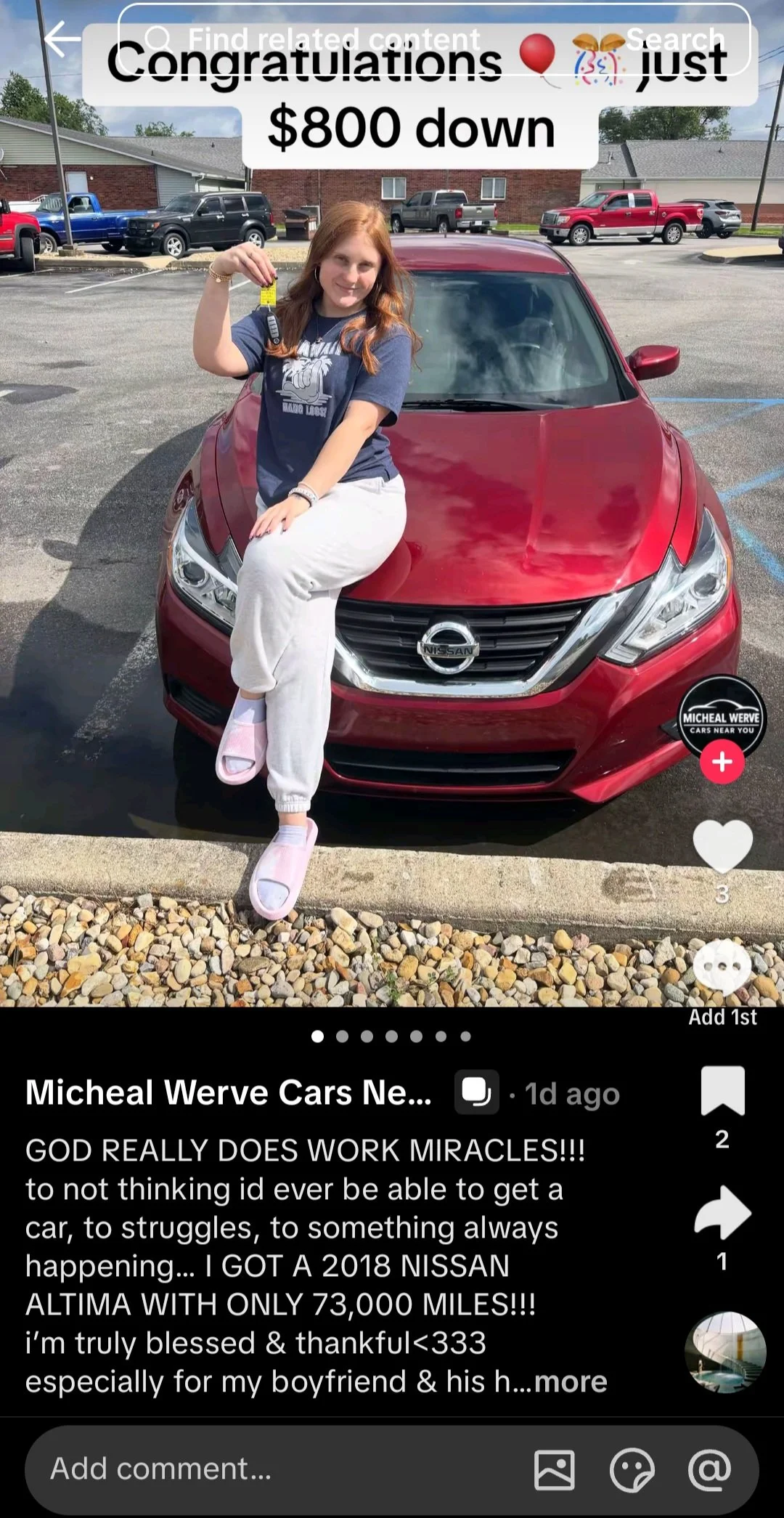
There's a woman pictured with a 2018 Nissan Altima with 73,000 miles, accompanied by text saying:
“Congratulations 🎈🎊 just $800 down.”
Then we jump to something much more interesting:
“Offloading the New Cayenne GTS coupe!”
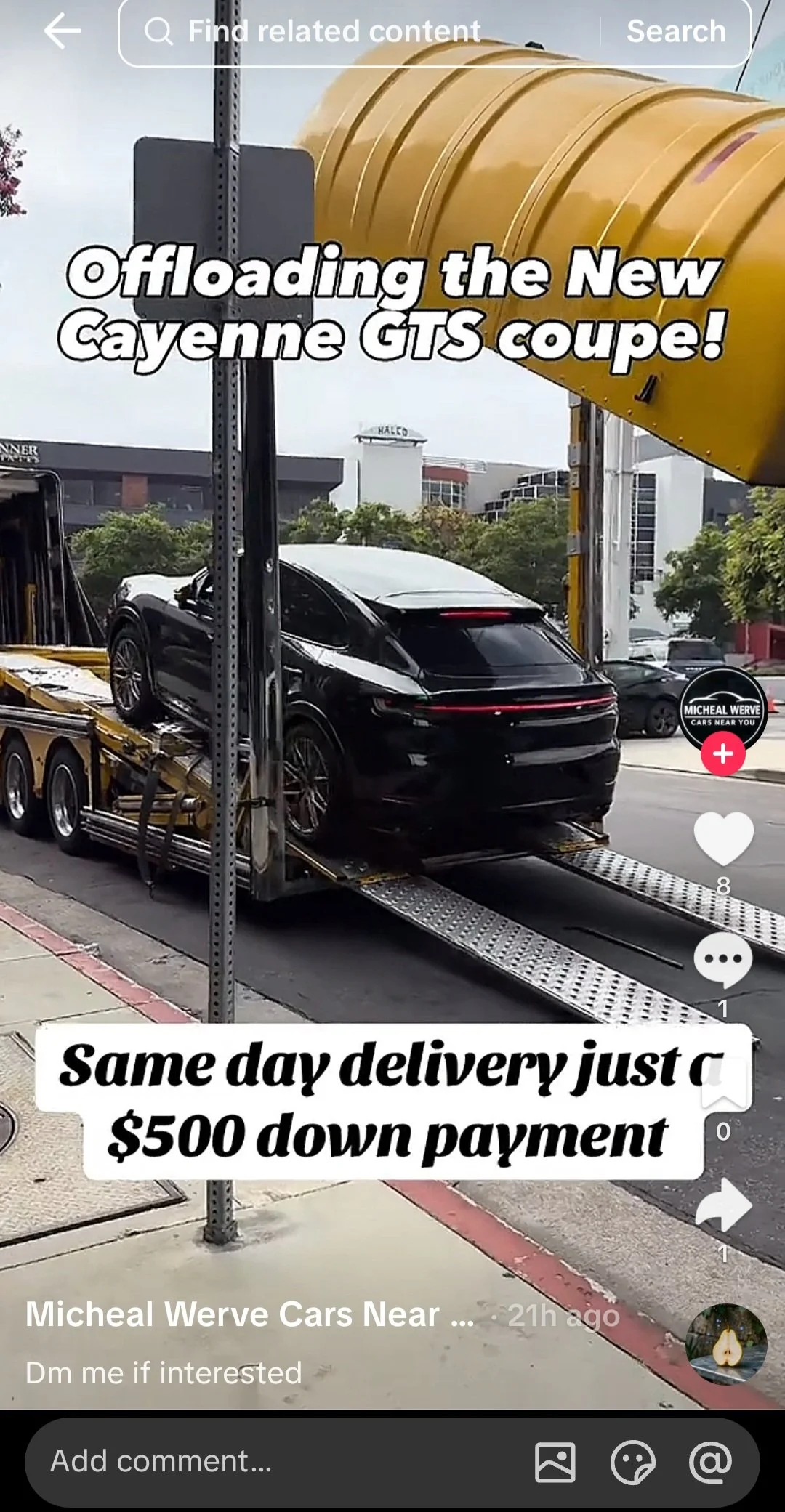
The video shows a Porsche being unloaded from a vehicle transporter and says:
“Same-day delivery with just a $500 down payment.”
That's quite a range of inventory.
Entry-level cars.
Used luxury cars.
SUVs.
Nearly new Toyotas.
And a Porsche Cayenne GTS Coupe.
All apparently tied together by remarkably small down payments.
🚩 Then There's the Camaro
One video caught my attention because the vehicle is sitting directly in front of a dealership.
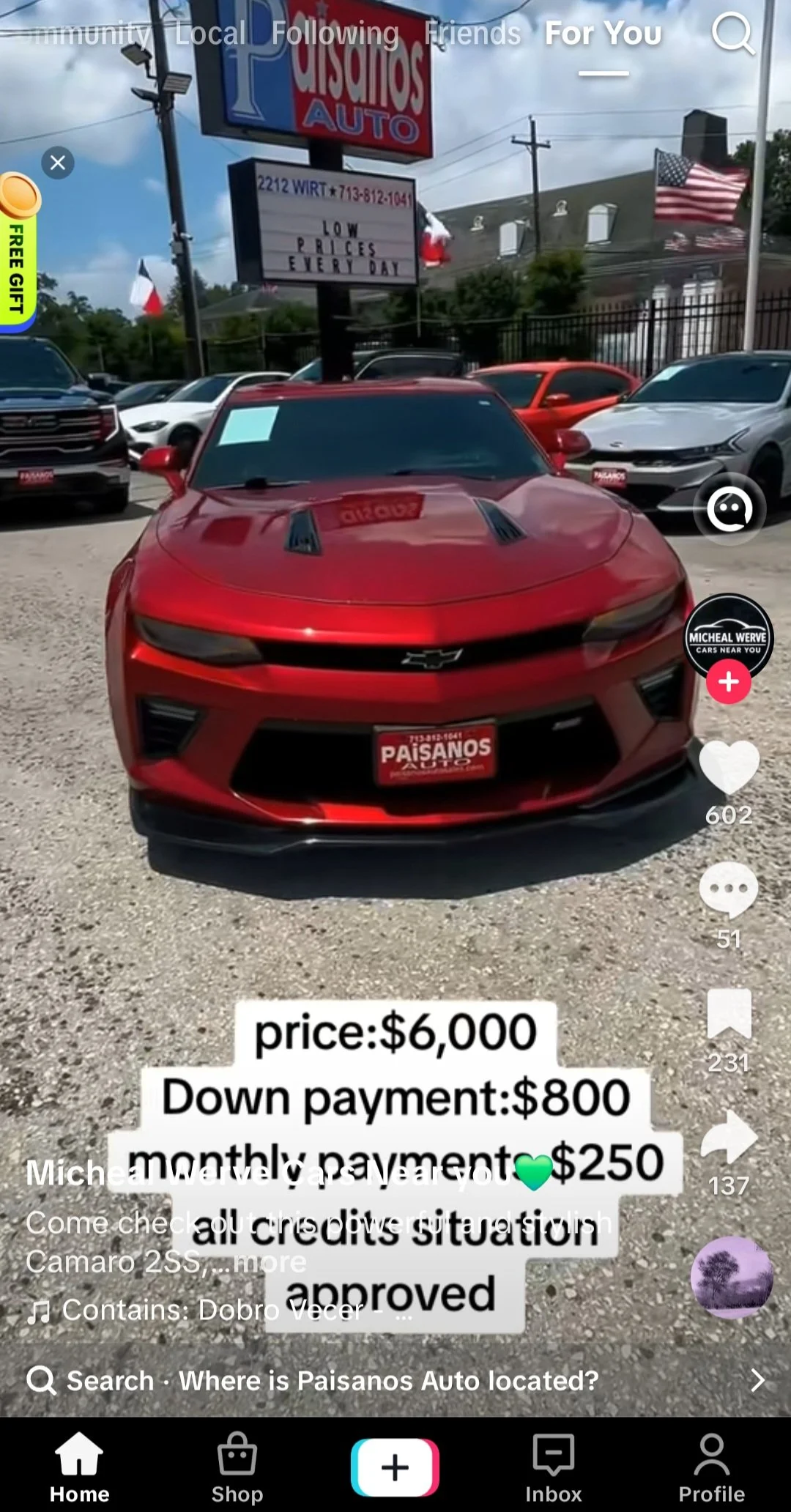
The TikTok overlay says:
Price: $6,000
Down payment: $800
Monthly payment: $250
All credit situations approved
But look behind the Camaro.
The dealership sign says Paisanos Auto.
That gave me something I could actually verify.
Paisanos Auto is a real used-car dealership at 2212 Wirt Road in Houston, Texas. Its own website confirms that address and says it has operated for more than 20 years. Paisano's Auto Sales
Here's where it gets much more interesting.
I found actual listings associated with Paisanos for Camaro 2SS models. One listing for a 2020 Camaro 2SS didn't advertise a $3,500 purchase price—it advertised $3,500 DOWN. Another 2023 Camaro listing similarly advertised $3,000 DOWN. OfferUp
Paisanos' own website makes the distinction even clearer. Its disclaimer says that prices advertised on Facebook Marketplace may represent the down payment, while the actual cash price and financing terms are separate. Paisano's Auto Sales
So a photograph or video of a real vehicle at a real dealership does not establish that the TikTok account showing it is authorized to sell that vehicle for the price it puts on the screen.
That's a very important distinction.
🚩 Then I Started Paying Attention to the Locations
This was another thing that bothered me.
I watched several of the account's shorts.
The scenery changes.
Dramatically.
One vehicle is clearly sitting at Paisanos Auto in Houston.
Another shows what looks like a transporter unloading a Porsche on a city street.
Another vehicle is photographed in a parking lot surrounded by brick, residential-looking buildings.
Another Corolla appears in a completely different retail parking lot at night.
Different backgrounds by themselves don't prove anything. A legitimate broker, multi-location dealership or delivery operation could certainly photograph vehicles in different places.
But when an account presents a stream of vehicles as available for extraordinarily small down payments, those changing locations become another reason I'd want to know:
Where is the actual dealership?
Who owns these vehicles?
Where can I physically inspect them?
What dealer license is the seller operating under?
What's the VIN?
And why do these videos appear to come from so many different places?
🚩 The Porsche Video Looks Like Transportation—not a Sale
The Cayenne video particularly caught my attention.
The text says:
“Offloading the New Cayenne GTS coupe!”
And:
“Same day delivery just a $500 down payment.”
But what I'm looking at is a Porsche coming off what appears to be a commercial vehicle transporter.
That establishes that somebody was transporting a Porsche.
It does not establish that the TikTok account owns that Porsche, sold that Porsche or can deliver that Porsche to me for $500 down.
That's the recurring problem with social-media vehicle content:
A real car doesn't automatically mean a real offer.
A real transporter doesn't prove a sale.
A real dealership in the background doesn't prove affiliation.
A real customer photograph doesn't independently establish the terms of a transaction.
Pictures prove what's visible in the pictures.
Not necessarily the story wrapped around them.
💰 Let's Talk About the Actual Values
This is where the economics become difficult to ignore.
Take the 2025 Toyota Corolla shown with “Only $500 down.”
Kelley Blue Book currently puts the Fair Purchase Price of a 2025 Corolla at roughly $21,400 to $26,600, depending on trim, with original MSRP ranging from $23,460 to $29,175. Kbb.com
Then there's the 2021 Ford Escape.
KBB currently shows Fair Purchase Prices ranging from about $13,900 to $18,050, depending on configuration. Even KBB trade-in estimates run roughly $7,550 to $12,200. Kbb.com
The 2016 Audi A6?
KBB's current Fair Purchase Price ranges from approximately $11,350 to $14,600, depending on trim. Kbb.com
And the 2018 Nissan Altima supposedly purchased with $800 down?
KBB currently puts dealer Fair Purchase Prices around $10,200 to $11,750, depending on trim, before adjusting for the specific 73,000-mile vehicle shown in the post. Kbb.com
None of this means a legitimate dealer can't finance a vehicle with a small down payment.
They absolutely can.
But a down payment isn't a purchase price.
That's precisely why the rest of the financing information matters.
📊 What About MMR Wholesale?
I also wanted to compare these offers with MMR—Manheim Market Report- because retail KBB values only tell part of the story.
MMR is a wholesale benchmark based on actual Manheim auction transactions. Manheim says its database draws from millions of auction transactions across the United States and Canada. Manheim
Here's the problem with giving one blanket “MMR price”: MMR is vehicle-specific. Mileage, trim, condition, region and the date of the transaction matter. Without the VINs and exact specifications of these TikTok vehicles—and direct MMR access—I don't want to manufacture wholesale numbers and pretend they're precise.
But we can find real-world examples.
A 2018 Nissan Altima 2.5 S with about 150,000 miles recently showed an MMR median of $4,275, with a range of roughly $3,225–$5,350. AUTOMAX
For 2021 Ford Escape examples, recent Manheim-linked data varies dramatically with mileage and condition. One high-mileage SE showed an MMR median of $3,425, while another better-condition example showed $8,225. A recent SEL example showed $6,000. AUTOMAX
That's exactly why VIN, mileage and condition matter.
And it's also why a vague “$500 down” tells a consumer almost nothing about what they're actually agreeing to pay.
🚩 The Math Is What Matters
Let's say somebody genuinely finances a $20,000 vehicle with $500 down.
They haven't bought a $500 car.
They've put $500 toward a transaction that could ultimately cost tens of thousands of dollars after the remaining principal, interest, taxes, registration, documentation fees, and other charges.
That's why I want to know:
What's the actual selling price?
What's the APR?
What's the loan term?
What's the monthly payment?
What's the total of payments?
Who's the lender?
Are there additional dealer fees?
What credit qualifications apply?
Is the $500 refundable?
And—before we get to any of that—
Does this account actually own or represent the vehicle?
Those aren't annoying questions.
Those are $20,000 questions.
🚩 Followers Don't Equal Verification
The account had thousands of followers when I looked at it.
That can create credibility.
“Four thousand people follow this person. It must be legitimate.”
No.
Follower counts aren't dealer licenses.
Likes aren't vehicle titles.
Views aren't VINs.
A polished TikTok profile isn't proof that the person behind it owns the vehicles appearing in the videos.
And a link in a bio doesn't become trustworthy simply because thousands of people follow the account.
🏡 Don't Be Passive—Be a Good Neighbor
This is the part I keep coming back to.
Someone desperately needs transportation.
They've been rejected for financing.
Their credit isn't great.
They need to get to work Monday.
Then TikTok serves them:
2025 COROLLA — $500 DOWN
or:
SAME DAY DELIVERY — $500 DOWN
Suddenly, something that seemed financially impossible looks possible.
That's exactly when another person asking questions can make a difference.
If you see a friend or family member getting excited about an offer like this, don't mock them.
Help them verify it.
Ask for the VIN.
Look up the dealership independently.
Call the dealership using the phone number on its official website, not a number supplied in a TikTok DM.
Check the vehicle's value.
Get the complete financing terms.
And don't send somebody a deposit simply because they say they can deliver the vehicle today.
The real Paisanos Auto, for example, has an independently verifiable Houston address, website, and phone number. Paisano's Auto Sales. That's the kind of information I'd use to verify whether someone posting a vehicle photographed on its property actually represents the dealership.
Because there is one sentence I keep repeating throughout this experiment:
A real car does not automatically make the offer real.
And neither do 4,000 followers.
Before sending $500, $800—or one dollar—verify who's actually on the other side of the screen.
Follow along at NielFlamm.com/blog for more questionable vehicle offers, suspicious emails, recruiting scams and whatever TikTok decides I need to investigate next.

Thank You for Your Order! What Did I Buy? Apparently, I Have to Open the Mystery Attachment
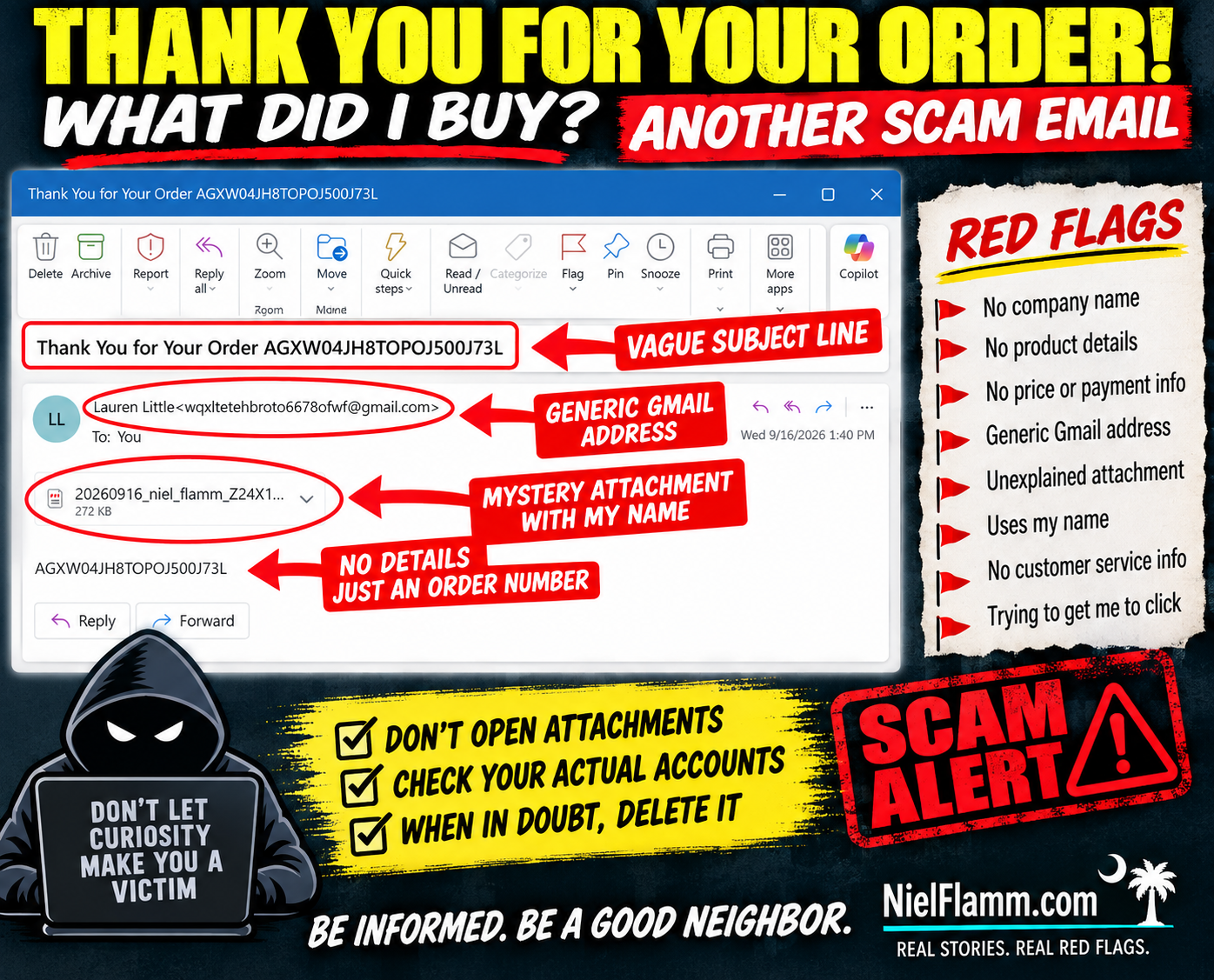
Oh, this one barely even tries. 😂
Another suspicious email landed in my inbox with the subject:
“Thank You for Your Order AGXW04JH8TOPOJ500J73L”
Well, thank you!
There's just one small problem.
WHAT DID I ORDER?
The email doesn't tell me.
No company name.
No product.
No price.
No payment method.
No shipping information.
No customer-service information.
Nothing.
The sender is Lauren Little, using a Gmail address that doesn't identify any recognizable merchant.
But don't worry—they did give me an order number.
And, more importantly, a 272 KB mystery attachment.
How thoughtful.
🚩 The Attachment IS the Email
The actual body contains essentially nothing except the same mysterious order number.
So if I want to know what I supposedly purchased, there's an obvious temptation:
Open the attachment.
And that's exactly what I'm not going to do.
I don't know what's inside that file, because I didn't open it. I'm not going to claim it's malware, a malicious document or anything else I haven't verified.
I also don't need to find out.
An unexpected email from an unknown sender telling me about an unidentified purchase and giving me an unexplained attachment has already failed my trust test.
🚩 Apparently Scammers Have Discovered Personalization
Here's another nice touch.
The attachment's filename includes:
“niel_flamm”
Ahhh.
They know my name!
That changes everything.
Actually, no.
Putting my name in the attachment doesn't make me more likely to open it. It makes me more likely to delete it.
Personalization isn't proof of legitimacy.
Names, email addresses, and other basic information can come from countless places online.
🧠 Curiosity Is the Hook
That's what makes these minimalist emails interesting.
They don't need an elaborate story.
They want me to create the story:
Did I accidentally buy something?
Did someone use my credit card?
How much did they charge me?
What company is this?
What's in that attachment?
And there's the trap.
Instead of giving me information, the email creates an information gap and gives me a file that supposedly fills it.
No thanks.
If I'm concerned about an unauthorized purchase, I'll check my bank and credit-card accounts myself.
I don't need to open a mystery attachment to discover whether I've spent money.
🏡 Don't Be Passive. Be a Good Neighbor.
If you receive something like this and recognize the warning signs, share them.
Someone else may see “Thank You for Your Order” and immediately panic.
Before they open the attachment, tell them:
Check your actual financial accounts first.
Sometimes being a good neighbor means preventing someone from making that one curious click.
Because sometimes the safest attachment is the one you never open.
Follow along at NielFlamm.com/blog for more suspicious emails, questionable vehicle offers, recruiting scams and whatever strange thing lands in my inbox next.

Another $399.99 Subscription? Apparently Geek Squad Is Throwing a Facebook Event
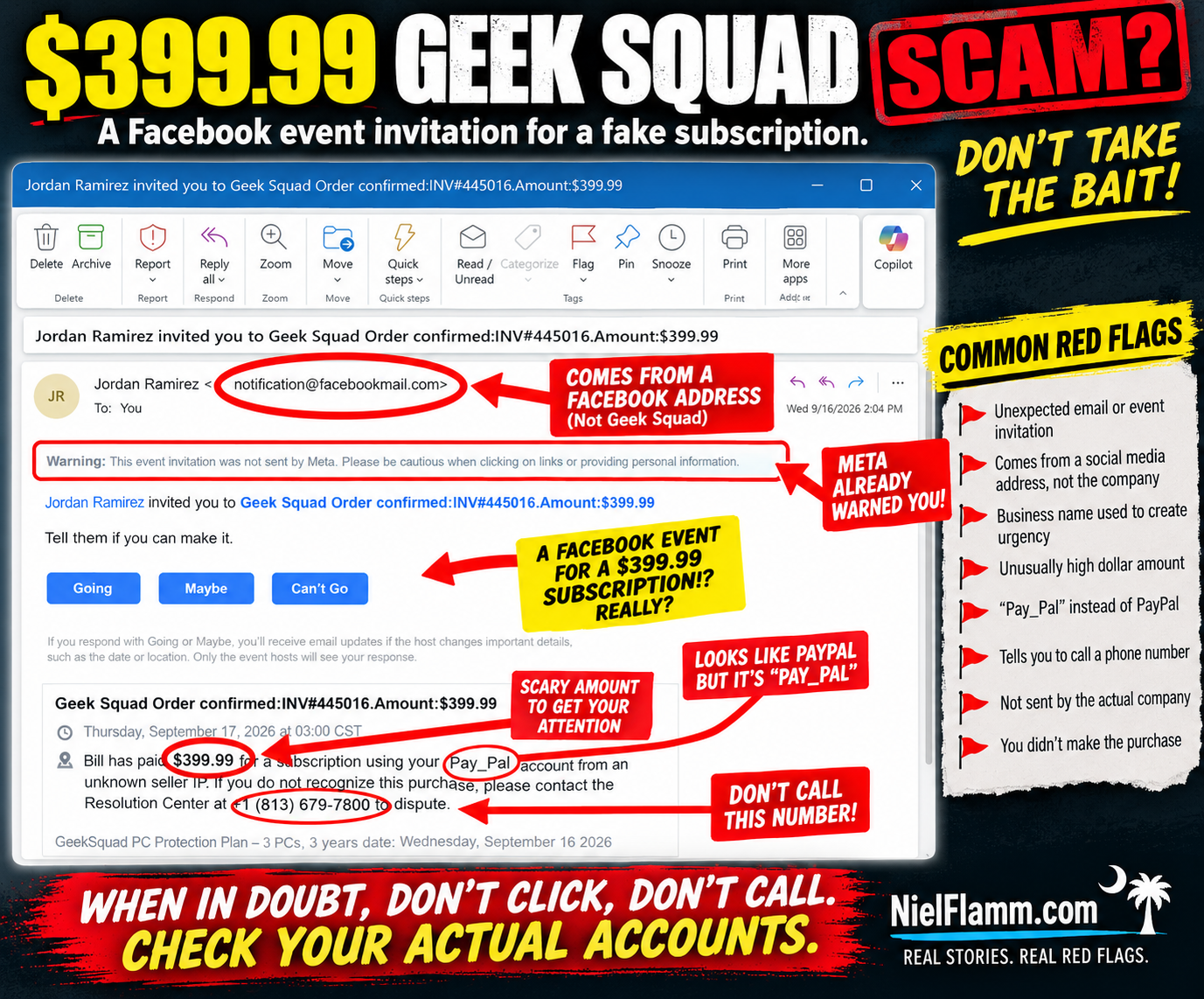
I have another expensive subscription I didn’t know about.
And once again, the scammers were thoughtful enough to invite me to a Facebook event to celebrate it.
This email arrived with the subject:
“Jordan Ramirez invited you to Geek Squad Order confirmed: INV#445016.Amount:$399.99”
According to the invitation, I supposedly paid $399.99 for a Geek Squad PC Protection Plan.
There's just one minor problem.
I didn't.
And if this looks familiar, it should.
🚩 Haven't We Seen This Movie Before?
Just recently, I received another Facebook event invitation claiming that $498.99 had been paid for a subscription through my PayPal account.
That one came from “Agnes V. Burden.”
This time we have Jordan Ramirez, Geek Squad, and $399.99.
Different person.
Different company.
Different dollar amount.
But remarkably similar script.
The invitation claims:
“Bill has paid $399.99 for a subscription using your PayPal account from an unknown seller IP.”
Wait.
Bill is back?!
Apparently Bill has access to my imaginary PayPal account and is having quite a shopping spree.
It would be helpful to sit Bill down and discuss boundaries.
🚩 Facebook Is Literally Warning Me
One of my favorite parts is that the warning is sitting right there at the top of the message:
“Meta did not send this event invitation. Please be cautious when clicking on links or providing personal information.”
Thank you, Meta.
Message received.
That's an important distinction because the sender shown in the email is:
Jordan Ramirez <notification@facebookmail.com>
Someone might see the Facebook-related email address and assume the underlying message must be trustworthy.
But the screenshot itself explains what's happening.
Jordan Ramirez invited me to an event.
The suspicious content is contained inside that event invitation.
A legitimate platform delivering a notification doesn't automatically make the content created by another user legitimate.
🎉 What Time Does My Geek Squad Party Start?
The invitation gives me the traditional Facebook choices:
Going
Maybe
Can't Go
Let's see.
Am I going to my imaginary $399.99 Geek Squad subscription celebration?
I'm leaning toward:
Can't Go.
I have plans that evening.
Specifically, not calling the phone number in this message.
🚩 And There It Is: The Phone Number
The message says that if I don't recognize the purchase, I should contact a:
“Resolution Center”
and conveniently provides a phone number.
That's the part that deserves attention.
The scary $399.99 charge gets your attention.
Geek Squad provides a recognizable brand.
PayPal adds a financial component.
And the phone number provides an immediate way to “fix” the problem.
That's exactly when I'd stop.
If I genuinely thought Geek Squad charged me $399.99, I wouldn't call the number supplied in a suspicious Facebook event.
I'd check my PayPal, credit card, and bank accounts independently.
Then, if necessary, I'd independently find the legitimate contact information for Geek Squad or the financial institution involved.
The suspicious message doesn't provide both the problem and the solution.
🚩 “Pay_Pal” Makes Another Appearance
This is another detail I noticed in both messages.
Not PayPal.
Pay_Pal.
The previous $498.99 subscription invitation used essentially the same wording.
Now this one does too.
So let's compare.
Previous message:
$498.99 subscription.
Facebook event invitation.
Claim involving “Pay_Pal.”
Unknown seller IP.
Phone number to call.
Current message:
$399.99 Geek Squad subscription.
Facebook event invitation.
Claim involving “PayPal.”
Unknown seller IP.
Phone number to call.
That's quite a coincidence.
Or perhaps we're looking at variations of the same social-engineering template.
🧠 The Scam Isn't Really About Geek Squad
That's an important point.
The recognizable company name makes the story believable.
Today it's Geek Squad.
Another day it could be PayPal, Norton, McAfee, Amazon, Microsoft, or another familiar brand.
The psychology is what matters.
You see:
$399.99
Your immediate reaction might be:
WHAT DID I BUY?!
Then you see:
“If you do not recognize this purchase, please contact...”
Perfect!
There's a phone number!
And before you've checked whether the transaction actually exists, you're talking to whoever is on the other end.
That's why urgency is so effective.
The message doesn't necessarily need to survive careful analysis.
It just needs to get you to act before you do careful analysis.
🚩 Don't Call the Number to Find Out Whether the Number Is Legitimate
This seems obvious when you say it out loud, but it's worth repeating.
If a suspicious message tells you that something terrible happened and then provides a phone number to fix it:
Don't use the suspicious message to verify the suspicious message.
Go around it.
Open your actual PayPal app.
Check your bank.
Check your credit card.
Go independently to the company's official website.
If there's no $399.99 transaction anywhere, that's important information.
And if there is an unauthorized transaction, contact the financial institution using independently verified information—not the number supplied in the questionable message.
🏡 Don't Be Passive. Be a Good Neighbor.
This is why I keep sharing these.
I recognize the pattern because I've been documenting them.
Someone else might not.
Someone might see Geek Squad, recognize the name, and panic.
Someone might think their spouse or child bought something.
Someone might worry that their PayPal account has been hacked.
And someone might immediately call.
If you see one of these, don't just delete it and move on.
Warn somebody.
Show your parents.
Show your neighbors.
Show the person who always calls you when something weird appears on their computer.
Report suspicious content through the appropriate platform.
Sometimes being a good neighbor is simply saying:
“Don't call that number. Let's check your actual account first.”
Jordan, I'm Going to Have to Decline
So thank you, Jordan Ramirez, for inviting me to the celebration of my imaginary $399.99 Geek Squad subscription.
Unfortunately:
Going? Nope.
Maybe? Still nope.
Can't Go? That's the one.
And apparently I need to have a serious conversation with Bill, because he keeps buying subscriptions with my imaginary PayPal account.
Follow along at NielFlamm.com/blog for more scam emails, suspicious recruiters, questionable vehicle offers, and whatever strange invitation lands in my inbox next.

The Delta Logo Almost Got Me—Until I Asked One Simple Question
I received an email today with the subject:
“Delta survey invitation: brief questions, possible reward”
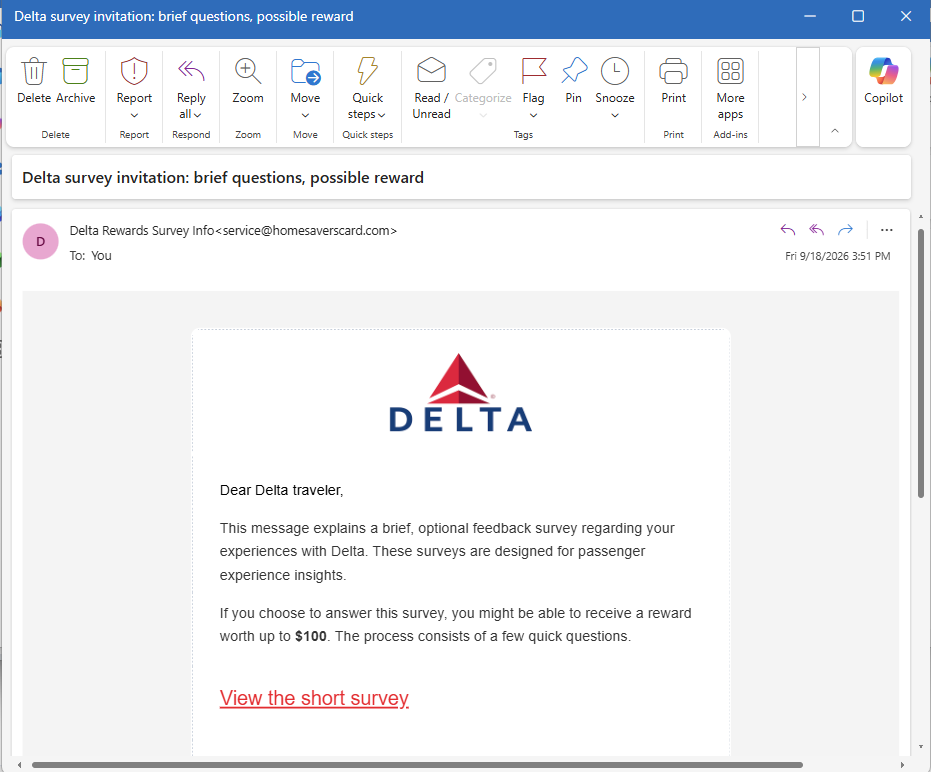
At first glance, I didn't think much about it.
The Delta logo was nicely displayed in the email. The message addressed me as a “Delta traveler” and said Delta wanted feedback about my passenger experience.
And asked if I'd complete a few quick questions.
I “might be able to receive a reward worth up to $100.”
Okay. A customer survey. I've received plenty of those.
Then my brain finally caught up with my eyes.
✈️ Wait... When Was the Last Time I Flew Delta?
I started thinking about it.
I haven't flown Delta recently.
Actually, I haven't flown Delta in a long time.
I'm talking at least five years.
So why would Delta suddenly want feedback about my passenger experience?
Was I supposed to review the legroom from 2021?
Tell them how the pretzels were half a decade ago?
That's when an email that initially looked routine became a lot more interesting.
🚩 The Logo Isn't the Sender
Here's the part I think is especially important.
I initially viewed the email on my device. It showed the sender as something along the lines of:
Delta Rewards Survey Info
At a glance, that looks plausible.
And on a small screen, the actual email address wasn't immediately visible.
So I clicked on the sender's name to see more information.
And...
BAM.
There it was:
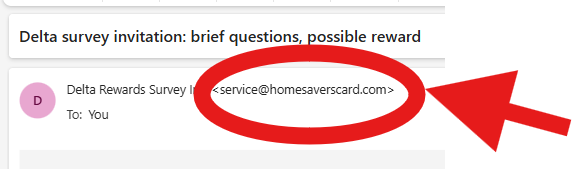
Well, hello there.
That's not what I expected to see under “Delta Rewards Survey Info.”
The email may have a Delta logo.
It may say “Delta traveler.”
It may talk about my “experiences with Delta.”
But the visible sender name and the actual sender address are two very different pieces of information.
That doesn't by itself prove exactly who created the message or what would happen after clicking the survey link. I didn't click the survey, and I'm not going to pretend I know where it ultimately leads.
But it was more than enough for me to stop.
🚩 Then the Rest of the Email Started Looking Different
Once I questioned the sender, other details stood out more.
The email says:
“If you choose to answer this survey, you might be able to receive a reward worth up to $100.”
Might be able to?
Up to $100?
That's a lot of work.
Then there's the big red:
“View the short survey.”
That's the action the email wants me to take.
The logo establishes familiarity.
The survey gives me a reason to click.
The possible $100 reward gives me an incentive.
And the sender name makes it look like I'm dealing with something related to Delta.
But none of that answers my original question:
Why is Delta asking someone who hasn't flown with them in at least five years about his passenger experience?
🧠 Context May Be the Best Scam Detector You Have
This is why recognizing suspicious emails isn't always about finding a misspelled word or a badly designed logo.
Sometimes the biggest red flag is:
The story doesn't make sense.
Your bank sends you something about an account you don't have.
A delivery company contacts you about a package you didn't order.
A recruiter offers you a job you never discussed.
A subscription service sends you a renewal for something you never subscribed to.
Or an airline asks about a passenger experience you haven't had in years.
Before clicking anything, ask:
Does this email make sense in the context of my actual life?
In this case, mine didn't.
🔍 Click the NAME—Not the Link
There's another practical lesson here.
On phones and other devices, email apps often emphasize the display name rather than showing the complete sender address prominently.
That's convenient.
It can also make a questionable message look more legitimate than it is.
If something seems strange, don't click the button in the email.
Instead, inspect the sender information.
In my case, tapping “Delta Rewards Survey Info” exposed the underlying address:
That took a few seconds.
And those few seconds completely changed how I viewed the email.
🏡 Don't Be Passive—Be a Good Neighbor
I've been saying this with the suspicious vehicle listings I've been documenting, and it also applies to email.
If you recognize something suspicious, don't assume everyone else will.
Someone else may see the Delta logo and click.
Someone else may see “reward worth up to $100” and get excited.
Someone else may not think to expand the sender information.
So show them.
Tell your friends and family how to reveal the actual sender address on their devices.
Remind them that a logo is an image—not authentication.
And if you're uncertain about a survey supposedly sent by an airline, bank, retailer, or other company, don't use the email to verify the email. Go independently to the company's official website or app.
Sometimes being a good neighbor means saying:
“Before you click that $100 survey, let's see who actually sent it.”
Because in my case, one tap was all it took.
Delta Rewards Survey Info
became:
And suddenly I wasn't nearly as interested in that $100 reward.
Follow along at NielFlamm.com/blog for more suspicious emails, questionable vehicle offers, recruiting scams, and whatever else decides to show up in my inbox.

41 Days Until Cruise Time: Checked In Emotionally, Still Single Officially
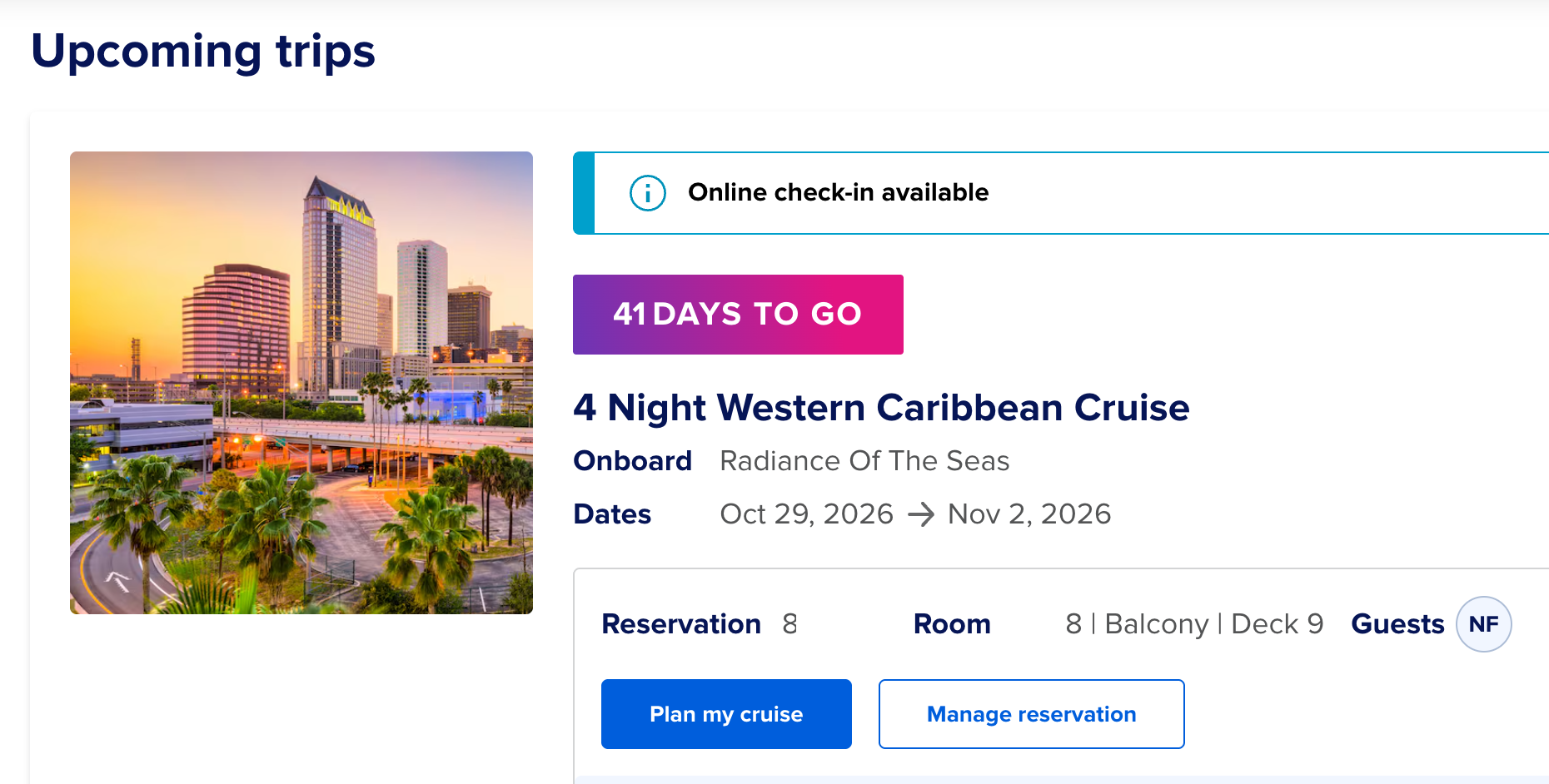
Royal Caribbean has informed me that my cruise is 41 days away and online check-in is available.
Finally, a relationship moving forward.
There it is on my screen: four nights in the Western Caribbean aboard Radiance of the Seas, October 29 through November 2. A balcony cabin on Deck 9. And under “Guests,” a little circle containing my initials: NF.
Naturally Fabulous.
No Fiancée.
Negotiations Failed.
Interpret that however you like.
Last time I checked, the countdown said 50 days. Now it says 41. Nine days have passed, and I’m pleased to report that my vacation planning has progressed from staring at the reservation on my phone to staring at it on a larger screen.
That’s called taking a broader view.
The website offers two buttons: “Plan my cruise” and “Manage reservation.”
I appreciate the confidence. I’m still trying to manage what’s in my refrigerator, but apparently I’m qualified to coordinate an international maritime adventure.
At least the cabin decision is settled: a balcony on Deck 9.
This gives me a private place to drink coffee, watch the ocean, and gaze thoughtfully into the distance as if I’m contemplating something deeper than whether breakfast is still being served.
A balcony also provides the perfect setting for romance. Ocean breeze. Beautiful sunsets. Two people sharing a quiet moment.
Currently, the second person is a chair.
We’re taking things slowly.
Yes, the search for my future ex-wife continues. I’ve secured the scenery, arranged the accommodations, and selected a departure date. At this point, I feel I’ve done more than my share of the relationship planning.
Ideal candidates should enjoy travel, appreciate sarcasm, and understand that “Would you like dessert?” is a logistical question about which dessert, not whether we’re having any.
Meanwhile, I still have the transportation puzzle: a 5 a.m. flight from Charleston to Tampa through Miami, or about seven hours of driving.
The flight requires leaving home around 3:30 a.m., when the only thing I want to connect with is my pillow.
And Miami? I’m trying to get to Tampa. The airline apparently thinks I should preview the rest of Florida first.
Driving remains tempting. I get my own seat, unrestricted access to snacks, and no possibility of my suitcase deciding to spend the weekend somewhere more interesting than I do.
I haven’t made the final call yet. Fortunately, I have 41 days to revisit the same calculations and arrive at the same level of uncertainty.
As for Radiance, yes, she’s an older ship. So what? I’m increasingly fond of things with a little mileage that still know how to have a good time.
I don’t need my ship to be the newest thing afloat. I need a comfortable bed, good food, an ocean view, and a schedule where “do absolutely nothing” is a legitimate afternoon activity.
This cruise also includes Halloween, which opens up some costume possibilities.
I could go as a well-rested man.
Or someone who packed appropriately.
Or a guy whose future ex-wife actually showed up.
Some costumes require more imagination than others.
After this, there’s MSC in January and Utopia of the Seas out of Port Canaveral in April. My calendar has a healthy social life. I’m hoping to catch up with it eventually.
For now, the countdown continues. The balcony is booked. Online check-in is open.
And Royal Caribbean keeps asking me to manage my reservation when, frankly, finding someone to occupy the other balcony chair would be a much more impressive service.
Forty-one days to go. Future ex-wife applications remain open. Please include availability, snack preferences, and your position on unnecessary layovers.